- Raspberry code. Python. Pyrebase.
You need:
pi@raspberrypi:~ $ python3 -V
Python 3.7.3
pi@raspberrypi:~ $ pip --version
pip 18.1 from /usr/lib/python2.7/dist-packages/pip (python 2.7)
If you don't have pip, you can install it:
pi@raspberrypi:~ $ curl https://bootstrap.pypa.io/get-pip.py | python3
You also need "Pyrebase", to communicate Python with Firebase.
pi@raspberrypi:~ $ sudo pip 3 install Pyrebase
-
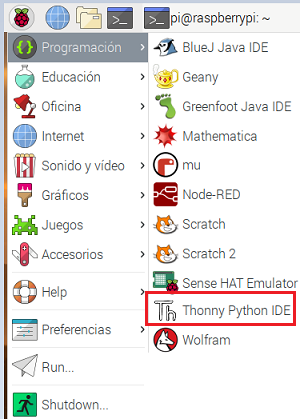
In Raspbian we have a text editor for Python.
-
Paste this code (Change apiKey, authDomain, databaseURL and storageBucket) :
# Juan A. Villalpando
# http://kio4.com/raspberry/9_firebasedb.htm

import RPi.GPIO as GPIO
import pyrebase
from time import sleep

config = {
  "apiKey": "AIzaSyAo9cEmTy2pOEygEEIXdCUHc7uOlSFdcW4",
  "authDomain": "kio4-3c240",
  "databaseURL": "https://kio4-3c240.firebaseio.com/",
  "storageBucket": "project-293607155139"
}

firebase = pyrebase.initialize_app(config)

LED22 = 22         # Terminal by number, el 22 es el GPIO25.
PushButton18 = 18  # Terminal by number, el 18 es el GPIO24.
                   # El otro terminal a GND.

GPIO.setmode(GPIO.BOARD)   # Terminal by number.
GPIO.setwarnings(False)
GPIO.setup(LED22,GPIO.OUT)
GPIO.setup(PushButton18, GPIO.IN, pull_up_down=GPIO.PUD_UP)

print("Inicio. (CTRL + C para salir.")

try:
    while True:      # Bucle principal

        database = firebase.database()
        ProjectBucket = database.child("project-293607155139")
        estadoLED22 = ProjectBucket.child("LED").get().val()

        # print(estadoLED22)

        if str(estadoLED22) == "\"OFF\"":
            print("LED22 now is OFF.")
            GPIO.output(LED22, GPIO.LOW)
        else:
            print("LED22 now is ON.")
            GPIO.output(LED22, GPIO.HIGH)

        if GPIO.input(PushButton18) == GPIO.HIGH:
            print("PushButton not pressed.")
            ProjectBucket.child("project-293607155139").child("PushButton").set("no_pressed.")
        else:
            print("PushButton pressed.")
            ProjectBucket.child("project-293607155139").child("PushButton").set("PRESSED.")

except KeyboardInterrupt:     # Salir con CTRL+C
    print("Salida.")
    GPIO.cleanup()            # Limpiar GPIO
- Connections.

- This tutorial in Spanish:
Raspberry Pi. FireBaseDB. Encender/Apagar LED. Deslizadores. App Inventor. Android.