4.- Raspberry Pi sends data to App.
p9B3i_recibir_RaspBerry.aia (2.6 KB)
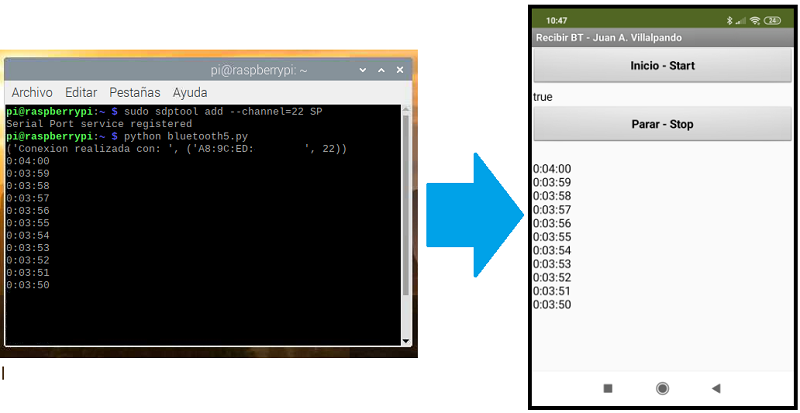
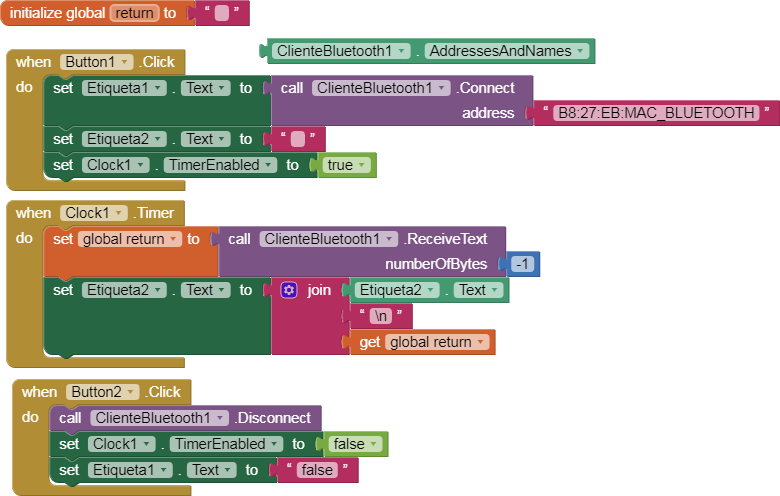
- Phyton2. Script : bluetooth5.py
import time
import datetime

import bluetooth
server_sock=bluetooth.BluetoothSocket(bluetooth.RFCOMM)
port = 22
server_sock.bind(("",port))
server_sock.listen(1)
client_sock,address = server_sock.accept()
print ("Conexion realizada con: ", address)


# Create class that acts as a countdown
def countdown(h, m, s):

    # Calculate the total number of seconds
    total_seconds = h * 3600 + m * 60 + s

    # While loop that checks if total_seconds reaches zero
    # If not zero, decrement total time by one second
    while total_seconds > 0:

        # Timer represents time left on countdown
        timer = datetime.timedelta(seconds = total_seconds)

        # Prints the time left on the timer
        print(timer)
        client_sock.send(str(timer))
        client_sock.send("\n")

        # Delays the program one second
        time.sleep(1)

        # Reduces total time by one second
        total_seconds -= 1

    print("Bzzzt! The countdown is at zero seconds!")

# Inputs for hours, minutes, seconds on timer
h = 0 #input("Enter the time in hours: ")
m = 4 #input("Enter the time in minutes: ")
s = 0 #input("Enter the time in seconds: ")
countdown(int(h), int(m), int(s))
- To run.
- First run the script with Python2
python2 bluetooth5.py
- Then Click the "Inicio - Start" button in the app.
[The countdown script is based on this code:
Create a Timer in Python: Step-by-Step Guide | Udacity]