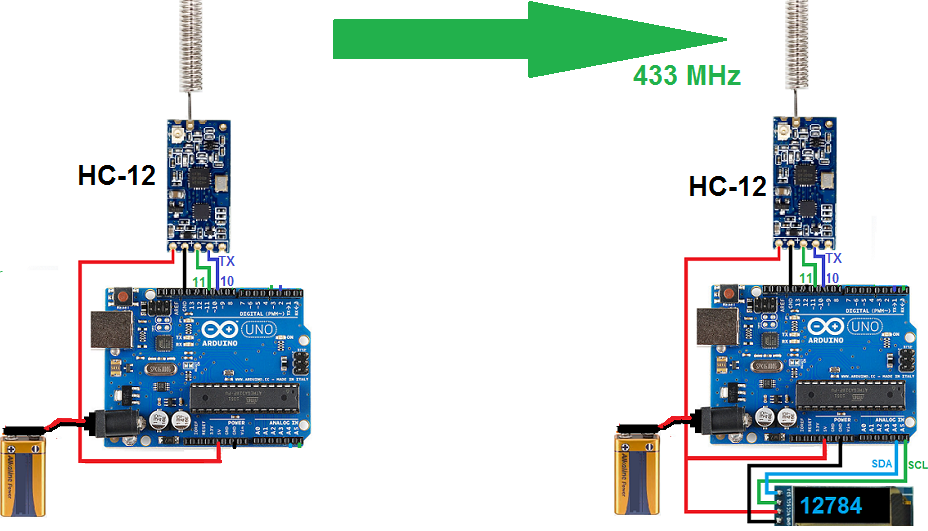
1.- With two Arduinos.
- Arduino_sender sends a continuous sequence of numbers to Arduino_receiver.
- We can see the information received on the Serial Monitor or on an OLED screen.
- U8g2 OLED Library.
arduino_sender.ino
#include <SoftwareSerial.h>
SoftwareSerial HC12(10,11); // TX to pin_10. RX to pin_11 of Arduino.

int x = 100;
unsigned long previousMillis = 0;
const long interval = 1000;

void setup() {
 HC12.begin(9600);
}

void loop() {
  unsigned long currentMillis = millis();
  if (currentMillis - previousMillis >= interval) {
      previousMillis = currentMillis;
      x = x + 1;
      HC12.println(x);
  }
}
arduino_receiver.ino
#include <SoftwareSerial.h>
SoftwareSerial HC12(10, 11); // TX to pin_10. RX to pin_11 of Arduino.

#include <U8g2lib.h>
U8G2_SSD1306_128X32_UNIVISION_F_HW_I2C u8g2(U8G2_R0);

void setup() {
 Serial.begin(9600);
 HC12.begin(9600);

 u8g2.begin();
 u8g2.clearBuffer();
 u8g2.setFont(u8g2_font_logisoso28_tr);
 u8g2.drawStr(30,31,"****");
 u8g2.sendBuffer();
}

void loop() {
  if(HC12.available()) {
  String texto = HC12.readStringUntil('\n');
  Serial.println(texto);

  u8g2.clearBuffer();
  u8g2.setFont(u8g2_font_logisoso28_tr);
  u8g2.drawStr(30,31,texto.c_str());
  u8g2.sendBuffer();
  }
 }