Hello,
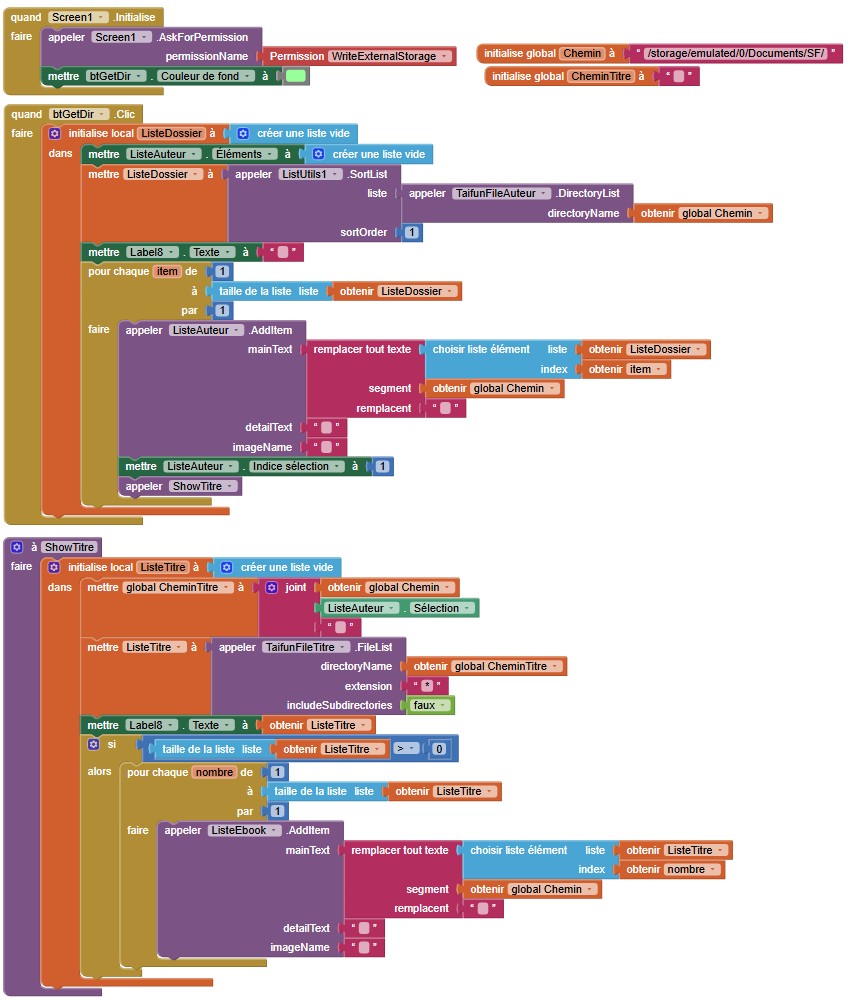
I have a folder that contains ebooks arranged by folder for each author that contains a folder for titles.
When I click on "btGetDir", I get the list of authors.
But then, it is impossible to retrieve the list of corresponding Titles.
With "TaifunFile FileList" the list is empty.
If there is a kind soul to come to my aid
Thank you
Shouldn't be that tricky, I built something quickly, and just used the File component in the Companion
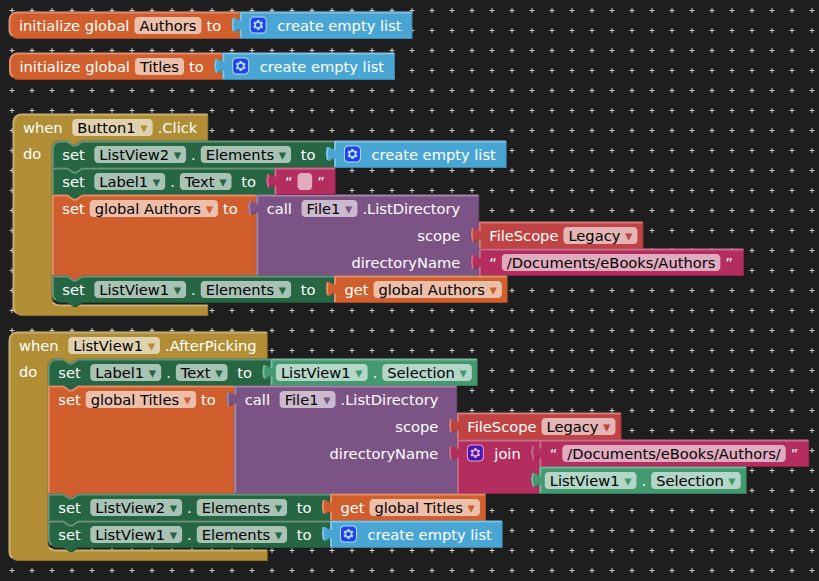
Directory structure (e.g. for Oliver by Dickens)
/Documents/eBooks/Authors/Dickens/Oliver.txt
Under Android 12, authors are displayed correctly but not titles
Under Android 16, nothing is displayed
My example was on Android 17...but note I was only creating a demo with the companion app.
Your issue on later Android versions is that the folders and files you are attempting to read have most probably not been created by your app, therefore they are only accessible using SAF.
If you move your file and folder structure to your app's ASD, it should work without requiring any permissions. You can use SAF to copy/move new files from Shared Storage to your ASD.
That makes no sense, because the Android file system has not changed between Android 12 and 16.
But the files you are trying to access must be created by the app. However, if they are created by the Companion app, you can't access them with the APK and vice versa.
I reworked my example to use the ASD, works companion and compiled.

FoldersAndSubFolders.aia (3.8 KB)
The first section of blocks with Screen1.Initialise simply creates the directories, subDirectories and example text files. (for your eBooks, you would download these to your app using the web component)
Hello,
I thank you but that's not what I want.
I saved my Ebooks in "Documents" then in a folder named "ebook". Each author is located in a folder with the author's name.
Then, in this folder you find the author's ebooks.
I want to display all the authors in a listview and each time an author is selected I want to display the corresponding ebooks in another listview.
But nothing is displayed in this listview because the list created by "TaifunFileList" is empty.
On the other hand, by testing several folders with the "*" extension, the list returns any image file contained in the parent folder.
As it already has been said
Read again the previous posts and follow the already given suggestions
Taifun
Is your app "just for you" and "just for your device" ?
If not, how would another user get the ebooks into the directory structure you propose ?