Short Description: Elevate your app's UI with a stunning, highly responsive Radial Circular Menu.
Full Description: Transform your app's user experience with the Premium Menu Extension for App Inventor, Kodular, and Niotron. Designed for developers who prioritize both aesthetics and functionality, this extension brings a sleek, modern radial navigation system to your projects.
Key Features:
-
Intuitive Radial Design: Present your app's actions in a beautiful, space-efficient circular layout.
-
Smooth Animations: Built-in "Overshoot" physics for a fluid, premium-feeling menu entrance.
-
Fully Customizable: Easily set custom icon sizes, colors, and menu dimensions to match your app’s theme.
-
Interactive Feedback: Integrated visual highlighting provides instant user confirmation when a sector is selected.
-
Developer Friendly: Seamless integration with simple blocks for adding icons, clearing items, and handling click events.
Take your app’s navigation to the next level. Build intuitive, professional-grade interfaces with ease.
Component Blocks Documentation
This extension provides a high-performance, visually stunning Circular Menu for your Android applications. Below is the documentation for all available blocks.
Functions (Actions)
| Block | Description |
|---|---|
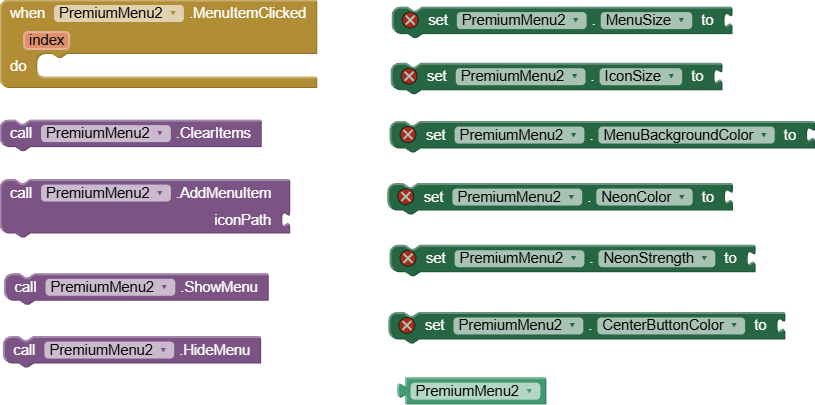
| AddMenuItem | Adds a path to an icon (from your assets) to the menu. Call this block for each item you wish to add. |
| ClearItems | Removes all previously added menu items. Use this to reset the menu configuration. |
| ShowMenu | Displays the circular menu in the center of the screen with a smooth entrance animation. |
| HideMenu | Closes the menu with a smooth exit animation. |
Properties
| Block | Description |
|---|---|
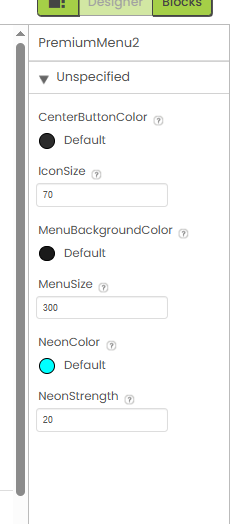
| MenuSize | Sets the total diameter of the menu (in pixels). Default is 300. |
| IconSize | Sets the size of the individual menu icons (in pixels). Default is 70. |
| MenuBackgroundColor | Defines the background color for the menu sectors. Allows you to match the menu with your app's theme. |
| NeonColor | Sets the color of the neon glow effect surrounding the menu sectors. |
| NeonStrength | Controls the intensity (blur radius) of the neon glow. Use higher values for a more intense "glow" effect. |
| CenterButtonColor | Sets the background color of the central close button. |
Events
| Block | Description |
|---|---|
| MenuItemClicked | Triggered when the user taps on a menu sector. Returns the index (1-based) of the selected item. |
Built using: FAST
Price: 3 dollars