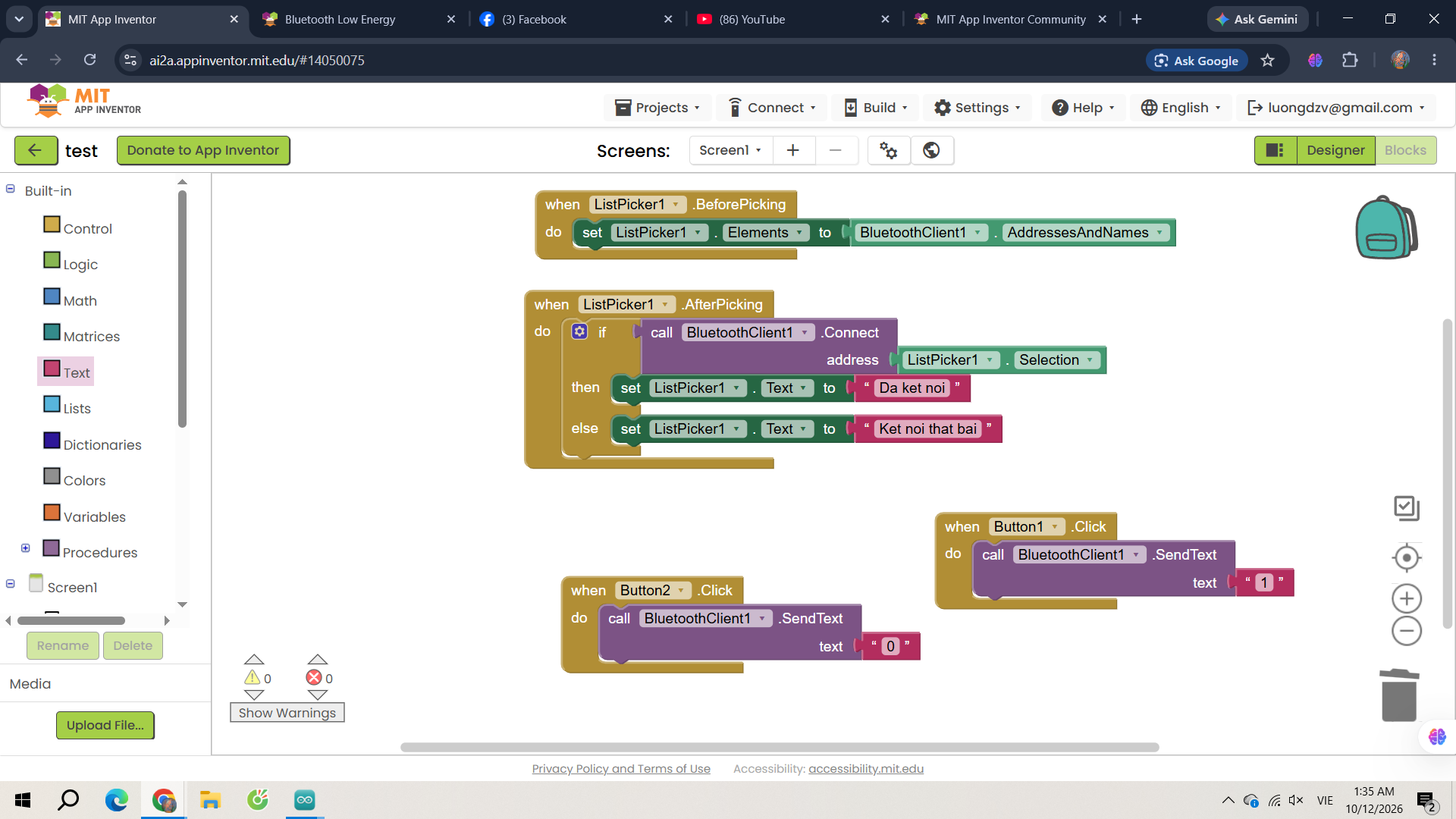

I am developing an Android app using MIT App Inventor to communicate with an Arduino Mega through an HC-05 Bluetooth module. However, I keep getting Error 507: Unable to connect when I try to connect to the HC-05 using my app.
Here are the details of my setup:
-
Microcontroller: Arduino Mega
-
Bluetooth module: HC-05
-
Phone: realme C15
-
Android version: Android 11
-
Development platform: MIT App Inventor
What I have tried:
-
I paired the HC-05 with my phone through Android Bluetooth settings.
-
The HC-05 appears in
BluetoothClient1.AddressesAndNamesin my app. -
I use a
ListPickerto display the paired Bluetooth devices. -
In
ListPicker1.AfterPicking, I callBluetoothClient1.ConnectusingListPicker1.Selectionas the address. -
I enabled the location permission for my app and turned on the phone's Location service.
-
I tried setting
BluetoothClient1.NoLocationNeededtotrue. -
I also tried setting
BluetoothClient1.Securetofalse. -
I tested the HC-05 using Serial Bluetooth Terminal on the same phone. It connects successfully, and I can send and receive data.
-
However, my MIT App Inventor app still reports Error 507. This happens both when I use the installed APK and when I test with the MIT AI2 Companion.
When I select the HC-05 in my app, the alert displays both its MAC address and its device name, for example:
75:E6:58:74:09:D1 HC-05
I have also tried requesting the android.permission.ACCESS_FINE_LOCATION permission when the screen initializes, but the problem persists.
My questions:
-
What could cause Error 507 when another Bluetooth terminal app can connect to the same HC-05 on the same phone?
-
Should I pass the complete
ListPicker.Selectionstring toBluetoothClient1.Connect, or should I extract only the MAC address? -
Is there any additional Bluetooth permission or component property I need to configure for Android 11?
-
Could the problem be related to the HC-05's Bluetooth serial service (SPP) or the way
BluetoothClient1.Connectis called?
I would appreciate any suggestions or a working example of the correct blocks for connecting to an HC-05 with MIT App Inventor.
Thank you for your help!