🏃♂️ TagSphare
An extension for MIT App Inventor 2. Specifications
 Package: io.th.tagsphare
 Size: 59.63 KB
 Version: 1.1
 Minimum API Level: 7
 Updated On: 2025-12-30T18:30:00Z
 Built & documented using: FAST v2.8.4
 Library Use Thanks you AleksRychkov for your tag-sphere Library.
 Get aix here Price 2USD
 .
.
Find More info on GitHub
Demo
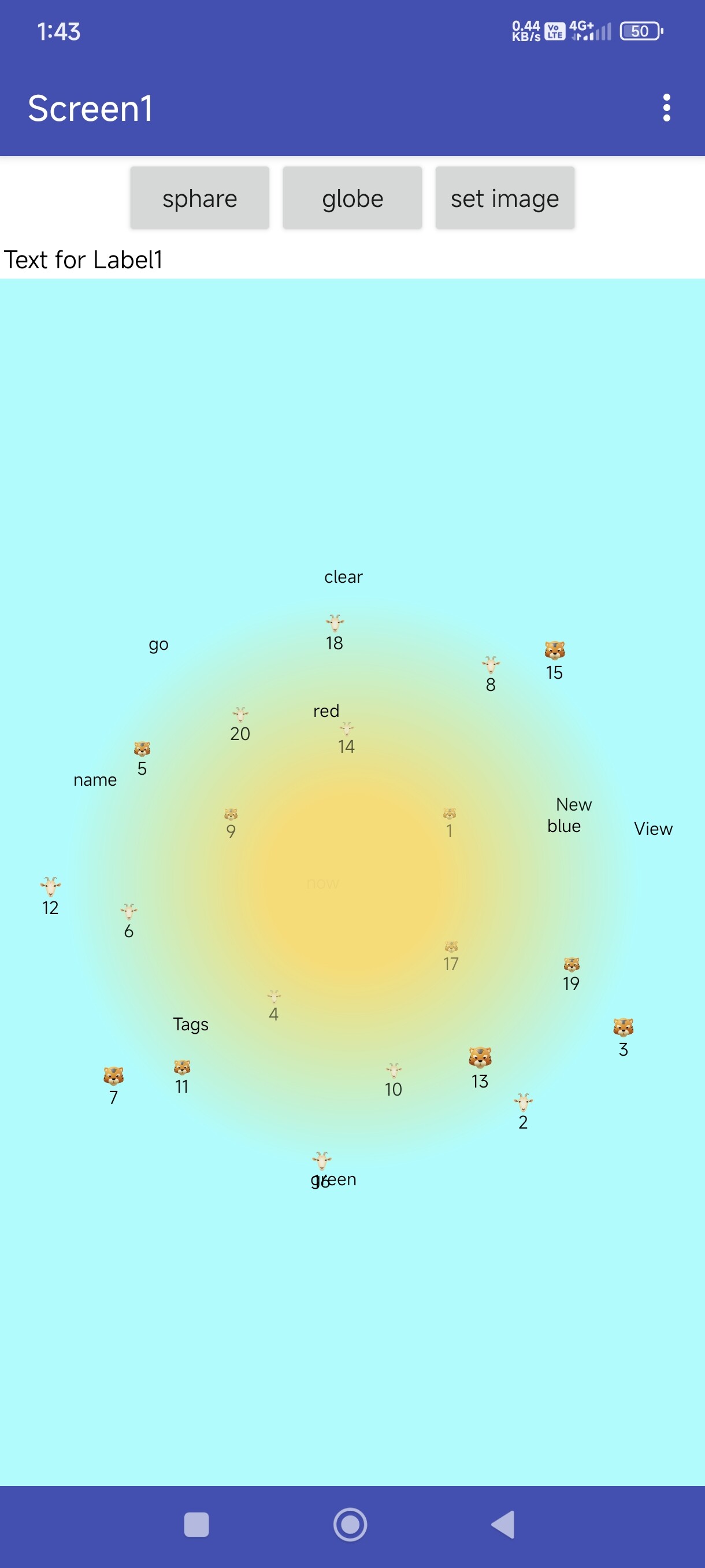
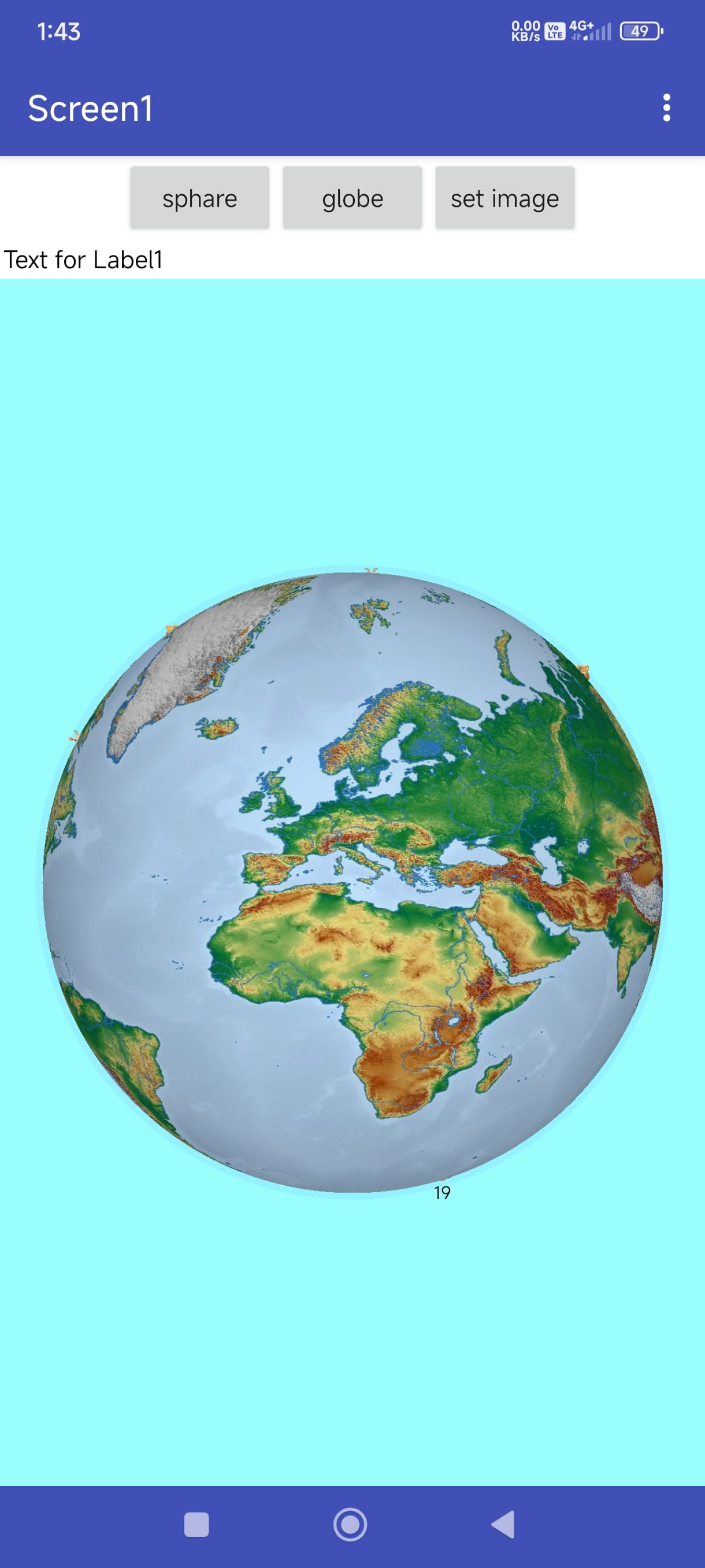
 Multi-Components
Blocks
 TagSphare
A 3D rotating tag sphere component with icon support. Developed by TechHamara using Fast.
Find More Extension
Terms & Conditions
Find More On BuyMeCoffee Page
Documentations
Events:
TagSphare has total 4 events.
TagTapped
Event fired when a text tag is tapped.
| Parameter | Type |
|---|---|
| tagText | text |
TagLongPressed
Event fired when a text tag is long pressed.
| Parameter | Type |
|---|---|
| tagText | text |
IconTagTapped
Event fired when an icon tag is tapped.
| Parameter | Type |
|---|---|
| id | text |
| text | text |
IconTagLongPressed
Event fired when an icon tag is long pressed.
| Parameter | Type |
|---|---|
| id | text |
| text | text |
Methods:
TagSphare has total 24 methods.
Initialize
Initialize the TagSphere inside an arrangement.
| Parameter | Type |
|---|---|
| arrangement | component |
AddTag
Add a single text tag to the sphere.
| Parameter | Type |
|---|---|
| text | text |
AddTags
Add multiple tags from a YailList.
| Parameter | Type |
|---|---|
| tagsList | list |
RemoveTag
Remove a tag by its text.
| Parameter | Type |
|---|---|
| text | text |
ClearAllTags
Clear all tags from the sphere.
GetTagCount
Get the number of tags currently in the sphere.
- Return type:
number
ContainsTag
Check if a tag with the given text exists.
- Return type:
boolean
| Parameter | Type |
|---|---|
| text | text |
GetAllTags
Get all tags as a list.
- Return type:
list
StartAutoRotation
Start automatic rotation with the specified delta values. Use positive/negative values to control direction.
| Parameter | Type |
|---|---|
| deltaX | number |
| deltaY | number |
StopAutoRotation
Stop automatic rotation.
SetEasingFunction
Set the easing function type. Options: 0=EaseIn, 1=EaseOut, 2=EaseInExpo, 3=EaseOutExpo, 4=InQuint, 5=OutQuint, 6=None
| Parameter | Type |
|---|---|
| type | number |
SetFontFromAsset
Set custom text font from assets.
| Parameter | Type |
|---|---|
| fontPath | text |
SetTextStyle
Apply bold and/or italic style. style: 0=Normal, 1=Bold, 2=Italic, 3=BoldItalic
| Parameter | Type |
|---|---|
| style | number |
SetBackgroundImage
Set the background image from a file path.
| Parameter | Type |
|---|---|
| imagePath | text |
SetBackgroundImageFromAsset
Set the background image from an asset file.
| Parameter | Type |
|---|---|
| assetPath | text |
ClearBackgroundImage
Clear the background image.
AddIconTag
Add an icon tag from a file path.
| Parameter | Type |
|---|---|
| id | text |
| imagePath | text |
AddIconTagFromAsset
Add an icon tag from an asset file.
| Parameter | Type |
|---|---|
| id | text |
| assetPath | text |
AddIconTagWithText
Add an icon tag with a text label below.
| Parameter | Type |
|---|---|
| id | text |
| imagePath | text |
| text | text |
AddIconTagFromAssetWithText
Add an icon tag from asset with a text label below.
| Parameter | Type |
|---|---|
| id | text |
| assetPath | text |
| text | text |
AddIconTagsFromAssets
Add multiple icon tags from a list. Each item should be a list of [id, assetPath] or [id, assetPath, text].
| Parameter | Type |
|---|---|
| tagsList | list |
RemoveIconTag
Remove an icon tag by its ID.
| Parameter | Type |
|---|---|
| id | text |
ContainsIconTag
Check if an icon tag with the given ID exists.
- Return type:
boolean
| Parameter | Type |
|---|---|
| id | text |
GetAllIconTags
Get all icon tag IDs as a list.
- Return type:
list
Designer:
TagSphare has total 8 designer properties.
Radius
- Input type:
float - Default value:
2.5
TouchSensitivity
- Input type:
integer - Default value:
10
RotateOnTouch
- Input type:
boolean - Default value:
True
TextColor
- Input type:
color - Default value:
&HFF000000
TextSize
- Input type:
float - Default value:
30
SphereColor
- Input type:
color - Default value:
&H00000000
BackgroundColor
- Input type:
color - Default value:
&H00000000
IconSize
- Input type:
integer - Default value:
48
Setters:
TagSphare has total 8 setter properties.
Radius
Set the sphere radius. Valid range: 1.0 to 10.0
- Input type:
number
TouchSensitivity
Set the touch sensitivity. Valid range: 1 to 100
- Input type:
number
RotateOnTouch
Set whether rotation on touch is enabled.
- Input type:
boolean
TextColor
Set the text color for tags.
- Input type:
number
TextSize
Set the text size in pixels.
- Input type:
number
SphereColor
Set the sphere gradient overlay color.
- Input type:
number
BackgroundColor
Set the background color of the TagSphere view.
- Input type:
number
IconSize
Set the icon size in pixels for icon tags.
- Input type:
number
Getters:
TagSphare has total 8 getter properties.
Radius
Set the sphere radius. Valid range: 1.0 to 10.0
- Return type:
number
TouchSensitivity
Set the touch sensitivity. Valid range: 1 to 100
- Return type:
number
RotateOnTouch
Set whether rotation on touch is enabled.
- Return type:
boolean
TextColor
Set the text color for tags.
- Return type:
number
TextSize
Set the text size in pixels.
- Return type:
number
SphereColor
Set the sphere gradient overlay color.
- Return type:
number
BackgroundColor
Set the background color of the TagSphere view.
- Return type:
number
IconSize
Set the icon size in pixels for icon tags.
- Return type:
number
WorldMapSphare
A realistic 3D interactive Globe Map component. Rotate the globe, click countries to highlight. Developed by TechHamara.
Find More Extension
Terms & Conditions
Find More On BuyMeCoffee Page
Blocks
Events:
WorldMapSphare has total 2 events.
CountryClicked
Triggered when a country is clicked on the globe.
| Parameter | Type |
|---|---|
| countryCode | text |
| countryName | text |
CountryLongPressed
Triggered when a country is long pressed on the globe.
| Parameter | Type |
|---|---|
| countryCode | text |
| countryName | text |
Methods:
WorldMapSphare has total 5 methods.
Initialize
Initialize the 3D Globe Map inside an arrangement. You can optionally load a world map texture for a realistic look.
| Parameter | Type |
|---|---|
| arrangement | component |
SetMapTextureFromAsset
Set a world map texture image from asset. Use an equirectangular projection map image for best results. The image will be wrapped onto the 3D globe.
| Parameter | Type |
|---|---|
| assetPath | text |
SetMapTexture
Set a world map texture image from file path. Use an equirectangular projection map image for best results.
| Parameter | Type |
|---|---|
| imagePath | text |
ClearMapTexture
Clear the map texture and show programmatic globe.
RotateTo
Rotate the globe to focus on a specific latitude and longitude.
| Parameter | Type |
|---|---|
| latitude | number |
| longitude | number |
Designer:
WorldMapSphare has total 4 designer properties.
OceanColor
- Input type:
color - Default value:
&HFF1E50A0
AtmosphereColor
- Input type:
color - Default value:
&H1E6496FF
ShowAtmosphere
- Input type:
boolean - Default value:
True
ZoomEnabled
- Input type:
boolean - Default value:
False
Setters:
WorldMapSphare has total 7 setter properties.
OceanColor
Set the ocean color.
- Input type:
number
AtmosphereColor
Set the atmosphere glow color.
- Input type:
number
ShowAtmosphere
Set whether to show atmosphere glow effect.
- Input type:
boolean
ZoomEnabled
Set whether pinch-to-zoom gesture is enabled.
- Input type:
boolean
Zoom
Set the current zoom level (0.5 to 3.0). Default is 1.0.
- Input type:
number
MinZoom
Set the minimum zoom level. Default is 0.5.
- Input type:
number
MaxZoom
Set the maximum zoom level. Default is 3.0.
- Input type:
number
Getters:
WorldMapSphare has total 7 getter properties.
OceanColor
Set the ocean color.
- Return type:
number
AtmosphereColor
Set the atmosphere glow color.
- Return type:
number
ShowAtmosphere
Set whether to show atmosphere glow effect.
- Return type:
boolean
ZoomEnabled
Set whether pinch-to-zoom gesture is enabled.
- Return type:
boolean
Zoom
Set the current zoom level (0.5 to 3.0). Default is 1.0.
- Return type:
number
MinZoom
Set the minimum zoom level. Default is 0.5.
- Return type:
number
MaxZoom
Set the maximum zoom level. Default is 3.0.
- Return type:
number
Thanks
TechHamara
Feel free to contact us any quarry or suggestions.