RecyclerList is a high-performance, advanced list extension for MIT App Inventor 2 and Niotron. Built on the native Android RecyclerView, it offers blazing-fast scrolling, 100% reliable clicks, and a revolutionary "Magic Ad" system.
Created by: Kapil Patel
Build using: FAST CLI
 Why choose RecyclerList?
Unlike standard list extensions, RecyclerList is built for Performance and Universal Compatibility.
 Magic Ad Integration: Automatically handles root switching for AdMob, Facebook, and AppLovin ads. No more "Type Mismatch" errors!
 Forceful Click Interception: Never miss a tap again. The extension captures clicks even if child views are in the way.
 True Dynamic UI: Build your design from scratch using any dynamic components.
 Infinite Scrolling: Use the
 OnLoadMoreevent to automatically fetch and add more data as the user scrolls. Blazing Fast: Optimized for smooth scrolling even with thousands of items.
 The Ultimate Guide
Phase 1: Basic Setup
- Import: Add the
RecyclerList.aixto your project. - Container: Drag a VerticalArrangement and set its dimensions to Fill Parent.
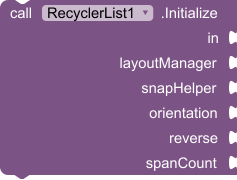
- Initialize: Call the
Initializefunction in your Screen Initialize block:- LayoutManager:
Linear,Grid, orStaggered. - SnapHelper:
None,Linear, orPager. - Orientation:
VerticalorHorizontal. - SpanCount: Row/Column count (e.g., 1 for lists, 2 or 3 for grids).
- LayoutManager:





 Phase 2: Design (
OnCreateView)
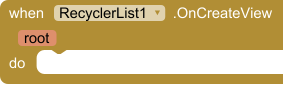
- Find the
OnCreateView(root)event. fast - Use
CreateComponentto add components (Labels, Images, etc.) to theroot. - Give each component a unique Tag (e.g.,
"username","avatar") to find it later.
 Phase 3: Binding (
OnBindView)
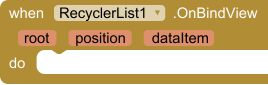
- Find the
OnBindView(root, position, dataItem)event. - Use
GetComponent(root, tag)to find your components. - Bind your data (text, images, etc.) to those components.
 Phase 4: Reliable Clicks
InterceptClicks(Property):- True: The whole row acts as one button (100% reliable).
- False: Only individual buttons inside the row are clickable.
OnItemClick(position): Returns the exact index of the tapped item.
 Phase 5: Universal Ads (The Magic Logic)
- Enable: Set
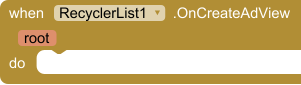
AdsEnabledto True. - Create (
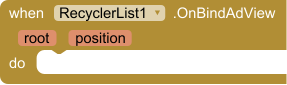
OnCreateAdView): Create your Ad component (AdMob, FB, etc.) inside therootusing its class name. - Bind (
OnBindAdView):- The Magic: In this event, the
get rootblock automatically becomes your actual Ad component! - Just plug
get rootdirectly into your Ad network'sLoadAdblock. - Works with Native Ads, Banners, and Banner Ads from any network!
- The Magic: In this event, the
Phase 6: Infinite Scrolling & Scroll Events
RecyclerList makes it easy to handle pagination and "Load More" logic.
OnLoadMore(Event):- This event is triggered when the user scrolls to the very bottom of the list.
- Use this to fetch more data from your database or API and append it to your list.
OnScrollReachedTop(Event):- This event is triggered when the user scrolls back to the very first item.
- Useful for implementing features like "Pull to Refresh" or hiding specific UI elements.
OnScrollStateChanged(Event):- Tells you if the list is
Idle(0),Dragging(1), orSettling(2). Useful for stopping image loading during fast scrolls.
- Tells you if the list is


 Performance Tips
- Simple Layouts: Avoid deep nesting for smoother scrolling.
- Unique Tags: Always use clear, unique tags for every component.
- Clean Refresh: Use the
Clearfunction when resetting large lists.
 Summary of Blocks
| Block | Action |
|---|---|
| Initialize | Sets up the list inside your arrangement. |
| CreateComponent | Adds a component to the row. |
| GetComponent | Finds a component inside a row using its tag. |
| Data (Property) | Use a List of Objects to populate your recycler. |
| InterceptClicks | Ensures taps are detected 100% of the time. |
Special thanks to
Special thanks to for JEWEL for Fast CLI and
zainulhassan for O/S RecyclerList
If you wan to buy just DM me..
Price 15 USD
Happy Coding! 
If you like this extension, don't forget to share it with the community!
Thank you for this amazing supporting community.