
Hello MIT App Inventor Community, Educators & Developers! 
We are thrilled to officially unveil Google Map Ultra Pro (v1.0) — the most advanced, ultra-performant, and comprehensive Google Maps extension ever developed for MIT App Inventor 2!
Tired of the basic OpenStreetMap component that lacks Google's real-time features? Frustrated with laggy map components that freeze your app when loading more than 50 pins? Struggling to build an Uber, Careem, or food delivery tracking app with smooth vehicle movement and live road routes?
Google Map Ultra Pro completely revolutionizes mapping on MIT App Inventor. Built on Google's modern WebGL Vector Maps engine, it brings true AAA enterprise navigation, 3D building perspectives, and smooth GPS vehicle tracking directly into your visual drag-and-drop blocks!
 Why Google Map Ultra Pro Dominates Every Other Map Extension
| Feature | Standard App Inventor Map / Legacy Components | Google Map Ultra Pro  |
|---|---|---|
| Rendering Engine | Basic Android Native Views (Slow) | High-Speed Dual WebGL 3D Vector Engine |
| Marker Capacity | Freezes or crashes after 50–100 pins | 10,000+ Pins with Super-Cluster Engine |
| Vehicle Tracking | Jerky / teleporting pins | Uber/Careem Spherical Slerp + Auto-Bearing Rotation |
| Route Navigation | Straight lines only or slow 3rd party APIs | Official Google Directions Turn-by-Turn Engine |
| Live Layers | Not supported or unreliable | Real-Time Live Traffic, Transit & Bicycling Layers |
| StreetView | None | Built-in Interactive 360° StreetView Panorama |
| Heatmaps | Not available | Weighted Dynamic Heatmaps (Real Estate / Delivery Zones) |
| Geofencing | External background service required | Real-Time Circular Proximity & Breach Detector |
| Map Snapshots | Clunky screen grab | Crystal-Clear Native Bitmap / Base64 Snapshot |
| Live Companion | Breaks or throws missing library errors |  100% Works in MIT AI2 Companion & Exported APK |
Key Superpowers & Features
 1. Uber / Careem Style Smooth Vehicle Animation (
AnimateMarker)
Build professional ride-hailing, courier, or ambulance tracking apps!
- Spherical Slerp Interpolation: Moves vehicle markers smoothly between coordinates without jumping or teleporting.
- Auto-Bearing Heading: Automatically calculates road curve angle and smoothly rotates the vehicle icon towards the exact direction of travel.
- Custom Duration: Set duration (e.g.
1200ms) for buttery-smooth live GPS tracking.
 2. Official Turn-by-Turn Route Navigation (
DrawDirectionsRoute)
- Directly powered by the official Google Maps Directions API.
- Automatically decodes Google's compressed overview polyline into thousands of high-precision road points.
- Returns real-world driving distance (in km/miles) and estimated travel duration (in minutes/hours).
- Fires
RouteReadywith total distance, travel time, and polyline coordinates.
 3. Ultra-Fast Marker Clustering (
AddClusterMarker)
- Render thousands of store locations, real estate properties, or ATM machines without losing a single frame!
- Dynamic zoom expansion: markers automatically group into labeled cluster bubbles and smoothly expand as the user zooms in.
 4. Weighted Dynamic Heatmaps (
AddHeatmap)
- Render visual heat densities for food delivery demand, crime rate tracking, or epidemic monitoring.
- Supports customizable opacity, radius, and color gradient scales.
 5. Circular Geofencing Alarms (
AddGeofence)
- Set virtual boundaries around stores, campuses, or customer drop-off points.
- Fires
GeofenceTriggeredinstantly when a user enters or exits the boundary zone.
 6. Embedded 360° Interactive StreetView (
ShowStreetView)
- Immersive panoramic street-level view embedded directly inside your app!
- Supports pitch, heading, and street-level navigation controls.
 7. 6 Beautiful Pre-Engineered Map Themes
- Switch instantly between Standard, Silver, Retro, Dark Mode, Night Ride, and Aubergine with a single block!
 Technical Specifications
| Specification | Details |
|---|---|
| Extension Name | Google Map Ultra Pro |
| Package Name | com.abid.googlemapultra |
| AIX File Size | 83.0 KB (Ultra-Lightweight & Clean) |
| Total Blocks | 67 Methods • 20 Events • 8 Properties |
| Min Android SDK | Android 5.0+ (API 21+) |
| Target Android SDK | Android 14 / 15 / 16 (API 34/35/36) |
| Dependencies | Zero external heavy JARs • No ProGuard conflicts |
| Tested Platforms | MIT AI2 Companion (Android 10 - 15,16) & Exported APKs |
| Compiler Engine | GOSHI CLI v1.0.0 (AIX Hub Studio 2027) |
| Developer | Abid Ali Bhatti (AIX Hub) |
| Official Website | https://aixhub.store |
 Complete Visual Blocks Palette
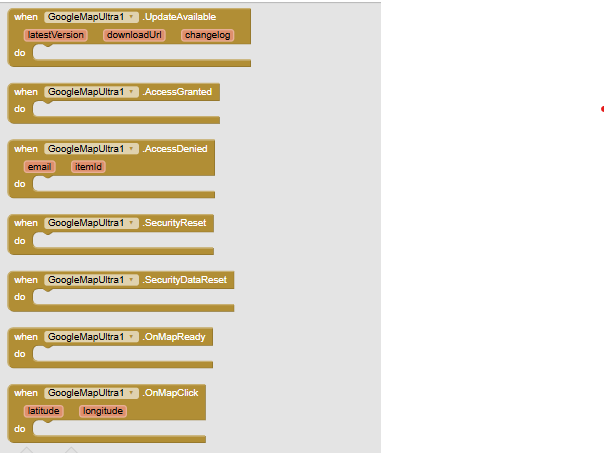
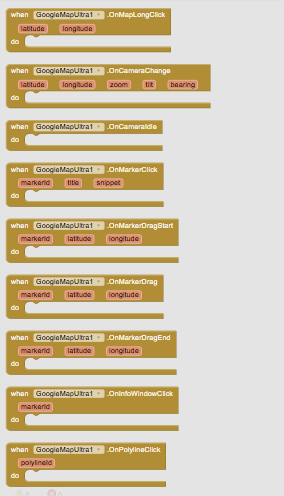
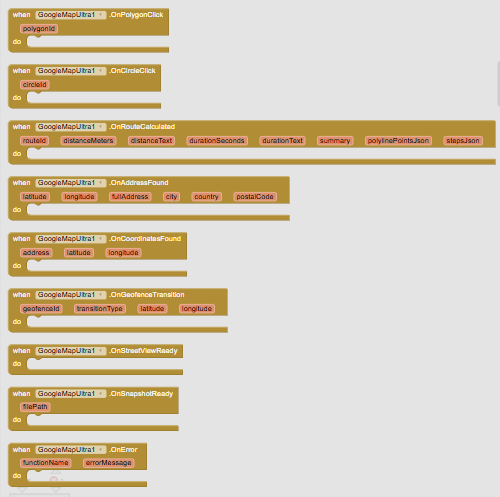
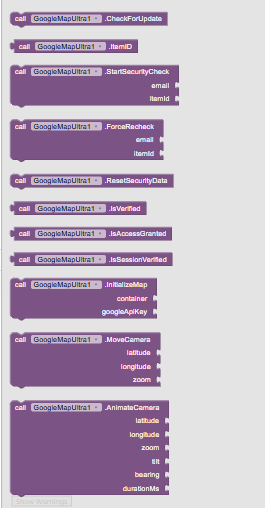
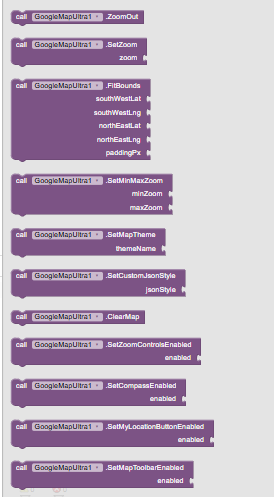
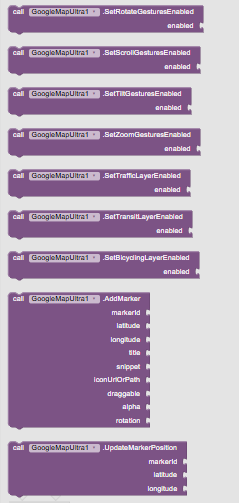
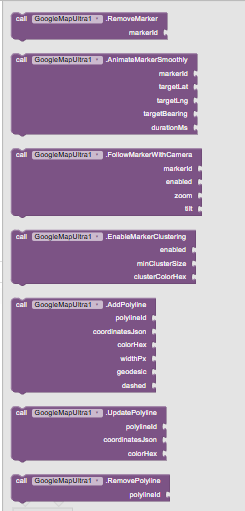
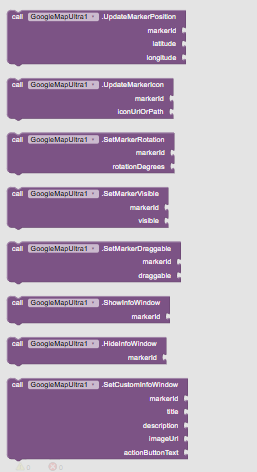
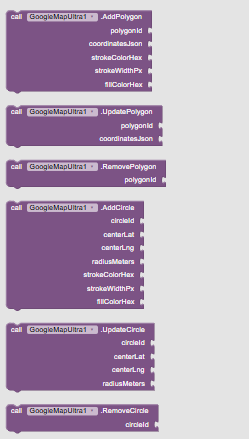
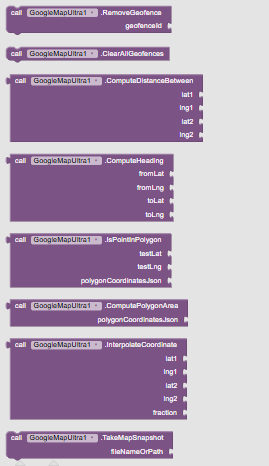
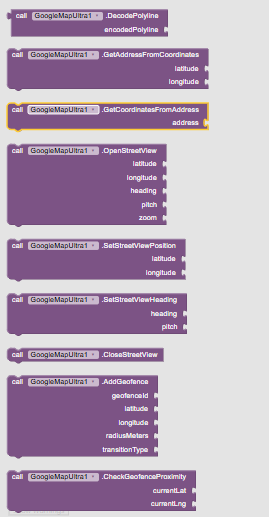
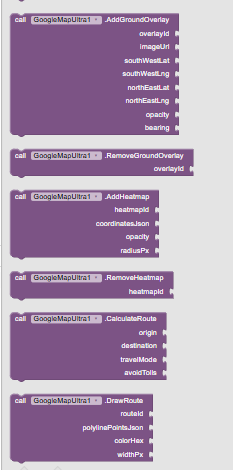
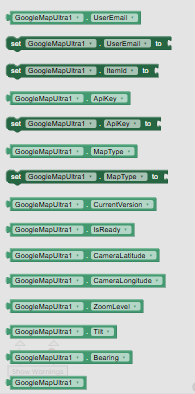
(A complete ZIP package containing high-resolution block images categorized for MIT App Inventor, Kodular, Android Builder, and Niotron is included in the download section).
 Quick Blocks Guide for App Inventor
1. Initialize Map & Set Google API Key
when Screen1.Initialize do
  set GoogleMapUltra1.GoogleApiKey to "AIzaSy..."
  call GoogleMapUltra1.InitializeMap (in: VerticalArrangement_Map, lat: 31.5204, lng: 74.3587, zoom: 15)
2. Smooth Vehicle Movement (Uber / Careem Style)
when LocationSensor1.LocationChanged (latitude, longitude, altitude, speed) do
  call GoogleMapUltra1.AnimateMarker (
       markerId: "car_driver_1",
       toLat: latitude,
       toLng: longitude,
       durationMs: 1200,
       autoRotateBearing: true
  )
3. Draw Real Road Route Between Coordinates
when Button_GetDirections.Click do
  call GoogleMapUltra1.DrawDirectionsRoute (
       origin: "Lahore, Pakistan",
       destination: "Islamabad, Pakistan",
       travelMode: "DRIVING",
       strokeColor: -16776961, // Blue
       strokeWeight: 6
  )

when GoogleMapUltra1.RouteReady (distanceText, durationText, distanceMeters, durationSeconds) do
  set Label_Distance.Text to join ("Distance: ", distanceText)
  set Label_ETA.Text to join ("Estimated Time: ", durationText)
 Pricing & Commercial License
This is a Premium Paid Extension backed by lifetime updates, enterprise bug fixes, and direct developer support.
| Currency | Price | Payment Methods Supported |
|---|---|---|
 USD (International) |
$12 | PayPal • Binance Pay • Credit / Debit Card • Stripe |
 PKR (Pakistan) |
Rs. 3,600 | JazzCash • EasyPaisa • SadaPay • NayaPay • Raast • Bank Transfer |
 INR (India) |
₹1,200 | UPI • Google Pay • PhonePe • Paytm |
 How to Purchase & Instant Download
Get your copy instantly within 2 minutes:
-
Official Website (Instant Download):
 https://aixhub.store
-
 Email Support:
aixhubstore@gmail.com
 What You Receive:
-
com.abid.googlemapultra.aix (124.6 KB) (Clean, signed, production-ready AIX file).
-
Not Uploaded (Complete high-res visual blocks categorized for App Inventor).
-
guide.html(Interactive responsive documentation with 1-click Google Cloud API setup buttons). -
Complete Sample AIA Project ready to import directly into MIT App Inventor!
-
24/7 dedicated developer support.
Built with  by Abid Ali Bhatti (AIX Hub) • Powered by GOSHI CLI 2027 • https://aixhub.store