 Bolt CLI (Universal Edition)
Build Faster, Compile Smarter.
The Universal, Lightning-Fast Framework & CLI for MIT App Inventor 2 Extensions.

Features • Installation • Commands • Compiler Daemon • Diagnostics • D8 DEX Caching • Live Testing • Mini-NDK • Unit Testing • Licensing • Compatibility • bolt.yml • Build from Source • Credits
 Overview
Bolt CLI is a modern, high-performance universal command-line tool designed to revolutionize how you develop and build extensions for MIT App Inventor 2 and its distributions (Kodular, Niotron, AndroidBuilder, etc.).
Powered by an in-process Kotlin & ECJ JVM compiler engine, Bolt runs universally on Windows, macOS (Intel & Apple Silicon), Linux, and Android Termux without platform-specific native binary dependencies.
[!IMPORTANT]
Credits & Acknowledgements: Bolt CLI is built upon the excellent foundation of the original Rush CLI project created by Shreyash Saitwal. We express our sincere gratitude and credit to Shreyash and all the Rush contributors for their pioneering work in building compilation toolsets for the App Inventor community.
- Thanks to Fast CLI by jewel to innovate me to there features functions ideas to help us the excellent innovation develop and implement on Boltcli.
 Key Features
-
 Advanced Multi-Tier Dependency System: Support for runtime
 dependencies:(Local JAR/AAR indeps/or remote Maven coordinates with automatic inline comment stripping), compile-time onlycompile_time:stubs (strictly excluded from AIX), and companionprovided_dependencies:(excluded from final AIX). -
 Real-Time System Diagnostics & Clean Terminal Output: Clean, distraction-free bullet logs during
 bolt build, paired with detailed.bolt/BuildLog.txtrecording real-time device specs (CPU cores, physical RAMUsed/Total GB, storage disk space, Android/Windows OS detection) and exact build duration. -
 Auto-Injected Helper dropdown blocks (
OptionList): Scaffold dropdown block helpers (bolt generate helper <type>orbolt create -t <int|str>) with automatic helper class imports and demo@SimplePropertydropdown methods injected directly into your main component class.
Helper blocks template here
Helper Enums (OptionList) with Auto-Injected @SimpleProperty
App Inventor supports dropdown blocks through OptionList<T>. Bolt CLI completely automates scaffolding, import injection, and demo property creation with support current project and New project creation:
# Generate Integer dropdown helper enum on existing projects
bolt generate helper int
# Or generate String dropdown helper enum
bolt generate helper str
# Or generate helper by custom name
bolt generate helper int Direction
# Or New projects
#When you generate a helper or create a project with -t int or -t str
bolt create <project name> -h int|str
 100% App Inventor Build Server Compatibility (AAPT & D8): Clean
 .aixpackaging layout with zero duplicate class collisions, XML comment stripping inAndroidManifest.xml, shorthand component expansion (.MyService-><pkg>.MyService),${applicationId}substitution, and automatedmin_sdkverification. Extension Assets Validation (
assets:): Declared assets inassets/are validated with automated warnings if file size exceeds 5MB to prevent AIX upload rejections, and auto-packaged directly into the.aixarchive.- R8 Minimization & Code Preservation (
minimize:): Customexclude_dependencyandexclude_projectdirectives automatically generate-keep class <pkg>.** { *; }rules in.bolt/minimize-rules.proto prevent essential classes from being stripped during shrinking.  Extension Homepage & Auto-Versioning: Declare
 homepage:to render clickable links in component metadata andout/extension.txt, and enableauto_version: trueto increment component version on every successful build automatically.- Lightning-Fast In-Process Builds (
bolt build): Compiles Java, Kotlin, AIDL, ProGuard, R8, D8 Dex, and packages the.aixbundle in sub-3 seconds without external JVM spawn overhead.  Persistent Compiler Daemon (
bolt daemon): Keeps JVM dependencies, HotSpot JIT, and compiler classes warmed up in RAM for sub-4 second incremental builds.- D8 DEX Compilation & Incremental Caching (
--dex,-dx): Compiles Java/Kotlin bytecode into Dalvik/ARTclasses.dexwith incremental MD5 checksum caching for instant cache hits.  Dev Sync (
bolt sync dev): Automatically fetches and updatesdesugar_jdk_libs:2.1.5and configuration files directly from Google Maven. Real Unit Testing (
bolt test): Execute unit tests locally powered by the official JUnit 5 Platform Console Standalone Runner with automatic test scaffolding and live progress trees. Live Hot-Reloading (
bolt run): Instant live extension hot-reloading to an Android phone over WebSocket (port 9000) and Wi-Fi UDP auto-discovery (port 9001) without rebuilding APKs. Mini-NDK & Native C/C++ (JNI & NDK) Support: Build ultra-compact C/C++ shared libraries out-of-the-box (
2-3 KB) using-Oz,-flto, and--strip-allwithout requiring the full Android Studio NDK! JNI Native Library Support: Package
 .sonative libraries across architectures (armeabi-v7a,arm64-v8a,x86_64,x86). By parsing@UsesNativeLibraries, Bolt intelligently maps ABI suffixes like-v7aintocomponent_build_infos.jsonand bundles physical binaries into the.aixper official MIT App Inventor build server specifications.- Custom XML Integration (
@UsesXmls): Custom layouts and manifests specified via@UsesXmlsare extracted and injected into.aixviacomponent_build_infos.json, maintaining compatibility with Kodular and Niotron. - Multi-Component & Android 11+ Manifest Extraction: Build projects with multiple
@DesignerComponentclasses, and automatically extract<uses-feature>and<queries>tags intocomponent_build_infos.json.  Annotation Stripping (
deannonate): Strip heavy App Inventor metadata annotations silently post-compilation using an ASM-based remapper for maximum binary efficiency. Automatic Documentation & Helper Enums: Automatically generates an
 out/extension.txtMarkdown file alongside your.aixsummarizing properties, methods, events, and Helper Enums (OptionLists) with parameter tables, return types, and binary size. Automated Offline RSA Licensing (
bolt auth): Secure your premium extensions with offline RSA-2048 public/private key licensing automatically tied to customer App Inventor email addresses. Project Scaffolding (
bolt create): Scaffold complete Java or Kotlin projects with pre-filled skeletons (str,int), IDE support (IntelliJ, VS Code, Eclipse), and GitHub Actions workflows.- Smart Dependency Management (
bolt add&bolt sync): Search Maven Central directly via CLI (bolt add <group>:<artifact>) and resolve remote dependencies automatically.  Project Tree Visualizer (
bolt tree): Display a beautiful visual hierarchical representation of project files and export clean output totree.txt.- Seamless Legacy Migration (
bolt migrate): Port legacy projects (Rush, Fast, Extension-Template, AI2 sources) into modern Bolt projects with automatic pre-migration ZIP backups. - Bytecode Shading & Protection: Built-in JarJar relocation (shading), StrGuard string encryption, ProGuard obfuscation, and R8 shrinking with clean noise-filtered logs.
 Modern Java & Kotlin Support: Write extensions in Java 8/11/17/21+, Kotlin, or both in the same project with full AIDL, AndroidManifest, and native App Inventor type resolution (
YailList,trove4j,kawa).
 Installation & Setup
Bolt requires a Java Runtime Environment (JRE or JDK 11+, JDK 17 recommended) to execute.
Note: Bolt bundles its own Eclipse Compiler for Java (
ecj.jar), so a standalonejavaccompiler is not required. Any standard Java 11+ runtime (java) is sufficient to run Bolt CLI.
 Windows (PowerShell)
Default location: %LOCALAPPDATA%\Bolt (e.g. C:\Users\<user>\AppData\Local\Bolt)
Run in PowerShell:
iwr https://raw.githubusercontent.com/TechHamara/bolt-cli/main/scripts/install/install.ps1 -useb | iex
To install in a custom directory:
& { $(iwr https://raw.githubusercontent.com/TechHamara/bolt-cli/main/scripts/install/install.ps1 -useb) } -InstallPath "D:\Tools\Bolt"
To skip Java check/download:
& { $(iwr https://raw.githubusercontent.com/TechHamara/bolt-cli/main/scripts/install/install.ps1 -useb) } -SkipJava
 macOS &
  Linux
Linux
Default location: ~/Bolt
Run in Terminal:
curl https://raw.githubusercontent.com/TechHamara/bolt-cli/main/scripts/install/install.sh -fsSL | sh
To install in a custom directory:
curl https://raw.githubusercontent.com/TechHamara/bolt-cli/main/scripts/install/install.sh -fsSL | sh -s -- --path /opt/Bolt
To skip Java verification:
curl https://raw.githubusercontent.com/TechHamara/bolt-cli/main/scripts/install/install.sh -fsSL | sh -s -- --skip-java
Android (Termux)
Default location: ~/Bolt
Build and compile extensions directly on your phone:
termux-setup-storage
curl https://raw.githubusercontent.com/TechHamara/bolt-cli/main/scripts/install/install-termux.sh -fsSL | bash
To install in a custom directory:
curl https://raw.githubusercontent.com/TechHamara/bolt-cli/main/scripts/install/install-termux.sh -fsSL | bash -s -- --path ~/my_custom_bolt
To skip Termux OpenJDK installation:
curl https://raw.githubusercontent.com/TechHamara/bolt-cli/main/scripts/install/install-termux.sh -fsSL | bash -s -- --skip-java
 Commands Reference
here
| Command | Description |
|---|---|
bolt build [path] |
Compiles the extension into a production .aix in out/ |
bolt create <name> |
Scaffolds a new extension project (Java or Kotlin) |
bolt clean [path] |
Deletes old build artifacts, temporary files, and .bolt caches |
bolt tree [path] |
Visualizes project file hierarchy in terminal and exports to tree.txt |
bolt add <dependency> |
Searches Maven Central and adds dependency coordinate to bolt.yml |
bolt sync [path] |
Downloads and syncs project and dev dependencies into deps/ |
bolt sync dev |
Automatically fetches desugar_jdk_libs:2.1.5 & config from Google Maven |
bolt sync ndk |
Verifies and checks Mini-NDK installation in ~/.bolt/libs/ndk |
bolt deps <sync|tree> |
Inspects and resolves project dependency trees |
bolt run [path] |
Starts Live Testing hot-reload server for Android companion (ports 9000/9001) |
bolt test [path] |
Executes real unit tests locally via JUnit 5 Console Platform Runner |
bolt auth <init|generate> |
Extension licensing system (RSA-2048 keypair & customer license generator) |
bolt generate helper <int|str> |
Scaffolds OptionList dropdown helper and injects @SimpleProperty into main class |
bolt migrate [type] |
Migrates legacy projects (Rush, Fast, Template, AI2) with auto ZIP backup |
bolt daemon <start|stop|status> |
Manages the persistent background Bolt Compiler Daemon |
bolt upgrade |
Upgrades Bolt CLI to the newest available release |
Command Options
here
-r/--proguard: Force ProGuard bytecode obfuscation and optimization-s/--r8: Force Google R8 shrieker and tree-shaking task onbuild-o/--optimize: Optimize extension bytecode size-dx/-x/--dex: Generate desugared Dalvik/ARTclasses.dexvia D8 with incremental caching-m/--keep-manifest: Keep manifest components (Activity, Service, Receiver) in ProGuard rules--no-daemon: Bypass the background compiler daemon and compile locally in-process--deannotate: Strip internal App Inventor metadata annotations post-build for smaller binary size-t <str\|int>/--template <str\|int>: Scaffold pre-filled extension skeleton with helper enum oncreate-p <package>/--package <package>: Specify root package identifier oncreate-l <Java\|Kotlin>/--language <Java\|Kotlin>: Set primary programming language oncreate-v/-d/--verbose/--debug: Enable verbose diagnostic logging-c/--color: Enable or disable ANSI terminal colors-V/--version: Display version information
Compiler Daemon
here
Bolt introduces a persistent background compiler daemon that keeps all toolchains (ECJ, Kotlin compiler, D8, ProGuard) resident and warm in RAM:
# Check daemon status
bolt daemon status

# Start daemon in background
bolt daemon start

# Run builds (automatically delegates to daemon!)
bolt build

# Stop daemon when finished
bolt daemon stop
When active, bolt build automatically delegates to the daemon on port 19090, reducing build times to under 3 to 4 seconds! If the daemon is stopped, Bolt transparently falls back to local in-process compilation.
Documentation & Wiki
For comprehensive usage guidelines, configurations reference, and architectural deep dives:
- Refer to Documentation.md
- Read the full offline wiki guide: WIKI.md
Demo Terminal
here
Bolt CLI version:
Bolt Language Selection
Bolt Project Created
Bolt Tree
Bolt Migrate
Bolt Build
 Open Source & Contributing
Bolt CLI is 100% Open Source and licensed under the GPL-3.0 License. We welcome contributions, bug reports, and suggestions from the extension developer community!
GitHub Repository: TechHamara/bolt-cli  (Don't forget to drop a star!)
Bolt-CLI release page
Issues & Bug Tracker: Report an issue
Contributions: Pull requests are highly welcome. Fork us and help make extension development better for everyone!
 Support & Donations
If Bolt CLI saves you hours of development time, please consider supporting the project:
-
Support via Paypal
-
Buy us a coffee: BuyMeCoffie1 | BuyMeCoffie2
-
Join telegram
Happy coding, and let's build some amazing extensions!
(Built with for the MIT App Inventor, Kodular, and Niotron Communities)

 mentioned,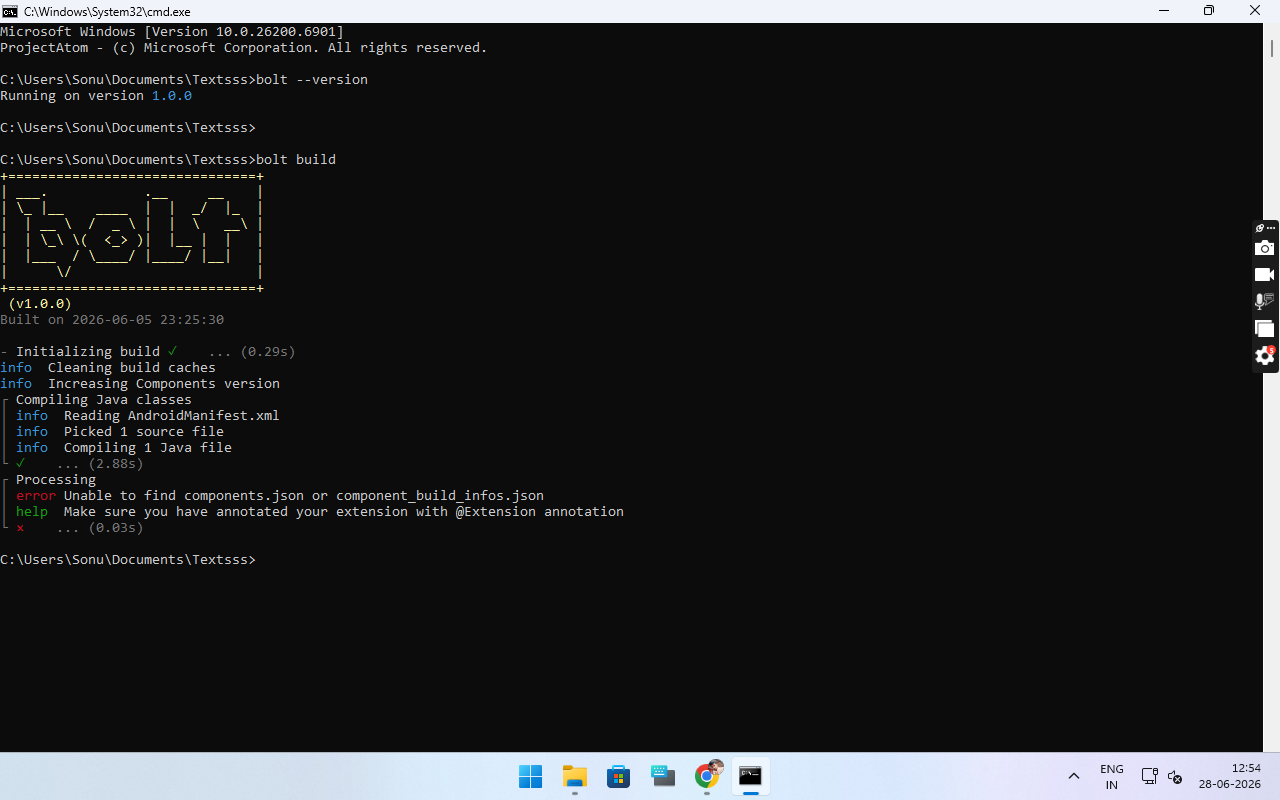
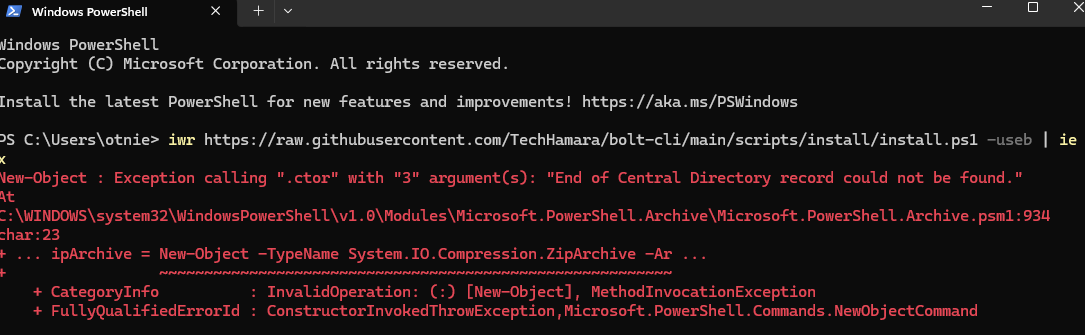
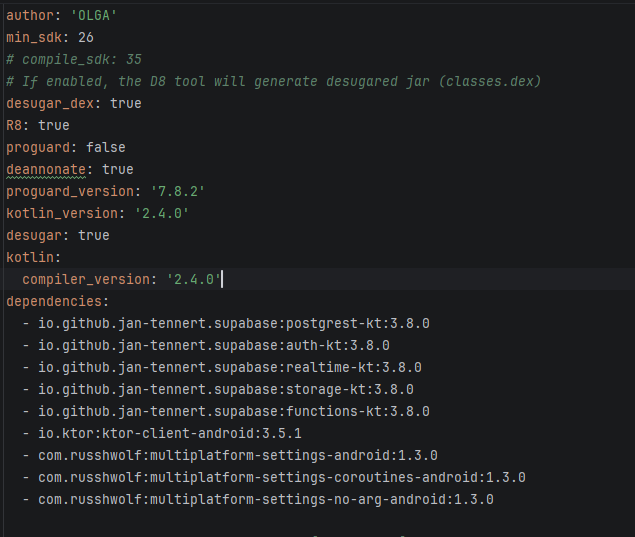
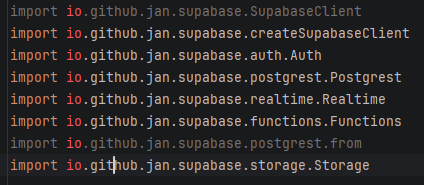
 Steps to Fix the Error:
 Dev
Dev