I did this but the data only sending (saving) when the app is restarted
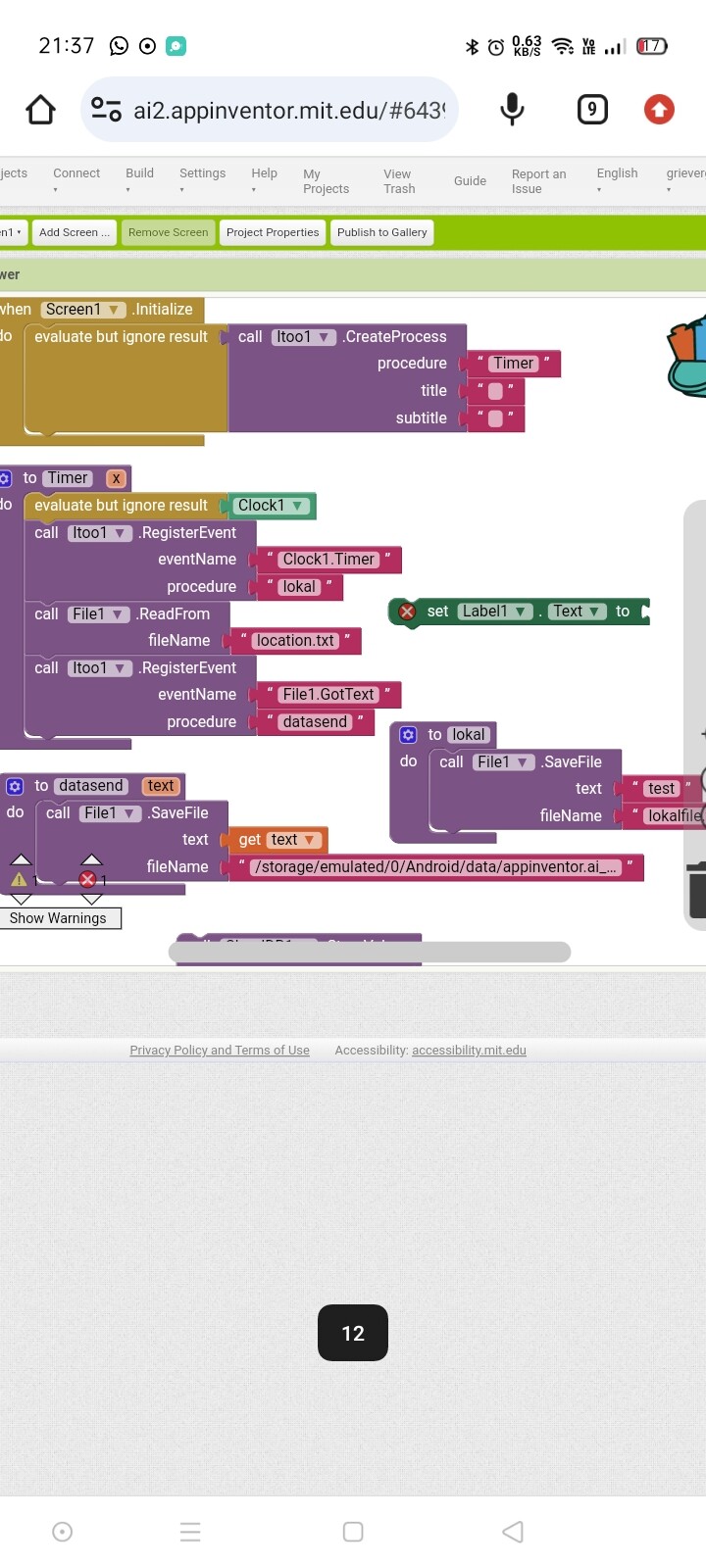
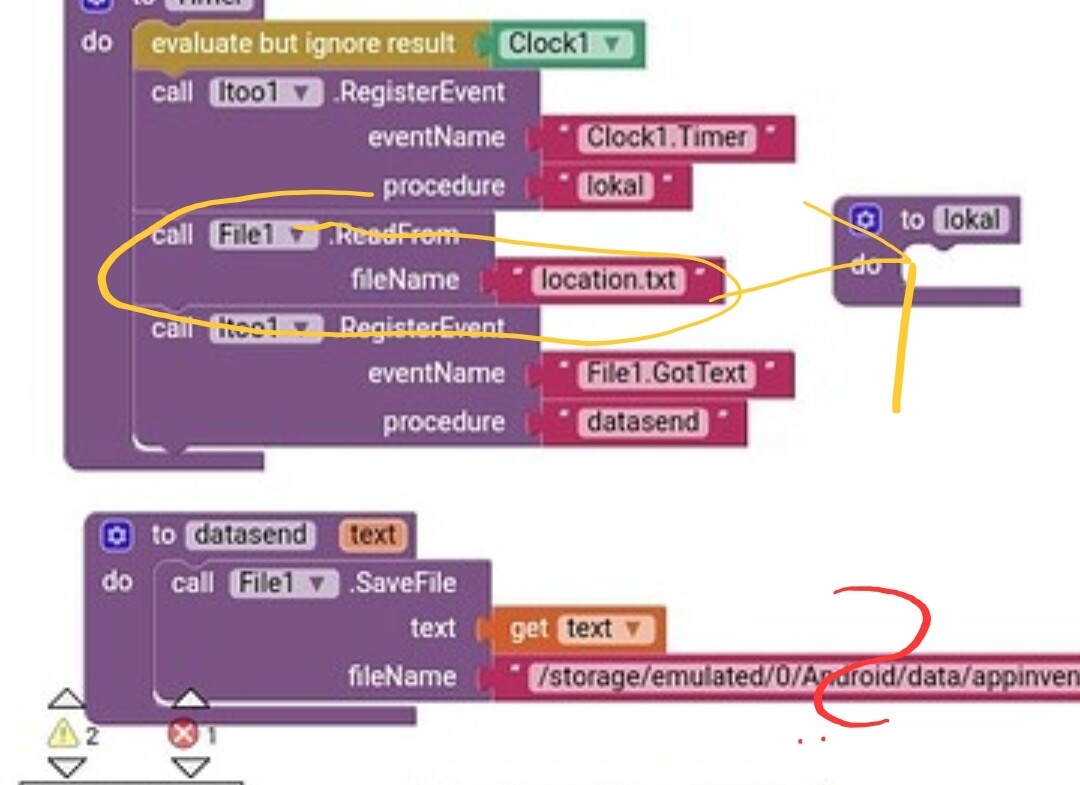
If you want to read the file on each Timer event, then you should read it in your event handler for the Timer event, which is your procedure lokal
Your path of your file method does not make sense... why are you using that path, which points to the companion app? You can test only after building the app anyway
And why did you change the example again? Your original plan was to store something in CloudDB?
Taifun
How often does the file content change?
You might want to elaborate, what exactly you are trying to do
Taifun
The data is streamed nicely thankyou taifun
The path is there because i need to check that the blok is functioning by saving in other places hehehe
you can't write a file to the ASD of another app, in this case the companion app...
try to store it in shared storage, for example /Download/locationj.txt
Taifun
The problem continues ican store the data using save file to dummy
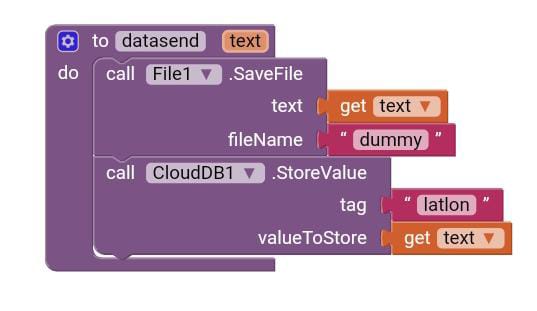
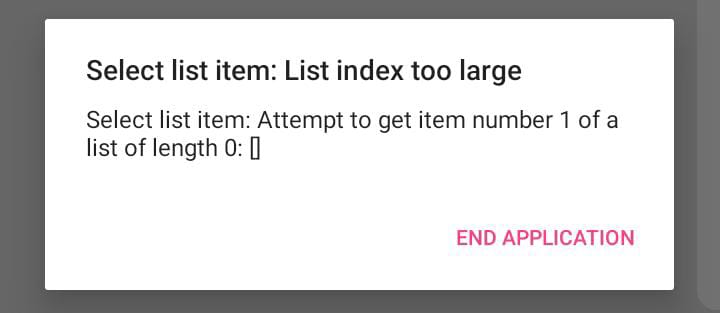
But i got error on clouddb the list is 0
please show your complete blocks of your Itoo setup
Taifun
I did try moving the cloudb into three event handler but it seems the clouddb blok not sending data
Here is the aia file
Bgtest.aia (70.4 KB)
Note: the location.txt content is changing every second
One last question is it possible tosend data via clouddb using itoo kuwaraswamy extension???
If so possible i will continue experiment with this ext
If not i will try another method sending the data.
Thank you
Cloud
If you are asking for help, I recommend you to make it as easy for others to be able to help you ...
You probably will get more feedback then...
which means in your case post a screenshot of your relevant blocks...
To download the aia file, upload it to App Inventor, open it, do some bug hunting for you, etc... this takes time, and most people will not do that...
Thank you.
Yes, but Inever tried it
Taifun
Trying to push the limits! Snippets, Tutorials and Extensions from Pura Vida Apps by  Taifun.
Sorry if my method of asking for help is not clear maybe iam whispering  . Then again thank you for your kindness helping me with the first step.
Still strugling with sending clouddb blok😭
I'm on mobile, so I can't check your aia file
If you want help from me, then provide a screenshot of your relevant blocks
Taifun
help please did everything as iknow of but still the clouddb store value is not functioning but if i replace with file1 savefile block the file is updated correctly
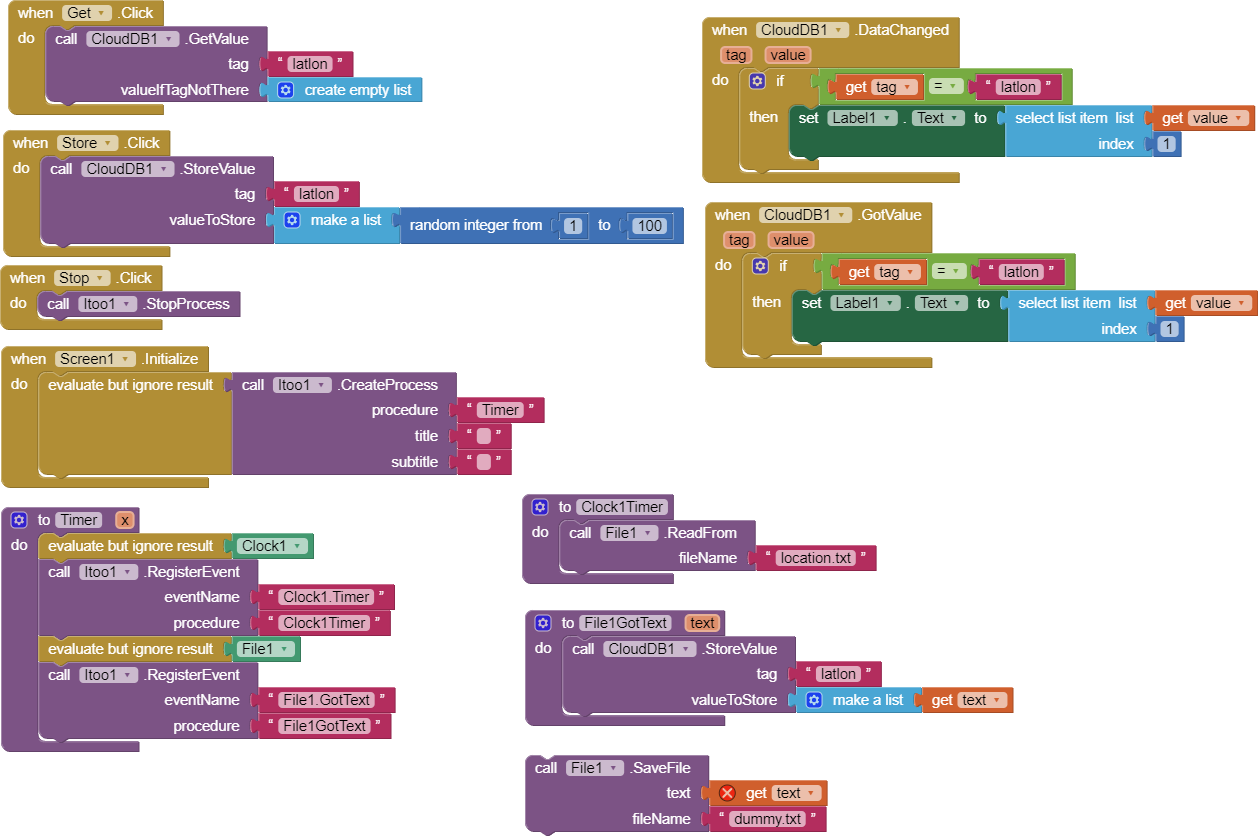
you registered the Clock1.Timer event and the File1.GotText event
and you use CloudDB.StoreValue block, this looks fine
later when you start your app again you theoretically should find some value in the CloudDB
where does that file come from?
I now prepared an example for you
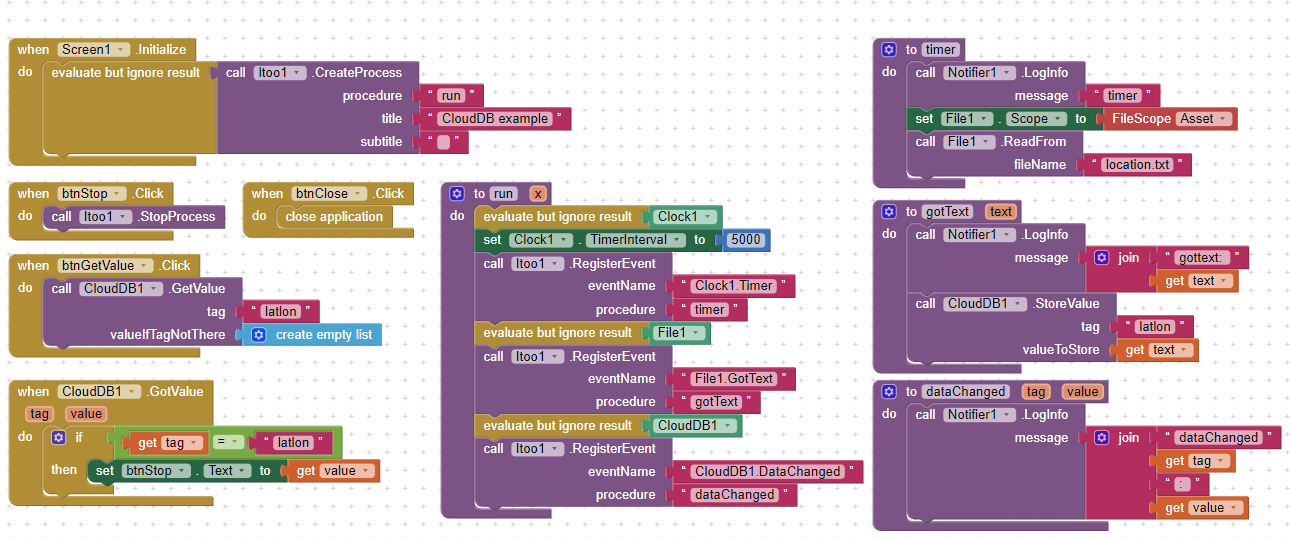
Bgtest1.aia (70.7 KB)
unfortunately storing a value in CloudDB gives an error, see logcat output here
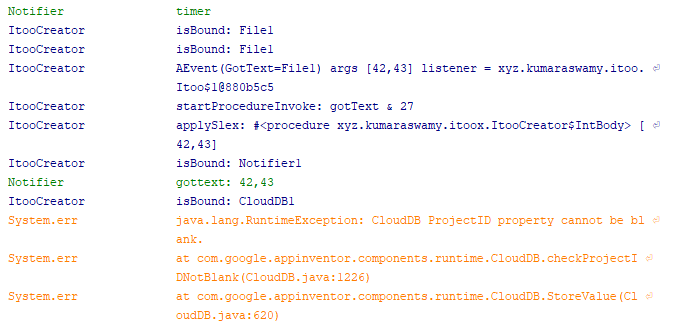
so the CloudDB properties have to be set in the blocks for Itoo to work...
unfortunately this is not possible with the CloudDB component, you only can set it in the designer... so it looks like you currently cannot use it together with Itoo... use another database instead...
Taifun
Thanks for the logs... Taifun...
Components like CloudDB and Firebase require some additional initialization invocations done to be ready for use in the background.
Itoo yet does not manually intervene in this matter at the stage of component creation.
Once I get time, I'll do my research to extend the capabilities... yet locked....
Thank you all kuwaraswamy for this awesome ext
And taifun for enlighten the day
Then waiting for the next stage perhaps:face_with_hand_over_mouth:
where does that file come from?
I store the data using another app with capabilty background cuz mit location sensor cant do live data stream in background
You probably have missed my locationservice extension
I'm currently working on implementing itoo functionality...
Taifun
Can i have a test of your extension. just to make sure your ext can send live to clouddb in my phone, Before buying full version
No you can't... the sane restrictions also apply for my extension...
In case ther iis a method, which uses the web component to connect to CloudDB, then it would be possible...
Taifun
In the meantime i think i can do store property in list method and fetch the data when app is alive that is possible right.
Or broadcast block.
Its not live data.
I need help tracking down a timing/out-of-sync problem that I have illustrated via the attached simplified case [please ignore certain text that would apply to the app that it was derived from  ]
]
Here is the aia and blocks (sorry blocks are so small, I used blocks editor save as image option):
DataMinder_ButtonCase.aia (903.1 KB)
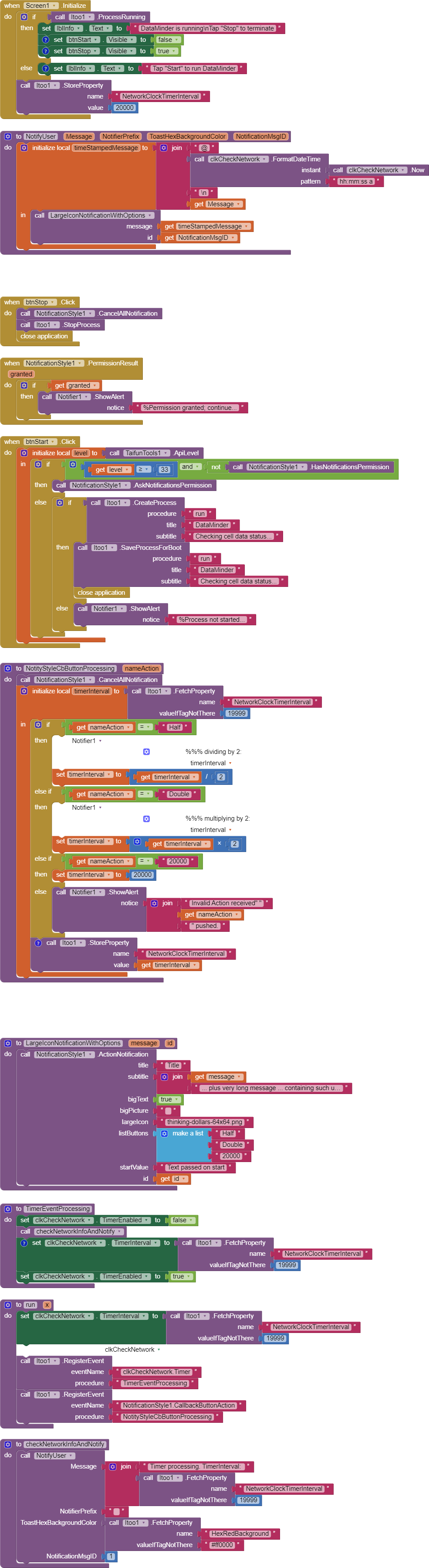
The troublesome behavior centers around the NotificationStyle1.ActionNotification with 3 user response buttons and the button response event NotificationStyle1.CallbackButtonAction, which is registered (from 'run') with itoo.RegisterEvent and procedure NotifyStyleCbButtonProcessing.
Initially the Clock.Timer event TimerInterval is 20 sec (20000). When the app starts and "Start" is touched, about 20 secs later the Timer event processing issues the following notification showing the time issued and the value of the TimerInterval (ignore the text that follows):
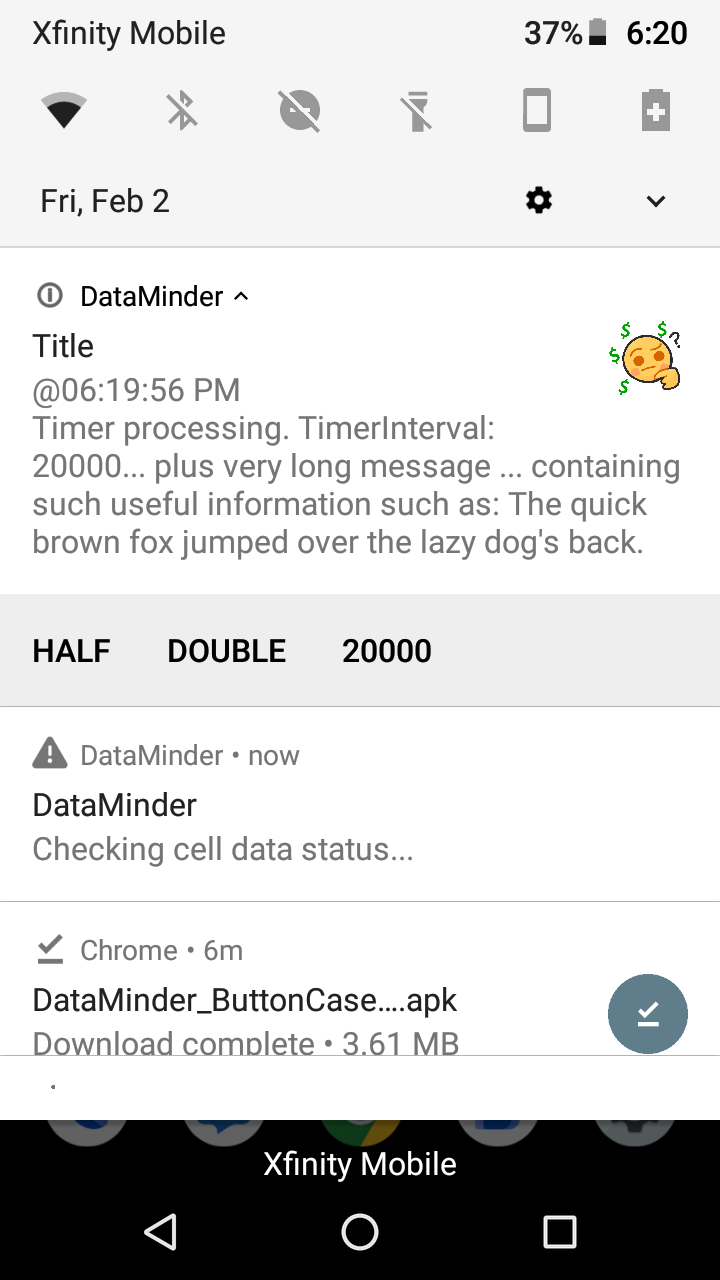
The user is presented with a choice:
- "Half" - Halving the TimerInterval
- "Double" - Doubling the TimerInterval or
- "20000" - Setting the TimerInterval to 20000.
If "Half" is selected two or three times (reducing the interval to 5000 or 2500), and then "Double" is selected the same number of times, the TimerInterval does not return to 20000.
Evidently I have done something(s) that does not assure synchronous behavior.
This is mitigated (perhaps solved?) by the introduction of Notifier1.loginfo messages which are "disabled" in the blocks.
What have I done? not done?
Kind regards,
Randal