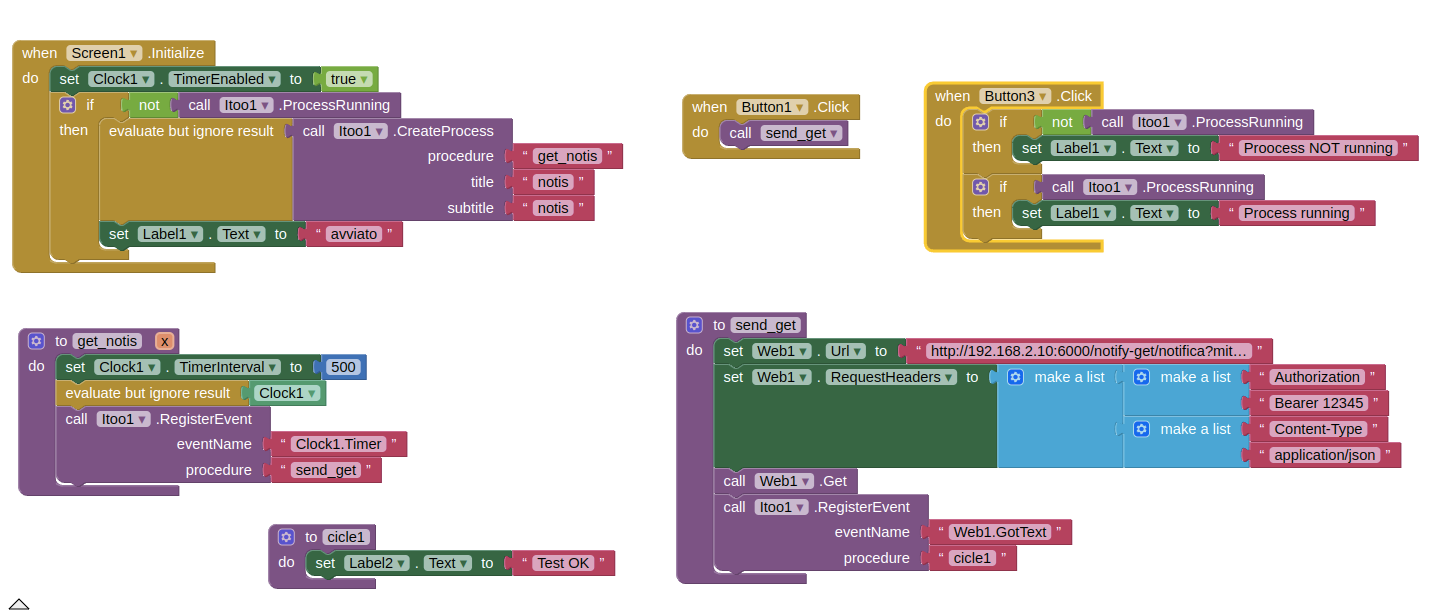
the event name to register is Clock1.Timer
and it should be registered inside the get_notis procedure and not inside the Clock1.Timer event
also you forgot to
Taifun
the event name to register is Clock1.Timer
and it should be registered inside the get_notis procedure and not inside the Clock1.Timer event
also you forgot to
Taifun
Just do one single change to the blocks above. Just change the value for the socket eventName and set it to Timer and you are all done.
Sorry but I don't understand.
It still does not work.
I've done various tests but it doesn't work at all.
Doesn't create the process (I think the "CreateProcess" block doesn't work)
If I check with "Button3" I always get not running.
If I call "Button1" it sends the request to the server but does not start the "cicle1" procedure
your procedure get_notis it here to register all events, also the Web1.GotText event
and your procedure cicle1 (why such a strange name, anyway...) should have the same arguments as the Web1.GotText event
and: in the background there is no user interface, there is no label etc... if you want to see something, use logcat or the notification style extension, see several examples here in this thread
Taifun
You cannot use UI components in the background, that means you cannot use Label2 component. Use the notification style modified extension to show a notification when the Web 1 Got text.
Also you need to change the signature of the circle1 block, add the required parameters. Same as the Web1.GotText
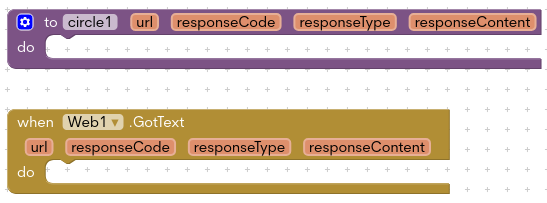
thanks for the explanation about cicle1 signature and background component. I'll fix it later
Now, the problem is before
If the process executes call Web1.Get I see it from the server logs, but the process does not execute the Web1.Get call.
What am I doing wrong ?
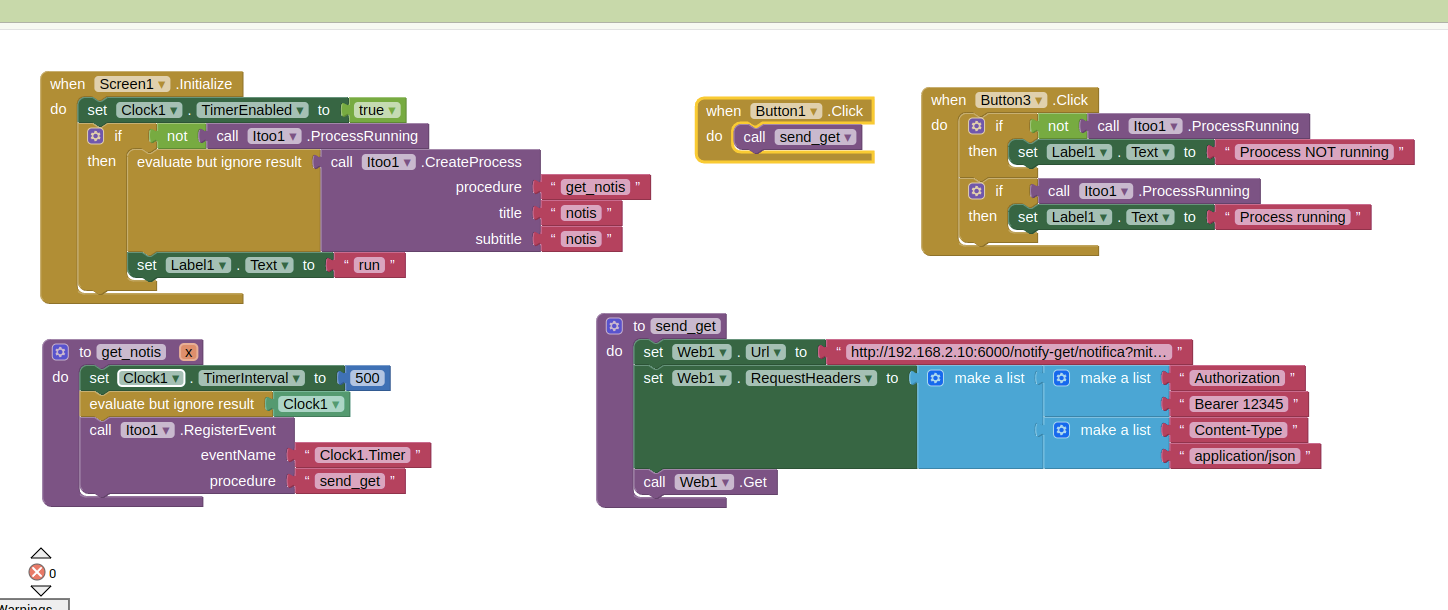
It is correct that the get_notis procedure has the input "X" (signature)?
The initialize block is correct?
The get_notis procedure is correct?
I attach the screen with only the blocks I need to check if the process send the request to the server
P.s: the name cicle1 is the first that came to mind 
Yes
The block looks fine to me, what is the issue you are facing? Tell me in a sentence.
the background process is not working
When open AI Companion for test in my huawei p30 not run any process in background and in the backend server not show any request.
You have to build the app to test it
Why are you using a timer interval of 500? Try 30000 as previously
Also add a Notifier.LogInfo block and check logcat
LogInfo(message)
Writes an information message to the Android log.
Taifun
Thanks, it works.
I build the app and magically it works.
Therefore, with the test from AI Companion it does not start the process.
Is there a way to test the process without building the app?
Thanks everyone and sorry for the waste of time
It is completely fine.
Itoo does not currently support running without building.
My friend, I am trying to donate to you using Paypal but I am getting an error. Could you send your email directly in my dm?
MANY THANKS!!!! This really motivates me to continue the project!
I'll send you the link in DM.
To clarify, in your example "Notification Every Second", could the "evaluate and discard result" be replaced by some other reference to the Clock component such as:
Second question: Is such a preparatory call required only before an "itoo.RegisterEvent" which makes reference to the component? Or are there other itoo calls that require a preparatory component reference/call?
Thanks,
Randal
@Kumaraswamy , Hi, I am planning to create an app that gives continous alarm sound until the user stops it. This alarm sound will be heard as a Notification to the new email that says 'New order Recieved from a Customer'.
You cannot use UI Components in the background.
You only need preparatory for before Itoo.RegisterEvent. If you have used any other block from that component, preparatory call isnt required.
It's because the component is only created when it's touched or accessed.
Nice idea
Opps! bad example...
... but thanks for answering the question I was trying to ask
...and a question that I did not ask, but I was wondering about.
Looking forward to learning about and using itoo.
Kind regards,
Randal
Hello,
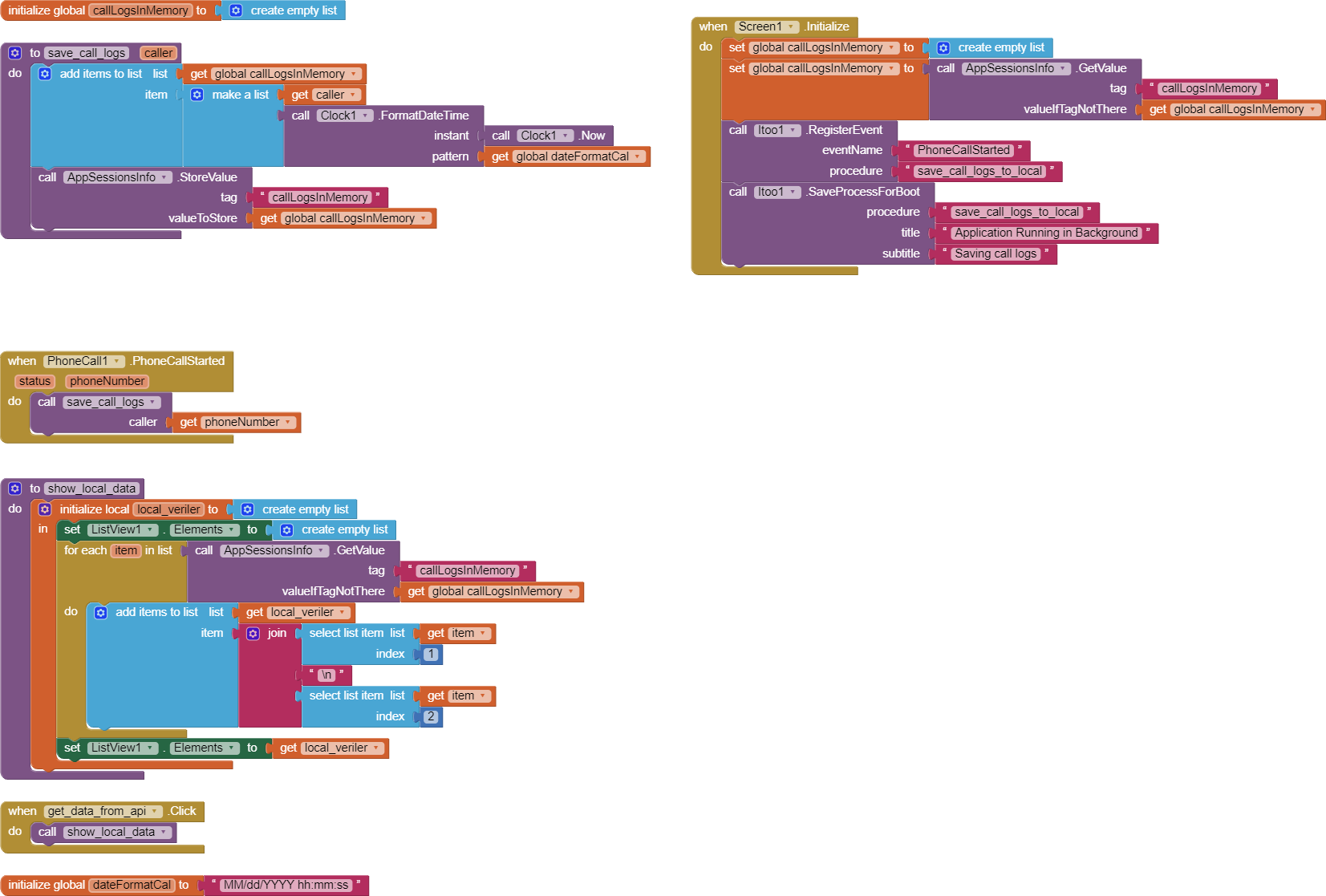
I am an App Inventor user, and I want to record incoming calls in my application. However, I need to ensure that this process continues even when the application is closed. Therefore, I am considering creating a background service.
My Challenges:
Seeking a Solution:
I need assistance on how to approach this with App Inventor. So far, here are the steps I've taken:
However, it seems that the background process is not running when I close the application.
Points Where I Need Help:
Additional Information:
You can also use the images I provided to overcome this issue.
Thank you.
you forgot to create the PhoneCall component in the background before registering the event
also your procedure is save_call_logs and not save_call_logs_to_local
and f you want to store something in the background, let me suggest you to use the FetchProperty/StoreProperty blocks rather than a global variable/TinyDB
Taifun