@Kumaraswamy Can I create a process, using a Clock1.Timer trigger, to perform an API call and, based on the returned json, decide whether or not to display a notification?
1 Like
Yes, this sounds doable
Read the entire thread, try the examples, play around with the extension.. then put together some blocks for your task... and if you got stuck, post a screenshot of your relevant blocks
Taifun
3 Likes
Seems, it read the data only once when process created. After that, even with clock event it shows the same. Data is changed, but output - no...
This is probably caused because of Synchronization issues.
Since the Taifun Location Service writes data to the normal storage, this isnt regularly updated while retrieving it in the background.
Please, explain, how to kill the background process. I used the StopProcess method to stop. Notification of the process disappeared, but another notification, generated by Notification style extension continue to appear 1 per second (by Clock event). It continues some minutes after process stop. As I understand, it's a task, which can be killed by StopTask method. But how to define it's id?
I've solved this issue with another extension by @Juan_Antonio, KIO4_terminal.aix. It reads properly. I will edit my previous post about reading TinyDB.
1 Like
Could you please show me your blocks again?
It's about StopTask?
No, show me all of your blocks related to background service and reading.
It's ok now after I'm using KIO4_Terminal.aix. I will prepare my solution. Please, give me information about stopping the process
1 Like
Normally, the StopProcess block will stop the service and destroys the registered events, and components, does this not work for you?
It stops after some minutes, as I've described.
Do you mean it takes few minutes for it to stop?
I'll wait for you to post your blocks, so that I can take a look into it.


Can you please use the StopTask block instead in the place you are calling StopProcess?
StopProcess can only be used within the background service.
Hm. The process started after an app goes into background. After the activity of the app changed to the "stop". Or, maybe I don't understand properly how an app goes into background? The goal of my app - working during approximately 40 minutes - 1 hour, and phone might be used in another apps. Should I start task or process in this case?
Start process is the best thing in your case, a foreground service is more reliable than normal services that could be limited by various reasons.
Interesting... Seems, Itoo extension does not work with boolean compairing blocks like this:
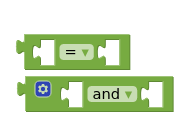
In my app task doesn't start with these blocks. Compairing of numbers and text works well.
Hi!
I was releasing an app that is a wifi ring bell, and I am finding the next problem:
I need to check Firebase constantly to know when someone has pressed the ring button, this is why I need the app to continue working in background and foreground.
In order to achieve this I have been reading about many background services and I decided to try ItoO. I need to keep checking the database to identify when the call flag is up, for this reason, I am using the DataChanged event from the Firebase extension, but I need to be able to include it in a function from ItoO. This is not possible as the when block does not allow this. That is why I was going to ask if someone has figured a workaround for this issue.

So far the app works while open, but once I close it (after several minutes) it stops working.
Thanks in advance!
Try to register an event with eventName "FirebaseDB.DataChanged", procedure name left without changes, but in the procedure "Check" define inputs "tag" and "value". And do the same as in the native FirebaseDB event. But, as I understand, it will fire only once. And don't forget to put the block "evaluate but ignore result" with Firebase component before registering event
2 Likes
Right, but it is recommended to use the Firebase Database REST API alternatively to the firebase component for background services.
You can achieve the same functionality through the API.
1 Like