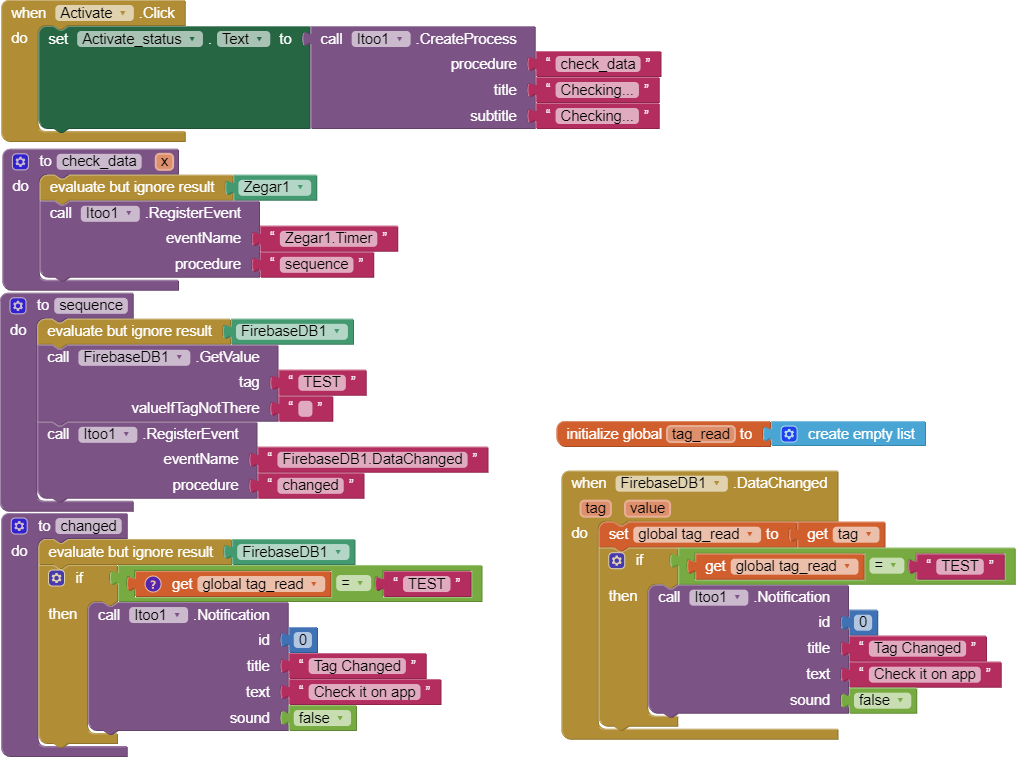
But i do not see notification id0, as if eventName "FirebaseDB1.DataChanged" never do procedure "changed". If i debug and put notification to the "sequence" they are popup but inside "changed" no
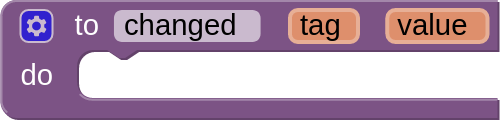
Now i edit code and if i turn on the app all works fine (if i edit tag in database, id0 popup) but if i close app i have only Checking... and no popup id0 when i edit tag in database. (i edit "changed" name because in upper version i have big C on procedure :P)
I use it, but still only if i have open app working, when i close do not have popup. Maybe i wrong write eventName or something still do not go to "changed" procedure
Some of the features have been removed (such as actions) to reduce complexity .
Added Boot Receiver Block
The functionality has been reintroduced.
Internal Changes to fully support changing Foreground notification through Notification Style Component (the new modified version)
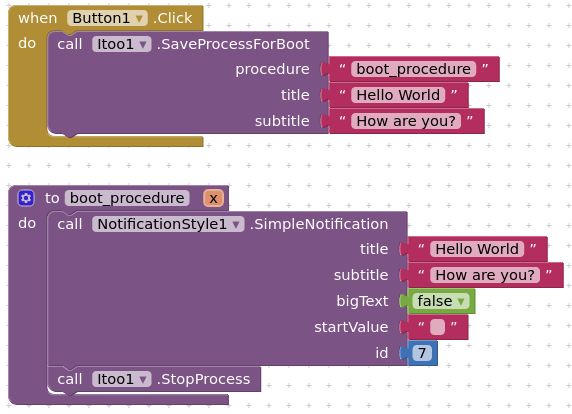
Added methods to store values
They are like Tiny DBs of Itoo, these blocks can be used in the background services, especially for non-foreground services to store and fetch properties. They provide special connectivity between services and and the application realtime.
Yes, if i close app, they do not popup, if i open it, i have popup when i change data. I think if app is open, orange block "when FirebaseDB1.DataChanged" is working but if i close app i need use loop "changed" but they do not turn on.
i am trying to make a chat app. Even if the app is closed, the user will get notification if receive message. actually this app is just for testing if the web component will work in background task. i need it for some thesis project where as i need to use web component even if the app is closed.
How to change Itoo 2 extension notification icon?
There are no opition to change icon on block components, Then how to connect "NotificationsStyle" to Itoo Foreground notification service to use own icon?
Are you by any chance try to replicate the same with web components or an API? Firebase components may be not supported right now.
You have to use the Modified Notification X.
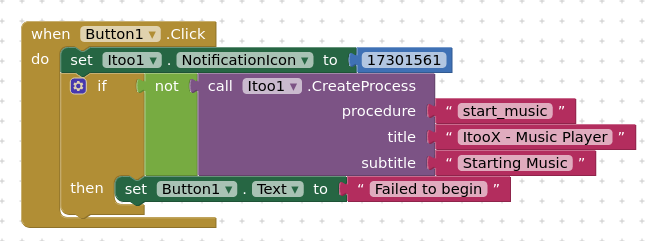
It is actually done this way, you have to get the icon code from Android docs, you have to copy the Constant value number and set it in the extension.
To connect Notification Style, you would have to modify the notification Id's in the notification style extension code, i had just did that for music-notification.
This way Doesn't work on ni0tron! App crash when click button1 to start service, k0dular working fine no crash... Please help me
I need this Create Presses bcz Configured Foreground work only few time not permanently on foreground...
Hi, I am trying to use your extensions to run a background task, that can listen to data/events from BLE device and play an audion. The BLE events are not read if app is sent to background and I want to handle it through background process. Can you share an example to perform the same? @Kumaraswamy
I tried like this. Is it because the background app doesn't have the context of BLE component and can't execute events unless I explicitly register?
Yes, you would have to create a foreground task instead of a normal one, and also add a little 'x' argument for the procedure, then you shall try again.
@Kumaraswamy You rock! - This is fantastic extension. After multiple trials I am able to figure out and my app seamlessly works. Thanks again for your contribution to this community. I am definitely going to donate for your cause. Can you share which are the correct links so that funds reach to you?