Here is the code, its quite long, sorry about that
#include <Wire.h>
#include <BLEDevice.h>
#include <BLEServer.h>
#include <BLEUtils.h>
#include <BLE2902.h>
#include <esp_adc_cal.h>

#define MXC_ADDR 0x15
#define I2C_SDA 6
#define I2C_SCL 5
#define REG_OUT_X_MSB 0x03
#define REG_OUT_X_LSB 0x04
#define REG_OUT_Y_MSB 0x05
#define REG_OUT_Y_LSB 0x06
#define REG_OUT_Z_MSB 0x07
#define REG_OUT_Z_LSB 0x08
#define REG_CTRL1 0x1B
#define SENSITIVITY 1024.0
#define N_SAMPLES 20
#define calibrationSamplingTime 3000 //milliseconds
#define timeBetweenLearningSamples 100
#define iterationsLearning 500

//BLE server name
#define bleServerName "Translating_Glove_v1"
// Default UUID for Environmental Sensing Service
// https://www.bluetooth.com/specifications/assigned-numbers/
#define SERVICE_UUID "177a85bc-c232-49bd-8aea-4a67348b6cea"

using namespace std;

// Temperature Characteristic and Descriptor (default UUID)
// Check the default UUIDs here: https://www.bluetooth.com/specifications/assigned-numbers/
BLECharacteristic dataCharacteristic("ffbbe6f9-922c-42ba-a06f-b97df12efd72", BLECharacteristic::PROPERTY_INDICATE);
BLEDescriptor dataDescriptor(BLEUUID((uint16_t)0x2902));

bool deviceConnected = false;
float calibratedStartX;
float calibratedStartY;
float calibratedStartZ;
int orientationX=1;
int orientationY=1;
int orientationZ=1;
String semn;
String answer;
float x0=0,x1=0,x2=0,x3=0,x4=0,xx=0,xy=0,xz=0;
float P0=1,P1=1,P2=1,P3=1,P4=1,Px=1,Py=1,Pz=1;
float Q0=0.1,Q1=0.1,Q2=0.1,Q3=0.1,Q4=0.1,Qx=0.1,Qy=0.1,Qz=0.1;
float R0=1,R1=1,R2=1,R3=1,R4=1,Rx=1,Ry=1,Rz=1;
float K0,K1,K2,K3,K4,Kx,Ky,Kz;

float kalman0(float measurement) {
// Prediction update
P0 = P0 + Q0;

// Measurement update
K0 = P0 / (P0 + R0);
x0 = x0 + K0 \* (measurement - x0);
P0 = (1 - K0) \* P0;

return x0;
}
float kalman1(float measurement) {
// Prediction update
P1 = P1 + Q1;

// Measurement update
K1 = P1 / (P1 + R1);
x1 = x1 + K1 \* (measurement - x1);
P1 = (1 - K1) \* P1;

return x1;
}
float kalman2(float measurement) {
// Prediction update
P2 = P2 + Q2;

// Measurement update
K2 = P2 / (P2 + R2);
x2 = x2 + K2 \* (measurement - x2);
P2 = (1 - K2) \* P2;

return x2;
}
float kalman3(float measurement) {
// Prediction update
P3 = P3 + Q3;

// Measurement update
K3 = P3 / (P3 + R3);
x3 = x3 + K3 \* (measurement - x3);
P3 = (1 - K3) \* P3;

return x3;
}
float kalman4(float measurement) {
// Prediction update
P4 = P4 + Q4;

// Measurement update
K4 = P4 / (P4 + R4);
x4 = x4 + K4 \* (measurement - x4);
P4 = (1 - K4) \* P4;

return x4;
}
float kalmanX(float measurement) {
// Prediction update
Px = Px + Qx;

// Measurement update
Kx = Px / (Px + Rx);
xx = xx + Kx \* (measurement - xx);
Px = (1 - Kx) \* Px;

return xx;
}
float kalmanY(float measurement) {
// Prediction update
Py = Py + Qy;

// Measurement update
Ky = Py / (Py + Ry);
xy = xy + Ky \* (measurement - xy);
Py = (1 - Ky) \* Py;

return xy;
}
float kalmanZ(float measurement) {
// Prediction update
Pz = Pz + Qz;

// Measurement update
Kz = Pz / (Pz + Rz);
xz = xz + Kz \* (measurement - xz);
Pz = (1 - Kz) \* Pz;

return xz;
}
//Setup callbacks onConnect and onDisconnect
class MyServerCallbacks: public BLEServerCallbacks {
void onConnect(BLEServer\* pServer) {
deviceConnected = true;
Serial.println("Device Connected");
};
void onDisconnect(BLEServer\* pServer) {
deviceConnected = false;
Serial.println("Device Disconnected");
}
};

int16_t readAxis(uint8_t regMSB, uint8_t regLSB) {
Wire.beginTransmission(MXC_ADDR);
Wire.write(regMSB);
Wire.endTransmission(false);  // restart for read

Wire.requestFrom(MXC_ADDR, 2);
if (Wire.available() < 2) return 0;

uint8_t msb = Wire.read();
uint8_t lsb = Wire.read();

int16_t raw = (msb << 8) | lsb;
raw >>= 4;               // right-align 12-bit
if (raw & 0x800) raw |= 0xF000;  // sign-extend

return raw;
}

float toResistance(int reading){
float VCC=3.3;
float R_DIV=100000;
int flexADC = reading;
float flexV = flexADC \* VCC / 4095.0;
float flexR = R_DIV \* (VCC / flexV - 1);
return flexR;
}

void setup() {

Serial.begin(921600);

BLEDevice::init(bleServerName);
BLEServer \*pServer = BLEDevice::createServer();
pServer->setCallbacks(new MyServerCallbacks());
BLEService \*gloveService = pServer->createService(SERVICE_UUID);
BLEDevice::setMTU(100);
gloveService->addCharacteristic(&dataCharacteristic);
dataCharacteristic.addDescriptor(&dataDescriptor);

gloveService->start();

pServer->getAdvertising()->start();

while(!deviceConnected){}

delay(1000);

Wire.begin(I2C_SDA, I2C_SCL);

Serial.println("Starting calibration");
Serial.println("Put you hand on the table and sit still for three seconds");
long long sumx;
long long sumy;
long long sumz;
Serial.println("Calibrating in three");
delay(1000);
Serial.println("Calibrating in two ");
delay(1000);
Serial.println("Calibrating in one");
delay(1000);
Serial.println("Calibrating...");
int secondsLeft=1;

for(int i=2;i<calibrationSamplingTime+2;i++){
calibratedStartX=(calibratedStartX\*(i-1)+readAxis(REG_OUT_X_MSB, REG_OUT_X_LSB))/i;
calibratedStartY=(calibratedStartY\*(i-1)+readAxis(REG_OUT_Y_MSB, REG_OUT_Y_LSB))/i;
calibratedStartZ=(calibratedStartZ\*(i-1)+readAxis(REG_OUT_Z_MSB, REG_OUT_Z_LSB))/i;
if(i%1000==0){
Serial.print(secondsLeft);
Serial.println(" seconds left");
secondsLeft-=1;
}
delay(1);
}
}

void loop() {
String ax = String(kalmanX(readAxis(REG_OUT_X_MSB, REG_OUT_X_LSB)-calibratedStartX));
String ay = String(kalmanY(readAxis(REG_OUT_Y_MSB, REG_OUT_Y_LSB)-calibratedStartY));
String az = String(kalmanZ(readAxis(REG_OUT_Z_MSB, REG_OUT_Z_LSB)-calibratedStartZ));
String degetAratator= String(kalman0(toResistance(analogReadMilliVolts(0))));
String degetMijlociu= String(kalman1(toResistance(analogReadMilliVolts(1))));
String degetInelar= String(kalman2(toResistance(analogReadMilliVolts(2))));
String degetMic= String(kalman3(toResistance(analogReadMilliVolts(3))));
String degetMare= String(kalman4(toResistance(analogReadMilliVolts(4))));
String data="{"values": \["+ ax+","+ay+","+az+","+degetAratator+","+degetMijlociu+","+degetInelar+","+degetMic+","+degetMare+"\]}#";
//String data="T#";
Serial.print(data);
Serial.println();


  dataCharacteristic.setValue(data);
  dataCharacteristic.indicate();

  delay(timeBetweenLearningSamples);


}
I have tried that and it didn't work, it was the same behaviour


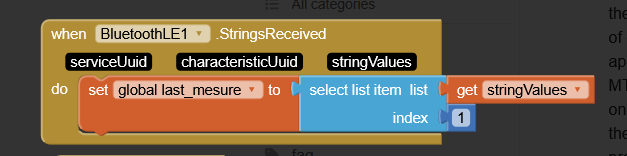
 ).
).