No Documentation on exactly which HTML tags are accepted in a LABEL

APP INVENTOR needs to explicitly list the HTML it can understand. PLEASE !

Amongst the HTML useable by a LABEL :–
^font color="#FF0000^ and ^br^ works at least (Using br to replace a comma in csv text)

But we simply MUST be able to change the font size – surely? ( other than BIG and SMALL )
And be able to indent. and the font itself.

It appears to not understand ^table^ and its associated html – amongst MANY other html tags.

(Had to replace all “grtr than” and “less than” with ^)

One of the Notifier blocks has some documentation on the little bit of html the Label can understand.

Why not use the webViewer with inline html?

2 Likes

Why not start a topic that lists all the html tags that work in AI2 ?

It would be nice to see an HTML supported list in the Help.

Let’s not forget that the WebView component can do a lot more…

Feel free.

Thanks
but to exhibit html from the AP into a WebViewer I
" have to upload the library jquery-1.8.0.min.js into the assets of your project" and
do a "appendTo("body");" in the js
App Inventor Code Snippets | Pura Vida Apps :frowning:

only for that particular example that requires the jquery library. Most plain javascript is handled by the webviewer natively, and only plain javascript is needed to run the webviewstring, as shown in the first example.

The webviewer remains blank !

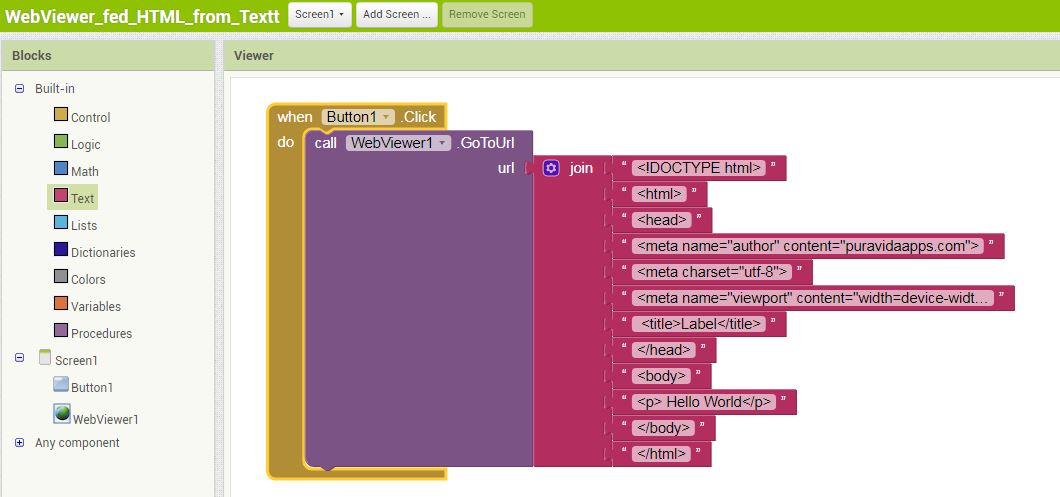
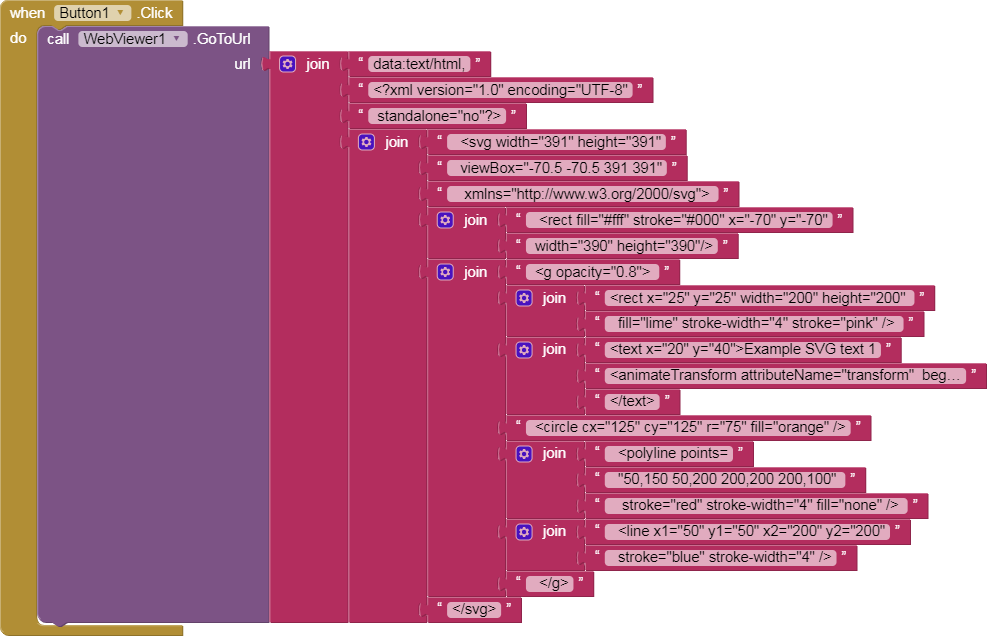
Of course its looking for a URL not html . Need to put contents of WebViewString in an exisitng, empty WebPage's BODY.

WebViewer_fed_HTML_from_Textt.aia (2.0 KB)

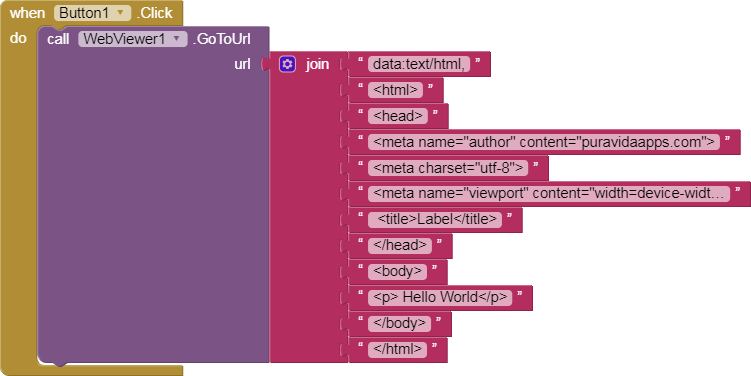
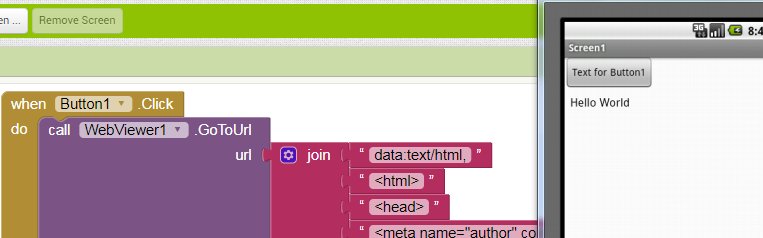
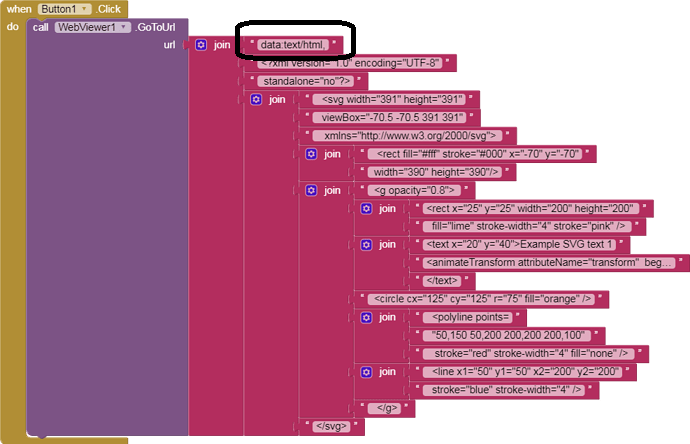
The trick is in the first piece of text in that JOIN.
(I got this from one of @TimAI2's samples)

WebViewer_fed_HTML_from_Textt (1).aia (2.0 KB)
The first (unmarked) button1 . Click png is draggable into your Blocks Editor.

Thanks – I thot I had tried that but not only did I not see the comma – I thot the colon was a period in data:text/html,

From Mariner 1 - Wikipedia
In other accounts, the bug consisted of:

  • a period typed in place of a comma, causing a FORTRAN DO loop statement to be misinterpreted (although there is no evidence that FORTRAN was used in the mission), of the form "DO 5 K=1. 3" interpreted as assignment "DO5K = 1.3".[15] There are anecdotal reports that there was, in fact, such a bug in a NASA orbit computation program at about this time, but it was a program for Project Mercury, not Mariner, and the claim was that the bug was noticed and fixed before any serious consequences resulted.[16]
  • a missing comma [17]
  • an extraneous semicolon [18]

Hi everyone!

It's been a while, but I was looking for an extension for a friend of mine and I ended up here.

To make my contribution, here (if I haven't missed anything :grin:) is the complete list extracted directly from Html.Java

Block-level / structural tags

Tag Effect
<p> Paragraph, with configurable margin and support for text-align via inline CSS
<div> Generic block, with configurable margin
<blockquote> Quote (rendered as a QuoteSpan)
<ul> List container, with configurable margin
<li> List item (rendered as a BulletSpan)
<br> Simple line break
<h1>–<h6> Headings, with scaled relative size (HEADING_SIZES) and automatic bold

Inline character-style tags

Tag Effect
<b>, <strong> Bold text
<i>, <em>, ``, <dfn> Italic text
<big> Text enlarged to 1.25x
<small> Text shrunk to 0.8x
<tt> Monospace font
<u> Underlined text
<del>, <s>, <strike> Strikethrough text
<sup> Superscript
<sub> Subscript

Tags with attributes / special content

Tag Notes
<font color="..." face="..."> Text color and font family
<a href="..."> Clickable link (requires LinkMovementMethod to actually be tappable)
<img src="..."> Image, uses the provided ImageGetter if available, otherwise falls back to a system placeholder image
<span style="..."> Interprets limited inline CSS: color, background-color, text-decoration: line-through

Character entities

  • Common symbols: &amp; &lt; &gt; &quot; &nbsp; &copy; &reg; &trade;
  • Typographic marks: &mdash; &ndash; &ldquo; &rdquo; &lsquo; &rsquo;
  • Fractions: &frac12; &frac14; &frac34;
  • Currency: &euro; &pound; &yen; &cent;
  • Accented/Latin-1 letters: &egrave; &agrave; &ugrave; &ccedil; &ntilde; &uuml;, etc.
  • Math symbols: &deg; &plusmn; &times; &divide; &infin; &sum; &radic;
  • Greek letters: &alpha; &beta; &pi; &Omega;, etc.
  • Numeric references: &#8364; (decimal) or &#x20AC; (hex), work for any Unicode character, including surrogate pairs for characters above U+FFFF (emoji, etc.)

  • The label component, if HTMLFormat is true, uses TextViewUtil.setTextHTML
    Source: Label.java
public void Text(String text) {
    if (htmlFormat) {
      TextViewUtil.setTextHTML(view, text);
    } else {
      TextViewUtil.setText(view, text);
    }
    htmlContent = text;
  }

public static void setTextHTML(TextView textview, String text) {
    textview.setText(Html.fromHtml(text));
    textview.requestLayout();
  }

  • Which uses import android.text.Html (Html.java)
    The latter processes the string by applying only the tags mentioned above, while the remaining ones are ignored.
1 Like