In this program, the new week starts on Monday. How can I change this so the new week starts on
Sunday?
In this program, the new week starts on Monday. How can I change this so the new week starts on
Sunday?
If you are on android check the “first day of week” setting
P.S
On my android 10 I can change it only changing language ( english us or english uk )
The ww format is documented at
but I don't see any mention there of starting at Monday.
This needs a bit of experimentation.
Be sure your phone is set to the proper time zone, just to be sure.
You can see the setting in a Do It of Clock1.Now:
firstDayOfWeek=1
Unfortunately, the Blocks Editor refuses to recognize the Clock1.Now block as suitable input to any text operation.
Detecting this at run time might require analyzing the various date format returns.
Here

The u format does not help me for retrieving the start of week policy of the phone.
It is just for retrieving the day of week number for a specific date, like "Today is a Monday (1) here in the USA".
The range (1-7 = Mon-Sun) is hard coded into the definition of the format code, and does not reflect the phone's policy setting of
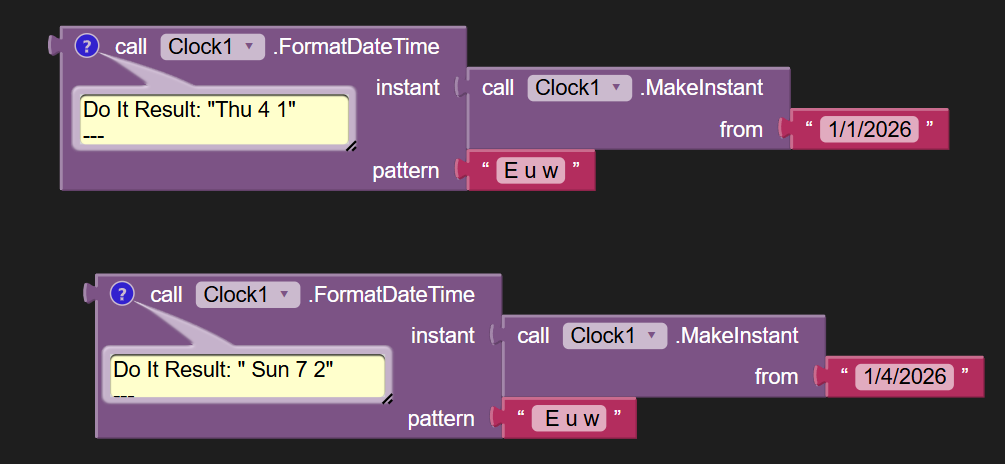
Examining the beginning of the year can help here, to spot where the week number changes:
This probe tells me my emulator changed its week number on or before Sunday Jan 4 2026.
Extrapolating from that requires a little math, which I am not up to at the moment.
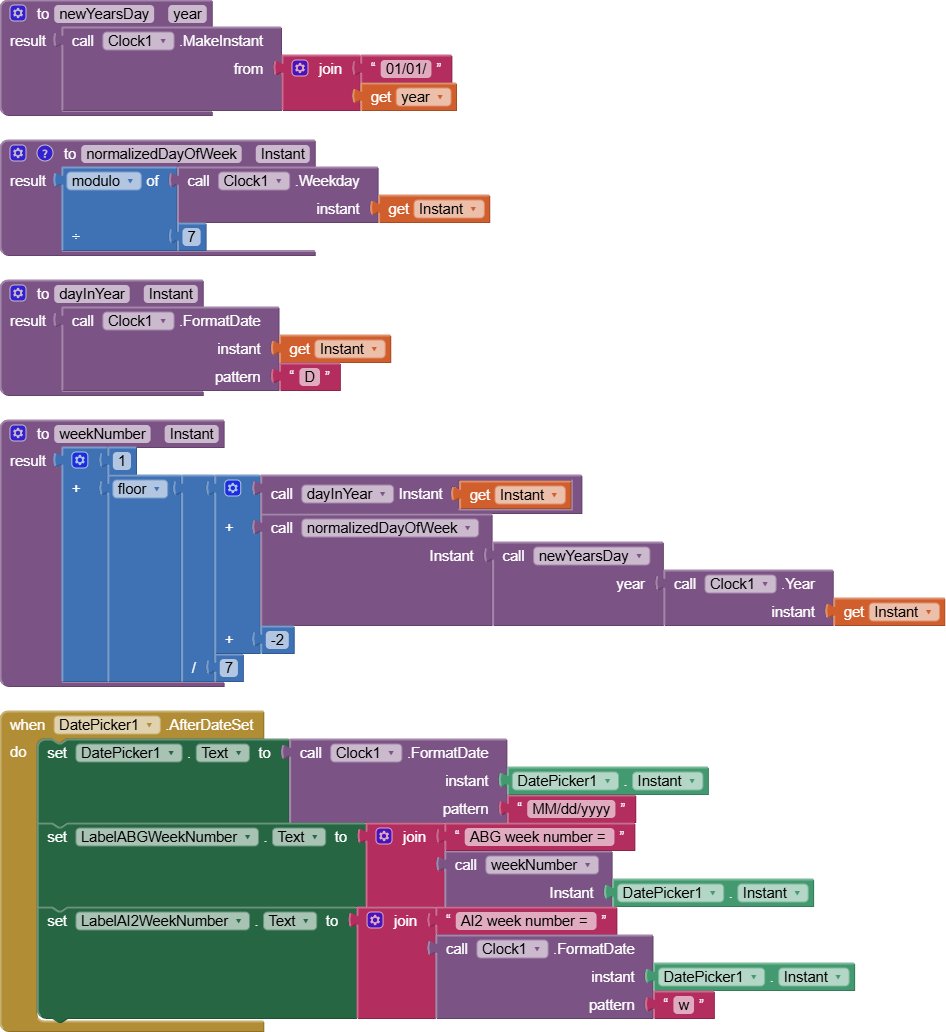
I got my version of a week number almost working, with some finagling.
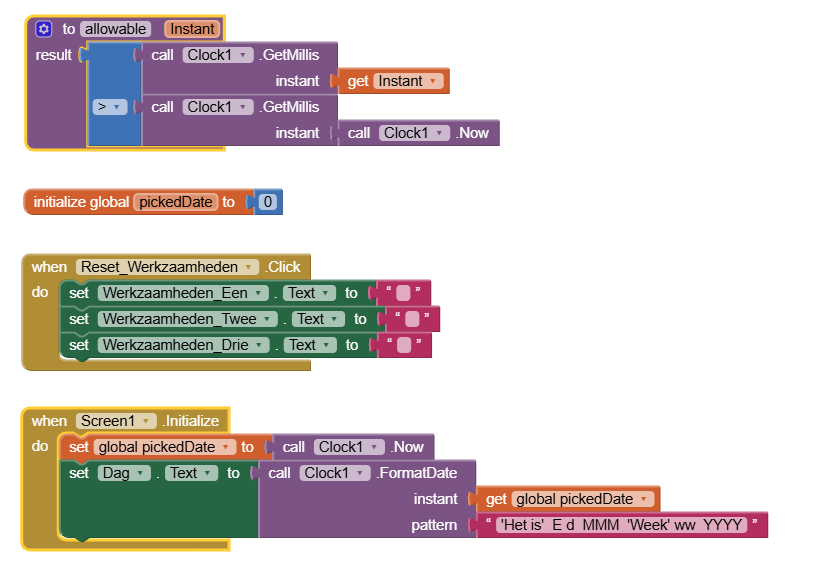
Here is a test bed you can use to verify the week numbers:
The Date Pickr lets you extract the week number using both my code and the Clock1.FormatDate code ('w'), for comparison.
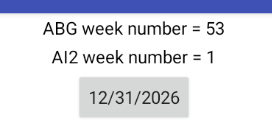
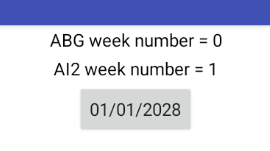
In the course of my testing, I discovered what looks like a bug in the AI2 'w' format handling.
The 'w' format code for the upcoming New Years Eve is 1, while my code says it should be 53.
(Afterthought, on further testing:)
My -2 fudge factor is wrong. I need to rethink how I am calculating the week number.
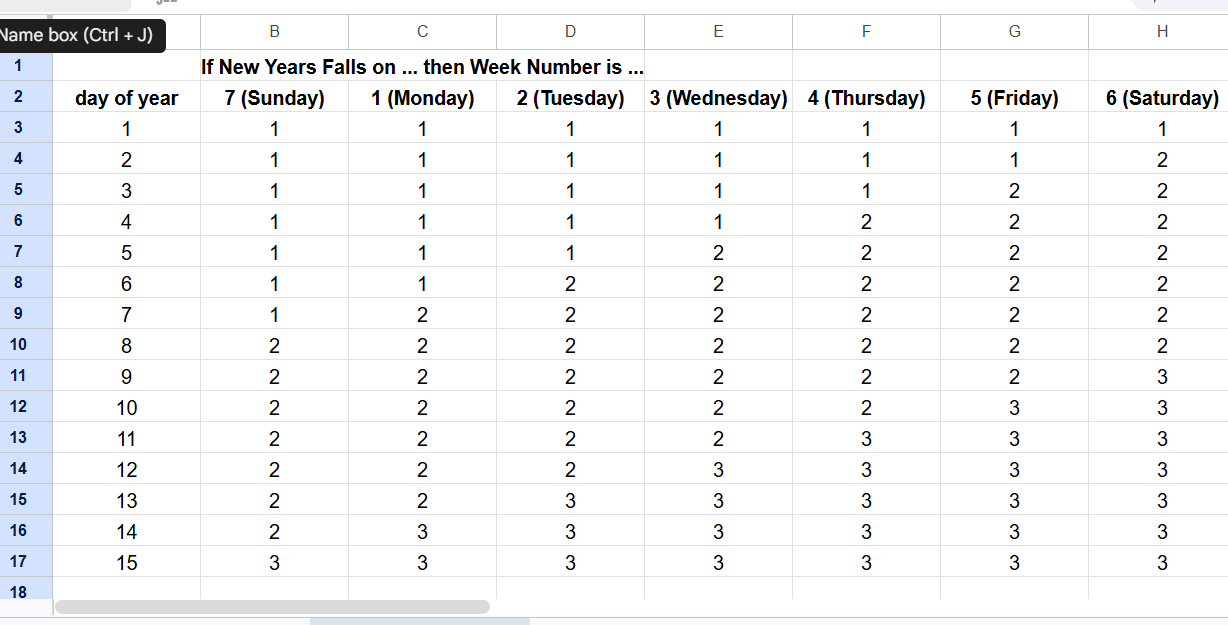
The answer lies in this chart ...
It maps week number against the combination of day number (1-365) and New Years' day of the week (0-6 if normalized.)
The boundary between week numbers runs diagonally.
Good evening, thanks for this program, exactly what I was looking for.
But it's wrong.
I need to sleep on this problem to get the formula right.
Alright. I'll wait calmly.
Okay, I am back in the fray.
I searched the web for algorithmic help, and after dodging results that relied on built-in functions in Excel, I found an informative thread in Stack Overflow:
Surprisingly, there is a 4 day rule in the ISO standard.
Before diving into this rabbit hole, I must ask you, as the Original Poster, if you are offering code to other people who might come back to you asking for ISO 8601 compliance?
The discussion referenced above to ISO 8601 week numbers relies on a Monday week number transition, instead of the Sunday transition you wanted. There is also the issue of splitting weeks between years depending on the number of days claimed by each neighboring year.
Here is an excerpt from that post, with their original code.
It would need tweaks for Sunday transitions.
Both the summary and the formal definition are intuitively clear, but it
is not obvious how to translate it into an algorithm.  However, we can
deal with the problem by exhaustively enumerating the seven options for
the day of the week on which 1st January falls (with actual year values
for concreteness):

    1st January 2001 is Monday    => Week 1 starts on 2001-01-01
    1st January 2002 is Tuesday   => Week 1 starts on 2001-12-31
    1st January 2003 is Wednesday => Week 1 starts on 2002-12-30
    1st January 2004 is Thursday  => Week 1 starts on 2003-12-29
    1st January 2010 is Friday    => Week 1 starts on 2010-01-04
    1st January 2005 is Saturday  => Week 1 starts on 2005-01-03
    1st January 2006 is Sunday    => Week 1 starts on 2006-01-02

(Cross-check: 1st January 1997 was a Wednesday; the summary notes state
that week 1 of 1997 started on 1996-12-30, which is consistent with the
table derived for dates in the first decade of the third millennium
above).

When working with the Informix DATE types, bear in mind that Informix
uses WEEKDAY values 0 = Sunday, 1 = Monday, 6 = Saturday.  When the
weekday of the first of January has the value in the LH column, you need
to add the value in the RH column to the 1st of January to obtain the
date of the first day of the first week of the year.

    Weekday         Offset to
    1st January     1st day of week 1

    0               +1
    1                0
    2               -1
    3               -2
    4               -3
    5               +3
    6               +2

This can be written as MOD(11-w,7)-3 where w is the (Informix encoding
of the) weekday of 1st January and the value 11 is used to ensure that
no negative values are presented to the MOD operator.  Hence, the
expression for the date corresponding to the 1st day (Monday) of the 1st
week of a given year, yyyy, is:

    d1w1 = MDY(1, 1, yyyy) + MOD(11 - WEEKDAY(MDY(1,1,yyyy)), 7) - 3

This expression is encapsulated in stored procedure day_one_week_one:
}

CREATE PROCEDURE day_one_week_one(yyyy INTEGER) RETURNING DATE;
    DEFINE jan1 DATE;
    LET jan1 = MDY(1, 1, yyyy);
    RETURN jan1 + MOD(11 - WEEKDAY(jan1), 7) - 3;
END PROCEDURE;

{
Given this date d1w1, we can calculate the week number of any other date
in the same year as:

    TRUNC((dateval - d1w1) / 7) + 1

The residual issues are ensuring that the wraparounds are correct.  If
the given date is earlier than the start of the first week of the year
that contains it, then the date belongs to the last week of the previous
year.  If the given date is on or after the start of the first week of
the next year, then the date belongs to the first week of the next year.

Given these observations, we can write iso8601_weeknum as shown below.
(Beware: iso8601_week_number() is too long for servers with the
18-character limit; so is day_one_of_week_one()).

Then comes the interesting testing phase -- when do you get week 53?
One answer is on Friday 1st January 2010, which is in 2009-W53 (as,
indeed, is Sunday 3rd January 2010).  Similarly, Saturday 1st January
2005 is in 2004-W53, but Sunday 1st January 2006 is in 2005-W52.
}

CREATE PROCEDURE iso8601_weeknum(dateval DATE DEFAULT TODAY) RETURNING CHAR(8);
    DEFINE rv CHAR(8);
    DEFINE yyyy CHAR(4);
    DEFINE ww CHAR(2);
    DEFINE d1w1 DATE;
    DEFINE tv DATE;
    DEFINE wn INTEGER;
    DEFINE yn INTEGER;
    -- Calculate year and week number.
    LET yn = YEAR(dateval);
    LET d1w1 = day_one_week_one(yn);
    IF dateval < d1w1 THEN
        -- Date is in early January and is in last week of prior year
        LET yn = yn - 1;
        LET d1w1 = day_one_week_one(yn);
    ELSE
        LET tv = day_one_week_one(yn + 1);
        IF dateval >= tv THEN
            -- Date is in late December and is in the first week of next year
            LET yn = yn + 1;
            LET d1w1 = tv;
        END IF;
    END IF;
    LET wn = TRUNC((dateval - d1w1) / 7) + 1;
    -- Calculation complete: yn is year number and wn is week number.
    -- Format result.
    LET yyyy = yn;
    IF wn < 10 THEN
        LET ww = '0' || wn;
    ELSE
        LET ww = wn;
    END IF
    LET rv = yyyy || '-W' || ww;
    RETURN rv;
END PROCEDURE;
I'm going to get started with this information. Thanks a lot.
To switch from Monday to Sunday as the base of each week, subtract 1 from each item in column 2.
I would use just a list index lookup instead of the fancy extended MOD formula, to avoid having to reverse engineer it.