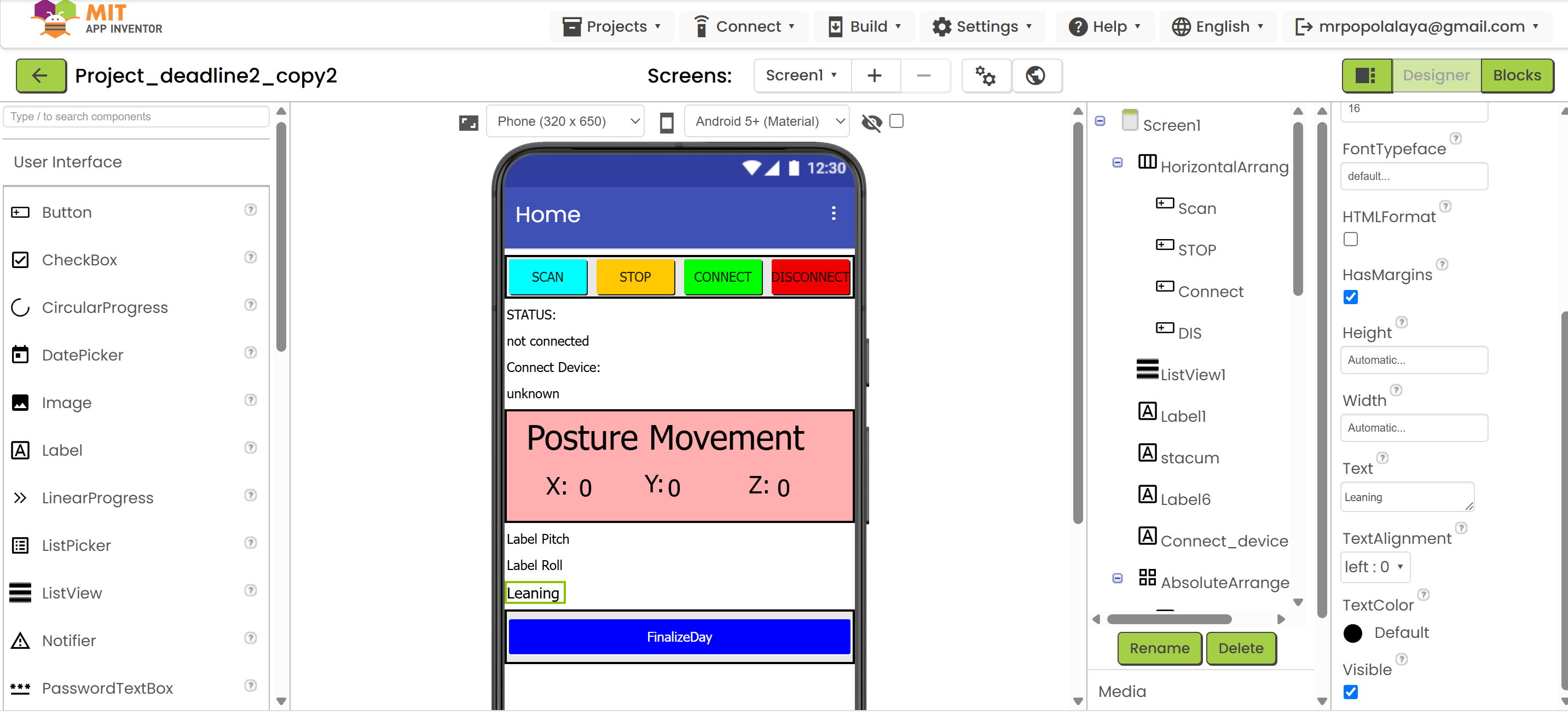
Here the file:
Project_deadline2_copy.aia (570.8 KB)
What the extension do:
What is the Good21 Extension?
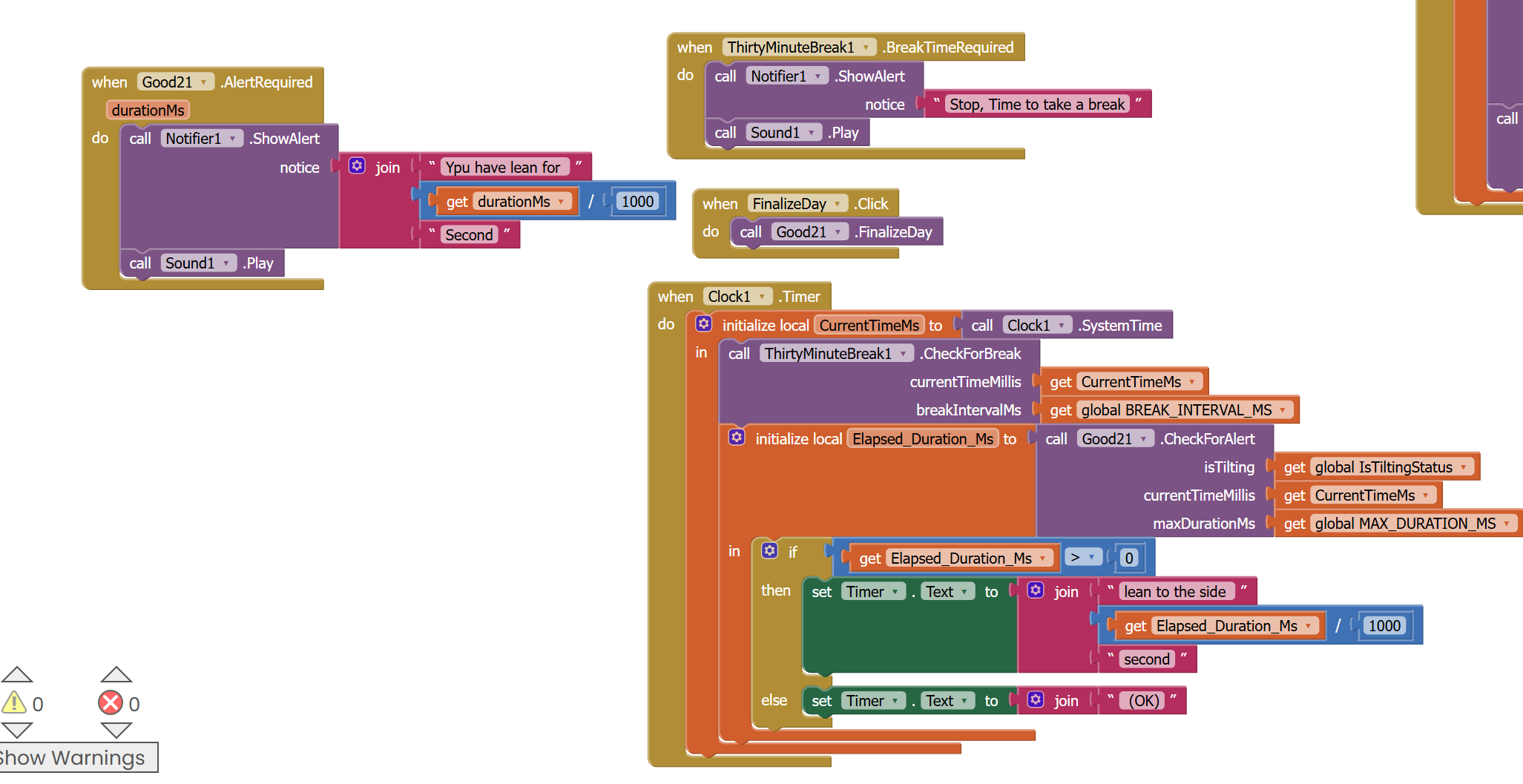
The Good21 extension is a custom component designed to manage the core logic of your posture monitoring application. It takes care of all the complex calculations and tracking related to how long a user's neck is tilted, when to send alerts, and summarizing daily posture data.
Think of it as the "brain" of your posture tracking system within App Inventor.
Key Functions and Purpose of Good21:
- Posture Tilt Tracking:
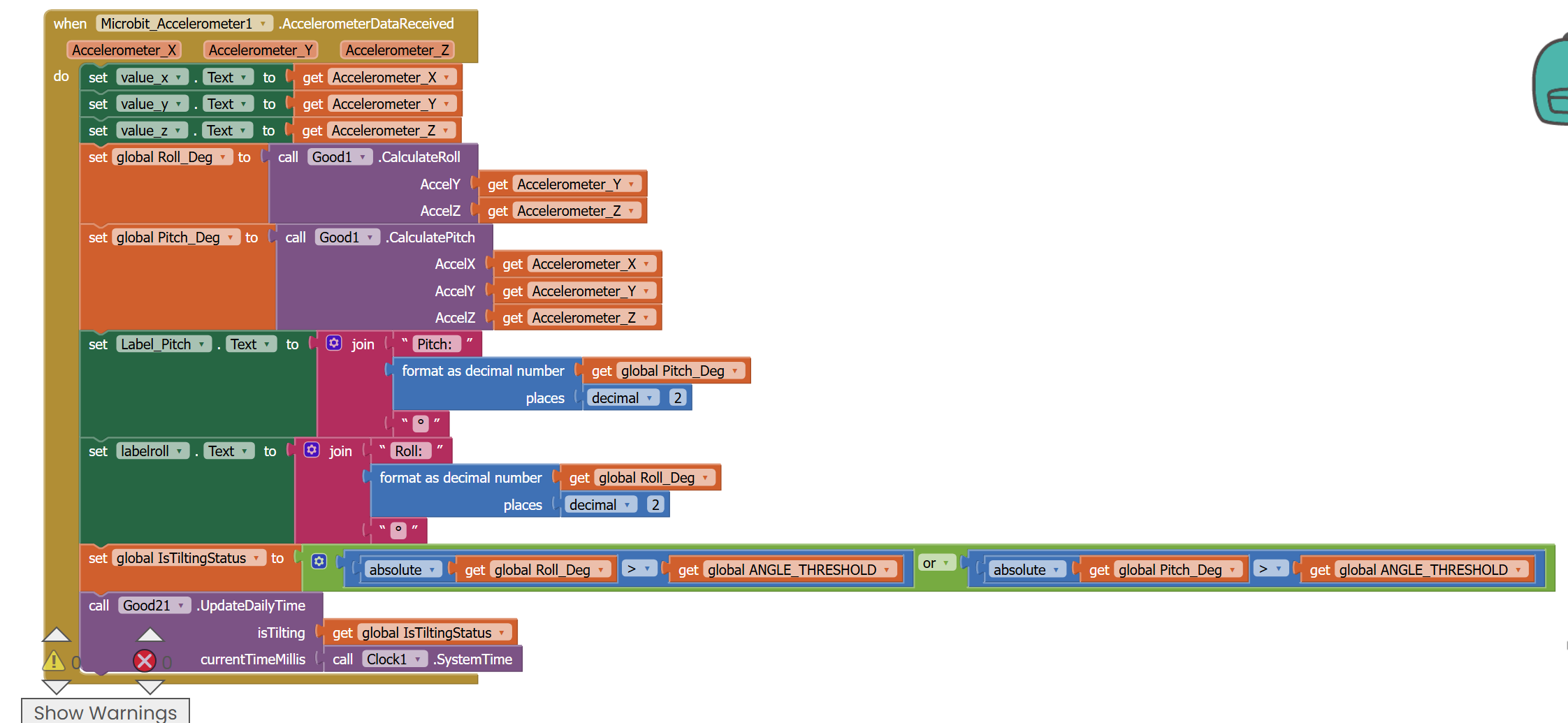
- It receives information about whether the user's neck is currently tilted (
isTiltingstatus) and the current time. - It precisely measures how long the neck stays tilted continuously. If the neck straightens, this continuous tilt duration resets.
- Alert Management:
- It checks if the continuously tilted duration exceeds a specified maximum allowed time (
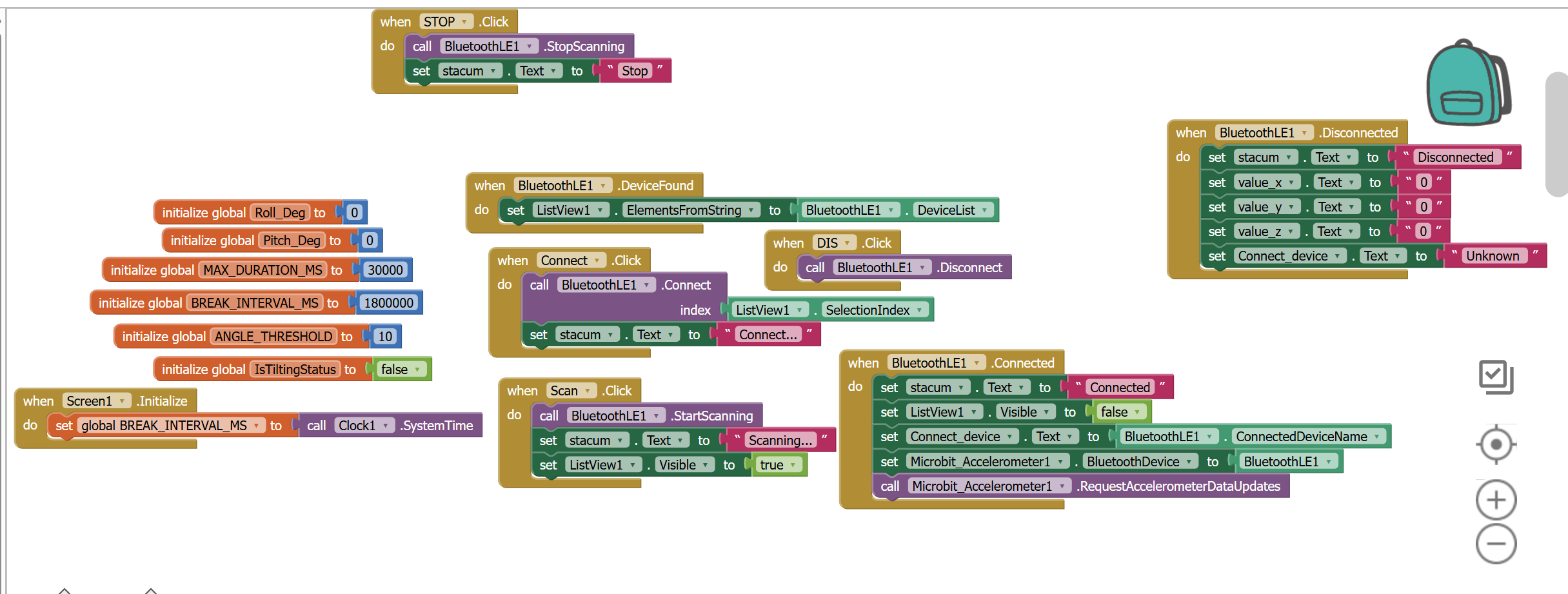
MAX_DURATION_MS, e.g., 30 seconds). - If the tilt duration exceeds this limit, it automatically triggers an
AlertRequiredevent, signaling your app to show a warning message or play a sound.
- Daily Usage and Tilt Time Accumulation:
- It keeps a running total of the daily active usage time (how long the app has been monitoring posture for the current day).
- It also accumulates the total time spent with a tilted neck throughout the day.
- Daily Summary and Risk Calculation:
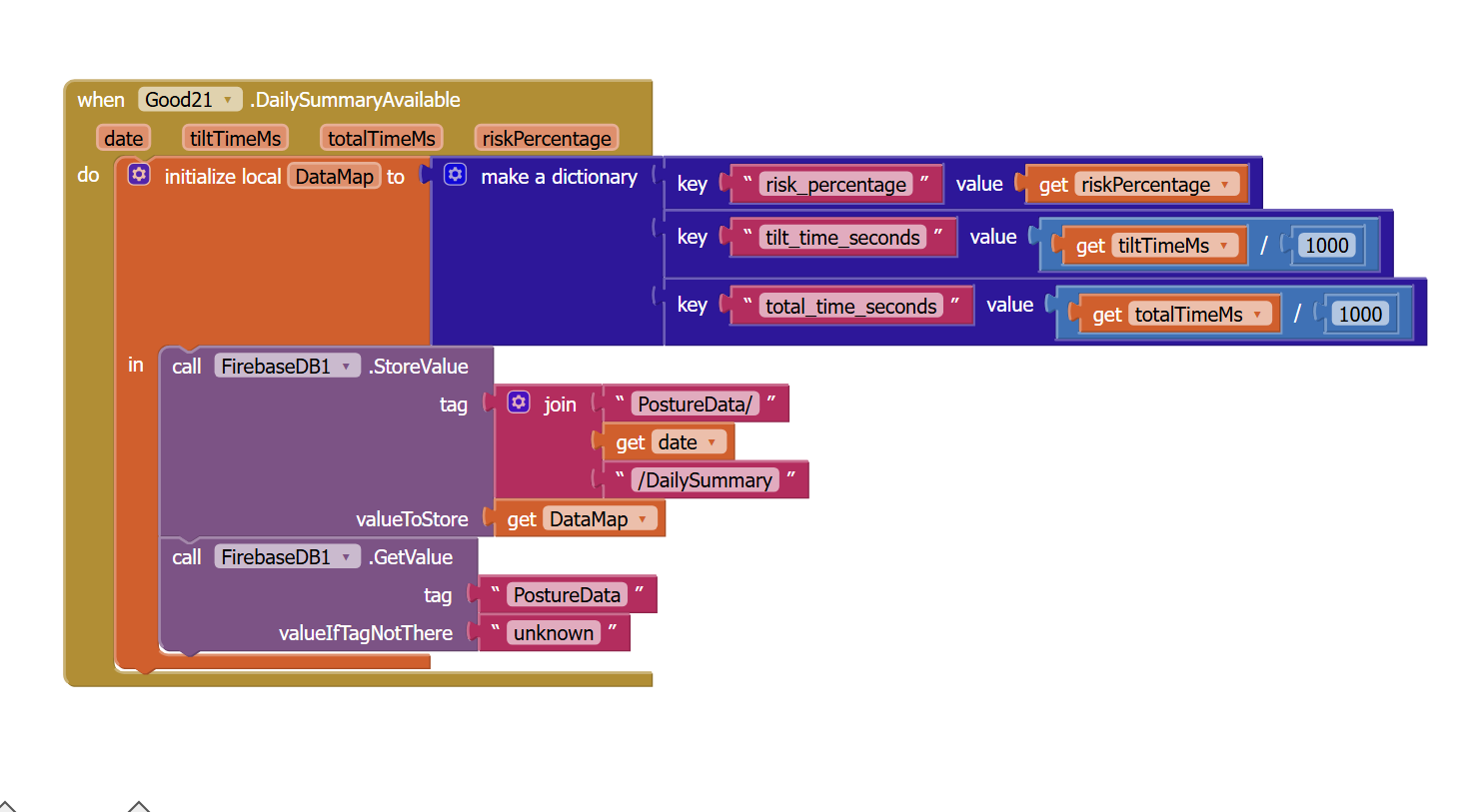
- It automatically detects when a new day begins (at midnight). When this happens, or if you manually request it, it compiles a summary for the previous day.
- This summary includes the date, total tilt time, total usage time, and calculates a risk percentage (total tilt time divided by total usage time).
- It then triggers a
DailySummaryAvailableevent, which your app can use to save this daily data (e.g., to FirebaseDB) or display it.
How you use Good21 in your App Inventor Blocks:
UpdateDailyTime(isTilting, currentTimeMillis): You call this function very frequently (e.g., insideMicrobit.Accelerometer1.AccelerationChanged) to feed the extension with the latest posture status and time. This keeps its internal timers and accumulators updated.CheckForAlert(isTilting, currentTimeMillis, maxDurationMs): You call this function regularly (e.g., insideClock1.Timer) to ask the extension if an alert is needed. It also returns the current continuous tilt duration.FinalizeDay(): You call this function (e.g., by pressing a "Summarize Day" button) if you want to force the extension to generate a daily summary immediately.AlertRequiredEvent: This event fires when the tilt duration exceeds the threshold. You use it to show alerts.DailySummaryAvailableEvent: This event fires when a daily summary is ready. You use it to store or display the daily posture data.
What is the ThirtyMinuteBreak Extension?
The ThirtyMinuteBreak (or ThirtyMinuteBreak1) extension is specifically designed to function as a break reminder timer manager. It allows your application to precisely track the time elapsed since the last break notification and signals when a specified interval (e.g., every 30 minutes) has passed.
Its primary purpose is to encapsulate the break timing logic, keeping your main App Inventor blocks cleaner and easier to manage.
Key Functions and Purpose of ThirtyMinuteBreak:
| Function Name | How to Use in Blocks | Purpose |
|---|---|---|
CheckForBreak(currentTimeMillis, breakIntervalMs) |
Must be called regularly, typically within the Clock1.Timer event. |
This is the main function for checking the time: |
-
It calculates the time elapsed since the last break was initiated.
-
If the elapsed time exceeds the
breakIntervalMs(e.g., 1,800,000 milliseconds for 30 minutes), it immediately fires theBreakTimeRequiredevent and resets its internal timer to start counting again from the current moment.|
|ResetTimer(currentTimeMillis)|Called when the user presses a "I've Taken a Break" button or when the app is initialized.|Used to manually reset the internal timer of the extension, making it start counting from the currentcurrentTimeMillis. Calling this function prevents immediate break notifications after the user has genuinely taken a break.|
|GetLastBreakTimeMs()|Called when you need to retrieve a timestamp.|Used to get the timestamp (in milliseconds) of the last time a break was triggered or the timer was initialized/reset.|
Main Event Fired by the Extension
| Event Name | When it Fires | How to Respond in Blocks |
|---|---|---|
BreakTimeRequired() |
When the CheckForBreak function determines that the specified break interval has been exceeded. |
You will use this event to display a notification (Notifier) or play an audio alert to prompt the user to take a break. |

