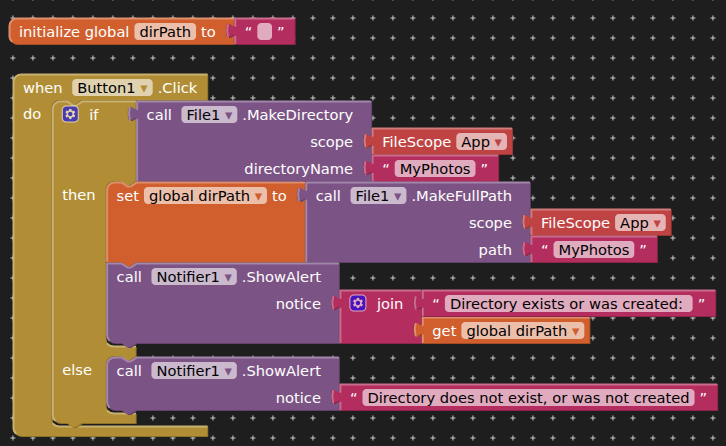
HI, I am working on an App wherein I intend to use the File blocks to store photos along with system and user generated info about the photo. I have read the file blocks documentation and come away from that with more questions than answers. For example. ...
The Make directory description simply states " MakeDirectory(scope ,directoryName )" It does not indicate if one needs to specify the entire file path ending with the new Directory name or do I simply state the Directory name? If the Latter where is the new Directory actually created?
It also stares that the system returns a true/false boolean value, but not how I would query said value after creating a directory to see it it was successful?
What I am attempting to put together is an app that allows user to take a photo, System then attaches user created Tag which is combined with Date and Time stamp along with user generated notes about the image and all of that customer and system supplied Exif data is stored in a file for future recall and display and export.
At this point I have no blocks to display but I do have a lot of questions about how to proceed.
would create a directory in your apps ASD (application specific directory).
The full file path for this would be:
/storage/emulated/0/Android/data/<packageName>/files/MyPhotos
(this location is (normally/generally) only accessible from within your app)
Using App as your filescope prefixes your directory name with most of the above.
Shared and Legacy filescopes prefix with /storage/emulated/0 but you may need other settings in place and to pass additional directories such as Download, Documents, Pictures, and you may need to request certain permissions.
...
Use an if block to capture/handle the boolean output of MakeDirectory
...
Would you be creating a separate text file with all your image and user data ?
Exif data is already in the image file...
I guess that is one of my questions. If need be I could create two files, one for photos and one for the User supplied data and system supplied date and time along with GPS co-ordinates. I was hoping to avoid using separate files as would mean two separate reads and two separate writes using the same user supplied key for both. The risk I see in that method is that if one of the read/write operations fails we losing the synchronization.
As for testing the Boolean response from the creation of the directory with an if statement, my question is what am I testing for example "If ??? = false Display message Bla, Bla, Bla. Where ??? equals - What am I testing?
You can create folders or subfolders (to save images there) in the ASD, the PrivateDir, and in Shared folders (/Documents, /Download, /Pictures, or /DCIM). On Android 11+, this is generally possible without storage permissions. On Android < 11, WRITE_EXTERNAL_STORAGE permission is required for all folders except the ASD and the PrivateDir.