Well done for following the howto!
Here is a simple solution, that requires a user of the app to register their email and password, then allows them to login, and then allows them to submit a simple report.
In order to keep the google sheet private, we use a google apps script web app that runs as "you", but you allow "anyone, even anonymous" to run it. The web app provides HTTP GET facilities for the registration, login, and report submission. Here is the code i used in the web app:
function doGet(e) {

  var ss = SpreadsheetApp.getActive();
  var sheet = ss.getSheetByName("Logins");
  var sh = ss.getSheetByName("Reports");

  if ( e.parameter.func == "register" ) {
    var email = e.parameter.email ;
    var passwd = e.parameter.passwd ;
    sheet.appendRow([email,passwd]);
    return ContentService.createTextOutput("New User Added");
  }

  else if ( e.parameter.func == "testLogin" ) {
    var msg = "Incorrect Login";
    var email = e.parameter.email;
    var passwd = e.parameter.passwd;
    var loginData = sheet.getDataRange().getValues();
    for ( var i = 0; i < loginData.length; ++i ) {
      if ( email == loginData[i][0]  && passwd == loginData[i][1] ) {
        msg = "Logged In";
    }
  }
    return ContentService.createTextOutput(msg);
  }

  else if (e.parameter.func == "report") {
    var email = e.parameter.email ;
    var date = e.parameter.date ;
    var data = e.parameter.data ;
    sh.appendRow([email,date,data]);
    return ContentService.createTextOutput("Report submitted");
  }
}
I have kept the login data and the report data on the same spreadsheet for simplicity, but you can use different google sheets if you wish. The login data, if successful, allows the user to progress in the app to report submission, it does not provide the app user any access to the google sheet. You will no doubt want to add additional fields for your reporting, just amend the url you submit in the app, and amend the appendRow section in the script accordingly.
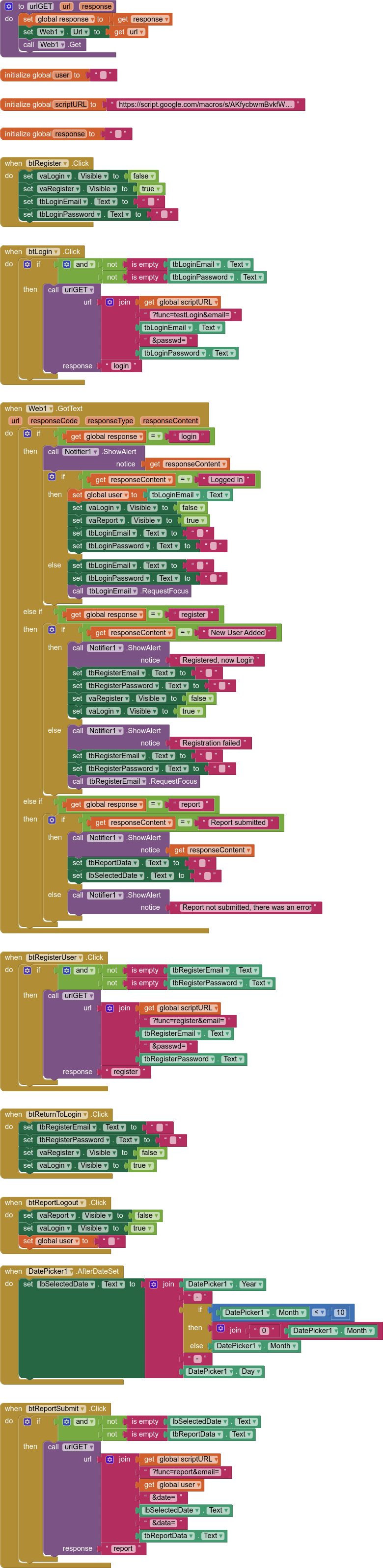
The example app uses three vertical arrangements as virtual screens, one for login, one for registration, and one for report submission. Here are the blocks used:
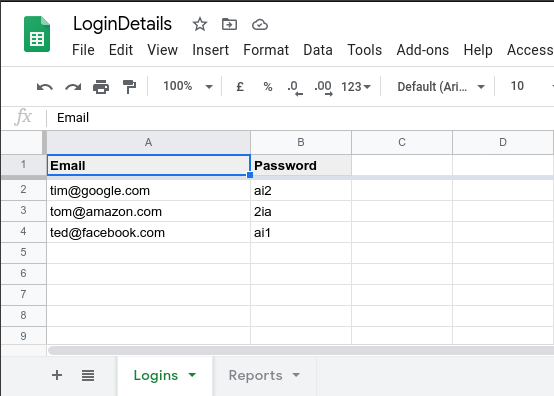
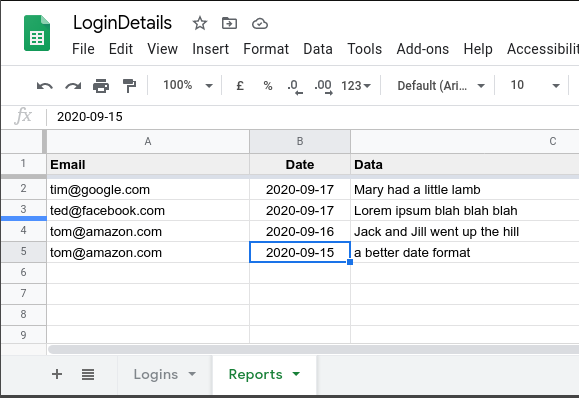
This is what the two grids on the spreadsheet look like:
Logins
Reports
I attach an aia project for your use:
GSLoginReports.aia (7.9 KB)
As a reminder, every time you make any changes to your google apps script, you need to publish a new version.
A simpler method without reports, just register and login: