The ListView listing on my IOS version of app is showing at least one line break between each item creating lots of unused space and the need to scroll through many screens to see the full listings.
I see that this issue was identified some years ago. I've set up a host of dimensions that allow all data to be displayed correctly yet this line break issue persists.
The App project is almost 10,000 blocks, so no AIA file produced.
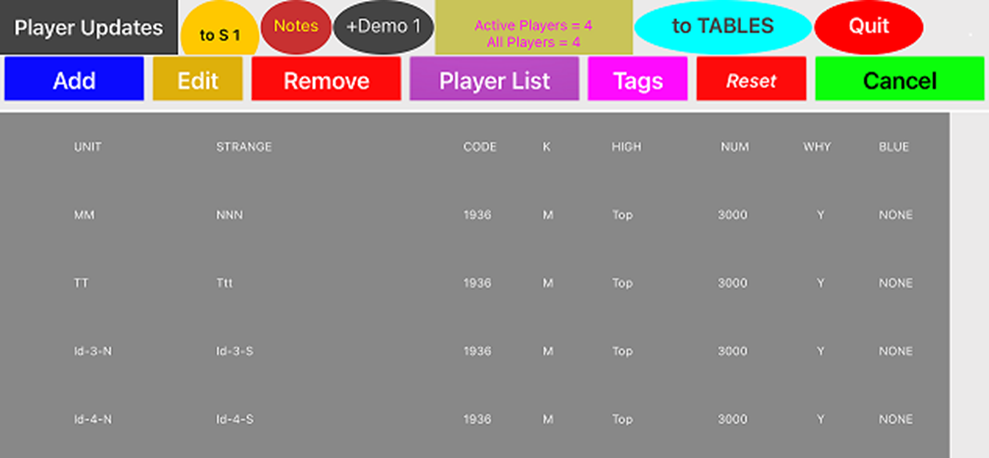
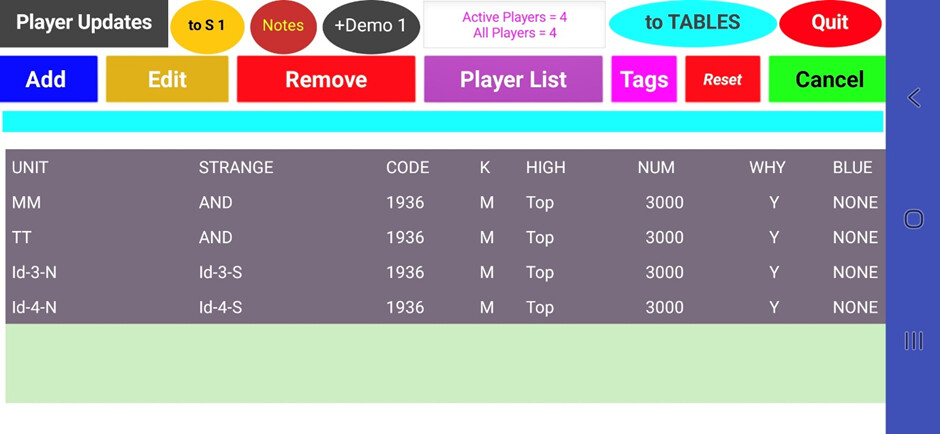
From the App, I've produced 2 screenshots of listviews, top = IOS, lower = Android.
They each have the same example data - a title row of 8 elements followed by test data for 4 people. Same info, vastly different layouts, with the IOS version showing deep line breaks - Android being the acceptable target.
I've reduced the font size to 10 to get the txt to appear within the listview components on the IOS version. It's set at 15 on the Android version.
It seems odd, to me, that there is so much space to the left of the first column on the IOS version c/w the Android version. Perhaps this spacing prevails over the other columns.
Could it be that the dimensions of the listview components are not consistent with the vertical and horizontal arrangements on IOS?