Hi everyone,
currently I'm using the extension "SoundPressureLevel" in my app. At a certain sound level, an action is triggered. I need relativly short listen-times to get te app run properly. I found out, that at setting listen time to 100 ms, a parallel startet timer at 10ms runs far to slowly. I think, there are not enough recources available. So I hat to set listening time to 200ms which is bad for my app performance.
Currently I get the decibel A value. As far as I know, this decibel A value is driven through a Fourier transformation.
I do not necessarily need a corrected decibal A value for my application.
Do you think, the unprocessed decibal value (without A or B) tunes up the system to go faster?
I do not know, if my thoughts are the right way.
Thank a lot for your valued opinions!
The application should do following:
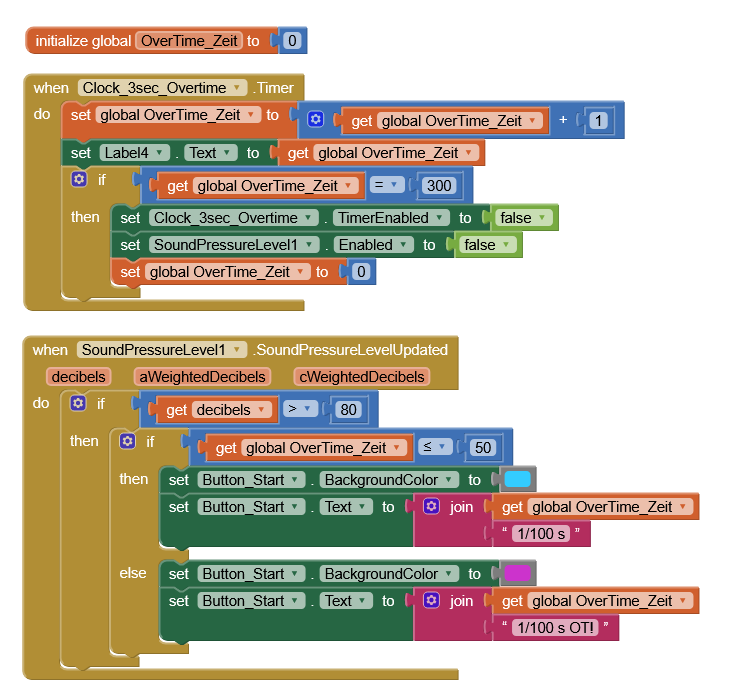
10ms timer starts to count 1/100 sec up to 3 sec total. Within this time period (3 sec) the sound pressure level is being activated to listen (every 100ms, better would be every 10ms). If a certain sound level occurs, the timer shall display it's current time value in a text field. Goal is to find out at which time (accuracy 10ms) within 3 sec the sound level reaches a certain level for example 80dB.
Detection works fine, but the 10ms timer runs way to slow, when SPL is activated. When deactivating SPL, the 10ms timer runs in correct speed.
When setting listening time of SLP to 500 ms (way to slow for my application), the 10ms timer runs at nearly correct speed.
Collecting unweighted "decibel" data instead of weighted "decibel-A" has no noticable impact.
I also set the 10ms timer to 3ms or even 1ms. This does not speed up the timer at all. Seems to be at it's limit, when SPL is active and listening time is to short (below 500ms)
Does anybody have an idea, how to speed up the 10ms timer to correct speed.
Do you really need that level of accuracy ? What sound are you measuring that requires such?
100ms is 1/10th of a second
10ms is 1/100th of a second
The Clock Timer in AppInventor works best at 50ms or above, below that it can be unreliable. My guess is that the event listener in the extension behaves in the same way.
Why do you need that timer? Remember that the blocks inside any event or procedure also need a few milliseconds for execution.
Just use the SoundPressureLevelUpdated event only together with an if statement and if the sound level reached that level get the current time and display it
What about providing a screenshot of some relevant blocks?
Yes, for my Application is it essential, to have at least 10ms accuracy.
Main problem is: If I do not agree at start of the app to use the microphone, all 10ms timers go well. If the microphone is allowed to use, all 10ms timers slow down already. So, I have to quit this project - therw are not enough ressources for such speedy applications.
Main goal is, to detect a certain soundlevel at least 10ms accuracy on apperarance.
This is exactly what I have done: There is a very simple "if - then" statement to trigger a simple timer, if a certain sound level is detected. If I only allow the microphone to be used in the app (evene without enabling the SPL at all), all 10ms timers slow down to approx. half speed.