I dont really know what to do, i need Label1 to change based on a text that im sending via bluetooth.
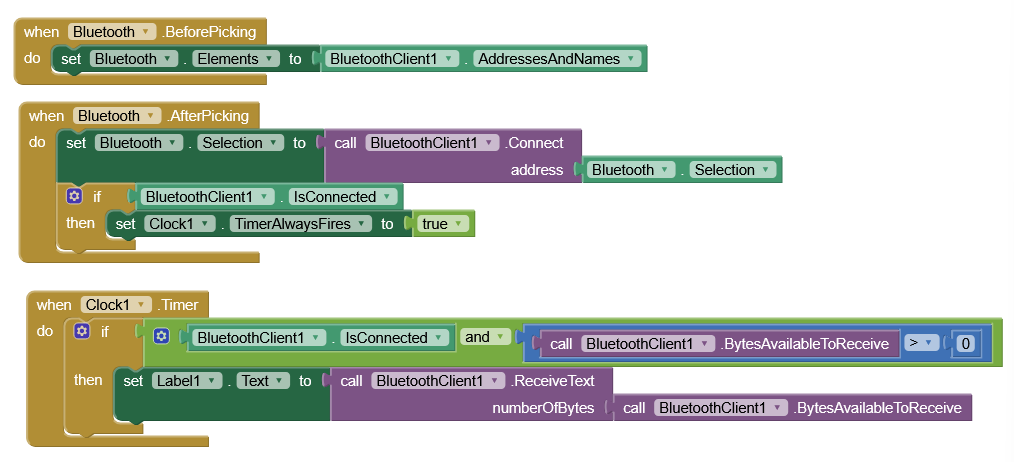
You want to turn on Timer Enabled, not Timer Always Fires.
If that does not help, be sure to grant Bluetooth and location permissions to the app.
I modified that, but the problem still persists, i wonder if its something with my code, but since im not using arduino i cant really know where the problem could be, im using PIC

Its relatively simple, I press certain buttons and the app should show the text I am sending no? I really know not how to use the bluetooth client not gonna lie, im using a HC-05 if that helps with something
Get a Bluetooth terminal app from the Play Store and try to connect with that, just to prove you have something to talk to.
Done, it says its connected but it doesn't receive anything, so its an error in the programming no?
So let's suppose that you're not using your app, on your Android device, but the SerialBluetoothTerminal app (free on playstore) and the BT connection seems obtained, but nothing is received.
With that assumption, you say you use a PIC connected to an HC05, but in my knowledge PIC is just a family of microcontrollers, therefore, how is your hardware made ? Your PIC is a development board ? The programming language that you've shown, belongs to which IDE ?
Moreover your "main:" how is it repeated ? Is it like the "loop" of Arduino IDE ? (i.e. automatically repeated)
Then, in your list of buttons, the configuration of row 27 isn't "5" but "7" (in bynary code the number 111 is = 7) and row 29 isn't "0" but "5" (in bynary 101). But I don't know how the buttons are mapped in your HW.
At the end, there are many things that are doubtful (only to me  ) and make me difficult to understand your system and try to give you help.
Best wishes.
Ill try to answer all your questions one by one. Firstly, yes PIC are a family of microcontrollers, if it helps im currently using a PIC16F877a, and yes it is something like a development board, there is a bunch of like modules that i can simply connect with jumpers directly to the PIC. To answer the question about the IDE, im using microcode studio due to its compatibility with PIC. "main" isnt really like the void loop or whatever arduino has, is simply a rutine, the code when it reaches the end goes back to the top, it doesnt have a void setup like arduino, so you just define everything at the top and write the rest of the code. The button configuration its whatever, im doing this for a proyect, where i use 3 flex sensors as "buttons", if i bend one it equals to 1, and 0 if it isnt (i cant really go too in depth with this cause it doesnt really matter), point is 101 which equals 5 with the flex sensors shows the middle finger in your hand, and for a school project, isnt really good you know? Thats why we descarded it and moved it, and im using buttons for simpler testing. Im just in charge of the app development, my teammate is in charge of the rest of the code. If there is something else that you dont really understand that could help, please tell me and ill try to explain the best i can.
Dear @edlm.165, I'm awfully sorry, but until next monday I'bb be abroad, with limited internet access. Just to have a quick look to emails.
If you don't solve within the next days, I'll have a look next week.
Please apologise me.
Cheers.
Its okay, ill try to fix it with my teammate, if we do fix it, ill be sure to update you, thanks for your help.
Did you find something ?
Is the Serial Bluetooth Terminal free app :

receiving ?
I don'want to seem rude, but until you've not succeeded with that, you can avoid to develop any single block on AI2 
As fas as the IDE you mention and its behaviour is concerned, it is more-or-less similar to the Arduino one (an initialization phase and a repeated-neverending main function), so the buttons recognition and the relevant configuration transmission should be granted, but, honestly, I know almost nothing about that development system you're using, therefore I'm afraid I'll not be in degree to help you much better ... 
Probably @Ghica or @ChrisWard do know something about that IDE ?
Hello Eduardo
I have never programmed a PIC - your micro code looks a bit like VS BASIC but it depends on your choice of compatible compilers - I think Pascal and C are also widely used, but what you use on the hardware side doesn't really matter to App Inventor, so long as you have working code that can send and or receive via your HC05. I assume your hardware is an interactive something or other 
Bluetooth has limitations. If your code is activating or operating hardware in some way and you want it to inform the User on their Smartphone, we wouldn't normally send the text verbatim - we would send a code for the App Inventor App to look-up and display the related text as required - so the App would have a List of messages and display a message with respect to the related code.
Example List:
Arsenal are the greatest football club ever
Being ill is bad for your health
Humans blink on average 15 to 20 times per minute
e.g. Your message may be "Arsenal are the greatest football club ever". Your HW would send "1" to the phone App and it would display List Item 1 in the Label.
1 Like
Dear Eduardo, I believe you've already done a look to Chris' answer.
You see that also he agrees that until you are not done with the basic communication between your hw and the phone, it is useless to try anything with AI2
About your scenario: is it mandatory to use the PIC ? Is it a schoolwork, so you are obliged to use it ?
If not (mandatory) please evaluate the use a true Ardiuno, instead. If this will be possible for you and your team, this will simplify greatly your (and PU's) job because on the forum you'll find a huge quantity of ready made examples.
Best wishes
Thanks for your help, sorry i came back a bit later, I went out for some days, but I was able to solve the problem, it was a matter of correcting the code, the app now receives what it should receive, but the problem was a coding problem, but with what you tell me i think i can make it better, thanks guys.
1 Like