My goal is to give a warning to the screen when the gas value exceeds 200, but how can I do it?

Was it wrong that I was able to do that?
My goal is to give a warning to the screen when the gas value exceeds 200, but how can I do it?
Use Delimiters to insure you get complete single text values.
When you get a value, use math > to insure proper comparison and to take into account the possibility that readings might have hopped over 200.
Be sure to use println() at the end of each message to send from the sending device, to signal end of message.
Only use print() in the middle of a message.
Be sure not to println() in the middle of a message, or you will break it into two short messages and mess up the item count after you split the message in AI2.
Do not rely on timing for this, which is unreliable.
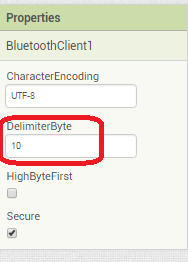
In the AI2 Designer, set the Delimiter attribute of the BlueTooth Client component to 10 to recognize the End of Line character.
In your Clock Timer, you should check
  Is the BlueTooth Client still Connected?
  Is Bytes Available > 0?
     IF Bytes Available > 0 THEN
       set message var  to BT.ReceiveText(-1)
This takes advantage of a special case in the ReceiveText block:
ReceiveText(numberOfBytes)
Receive text from the connected Bluetooth device. If numberOfBytes is less than 0, read until a delimiter byte value is received.