I have a couple of apps that do home automation stuff. When active, they repeatedly poll Arduino-based systems with HTML "get" requests. When I inadvertently put the app in the background (swipe up on Android phone) instead of stopping it, when I come back to the app there is almost always an error message that a request failed. It's somewhat annoying. Is there a way to make the app go inactive, or at least stop sending the requests, when it's in the background ?
Have you tried turning off the Clock flag that lets it continue in the background?
I'm not really sure what you mean, I'd be grateful if you'd explain. I do have timers which cause the polling 'get' requests. Disable them ? But how do I detect app moving to background ?
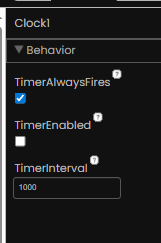
The TimerAlwaysFires flag.
Read its tool tip.
1 Like