Since the Camera component on devices with API ≥ 29 (→ Scoped storage *) no longer saves the pictures in this path:
file:///storage/emulated/0/Pictures`
but in the ASD (app-specific directory):
file:///storage/emulated/0/Android/data/<packageName>/files/Pictures
you can do something like this:
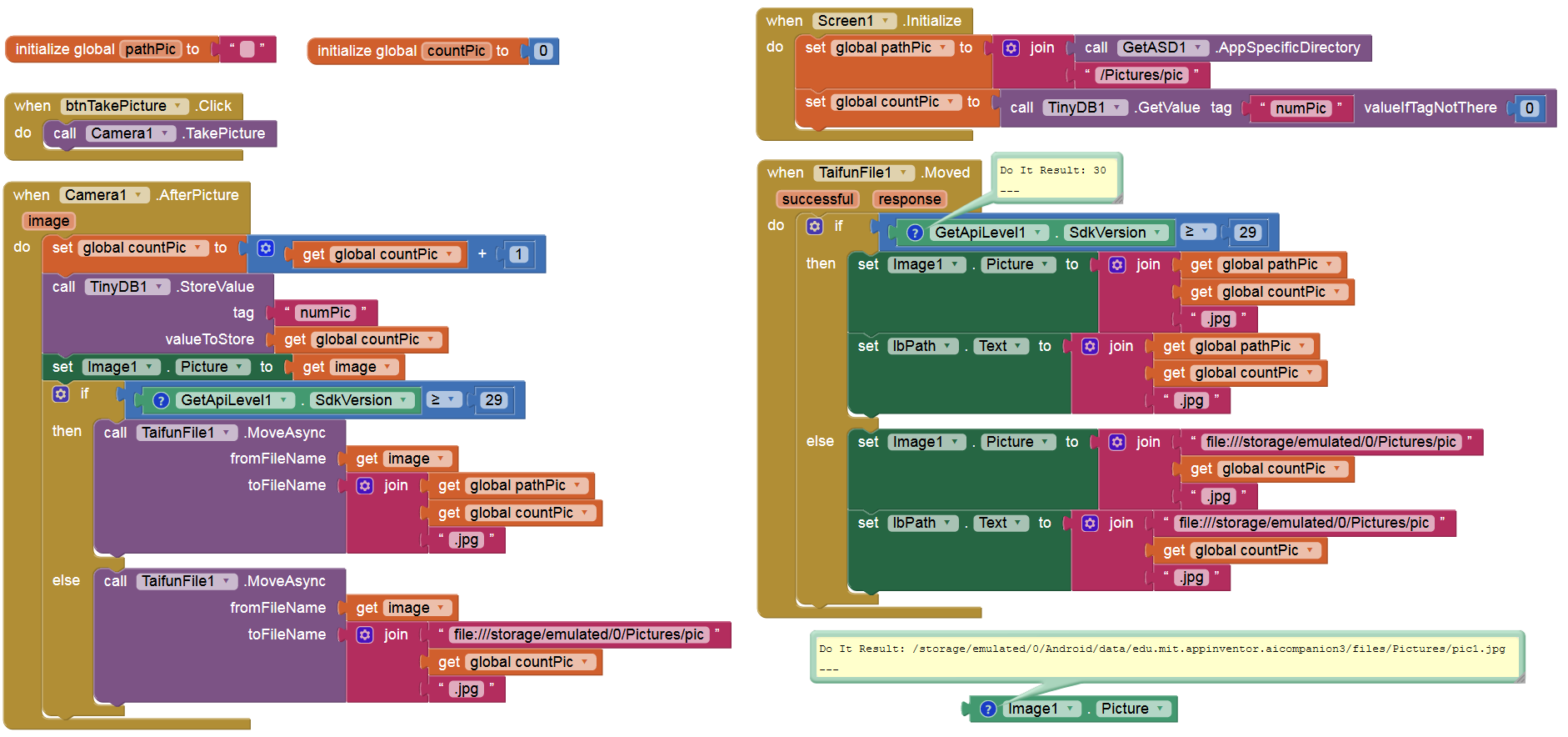
The following extensions are required:
- App Inventor Extensions: File | Pura Vida Apps
- Get the API Level of the device
- Get the path of → ASD (app-specific dir) & → private data dir (internal storage) (EDIT: you can also use:
 )
)
(*) Scoped storage → https://developer.android.com/training/data-storage#scoped-storage
Note:
READ_ / WRITE_EXTERNAL_STORAGE is also requested if the pictures are saved in the ASD (i.e. on devices with API ≥ 29). This should not be like that. @ewpatton