I am using Notify for user to input 1,2,3, or 4. How can I force for the numeric keyboard to appear for input for the Notify block?
I would suggest you check out this extension:
Alternatively, use a List Picker with Elements 1,2,3,4
That was the alternative but I just wanted to know if there was a way for Notify to do it. Thanks for your response.
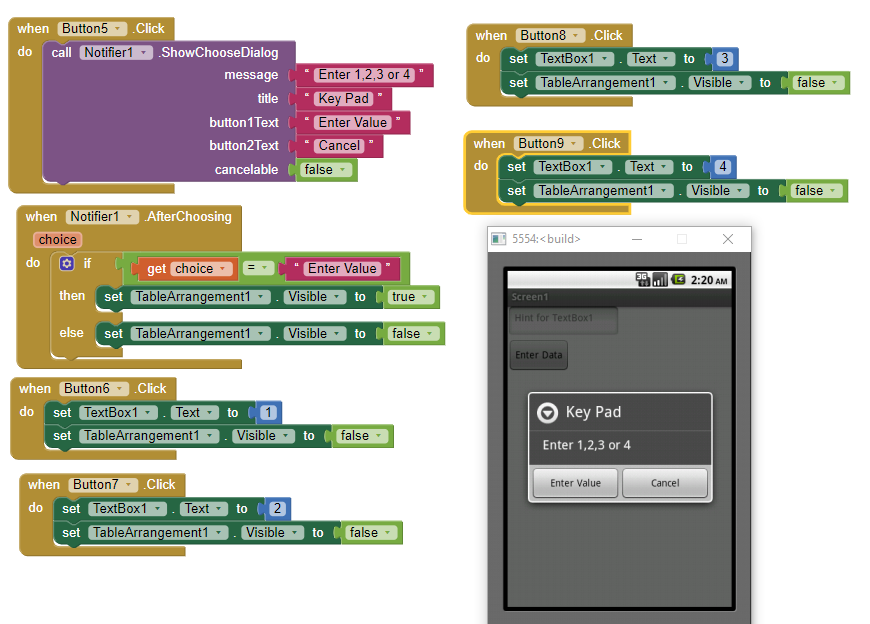
An alternative using Notifier, four Buttons, TableArrangement and a TextBox (to accept the input). Initially set the TableArrangement as hidden (Visible = False)
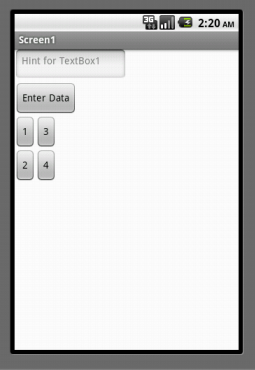 Select 3
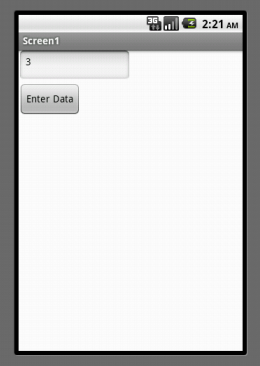 3 entered in TextBox and Button 'keyboard' closes.
Regards,
Steve
Thank you for the alternative. I was hoping there was a simple way to instruct Notifier to use the numeric keyboard, but seems that is not the case. I think I will use a Spinner instead.
I know that this is an old thread, but since I have a similar question and I found this, I thought I do not open a new one. Please let me know if this is not appropriate and I move my comment/question to start a separate discussion.
I understand that choosing from a limited option (1,2,3,4), a spinner is more appropriate, but since the original question was about limiting the keypad for a notifier user input and my goal is also to get only numerical answers, I was trying the following.
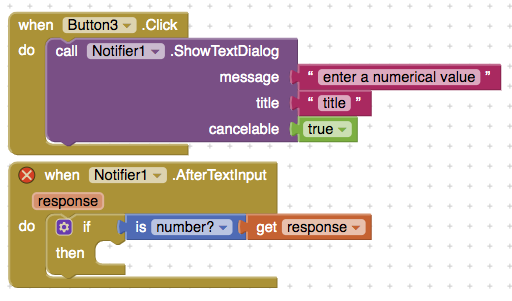
It seems to work in only accepting numerical inputs in moving forward, but I wanted to double check (and share my approach).
Probably it would also be good to add an alert notifier in an "else" part if the user input is not accepted.
Remark: This approach does not accept decimal comma instead of decimal point though, but since I am only interested in integers (which I filter out later), I do not really mind.
Thank you, but I do not want to use extensions since I want to keep the option open to make it available on iphones.
At the moment I have problem with the notifier working differently on android and iphone, but it is a separate issue and I want to experiment before I ask a question about it.
An alternative might be to just use a textbox and a button inside an arrangement that appears either at the top of the screen or somewhere on the screen that suits. This will, of course, push other content up/down. You could also just hide everything else and only show the textbox arrangement.