Helper Blocks Help!

I am attempting to replace 9 property blocks with one helper block with all the values.

current property blocks
//tops
	@SimpleProperty("Top Left")
	public String TopLeft() {
		return "51";
	}
	@SimpleProperty("Top Middle")
	public String TopMiddle() {
		return "49";
	}
	@SimpleProperty("Top Right")
	public String TopRight() {
		return "53";
	}
    //centres
	@SimpleProperty("Centre Left")
	public String CentreLeft() {
		return "19";
	}
	@SimpleProperty("Centre Middle")
	public String CentreMiddle() {
		return "17";
	}
	@SimpleProperty("Centre Right")
	public String CentreRight() {
		return "21";
	}
    //bottoms ;)
	@SimpleProperty("Bottom Left")
	public String BottomLeft() {
		return "83";
	}
	@SimpleProperty("Bottom Middle")
	public String BottomMiddle() {
		return "81";
	}
	@SimpleProperty("Bottom Right")
	public String BottomRight() {
		return "85";
	}

I have been following Beka's "how to" here and appear to have successfully created and placed the helper blocks java file:

helper blocks java
package uk.co.metricrat.overlayer.helpers;

import com.google.appinventor.components.common.OptionList;
import gnu.math.*;
import com.google.appinventor.components.common.Default;
import java.util.HashMap;
import java.util.Map;

public enum PositionUnits implements OptionList<String> {
    TopLeft("51"),
    TopMiddle("49"),
    TopRight("53"),
    CentreLeft("19"),
    @Default
    CentreMiddle("17"),
    CentreRight("21"),
    BottomLeft("83"),
    BottomMiddle("81"),
    BottomRight("85");

    private String positionUnits;

    PositionUnits(String val) {
        this.positionUnits = val;
    }

    public String toUnderlyingValue() {
        return positionUnits;
    }

    private static final Map<String, PositionUnits> lookup = new HashMap<>();

    static {
        for (PositionUnits val : PositionUnits.values()) {
            lookup.put(val.toUnderlyingValue(), val);
        }
    }

    public static PositionUnits fromUnderlyingValue(String val) {
        return lookup.get(val);
    }
}

I have setup a property getter and setter in my main java as she indicates, but this is where I get stuck:
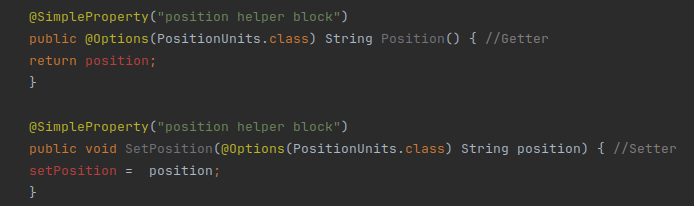
As you can see I have a "red" error in each property.

Questions:

  1. What do I need to do in order to return the helper block correctly?

  2. Do I have to have a setter/getter or can I just return the helper block?

    helpers_dropdown

  3. Perhaps more importantly all the values in my OptionsList should be integers and not strings ?

[EDIT] I have now seen that I use OptionList. Converted everything in the helper java, but now have two red errors there!
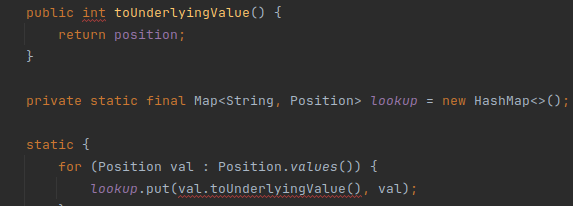
If you need to return the value as string:

public String Position() {
  return this.position.toUnderlyingValue();
}

Or if you want to return the helper instead:

public PositionUtils Position() {
  return this.position;
}

If you want to accepts either number/string & helper enum:

public void SetPosition(@Options(PositionUtils.class) Object position) {
  if (position instanceof PositionUtils) {
    this.position = (PositionUtils) position;
  } else if (position instanceof String) {
    this.position = PositionUtils.fromUnderlyingValue(position.toString());
  } else if (position instanceof Integer) {
    this.position = PositionUtils.fromUnderlyingValue(String.valueOf(position));
  }
}

You may also return the helper (enum) constants.

This is not mandatory. Its depends on your requirements.

Many thanks @Jewel, will get to work and report back.

1 Like

Refer to this project for further exploration.

OK I put this in my main java file

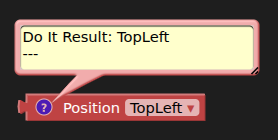
I get the helper block, but it is not returning the "value", but instead the "label" ?

(I have also changed the public enum to Position, from PositionUnit)

I believe the helper blocks do not fully display their underlying value when using Do It. You might consider attaching these blocks elsewhere, perhaps to a Label or Notifier, to observe their value.

Here, you're not returning its underlying value, you're just returning the enum constants.

Unable to attach the helper block to a label or notifier :frowning:

You need to use a local variable to attach it, then attach the variable to Label.

And it you want to see/get the underlying value, you need this:

public String Position() {
  return this.position.toUnderlyingValue();
}

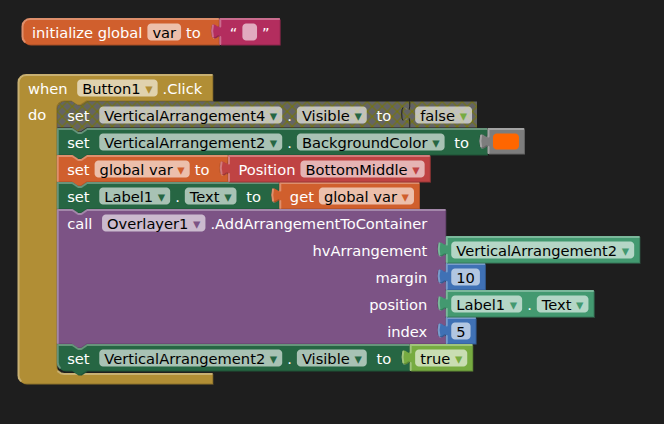
@Jewel, I am most grateful for your help, but I must have something wrong somewhere, or the helper blocks just do not work in the way I was expecting. In order to set the value from the helper block I am having to do this:

  1. Set a variable with the helper block and select an option
  2. Set a label with the variable to get the underlying value
  3. Set the extension socket with the label text

This cannot be correct ? :wink:

You don't need to attach the helper blocks anywhere else to accept its underlying value. Its very simple. Example:

@SimpleFunction
public void AddArrangementToContainer(
  HVArrangement hvArrangement,
  int margin,
  Position position,
  int index) {
   // egView.setPosition(position.toUnderlyingValue());
  // egView.setMargin(margin);
}

But then how does the user (of the extension) set the position?

The extension doesn't accept the helper block either...

You might use @SimpleProperty to allow user to change position anytime. So, you don't need to ask position from AddArrangementToContainer. Use global variable and use that one.

The toUnderlyingValue() method returns the actual value of the helper blocks.

Global variable:

private Position position = Position.TopLeft;

Property:

@SimpleProperty
public void SetPosition(Position position) {
  this.position = position;
}

In method:

@SimpleFunction
public void AddArrangementToContainer(
  HVArrangement hvArrangement,
  int margin,
  int index) {
   // egView.setPosition(this.position.toUnderlyingValue());
  // egView.setMargin(margin);
}

Sorry, you have lost me :upside_down_face:

I thought I would give this a go, but as expected, just not production ready (me!)

I will either go back to my nine properties, which can at least be selected from one block, or build my own option list and use a lookup in the blocks.

Thank you for your efforts on my behalf, you seem to have a handle on it, and I know it is the originators of this thing, not you, who I hold to account! :smiley:

Have a good evening.

1 Like

What exactly are you trying to achieve? Should the helper be attached to your function's "position" input?

Yes, that is what I had hoped for.

Here is the current helper blocks java

Helper Bocks java (Position.java)
package uk.co.metricrat.overlayer.helpers;

import com.google.appinventor.components.common.OptionList;
import com.google.appinventor.components.common.Default;
import java.util.HashMap;
import java.util.Map;

public enum Position implements OptionList<String> {
    TopLeft("51"),
    TopMiddle("49"),
    TopRight("53"),
    CentreLeft("19"),
    @Default
    CentreMiddle("17"),
    CentreRight("21"),
    BottomLeft("83"),
    BottomMiddle("81"),
    BottomRight("85");

    private String position;

    Position(String val) {
        this.position = val;
    }

    public String toUnderlyingValue() {
        return position;
    }

    private static final Map<String, Position> lookup = new HashMap<>();

    static {
        for (Position val : Position.values()) {
            lookup.put(val.toUnderlyingValue(), val);
        }
    }

    public static Position fromUnderlyingValue(String val) {
        return lookup.get(val);
    }
}

and the main extension java (Overlayer.java)

extension java
package uk.co.metricrat.overlayer;

import com.google.appinventor.components.annotations.*;
import com.google.appinventor.components.annotations.Component;
import android.content.Context;
import android.view.View;
import android.view.ViewGroup;
import android.widget.LinearLayout;
import android.widget.RelativeLayout;
import com.google.appinventor.components.runtime.AndroidNonvisibleComponent;
import com.google.appinventor.components.runtime.AndroidViewComponent;
import com.google.appinventor.components.runtime.ComponentContainer;
import gnu.math.*;
import org.json.*;
import uk.co.metricrat.overlayer.helpers.*;

@Component(
		version = 1,
		versionName = "1.0",
		description = "Developed by TIMAI2 using Fast. Credits to vsatish for the original idea",
		iconName = "icon.png"
)

public class Overlayer extends AndroidNonvisibleComponent {
	public Context context;
	private RelativeLayout rellay;
	private float density;
	private Position position = Position.CentreMiddle;

	public Overlayer(ComponentContainer container) {
		super(container.$form());
		this.density = this.form.deviceDensity();
		this.context = container.$context();
	}
// ...

// ...
	@SimpleFunction("add the arrangement to be overlaid")
	public void AddArrangementToContainer(AndroidViewComponent hvArrangement, int margin, int position, int index) throws JSONException {
		LinearLayout linlay = new LinearLayout(this.context);
		linlay.setLayoutParams(new ViewGroup.LayoutParams(-1, -1));
		linlay.setGravity(position);
//..		

//..

	@SimpleProperty("Position")
	public Position Position() {
		return this.position;
	}

}

Helper (Used integer):

package uk.co.metricrat.overlayer.helpers;

import com.google.appinventor.components.common.OptionList;
import com.google.appinventor.components.common.Default;
import java.util.HashMap;
import java.util.Map;

public enum Position implements OptionList<Integer> {
    TopLeft(51),
    TopMiddle(49),
    TopRight(53),
    CentreLeft(19),
    @Default
    CentreMiddle(17),
    CentreRight(21),
    BottomLeft(83),
    BottomMiddle(81),
    BottomRight(85);

    private int position;

    Position(int val) {
        this.position = val;
    }

    public Integer toUnderlyingValue() {
        return position;
    }

    private static final Map<Integer, Position> lookup = new HashMap<>();

    static {
        for (Position val : values()) {
            lookup.put(val.toUnderlyingValue(), val);
        }
    }

    public static Position fromUnderlyingValue(Integer val) {
        return lookup.get(val);
    }
}

Component:

package uk.co.metricrat.overlayer;

import com.google.appinventor.components.annotations.*;
import com.google.appinventor.components.annotations.Component;
import android.content.Context;
import android.view.View;
import android.view.ViewGroup;
import android.widget.LinearLayout;
import android.widget.RelativeLayout;
import com.google.appinventor.components.runtime.AndroidNonvisibleComponent;
import com.google.appinventor.components.runtime.AndroidViewComponent;
import com.google.appinventor.components.runtime.ComponentContainer;
import gnu.math.*;
import org.json.*;
import uk.co.metricrat.overlayer.helpers.*;

@Component(
		version = 1,
		versionName = "1.0",
		description = "Developed by TIMAI2 using Fast. Credits to vsatish for the original idea",
		iconName = "icon.png"
)

public class Overlayer extends AndroidNonvisibleComponent {
	public Context context;
	private RelativeLayout rellay;
	private float density;
	private Position position = Position.CentreMiddle;

	public Overlayer(ComponentContainer container) {
		super(container.$form());
		this.density = this.form.deviceDensity();
		this.context = container.$context();
	}

//..

//..
	@SimpleFunction("Add the arrangement to be overlaid")
	public void AddArrangementToContainer(AndroidViewComponent hvArrangement, Position position, int margin, int index) throws JSONException {
		LinearLayout linlay = new LinearLayout(this.context);
		linlay.setLayoutParams(new ViewGroup.LayoutParams(-1, -1));
        this.position = position;
        linlay.setGravity(position.toUnderlyingValue());
//..

//..
	@SimpleProperty("Returns the position.")
	public Position Position() {
		return position;
	}

}

It is weird, but it works :smiley:

1 Like

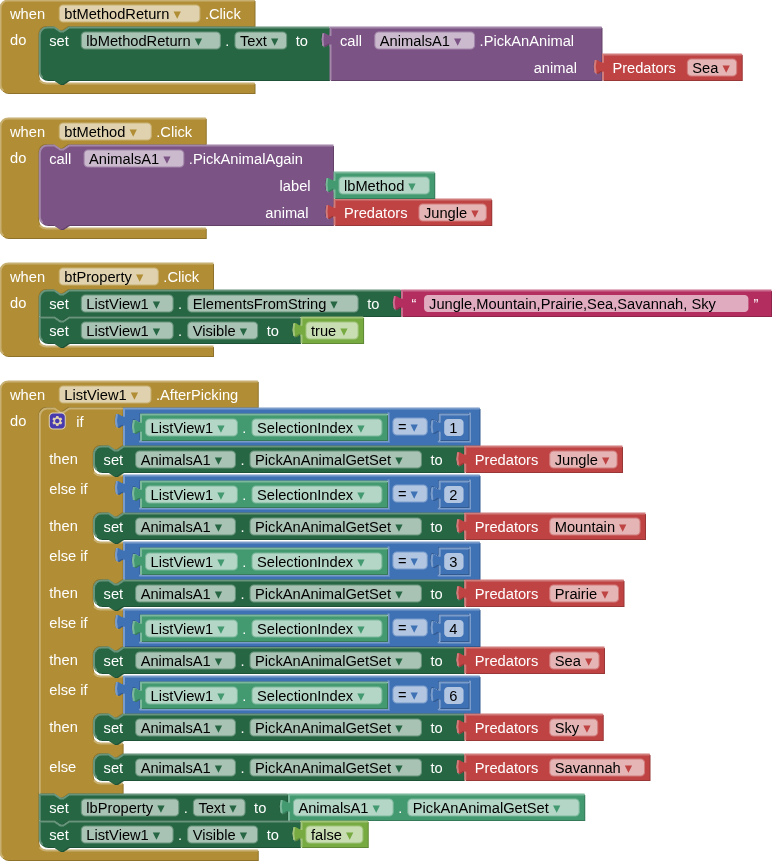
OK, I decided to take a few steps back, create a simple project and extension that focused just on the helper blocks, so there was nothing else going on in the extension or aia project that could confuse newcomers to helper blocks, after a few hours of getting it to work (setting the property was the tricky one). I attempted to use distinct values for class, variables, labels and underlying values so it should be easy enough to follow the workflow. Here are my results:

main java in extension
package uk.co.metricrat.animalsa;

import android.widget.*;
import com.google.appinventor.components.annotations.*;
import com.google.appinventor.components.annotations.Component;
import com.google.appinventor.components.runtime.*;
import uk.co.metricrat.animalsa.helpers.*;

@Component(
	version = 9,
	versionName = "1.0",
	description = "Developed by TIMAI2 using Fast.",
	iconName = "icon.png"
)
public class AnimalsA extends AndroidNonvisibleComponent {

	private Predators animal = Predators.Savannah;

	public AnimalsA(ComponentContainer container) {
		super(container.$form());
	}

	@SimpleFunction("Returns an animal")
	public String PickAnAnimal(Predators animal) {
		this.animal = animal;
		String pickedAnimal = animal.toUnderlyingValue();
	return pickedAnimal;
	}

	@SimpleFunction("Returns an animal")
	public void PickAnimalAgain(AndroidViewComponent label, Predators animal) {
		TextView text = (TextView) label.getView();
		this.animal = animal;
		String pickedAnimal = animal.toUnderlyingValue();
		text.setText(pickedAnimal);
	}

	@SimpleProperty("Gets an animal")
	public @Options(Predators.class) String PickAnAnimalGetSet() { //Getter
	return animal.toUnderlyingValue();
	}

	@SimpleProperty("Sets an animal")
	public void PickAnAnimalGetSet(@Options(Predators.class) String pickedAnimal) { //Setter
	animal = Predators.fromUnderlyingValue(pickedAnimal);
	}

}
helpers java in extension
package uk.co.metricrat.animalsa.helpers;

import com.google.appinventor.components.common.OptionList;
import com.google.appinventor.components.common.Default;
import java.util.HashMap;
import java.util.Map;

public enum Predators implements OptionList<String> {
    Jungle("tiger"),
    Mountain("bear"),
    Prairie("wolf"),
    Sea("shark"),
    @Default
    Savannah("lion"),
    Sky("eagle");

    private String position;

    Predators(String val) {
        this.position = val;
    }

    public String toUnderlyingValue() {
        return position;
    }

    private static final Map<String, Predators> lookup = new HashMap<>();

    static {
        for (Predators val : Predators.values()) {
            lookup.put(val.toUnderlyingValue(), val);
        }
    }

    public static Predators fromUnderlyingValue(String val) {
        return lookup.get(val);
    }
}
blocks

aia:
PickAnAnimalA.aia (10.2 KB)
extension:
uk.co.metricrat.animalsa.aix (7.2 KB)

One thing that might be worth adding is how to use the helper blocks to return a list of the labels for use in listviews/spinners etc. Easy enough to just separately create such a list, but would be better if this comes from the helper blocks setup ?

The aim of the exercise is to de-mystify the creation and use of helper blocks, given that, in my view, Beka's original documentation is incomplete and aimed at "real" components as opposed to extensions, and that every single example I have found and seen is overcomplicated or seems to bear no relation to the basics shown here.

Being a novice on this, I would, of course, welcome any suggestions and ideas on how to improve on this primer.

I also went back and worked up Beka's orginal example (just for the property block)

beka's example extension main java
package uk.co.metricrat.bekasexample;

import com.google.appinventor.components.annotations.*;
import com.google.appinventor.components.runtime.AndroidNonvisibleComponent;
import com.google.appinventor.components.runtime.ComponentContainer;
import uk.co.metricrat.bekasexample.helpers.*;

@Component(
	version = 1,
	versionName = "1.0",
	description = "Developed by TIMAI2 using Fast.",
	iconName = "icon.png"
)
public class BekasExample extends AndroidNonvisibleComponent {

	private Animal favoriteAnimal = Animal.Giraffe;

	public BekasExample(ComponentContainer container) {
		super(container.$form());
	}

	@SimpleProperty("get animal")
	public Animal FavoriteAnimal() {
		return favoriteAnimal;
	}

	@SimpleProperty("set animal")
	public void FavoriteAnimal(Animal animal) {
		favoriteAnimal = animal;
	}
}

beka's example extension helper java
package uk.co.metricrat.bekasexample.helpers;

import com.google.appinventor.components.common.OptionList;
import com.google.appinventor.components.common.Default;

import java.util.*;

public enum Animal implements OptionList<String> {
    Lion("lion"),
    @Default
    Giraffe("giraffe"),
    Elephant("elephant"),
    Dodo("dodo");

    private String animal;

    Animal(String anim) {
        this.animal = anim;
    }

    public String toUnderlyingValue() {
        return animal;
    }

    private static final Map<String, Animal> lookup = new HashMap<>();

    static {
        for (Animal anim : Animal.values()) {
            lookup.put(anim.toUnderlyingValue(), anim);
        }
    }

    public static Animal fromUnderlyingValue(String anim) {
        return lookup.get(anim);
    }

} //END


blocks

aia

BekasExample.aia (7.9 KB)

extension

uk.co.metricrat.bekasexample.aix (6.5 KB)

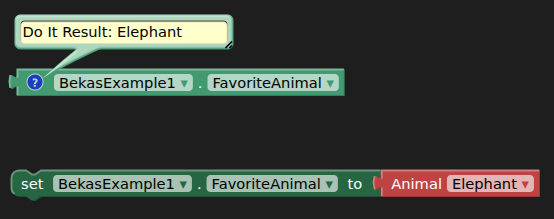
The property is initially set with "giraffe" from the variable set in the extension in the main java:

private Animal favoriteAnimal = Animal.Giraffe;

Doing this is nowhere to be seen (as far as I could see) in her documentation. If you do not set this as such e.g. to null, you need to use setProperty first before the getter returns an underlying value.

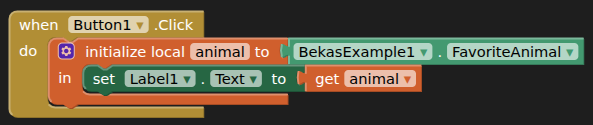
Also note, with this method, that a label/textbox cannot accept the getter block, you have to use a variable to return the underlying value: