I’m doing a project with an Arduino that has an Ultrasonic sensor, a buzzer and Bluetooth, what I can’t seem to get right is that, I don’t know if the arudino is not reading what the app says or viceversa, this is a summary:
The app needs to activate and deactive the sensor and buzzer, it also has to send an alarm to the app once the sensor detects movement.
I would really aprecciate the help, if I made any gramatical mistakes forgive me, English is not my first lenguague. Thank you.
If I get answers I’ll put the codes on the replies.
For cases like this, you need an impartial third party app from the Play Store to try to connect to the sensor and show the data traffic.
Search for Serial Bluetooth Terminal on the Play store, install it, and see if it can connect to and communicate with your board.
That will tell you if your data stream is BLE or old Bluetooth, as well as show how its data stream is built.
You might as well upload the code for both sides now, too.
1 Like
Thank you! This is the code we have:
#include <SoftwareSerial.h>
SoftwareSerial BT1(10, 11);
const int piezo = 8;
const int trigPin = 6;
const int echoPin = 7; // Corregido al pin 5 que definimos en el hardware
const int distanciaAlarma = 15;
// --- NUESTRO INTERRUPTOR VIRTUAL ---
bool sistemaActivo = false;
void setup() {
Serial.begin(9600);
BT1.begin(9600);
pinMode(piezo, OUTPUT);
pinMode(trigPin, OUTPUT);
pinMode(echoPin, INPUT);
Serial.println("Safe Kit: Sistema Iniciado. Esperando orden de la App...");
}
void loop() {
// 1. ESCUCHA Y CONTROL BLUETOOTH
if (BT1.available()) {
char comando = BT1.read();
if (comando == '1') {
  sistemaActivo = true;
  Serial.println("SISTEMA ACTIVADO");
} else if (comando == '0') {
  sistemaActivo = false;
  Serial.println("SISTEMA DESACTIVADO");
  noTone(piezo); // Aseguramos silencio al apagar
}
}
// 2. EL SENSOR SOLO TRABAJA SI EL SISTEMA ESTÁ ACTIVO
if (sistemaActivo) {
digitalWrite(trigPin, LOW);
delayMicroseconds(2);
digitalWrite(trigPin, HIGH);
delayMicroseconds(10);
digitalWrite(trigPin, LOW);

long duracion = pulseIn(echoPin, HIGH);
long distancia = duracion * 0.034 / 2;

if (distancia > 0 && distancia <= distanciaAlarma) {
  tone(piezo, 1500);
  Serial.println("ALERTA: Intruso detectado.");
  BT1.println("INTRUSO"); // Envía aviso a la app
} else {
  noTone(piezo);
}
}
delay(100);
}
I also have 4 screens on the App, but this is the main one
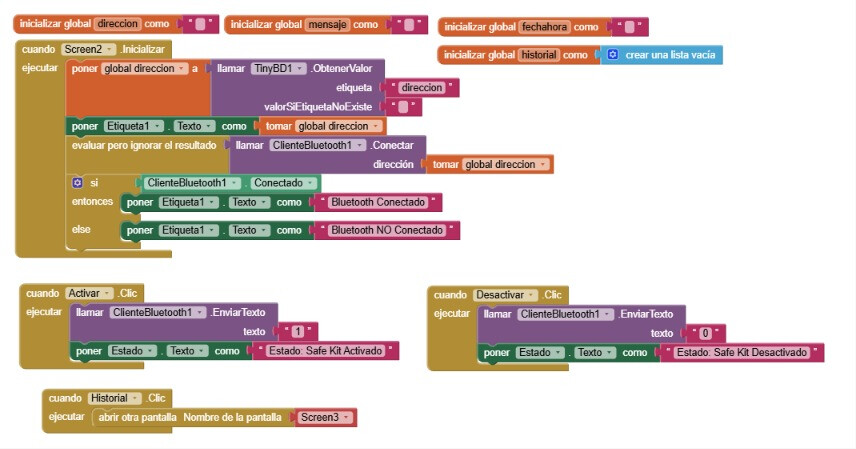
Switching Screens cuts the Bluetooth connection.
Use stacked vertical Arrangements, one visible at a time, to avoid that.
Export and post an aia for better advice.
1 Like
Thank you! I will, this is the aia
SafeKit_copiar.aia (2.2 MB)
The aia confirms that you have duplicated Bluetooth functions across 4 Screens.
To fix this, add 4 Vertical Arrangements to Screen1, and use Designer Copy (Ctrl-C) and Paste (Ctrl-V) on Screens 2,3,4 to copy them into Screen1's Vertical Arrangements.
I prefer leaving cleanup like this to the OP.
Also, my non-English skills are sorely lacking.
1 Like
hahaha, I understand the lenguague barrier, I will change the lenguague to English, I will fix it now, Thank you, truly
Dear @antito ,
there are few things, in addition to what has already said @ABG, that, I hope, can help you.
First of all I assume that you are using a UNO board in conjunction with a HC05 or HC06 BT shield. Second is that if you use a HC05 you shall be sure that it is a "true" HC05 featuring the classic BT, because there are many "fake" HC05 that are working on the BLE (BT Low Energy) instead.
Third : since you use the softwareserial library, please be aware that you must cross the wires between UNO and HC05 (i.e. the UNO pin 10-Rx, shall be tied to the TX pin of the HC05, while the UNO pin 11-Tx shall be connected to the Rx pin of the HC05. Once you are done with these HW checks, please download from the playstore the free app SerialBluetoothTerminal (SBT) and install it on your Android device (phone/tablet). Select Classic BT and try to exchange messages between the Arduino board and the SBT. To this purpose write a super-simple code on Arduino to send/receive just a "Hello world" message. Only after you are done with that very basic message exchange code, you can focus on the rest of the system (by adding the ultrasonic sensor and so on). Please also keep in mind that sometimes the Arduino peripherals that are using interrupts could interfere with the BT comm's. Hopefully this will not be the case but, this is one reason more to verify that the BT comm's is working properly, before doing any other attempts. Last, but not least, please avoid as much as possible the delay(milliseconds) function of Arduino, because in some implementations this function completely stops the CPU, therefore breaking the BT.
(Really  ) last: if you want to read an example on how to use multiple "virtual" screens (as suggested by @ABG) please take a look to the annexed aia. Cheers
MultipleScreen.aia (849.0 KB)
1 Like
Thank you so much for your reply! I am actually using the Arduino UNO with a HC-06 Bluetooth given by my university, I will see the example, Thank you so much! I will follow what you said
You're welcome !!!
UNO + HC06 : really the easiest BT pair to use: lucky guy !!! Whether do you need more hints, please do not hesitate to ask.
1 Like
Hi! I' hope you’re doing well, I did the changes you told me and now the Activation and Deactivation works!!! I screamed so hard in the library when it worked that I had to leave, anyways, now my only problem is that the ALARM doesn’t work. When the sensor detects movement, it has to go to Screen4, that automatically starts a Player1, also has to have the hour and date when the movement was made, but it doesn’t work, I don’t know what is not working. I also wanted to thank you @uskiara because I had no idea how to work with the multiple screens and now I was able to do it, Thank you both!
I hope that's not an Ai2 Screen.
Have you moved everything into a single Screen yet, and switched to stacked Arrangements yet?
1 Like
My mistake, “Screen4” is a vertical arrangements sorry! And yes, everything is in one screen
It's time for a fresh export and post, then.
Show us everything.
1 Like
SafeKit_SI.aia (3.5 MB) There is it! Thank you!
I suggest you move the Label Estado from Screen2 to Screen1, so it is always visible.
You use it to show the incoming messages.
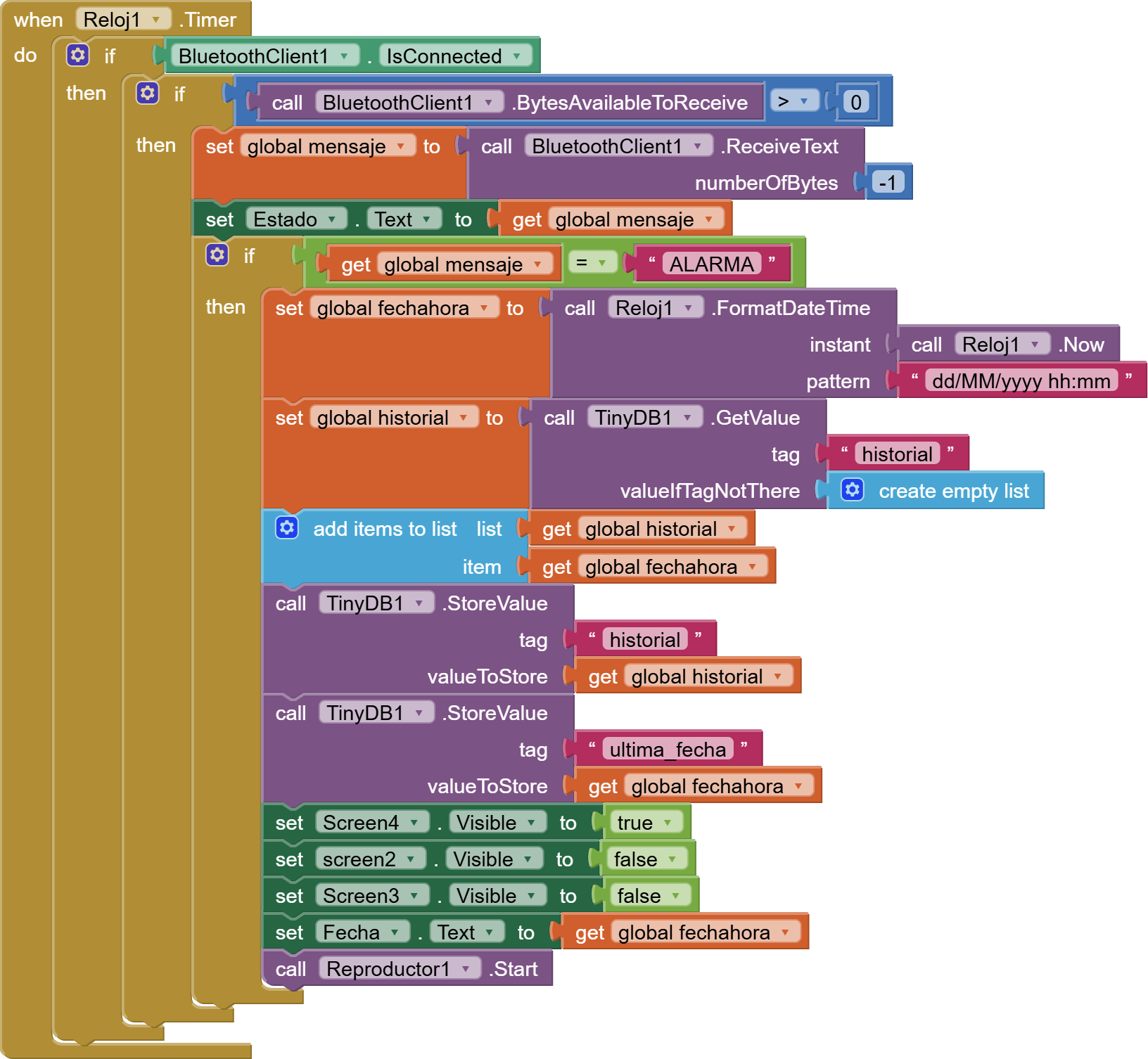
I see you have set the Bluetooth delimiter to 10, properly.
Upload your sketch code too, so we can compare the text 'ALARMA' for surprises.
1 Like
Thank you, I will! here is the sketch code:
#include <SoftwareSerial.h>
SoftwareSerial BT1(10, 11);
const int piezo = 8;
const int trigPin = 6;
const int echoPin = 7; // Corregido el pin del hardware
const int distanciaAlarma = 15;
// --- NUESTRO INTERRUPTOR VIRTUAL ---
bool sistemaActivo = false;
void setup() {
Serial.begin(9600);
BT1.begin(9600);
pinMode(piezo, OUTPUT);
pinMode(trigPin, OUTPUT);
pinMode(echoPin, INPUT);
Serial.println("Safe Kit: Sistema Iniciado. Esperando orden de la App...");
}
void loop() {
// 1. ESCUCHA Y CONTROL BLUETOOTH
if (BT1.available()) {
char comando = BT1.read();
if (comando == '1') {
  sistemaActivo = true;
  Serial.println("SISTEMA ACTIVADO");
} else if (comando == '0') {
  sistemaActivo = false;
  Serial.println("SISTEMA DESACTIVADO");
  noTone(piezo); // Aseguramos silencio al apagar
}
}
// 2. EL SENSOR SOLO TRABAJA SI EL SISTEMA ESTÁ ACTIVO
if (sistemaActivo) {
digitalWrite(trigPin, LOW);
delayMicroseconds(2);
digitalWrite(trigPin, HIGH);
delayMicroseconds(10);
digitalWrite(trigPin, LOW);
long duracion = pulseIn(echoPin, HIGH);
long distancia = duracion * 0.034 / 2;
if (distancia > 0 && distancia <= distanciaAlarma) {
tone(piezo, 1500);
Serial.println("ALERTA: Intruso detectado.");
BT1.println("ALARMA"); // Envía aviso a la app
} else {
noTone(piezo);
}
}
delay(100);
}
Dear @antito,
let me tell you another suggestion;
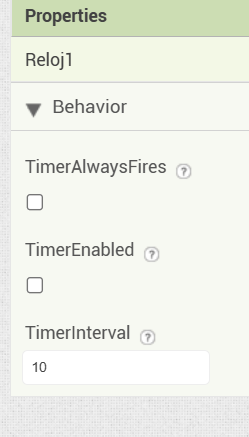
Don't enable the TimerAlways Fires, because it can lead to unpredicatble results, sinche now you have only one screen working (everything is in a unique OS thread, now). Don't enable the clock, which is intended to manage the BT comm's, until a successfully BT connection has been achieved. Therefore enable it only after the BT client connected has been set to true:

The block call BTCLient1.Connect returns true or false , therefore you can use directly its output to enable (or not) the clock1.
The polling rate can be much faster than 1000 milliseconds. Typically I use 10 milliseconds; so to have a "real-time" reception capability.
in my experience very rarely the BTClient.IsConnected works, therefore it is not needed in the Clock1 event, in effect if no data have been received by your app from the BT line, the following block:

is more than enough to fetch the data, if any, else to leave the function immediately whether no data have been received. So no waste of time, though the clock1 fires every 10 milliseconds.
Next step is to have a look to your arduino code.
In the meanwhile, please download the free app SerialBluetoothTerminal (SBT) from the playstore and install it on your Android device. Then you can use it as a debug tool to verify that your Arduino system is capable to communicate toward the device, because in that way you have only one system to check, the Arduino, since the SBT is working for sure and therefore you have only (!) the 50% of uncertainty  .
.
Mis mejores deseos para tu desarrollo.
EDIT just a quick look to your Arduino: I'm not pretty sure whether the app is sending not only '0' or '1' buy, when sending text it could probably send also a linefeed (0x0A), or [LF], or a carriage return (0x0D), [CR], or both. You could then use the SBT to transmit to your Arduino system the simple characters '1' or '0' without any CRLF and see what happens, Once you are done with that you can go on with your app and trim everything.
EDIT 2
Please be aware to cross the wires between UNO and HC06 the Rx pin (typically pin 10 of the UNO) shall be connected to the Tx pin of HC06 and visa versa..
2 Likes
Awh you are so sweet! Thank you so much  I’ll do your suggestions, and as soon as my andriod charges up (which is taking forever) I will download the app, Thank you so much!
 are you connecting from the Moon ???
1 Like