FreeTranslator Extension Documentation
FreeTranslator Extension: Advanced Google Translate (No API Key Required!)
Hello everyone! I'm excited to share a major update to the FreeTranslator extension. This extension allows you to translate text completely for free using the Google Translate endpoint (client=gtx), without needing to register for paid API keys.
The latest version brings massive improvements, making it highly robust, fast, and feature-rich for production-ready apps!
 What's New in (Major Features)
-
 Smart Local Caching: The extension now automatically remembers previously translated text. If a user tries to translate the same sentence again, it returns the result instantly from the local cache without making a network request. This makes the app lightning-fast and practically eliminates the infamous HTTP 429 (Too Many Requests) error!
 -
 Text-to-Speech (TTS) Support: You can now generate direct audio URLs to hear the pronunciation of the text.
 -
 Language Detection: Don't know the language? The extension can now detect it for you.
 -
 Dynamic Dictionary: Add new supported languages on the fly using blocks, without needing to recompile the extension.
 Blocks Documentation
 Methods (Functions)
-
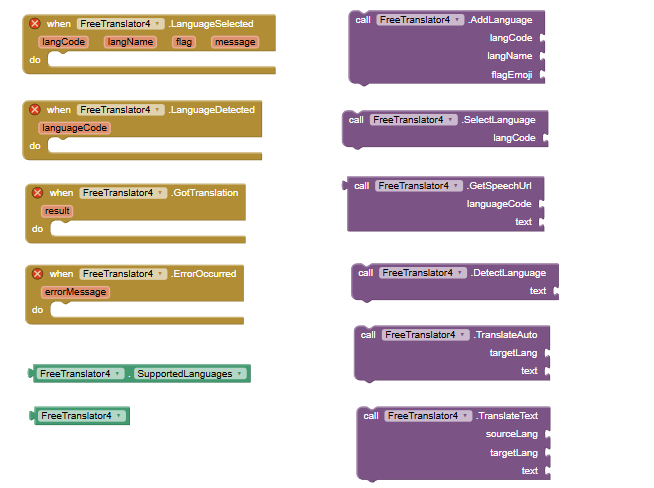
TranslateText(sourceLang, targetLang, text) Asynchronously translates the text. Note: This function now checks the local cache first. If the translation exists, it returns instantly. Use"auto"as thesourceLangfor automatic detection. -
TranslateAuto(targetLang, text) A quick shortcut to translate text with automatic source language detection. -
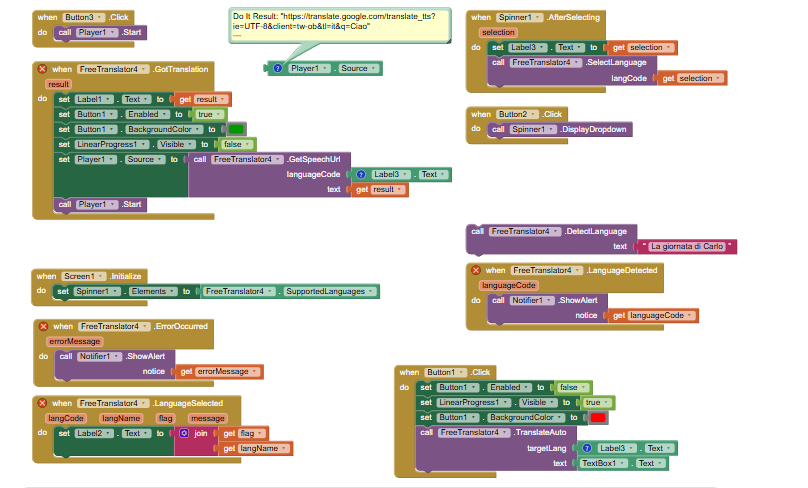
GetSpeechUrl(languageCode, text) ➔ Returns String Returns a direct URL to an MP3 file containing the spoken text. Pro Tip: Simply plug this block directly into theSourceproperty of a Player or Sound component and callStartto play the audio! -
DetectLanguage(text) Analyzes the text and triggers theLanguageDetectedevent with the detected language code. -
AddLanguage(langCode, langName, flagEmoji) Dynamically adds a new language to the internal dictionary (e.g.,langCode: "pl",langName: "Polish",flagEmoji: "🇵🇱"). -
SelectLanguage(langCode) A UI helper method. It searches the dictionary for the code and triggers theLanguageSelectedevent with beautifully formatted data.
 Properties
SupportedLanguages(Returns YailList) Returns a list of all currently supported language codes. Perfect for directly populating aListPickerorSpinnercomponent!
 Events
-
GotTranslation(result) Triggered when the translation is successfully completed (either retrieved from the network or instantly from the cache). -
ErrorOccurred(errorMessage) Triggered if something goes wrong (e.g., No Internet, 5-second Timeout, or HTTP 429). -
LanguageDetected(languageCode) Triggered after callingDetectLanguage. Returns the code of the detected language (e.g.,"fr"for French). -
LanguageSelected(langCode, langName, flag, message) Triggered after callingSelectLanguage. It provides ready-to-use variables for your UI:-
langCode: e.g.,"ru" -
langName: e.g.,"Russian" -
flag: e.g.,"🇷🇺" -
message: A pre-formatted string, e.g.,"Selected 🇷🇺 Russian"
-