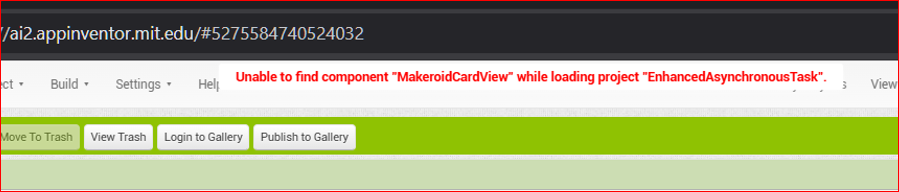
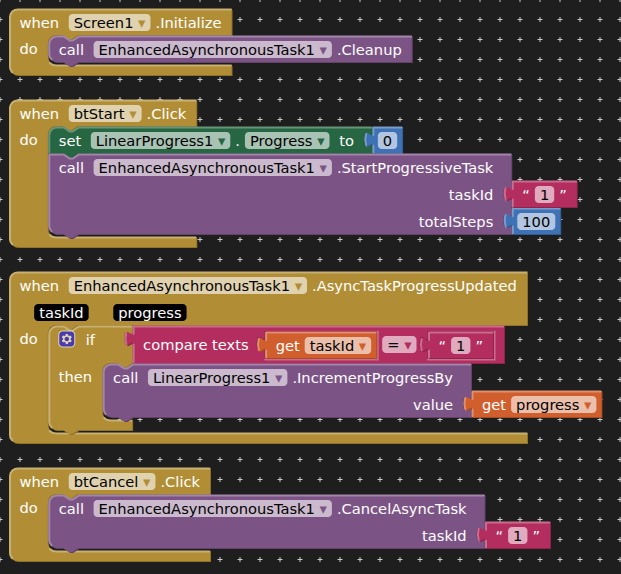
Aqui está a documentação completa com todos os blocos e informações:
 EnhancedAsynchronousTask
Enhanced extension for interacting with App Inventor blocks, using ExecutorService for asynchronous tasks with improved lifecycle management, thread safety, and monitoring capabilities.
 Specifications
 Package: com.bosonshiggs.enhancedasynchronoustask
 Size: 65,32 KB
 Version: 4.0
 Minimum API Level: 14
 Updated On: 2026-02-23
 Built & documented using: FAST v5.5.0
 Recompiled with: FAST Compiler - Optimized for better performance and compatibility
 Multi-Platform Support
This extension is available for both major no-code platforms:
- MIT App Inventor 2: Primary version documented here
- Kodular: A compatible version is available on the Kodular Community
 Overview
This extension provides advanced asynchronous task management capabilities for no-code applications. It uses Java's ExecutorService to handle background operations efficiently, with features like task scheduling, progress tracking, timeout management, and state persistence. The extension has been recompiled using the FAST compiler for optimized performance and better integration with both MIT App Inventor and Kodular projects.
Events:
EnhancedAsynchronousTask has total 10 events.
1. OnTimeEvent
Description: Event triggered at the specified time when using ScheduleEventAtTime().
Usage: Connect this event block to execute code when the scheduled time is reached.
when EnhancedAsynchronousTask1.OnTimeEvent
    do call ToastMessage.ShowMessage
        message: "Scheduled time reached!"
2. AsyncTaskWithDelayCompleted
Description: Event fired when an asynchronous task with delay is completed.
Usage: Triggered after StartAsyncTaskWithDelay() finishes execution. Use the taskId parameter to identify which task completed.
| Parameter | Type | Description |
|---|---|---|
| taskId | text | The unique identifier of the completed task |
when EnhancedAsynchronousTask1.AsyncTaskWithDelayCompleted
    taskId: taskId
    do call ToastMessage.ShowMessage
        message: join "Task " taskId " completed with delay"
3. RepeatingTaskTriggered
Description: Event fired each time a repeating task interval is reached.
Usage: This event fires repeatedly at the interval specified in StartRepeatingTask(). Handle periodic operations here.
| Parameter | Type | Description |
|---|---|---|
| taskId | text | The identifier of the repeating task being triggered |
when EnhancedAsynchronousTask1.RepeatingTaskTriggered
    taskId: taskId
    do call Notifier1.ShowAlert
        notice: join "Repeating task " taskId " triggered"
4. AsyncTaskProgressUpdated
Description: Event fired to update on the progress of a progressive task.
Usage: Used with StartProgressiveTask() to receive progress updates. Great for UI progress bars.
| Parameter | Type | Description |
|---|---|---|
| taskId | text | The task reporting progress |
| progress | number | Progress percentage (0-100) |
when EnhancedAsynchronousTask1.AsyncTaskProgressUpdated
    taskId: taskId
    progress: progress
    do set ProgressBar1.Progress to progress
5. AsyncTaskResultReceived
Description: Event fired with the result of a completed asynchronous task.
Usage: Receives the final result from tasks like StartProgressiveTask() or StartTaskWithTimeout().
| Parameter | Type | Description |
|---|---|---|
| taskId | text | The task that produced the result |
| result | any | The result data (can be text, number, or list) |
when EnhancedAsynchronousTask1.AsyncTaskResultReceived
    taskId: taskId
    result: result
    do call Notifier1.ShowMessageDialog
        message: join "Task " taskId " returned: " result
        title: "Task Complete"
        buttonText: "OK"
6. AsyncTaskErrorOccurred
Description: Event fired when an error occurs during task execution.
Usage: Handle task failures and display error messages to users.
| Parameter | Type | Description |
|---|---|---|
| taskId | text | The task where the error occurred |
| errorMessage | text | Description of what went wrong |
when EnhancedAsynchronousTask1.AsyncTaskErrorOccurred
    taskId: taskId
    errorMessage: errorMessage
    do call Notifier1.ShowAlert
        notice: join "Error in task " taskId ": " errorMessage
7. AllTasksCancelled
Description: Event triggered when all tasks have been successfully cancelled.
Usage: Confirmation event after calling CancelAllTasksAsync() when all tasks are properly terminated.
when EnhancedAsynchronousTask1.AllTasksCancelled
    do call ToastMessage.ShowMessage
        message: "All tasks have been cancelled"
8. TasksOperationComplete
Description: Event triggered when any task operation completes successfully.
Usage: General-purpose completion event for various operations.
| Parameter | Type | Description |
|---|---|---|
| message | text | Success message describing the completed operation |
when EnhancedAsynchronousTask1.TasksOperationComplete
    message: message
    do call ToastMessage.ShowMessage
        message: message
9. DetailedErrorOccurred
Description: Event triggered with detailed error information including category.
Usage: Advanced error handling with error categorization for debugging.
| Parameter | Type | Description |
|---|---|---|
| taskId | text | The task where the error occurred |
| errorMessage | text | Detailed error description |
| category | text | Error category (TIMEOUT, INTERRUPTION, EXECUTION, SCHEDULING, VALIDATION, RESOURCE) |
when EnhancedAsynchronousTask1.DetailedErrorOccurred
    taskId: taskId
    errorMessage: errorMessage
    category: category
    do call Notifier1.ShowAlert
        notice: join "Category: " category " - Error: " errorMessage
10. TaskStateSaved
Description: Event triggered when task state is successfully saved to a file.
Usage: Confirmation that SaveTaskState() completed successfully.
| Parameter | Type | Description |
|---|---|---|
| filename | text | Name of the file where state was saved |
when EnhancedAsynchronousTask1.TaskStateSaved
    filename: filename
    do call ToastMessage.ShowMessage
        message: join "State saved to " filename
Methods:
EnhancedAsynchronousTask has total 13 methods.
1. Cleanup
Description: Gracefully cleans up resources and shuts down the executor. Call this when the extension is no longer needed.
Usage: Always call this in your app's shutdown sequence or when permanently done with background tasks to prevent memory leaks.
call EnhancedAsynchronousTask1.Cleanup
2. CancelAllTasksAsync
Description: Cancels all scheduled or running tasks asynchronously.
Usage: Use to terminate all background operations at once. Triggers AllTasksCancelled() when done.
call EnhancedAsynchronousTask1.CancelAllTasksAsync
3. CancelAsyncTask
Description: Cancels a specific asynchronous task by its identifier.
Usage: Target a single task for cancellation while leaving others running.
| Parameter | Type | Description |
|---|---|---|
| taskId | text | The unique ID of the task to cancel |
call EnhancedAsynchronousTask1.CancelAsyncTask
    taskId: "task_1"
4. StartAsyncTaskWithDelay
Description: Starts a one-time task after a specified delay.
Usage: Perfect for delayed operations like showing notifications after a pause.
| Parameter | Type | Description |
|---|---|---|
| delayMillis | number | Delay in milliseconds before task executes |
| taskId | text | Unique identifier for this task |
call EnhancedAsynchronousTask1.StartAsyncTaskWithDelay
    delayMillis: 5000
    taskId: "delayed_notification"
5. StartRepeatingTask
Description: Starts a task that repeats at fixed intervals.
Usage: Ideal for periodic updates, polling, or recurring background operations.
| Parameter | Type | Description |
|---|---|---|
| intervalMillis | number | Interval between repetitions in milliseconds |
| taskId | text | Unique identifier for this repeating task |
call EnhancedAsynchronousTask1.StartRepeatingTask
    intervalMillis: 60000
    taskId: "minute_updater"
6. StartProgressiveTask
Description: Executes a task that reports its progress in steps.
Usage: Great for operations with multiple stages like file processing or data syncing.
| Parameter | Type | Description |
|---|---|---|
| taskId | text | Unique identifier for this task |
| totalSteps | number | Total number of steps in the process |
call EnhancedAsynchronousTask1.StartProgressiveTask
    taskId: "data_import"
    totalSteps: 10
7. StartTaskWithTimeout
Description: Executes a task with automatic cancellation if it exceeds the timeout.
Usage: Prevent hanging operations by setting a maximum execution time.
| Parameter | Type | Description |
|---|---|---|
| taskId | text | Unique identifier for this task |
| timeoutSeconds | number | Maximum execution time in seconds |
| totalSteps | number | Total steps for progress reporting |
call EnhancedAsynchronousTask1.StartTaskWithTimeout
    taskId: "network_request"
    timeoutSeconds: 30
    totalSteps: 5
8. CheckTaskStatus
Description: Returns the current status of a specific task.
Return type: text - Returns "Not Found", "Cancelled", "Completed", "Running", or "Error"
Usage: Monitor task state for conditional logic.
| Parameter | Type | Description |
|---|---|---|
| taskId | text | The task ID to check |
set status to call EnhancedAsynchronousTask1.CheckTaskStatus
    taskId: "task_1"
9. GetAllTaskIDs
Description: Returns a list containing all active task identifiers.
Return type: list - YailList of task IDs
Usage: Get an overview of all running or scheduled tasks.
set activeTasks to call EnhancedAsynchronousTask1.GetAllTaskIDs
10. GetTaskStatistics
Description: Returns statistics about task execution.
Return type: list - Contains completed, failed, cancelled, active counts, and thread pool size
Usage: Monitor extension performance and task history.
set stats to call EnhancedAsynchronousTask1.GetTaskStatistics
11. RunTasksSequentially
Description: Executes multiple tasks in sequence, one after another.
Usage: Chain dependent operations where each task must complete before the next starts.
| Parameter | Type | Description |
|---|---|---|
| taskIds | list | List of task IDs in execution order |
| taskSteps | list | List of step counts for each task |
call EnhancedAsynchronousTask1.RunTasksSequentially
    taskIds: create list "task1" "task2" "task3"
    taskSteps: create list 5 3 7
12. ScheduleEventAtTime
Description: Schedules an event at a specific date and time.
Usage: Set up calendar-based notifications or scheduled operations.
| Parameter | Type | Description |
|---|---|---|
| year | number | Year (e.g., 2026) |
| month | number | Month (1-12) |
| day | number | Day of month (1-31) |
| hour | number | Hour (0-23) |
| minute | number | Minute (0-59) |
| second | number | Second (0-59) |
| millisecond | number | Millisecond (0-999) |
call EnhancedAsynchronousTask1.ScheduleEventAtTime
    year: 2026
    month: 3
    day: 15
    hour: 14
    minute: 30
    second: 0
    millisecond: 0
13. SaveTaskState
Description: Saves current task states and statistics to a JSON file.
Usage: Persist task information for recovery or debugging purposes.
| Parameter | Type | Description |
|---|---|---|
| filename | text | Name of the file to save (without path) |
call EnhancedAsynchronousTask1.SaveTaskState
    filename: "task_backup.json"
Designer Properties:
1. ThreadPoolSize
Description: Sets the number of concurrent threads available for task execution.
Input type: non_negative_integer
Default value: 4
Usage: Increase for more parallel tasks, decrease for resource-constrained devices.
In Designer view:
EnhancedAsynchronousTask1 -> Properties -> ThreadPoolSize
Setters & Getters:
Setter: ThreadPoolSize
Description: Dynamically changes the thread pool size during runtime.
Input type: number
Usage: Adjust performance based on current app needs.
set EnhancedAsynchronousTask1.ThreadPoolSize to 8
Getter: ThreadPoolSize
Description: Returns the current thread pool size.
Return type: number
Usage: Check current concurrency settings.
set currentSize to EnhancedAsynchronousTask1.ThreadPoolSize
 Best Practices
- Always use unique task IDs to avoid conflicts
- Call Cleanup() when the screen closes or app exits
- Monitor timeouts for network operations
- Use progressive tasks for long operations to keep UI responsive
- Save task state periodically for critical operations
- Adjust thread pool size based on device capabilities
- Handle errors using both error events for robust apps
Example: Download Manager
when Button1.Click
    do call EnhancedAsynchronousTask1.StartProgressiveTask
        taskId: "download_file"
        totalSteps: 100

when EnhancedAsynchronousTask1.AsyncTaskProgressUpdated
    taskId: taskId
    progress: progress
    do if taskId = "download_file"
        then set ProgressBar1.Progress to progress

when EnhancedAsynchronousTask1.AsyncTaskResultReceived
    taskId: taskId
    result: result
    do if taskId = "download_file"
        then call Notifier1.ShowAlert
            notice: "Download completed: " result

when EnhancedAsynchronousTask1.AsyncTaskErrorOccurred
    taskId: taskId
    errorMessage: errorMessage
    do call Notifier1.ShowAlert
        notice: join "Error: " errorMessage
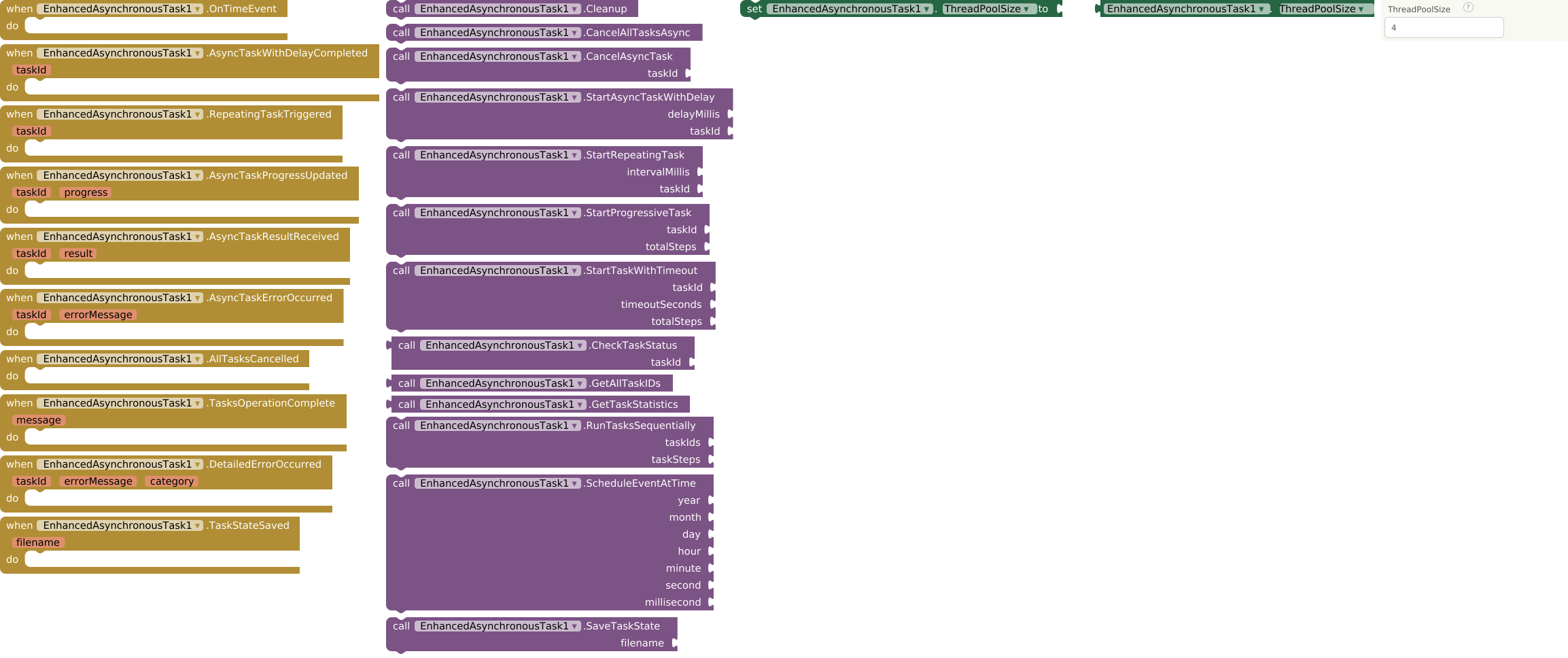
 Performance Notes
- Recompiled with FAST compiler v5.5.0 for optimal performance
- Thread-safe implementation using ConcurrentHashMap
- Automatic resource management with proper cleanup
- Configurable thread pool for different device capabilities
- JSON state persistence for debugging and recovery
- Compatible with both MIT App Inventor 2 and Kodular platforms
New files (Fast Cli)
- AIX (V3): com.bosonshiggs.enhancedasynchronoustask.aix (65.3 KB)