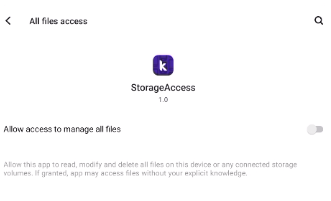
Starting from Android 11 (SDK level 30), Google introduced scoped storage which limits access to external storage by apps for better privacy.
For non-media files, apps need to use the Storage Access Framework (SAF) to interact with files. This allows users to select specific files or directories that your app can access
All Blocks
Documentation
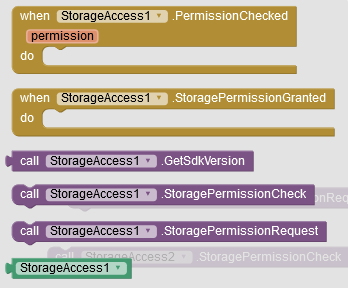
PermissionChecked
event is triggered within the StorageAccess extension to notify the app when the permissions have been checked. It provides the app with information about whether the required storage permission is granted or not,
this method is used to check the storage permissions of the app. If the app has the necessary permission to manage external storage on Android devices with SDK version 30 or above, it triggers the OnManageExternalStoragePermissionGranted() event and reports that the permission has been checked and granted through the true event. Otherwise,
it triggers the false event to indicate that the permission is not granted or the device’s SDK version is below 30.
GetSdkVersion method is used to retrieve the Android SDK version of the device.
This method is used to request storage permissions from the user. If the Android SDK version is below 30, it requests the READ_EXTERNAL_STORAGE and WRITE_EXTERNAL_STORAGE permissions using ActivityCompat.requestPermissions() . If the Android SDK version is 30 or above and the app does not have the necessary permission to manage external storage, it opens the system settings page for the user to grant the permission.
Could you please explain what exactly is the advantage compared to the built in AskForPermission / PermissionGranted / PermissionDenied blocks? Does the extension consider the different permissions needed for different Android versions?
It looks like you did not learn anything from your last post... do we really have to explain everything again and again?
I asked some simple questions. You did not answer them. . And edit your first post to provide all information there... thank you. .
Could you please explain what exactly is the advantage compared to the built in AskForPermission / PermissionGranted / PermissionDenied blocks? Does the extension consider the different permissions needed for different Android versions?
Taifun
PS: Please do not send PM, keep the discussion in this thread
You now additionally added some detailed technical documentation... it looks like you asked ChatGPT to write a technical documentation for you... however a user of your extension is not interested in the technical details ...
Please only have one documentation which explains each method and event in a way, a user of your extension will be able to understand it
So now we can see, the extension is about manage external storage permission... why should we use the extension? When should we use it? When should we NOT use it? Can we still publish our app in Google Play after using it?
Read this and then question the necessity, usefulness, applicability and understandability of your extension.
Also ask yourself whether it is enough to just talk about storage permissions or whether it is not necessary to explicitly refer to WRITE and READ permissions.
Yes, MANAGE_EXTERNAL_STORAGE permission is only required if you want unrestricted access to the entire external storage on Android 11+, especially to the
It looks like you do not really understand what you are doing. . You needed ChatGPT to write the documentation, you probably also needed ChatGPT to write the extension...
You failed to provide answers to my questions... it looks like you do not understand, what the permission manage external storage is about.
 Released on : 4 November 2023
 Latest Version : 1.0
All Blocks
Documentation





How to Use

Download