PakPaymentGatewayUltra is an all-in-one, enterprise-grade payment gateway extension developed for MIT App Inventor, Kodular, and AndroidBuilder. It brings 100% real, production-ready Pakistani payment methods into your apps with modern native bottom sheets, HMAC-SHA256 cryptography, and direct wallet debit.
 Blocks Screenshot
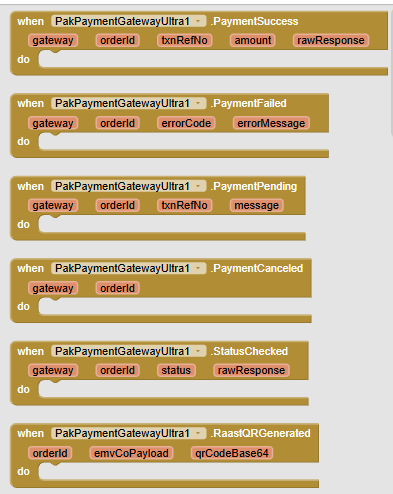
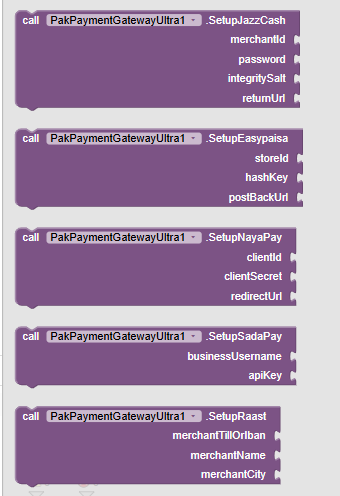
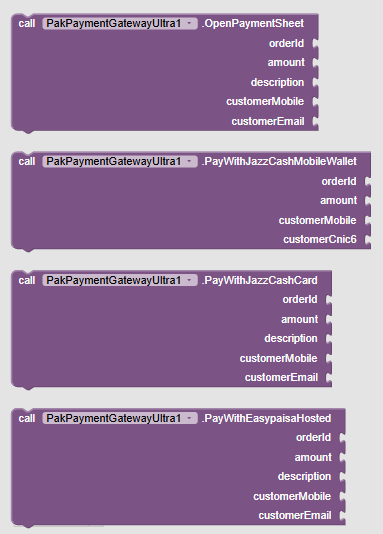
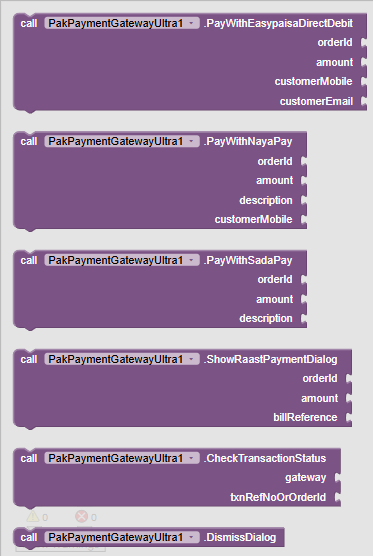
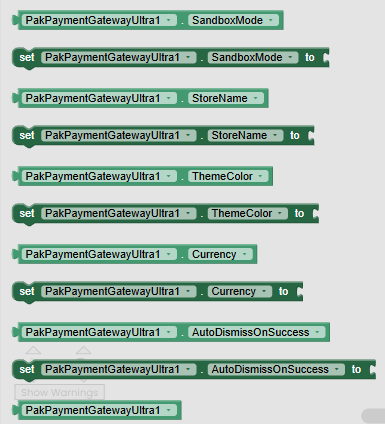
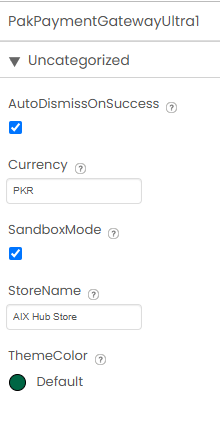
 Key Supported Payment Methods
-
 JazzCash Mobile Wallet (MWALLET)
- Triggers a real USSD push directly to the customer's phone asking for their MPIN.
- High success rate for local Pakistani users.
-
 JazzCash Card / Hosted Checkout
- Secure in-app WebView checkout supporting Visa, Mastercard, and PayPak debit/credit cards.
-
Easypaisa Hosted IPG Checkout
- Official in-app hosted checkout covering Easypaisa Mobile Wallet, Over-the-Counter (OTC), and Debit/Credit Cards.
-
 Easypaisa Direct Debit
- Direct debit prompt to customer's Easypaisa mobile account.
-
 NayaPay Arc Checkout
- Modern fintech payment integration for NayaPay wallet holders.
-
 SadaPay SadaBiz
- Seamless SadaBiz business checkout link and instant digital invoice generation.
-
 State Bank of Pakistan Raast Dynamic EMVCo QR Code
- Dynamic QR code generation complying with the official SBP EMVCo standard.
- 1-tap "Copy Raast ID" and "Open Banking App" deep-link dialog.
-
 Native Multi-Payment Sheet
- A single, beautiful dark-themed bottom sheet displaying all enabled payment methods with 1-click customer selection.
 How to Use Each Payment Method (Step-by-Step)
1. Initialize the Gateway
In Screen1.Initialize, set Sandbox/Live mode, store name, and credentials:
when Screen1.Initialize do:
    set PakPaymentGatewayUltra1.SandboxMode to False
    set PakPaymentGatewayUltra1.StoreName to "My App Store"
    set PakPaymentGatewayUltra1.ThemeColor to &HFF006644  // Pakistan Emerald Green

    // Setup JazzCash
    call PakPaymentGatewayUltra1.SetupJazzCash (
        merchantId: "YOUR_JAZZCASH_MERCHANT_ID",
        password: "YOUR_JAZZCASH_PASSWORD",
        integritySalt: "YOUR_INTEGRITY_SALT",
        returnUrl: "https://yourdomain.com/jazzcash/callback"
    )

    // Setup Easypaisa
    call PakPaymentGatewayUltra1.SetupEasypaisa (
        storeId: "YOUR_EASYPAISA_STORE_ID",
        hashKey: "YOUR_EASYPAISA_HASH_KEY",
        postBackUrl: "https://yourdomain.com/easypaisa/callback"
    )

    // Setup Raast (SBP Instant Payment)
    call PakPaymentGatewayUltra1.SetupRaast (
        merchantTillOrIban: "PK00XXXX0000000000000000",
        merchantName: "My Store",
        merchantCity: "Lahore"
    )

    // Setup SadaPay (Optional)
    call PakPaymentGatewayUltra1.SetupSadaPay (
        businessUsername: "mybusinesshandle",
        apiKey: ""
    )

    // Setup NayaPay (Optional)
    call PakPaymentGatewayUltra1.SetupNayaPay (
        clientId: "YOUR_NAYAPAY_CLIENT_ID",
        clientSecret: "YOUR_NAYAPAY_SECRET",
        redirectUrl: "https://yourdomain.com/nayapay/callback"
    )
2. Method A: All-in-One Multi-Payment Sheet (Recommended)
Pop up a unified payment sheet allowing the customer to choose their preferred method:
when ButtonCheckout.Click do:
    call PakPaymentGatewayUltra1.OpenPaymentSheet (
        orderId: "ORDER_1001",
        amount: 500,
        description: "Premium Plan Subscription",
        customerMobile: "03001234567",
        customerEmail: "customer@example.com"
    )
3. Method B: JazzCash Mobile Wallet (USSD Push)
Charge directly from the customer's JazzCash mobile balance:
when ButtonJazzCashWallet.Click do:
    call PakPaymentGatewayUltra1.PayWithJazzCashMobileWallet (
        orderId: "ORDER_1002",
        amount: 250,
        customerMobile: "03001234567",
        customerCnic6: "123456"   // Last 6 digits of customer CNIC
    )
4. Method C: Easypaisa Hosted Checkout
Open secure in-app checkout for Easypaisa wallet/cards:
when ButtonEasypaisa.Click do:
    call PakPaymentGatewayUltra1.PayWithEasypaisaHosted (
        amount: 1000,
        orderId: "ORDER_1003",
        customerMobile: "03451234567",
        customerEmail: "customer@example.com"
    )
5. Method D: Raast Dynamic QR Code
Generate and display State Bank of Pakistan Raast instant payment QR code:
when ButtonRaast.Click do:
    call PakPaymentGatewayUltra1.ShowRaastPaymentDialog (
        amount: 750,
        billReference: "ORDER_1004"
    )
6. Method E: SadaPay SadaBiz & NayaPay Arc
Initiate instant digital payment for SadaPay or NayaPay:
// SadaPay
call PakPaymentGatewayUltra1.PayWithSadaPay (
    amount: 500,
    orderId: "ORDER_1005",
    description: "Digital Product"
)

// NayaPay
call PakPaymentGatewayUltra1.PayWithNayaPay (
    orderId: "ORDER_1006",
    amount: 500,
    description: "In-App Purchase",
    customerMobile: "03001234567"
)
7. Handling Payment Events
when PakPaymentGatewayUltra1.PaymentSuccess (gateway, orderId, txnRefNo, amount, rawResponse) do:
    set LabelStatus.Text to join("Payment Successful via ", gateway, "! TXN: ", txnRefNo)
    // Deliver purchased digital item / unlock features

when PakPaymentGatewayUltra1.PaymentFailed (gateway, orderId, errorCode, errorMessage) do:
    set LabelStatus.Text to join("Payment Failed (", errorCode, "): ", errorMessage)

when PakPaymentGatewayUltra1.PaymentPending (gateway, orderId, txnRefNo, message) do:
    set LabelStatus.Text to join("Payment Pending: ", message)

when PakPaymentGatewayUltra1.PaymentCanceled (gateway, orderId) do:
    set LabelStatus.Text to "Payment canceled by user."
 Downloads & AIA Note
- AIX File: Download the latest com.abid.pakpaymentgateway.aix (86.8 KB)
- Sample AIA File Note:
A sample AIA project is not included because live testing of merchant payment gateways requires active, registered merchant/business credentials from the respective banks and telecom providers.
 Built with Goshi CLI
This extension was compiled and optimized using Goshi CLI — the next-generation autonomous AIX builder engine with zero third-party trackers, ultra-fast D8 desugaring, and complete Android 14+ / SDK 36+ support.
- GitHub Repository: https://github.com/aixhub-store/goshi-cli
- Official Portal: https://aixhub.store
Developed by Abid Ali Bhatti (AIX Hub)