🧩 Maps
An extension for MIT App Inventor 2.Developed by mariosoft using Fast.
A version of Maps without localization is attached for compatibility with Google Play.
Version 1.6
The extension now contains 3 components: Maps, Localiza, and RouteProvider.
Changes in Maps:
The MapLongClick event returns, and the MapPitchChanged event has been added, indicating the camera angle at any given time.
The panels have been completely redesigned. They are now App Inventor containers embedded in the map, which is much simpler than the previous method of managing panels (you can now create one panel at the top and another at the bottom). This is achieved with two functions: CreatePanelEmbedded and SetPanelEmbedVisibility, which hide or show the panel depending on its position.
To enhance the appearance of App Inventor elements, the SetRounderCorner function has been created, allowing you to create elements with rounded corners, and the SetContainerClickable function with its corresponding event, which is very useful for creating attractive buttons. Several bugs have been fixed in clickElement and in polygon area calculations.
Localiza:
This component creates a GPS locator with two types: service-based and non-service-based. In addition to the logical LocationChanged event, it has the OnCurrentLocation event, which is valid when a single location is requested using the GetCurrentLocation function.
It now allows loading and saving GPX files, and recording routes that can later be converted to a GPX file. It also allows loading a GPX file from the Android "Open with..." menu.
It creates a database of saved routes, with the option to add markers to them.
The "Location with service" and "Open with..." options only work in compiled applications. It is also possible to navigate a loaded route.
RouteProvider
It has always been my intention that the extension work without any API key, so Walhalla is used as the route server, which is free and doesn't require a key to calculate a route. The rest of the functionalities already existed in previous versions.
Version 1.5
Although I've always programmed my maps with Leaflet, due to its native map rotation issues, I've completely rewritten the code for MapsLibre, the free version of Mapbox. MapsLibre is much more stable and natively supports rotation, eliminating the problems with element placement when the map is rotated. I've also included many new features in the map:
Layers
Regarding the OSM blocking issues with tile requests from mobile apps, the German version of OSM, which doesn't have this problem, is now used, although the option to choose the original OSM version remains.
I've included the 3D option :
Enable3DBuildings() - tilts the camera to 45°
Disable3DBuildings() - returns to top view (0°)
SetPitchAngle(degrees) - custom angle (0-85°)
Works best with vector layers like 'ESRI World Imagery'
A new “3D Buildings” layer
Elements
Now, by default, elements are not centered on the map when created. If you want them centered, you must use centermap.
A new type of marker, CircleMark, has been created, which gives you the option of border and interior color, radius, and interior text.
New events have been included, such as MoveMap, which fires when the user moves, rotates, or zooms the map. Events have also been created for boundingbox, such as me. They requested
And finally, an event for the panels, which I will discuss later.
Panels
Now there is complete integration of the map into the application through the panels, which allow us to create horizontal and vertical layouts, labels, buttons, EditText fields, and images, all embedded in the map. Interaction between the panels and the application is through the ClickPanel event.
Navigation
The isOffRoute function has been created, which detects if we are not following the route correctly.
New information about the next point, and the indication of the direction of the next turn in the form of a text icon.
Version 1.4
Fixed bugs related to deleting elements and button visibility
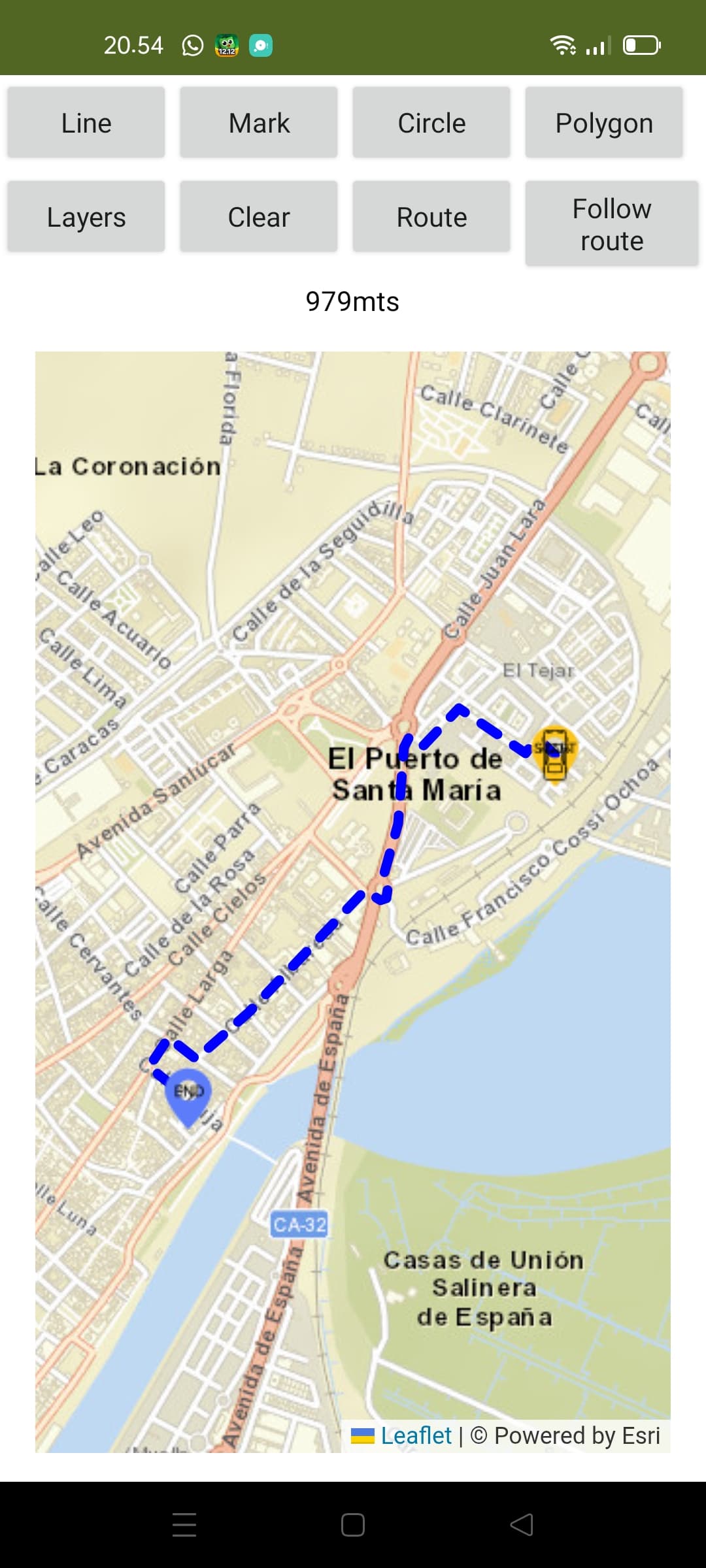
Route navigation has been added to adapt it to the extension. For this, you need a free API key from https://openrouteservice.org/
Two AIAs are now included: one for an overview of the extension and another for navigating an OpenStreamRoute route. In the general AIA, actions are performed via the map button, and in the navigation AIA, you must include its API key for it to work.

Version 1.3
Errors have been corrected regarding hiding the map button and the information displayed on elements when clicked.
Version 1.2
After help from TIMAI2 and suggestions from curious_singh, Zaq_Qum, and David_B, significant modifications have been made to the extension:
-
The extension now ignores the App Inventor WebView and generates from the native Android WebView component. You will need to specify a container to include the map. This eliminates the zoom button and makes map interaction smoother.
-
The map now adapts 100% to the container size.
-
Mark icons now have a new "size" parameter where you specify the icon size up to infinity, although 64 is recommended. You must consider the size of the asset icon to avoid misalignment.
-
The extension now works with both the App Inventor Companion and Kodular Companions without asset permission issues.
-
In addition to the clean map, you can now delete elements individually. To do this, each element (Marks, Lines, Polygons, and Circles) must have an ID. (Unique)
-
The colors of the circle, line, and polygon can be in #3388ff format or with the color's own name.
-
In the case of watermarks, it's different; it allows a color change from 0 to 360 degrees depending on the hue filter of the CSS file. 8. Elements allow a click event, returning all element information, except for markers, which will be triggered by a double click, as a single click is reserved for popup information.
-
Two Bounding Boxes have been included: one over the map with the north, south, east, and west coordinate parameters, and another over each element.
-
The map rotation function has been included.
-
The map includes a button that can be deleted by the user, which would be very useful for, for example, centering my position and creating a marker at my location, or anything else I want to do.
-
Functions have been included that calculate the length of the line in meters and the areas of the polygon and circle in square meters.
-
Four new layers have been included.
-
Two new functions have been included: one that converts a JSON of coordinates into an App Inventor list of lists, and another that converts an App Inventor list of coordinates into a JSON coordinate string.
 Specifications
 Package: es.mariosoft.maps
 Size: 129,69 KB
 Version: 1.6
 Minimum API Level: 14
 Updated On: 2026-04-09T22:00:00Z
 Built & documented using: FAST v5.5.0
 Multi-Components
 Maps
Maps
Extension component for Maps. Created using Rush.
Events:
Maps has total 19 events.
1. ButtonClick
It is triggered when the user touches the floating circular button on the map.
2. ReceiveMeasure
Event that returns the requested measurement (meters or square meters).
| Parameter | Type |
|---|---|
| id | text |
| tipo | text |
| valor | number |
3. ReceiveGetBound
Returns the map bounding box as JSON array where each element is: [0]=N (North), [1]=S (South), [2]=E (East), [3]=W (West). Example: [[40.5],[40.4],[-3.7],[-3.8]]
| Parameter | Type |
|---|---|
| json | text |
4. BoundigBox
It is triggered when the Boundig Box
5. MoveMap
Event triggered when user move map.
6. ReceiveCoordinates
Event received when requesting the coordinates of a marker
| Parameter | Type |
|---|---|
| id | text |
| lat | number |
| lng | number |
7. Rotate
Event that is triggered when a touch zoom/rotate gesture is completed.
| Parameter | Type |
|---|---|
| angle | number |
8. HeadingChanged
Event triggered when device compass heading changes (0-360 degrees)
| Parameter | Type |
|---|---|
| heading | number |
9. PitchChanged
Event triggered when map pitch (inclination) changes (0-85 degrees)
| Parameter | Type |
|---|---|
| pitch | number |
10. ZoomChange
Event received when Zoom Change
| Parameter | Type |
|---|---|
| nivel | number |
11. MapClick
Event received when Click Map
| Parameter | Type |
|---|---|
| lat | number |
| lng | number |
12. MarkerClick
Event received when Click Marker
| Parameter | Type |
|---|---|
| id | text |
| lat | number |
| lng | number |
| info | text |
| type | text |
13. MapDobleClick
Event received when DoubleClick Map
| Parameter | Type |
|---|---|
| lat | number |
| lng | number |
14. MapLongClick
Event received when LongClick Map (500ms hold)
| Parameter | Type |
|---|---|
| lat | number |
| lng | number |
15. ElementClick
Event received when Click Element
| Parameter | Type |
|---|---|
| id | text |
| lat | number |
| lon | number |
| info | text |
| type | text |
16. CircleClick
Event received when Click Circle
| Parameter | Type |
|---|---|
| id | text |
| lat | number |
| lng | number |
| info | text |
| type | text |
17. ElementDragged
Event received when one element dragged
| Parameter | Type |
|---|---|
| id | text |
| lat | number |
| lng | number |
18. MapReady
It fires when the map has loaded and is ready to receive commands.
19. ClickContainer
Event triggered when a container is clicked
| Parameter | Type |
|---|---|
| container | component |
Methods:
Maps has total 41 methods.
1. CrearWebView
Initialize a custom WebView in the chosen container
| Parameter | Type |
|---|---|
| contenedor | component |
2. OpenStreetView
Load Street View in the current viewer using coordinates.
| Parameter | Type |
|---|---|
| lat | number |
| lng | number |
3. CloseStreetView
Close Street View
4. ShowCompass
See or hide the compass
| Parameter | Type |
|---|---|
| visible | boolean |
5. ShowScale
Show or hide the scale and configure the measurement type
| Parameter | Type |
|---|---|
| visible | boolean |
| useImperial | boolean |
6. InitMap
Initialize the map to an exact location and zoom level
| Parameter | Type |
|---|---|
| lat | number |
| lng | number |
| zoom | number |
7. Layers
Change the map layer
| Parameter | Type |
|---|---|
| layername | text |
8. CrearMarca
Create marker
| Parameter | Type |
|---|---|
| id | text |
| lat | number |
| lng | number |
| info | text |
| color | number |
| drag | boolean |
9. RotateMapa
Rotate the map to orient yourself according to the bearing or compass
| Parameter | Type |
|---|---|
| grados | number |
10. GetRotation
Get the current rotation angle of the map (returns event)
11. IconMark
Replace a Mark icon with an image URL or an asset file
| Parameter | Type |
|---|---|
| id | text |
| iconoUrl | text |
| size | number |
12. AngleMark
Rotate a mark the indicated degrees
| Parameter | Type |
|---|---|
| id | text |
| grados | number |
13. MoveMark
Move a marker to a specific latitude and longitude
| Parameter | Type |
|---|---|
| id | text |
| lat | number |
| lng | number |
14. DrawLine
Draw a Line on the map
| Parameter | Type |
|---|---|
| id | text |
| json | text |
| color | text |
| thickness | number |
| info | text |
| discontinuous | boolean |
15. DrawPolygon
Draw a polygon on the map
| Parameter | Type |
|---|---|
| id | text |
| json | text |
| color | text |
| info | text |
| drag | boolean |
16. DrawCircle
Draw a circle on the map
| Parameter | Type |
|---|---|
| id | text |
| lat | number |
| lng | number |
| rad | number |
| color | text |
| info | text |
| drag | boolean |
17. DrawCircleMark
Draw a circle marker with border
| Parameter | Type |
|---|---|
| id | text |
| lat | number |
| lng | number |
| rad | number |
| color | text |
| borderColor | text |
| text | text |
| info | text |
| drag | boolean |
18. MarkCoordinates
Request the coordinates of a marker
| Parameter | Type |
|---|---|
| id | text |
19. ClearMap
Clear map
20. SetView
Change position and zoom simultaneously with a flight effect.
| Parameter | Type |
|---|---|
| lat | number |
| lng | number |
| zoom | number |
21. SetZoom
Change the zoom without moving the coordinates.
| Parameter | Type |
|---|---|
| nivel | number |
22. CenterMap
Center Map
| Parameter | Type |
|---|---|
| lat | number |
| lng | number |
23. JSONAListoCoordeinates
Convert list JSON [[lat,lng],...] in one List of List App Inventor.
- Return type:
list
| Parameter | Type |
|---|---|
| jsonTexto | text |
24. ListCoordinatesAJSON
Convert ones list of coordinates App Inventor a JSON list coordinates.
- Return type:
text
| Parameter | Type |
|---|---|
| lista | list |
25. DeleteElement
Delete any element
| Parameter | Type |
|---|---|
| id | text |
26. BoundigBoxMap
Bounding box map on four points
| Parameter | Type |
|---|---|
| n | number |
| s | number |
| e | number |
| w | number |
27. BoundigBoxElement
Adjust the camera to perfectly frame a specific item using its ID.
| Parameter | Type |
|---|---|
| id | text |
28. RequestMeasure
Request the measurement (area or length) of an item by its ID.
| Parameter | Type |
|---|---|
| id | text |
29. GetBoundigBox
Returns the map bounding box as JSON array where each element is: [0]=N (North), [1]=S (South), [2]=E (East), [3]=W (West). Example: [[40.5],[40.4],[-3.7],[-3.8]]
30. Providers
List of Provider
- Return type:
list
31. Distances
Returns the distance in meters between two coordinates
- Return type:
number
| Parameter | Type |
|---|---|
| lat1 | number |
| lon1 | number |
| lat2 | number |
| lon2 | number |
32. Heading
Calculate the angle (0-360) between two GPS coordinates.
- Return type:
number
| Parameter | Type |
|---|---|
| lat1 | number |
| lng1 | number |
| lat2 | number |
| lng2 | number |
33. IconTextMark
Determine the text icon that a CircleMark should have based on its info
- Return type:
text
| Parameter | Type |
|---|---|
| texto | text |
34. Language
Language
- Return type:
text
35. Enable3DBuildings
Enable 3D buildings on the map
36. Disable3DBuildings
Disable 3D buildings
37. SetPitchAngle
Set the pitch angle for 3D view (0-85 degrees)
| Parameter | Type |
|---|---|
| degrees | number |
38. CreatePanelEmbed
Create an embedded panel (TOP or BOTTOM) with automatic alignment and CSS element adjustment
| Parameter | Type |
|---|---|
| container | component |
| position | text |
| align | text |
39. SetPanelEmbedVisibility
Show or hide an embedded panel and adjust CSS elements automatically
| Parameter | Type |
|---|---|
| position | text |
| visible | boolean |
40. SetRoundedCorners
Set rounded corners for any App Inventor component (Button, Label, Container, etc.)
| Parameter | Type |
|---|---|
| component | component |
| cornerRadius | number |
| backgroundColor | text |
41. SetContainerClickable
Make a container (Vertical or Horizontal Arrangement) clickable. Fires ClickContainer event.
| Parameter | Type |
|---|---|
| container | component |
| clickable | boolean |
Setter:
Maps has total 1 setter property.
1. ButtonVisible
Show or hide the circular button on the map.
- Input type:
boolean
Getter:
Maps has total 1 getter property.
1. ButtonVisible
Show or hide the circular button on the map.
- Return type:
boolean
Localiza
Extension for Localiza
Events:
Localiza has total 5 events.
1. OnLocationChanged
Fired when location changes
| Parameter | Type |
|---|---|
| latitude | number |
| longitude | number |
| altitude | number |
| accuracy | number |
| speed | number |
2. OnCurrentLocation
Fired when getting current location once
| Parameter | Type |
|---|---|
| latitude | number |
| longitude | number |
| altitude | number |
| accuracy | number |
3. onResume
Event is fired on onResume callback.
4. DataParsed
Event fired when GPX or route data is parsed: returns points, waypoints, stats, JSON line, and start/end coordinates
| Parameter | Type |
|---|---|
| points | list |
| waypoints | list |
| totalDistance | number |
| averageAltitude | number |
| totalTime | number |
| averageSpeed | number |
| jsonLine | text |
| latStart | number |
| lonStart | number |
| latEnd | number |
| lonEnd | number |
5. FileSaved
Event fired gpx write
| Parameter | Type |
|---|---|
| path | text |
Methods:
Localiza has total 15 methods.
1. GetCurrentLocation
Get current location once. Uses useService flag from Start()
2. requestNotificationPermission
Request Permission Notification for Service Location
3. AddMarkDataBase
Add Marks database
| Parameter | Type |
|---|---|
| lat | number |
| lon | number |
| info | text |
4. Start
Start GPS with interval (ms), distance (m), save track and useService flag (true=service, false=direct)
| Parameter | Type |
|---|---|
| interval | number |
| distance | number |
| grabtrack | boolean |
| useServiceFlag | boolean |
5. Stop
Stop GPS (service or direct)
6. IsGpsActive
Is GPS Active
- Return type:
boolean
7. GetDates
Dates of routes
- Return type:
list
8. CalRouteDatabase
Calculate route from database: gets points and marks, fires DataParsed event with all data
| Parameter | Type |
|---|---|
| date | text |
9. CreateGpx
Create gpx from database
| Parameter | Type |
|---|---|
| Title | text |
| Date | text |
10. AddtoLat
address to Latitud
- Return type:
number
| Parameter | Type |
|---|---|
| Address | text |
11. AddtoLon
address to Longitude
- Return type:
number
| Parameter | Type |
|---|---|
| Address | text |
12. GetAddress
Return adress for lat, lon
- Return type:
text
| Parameter | Type |
|---|---|
| latitude | number |
| longitude | number |
13. ReadGpxContent
Read GPX Text
| Parameter | Type |
|---|---|
| Content | text |
14. ReadGpxFile
Read file GPX
15. ReceivedAction
Receive external action
- Return type:
text
Getters:
Localiza has total 8 getter properties.
1. CurrentLat
Current Latitude
- Return type:
number
2. CurrentLon
Current Longitude
- Return type:
number
3. CurrentAlt
Current Altitude
- Return type:
number
4. CurrentAccuracy
Current Accuracy in meters
- Return type:
number
5. CurrentSpeed
Current Speed in m/s
- Return type:
number
6. CurrentAddress
Current Address (uses Geocoder)
- Return type:
text
7. TitleGpx
Title Gpx
- Return type:
text
8. isGpx
is gpx
- Return type:
boolean
RouteProvider
provider route with navigation
Events:
RouteProvider has total 3 events.
1. OnRouteCalculated
Event in calculating Navigation
| Parameter | Type |
|---|---|
| distance | text |
| duration | text |
| points | list |
| json | text |
| latStart | number |
| lonStart | number |
| latEnd | number |
| lonEnd | number |
2. OnRouteError
Event on Error Route Calculated
| Parameter | Type |
|---|---|
| error | text |
3. NavigationCompleted
Event that is triggered when the user reaches the final destination.
Methods:
RouteProvider has total 5 methods.
1. RequestNavigation
Request Navigation
| Parameter | Type |
|---|---|
| lat1 | number |
| lon1 | number |
| lat2 | number |
| lon2 | number |
2. StartNavigation
Start Navigation
3. Navigation
Navigation
| Parameter | Type |
|---|---|
| latitud | number |
| longitud | number |
| speed | number |
| Transportation | text |
4. IsOffRoute
Detects route deviation during navigation
- Return type:
boolean
| Parameter | Type |
|---|---|
| latActual | number |
| lonActual | number |
| speed | number |
| Transportation | text |
| accuracy | number |
5. IconString
Extract Icon text a one instruction navegation (??, ?, ?, ??, ??, ??, ??, ??)
- Return type:
text
| Parameter | Type |
|---|---|
| ins | text |
Setters:
RouteProvider has total 2 setter properties.
1. Transportation
Type Transportation (foot-walking, driving-car, cycling-regular)
- Input type:
text
2. Mute
Mute voice notifications
- Input type:
boolean
Getters:
RouteProvider has total 8 getter properties.
1. Transportation
Type Transportation (foot-walking, driving-car, cycling-regular)
- Return type:
text
2. KmRemaining
Km remaining
- Return type:
text
3. SpeedRoute
Speed Route
- Return type:
text
4. InsRoute
Instruction Route
- Return type:
text
5. TimeRemaining
Time Remaining
- Return type:
text
6. IconDirection
Icon Direction
- Return type:
text
7. NextPoint
Next Point Navigation
- Return type:
text
8. Mute
Mute voice notifications
- Return type:
boolean
es.mariosoft.maps.aix (85,9 KB) (Version without localization)
es.mariosoft.maps.aix (129,7 KB)
Mapas1.aia (170,1 KB)
Navigator.aia (173,3 KB)
Localizers.aia (149,2 KB)
Un saludo