🧩 Maps
An extension for MIT App Inventor 2.Developed by mariosoft using Fast.
Version 1.4
Fixed bugs related to deleting elements and button visibility
Route navigation has been added to adapt it to the extension. For this, you need a free API key from https://openrouteservice.org/
The blocks for this are as follows:
13. onCalculating
Event in calculating Navigation
| Parameter | Type |
|---|---|
| Km | text |
| Time | text |
| Points | list |
| Json | text |
| LatStart | number |
| LonStart | number |
| LatEnd | number |
| LonEnd | number |
14. NavigationCompleted
Event that is triggered when the user reaches the final destination.
31. StartNavigation
Start Navigation
32. Navigation
Navigation
| Parameter | Type |
|---|---|
| latitud | number |
| longitud | number |
| speed | number |
| Transportation | text |
34. RequestNavigation
Request Navigation
| Parameter | Type |
|---|---|
| Lat1 | text |
| Lon1 | text |
| Lat2 | text |
| Lon2 | text |
35. keepsScreen
It keeps the screen on so that the GPS doesn't stop during navigation.
| Parameter | Type |
|---|---|
| Active | boolean |
2. NavigatorApiKey
Api Key Navigator
- Input type:
text
3. Transportation
Type Transportation (foot-walking, driving-car, cycling-regular)
- Input type:
text
2. NavigatorApiKey
Api Key Navigator
- Return type:
text
3. Transportation
Type Transportation (foot-walking, driving-car, cycling-regular)
- Return type:
text
4. KmRemaining
Km remaining
- Return type:
text
5. SpeedRoute
Speed Route
- Return type:
text
6. InsRoute
Instruction Route
- Return type:
text
7. TimeRemaining
Time Remaining
- Return type:
text
Access to Google Street View has been added with the following blocks:
2. OpenStreetView
Load Street View in the current viewer using coordinates.
| Parameter | Type |
|---|---|
| lat | number |
| lng | number |
3. CloseStreetView
Close Street View
Map rotation and zoom functionality have been added.
27. ActiveRotationFingers
Define whether the two fingers zoom (false) or rotate (true).
| Parameter | Type |
|---|---|
| OnlyRotate | boolean |
A compass and scale have been added, which can be visible or hidden at the user's discretion.
4. ShowCompass
See or hide the compass
| Parameter | Type |
|---|---|
| visible | boolean |
5. ShowScale
Show or hide the scale and configure the measurement type (imperial or decimal)
| Parameter | Type |
|---|---|
| visible | boolean |
| useImperial | boolean |
Other included features
33. Language
Language
- Return type:
text
28. Providers
List of Provider
- Return type:
list
Two AIAs are now included: one for an overview of the extension and another for navigating an OpenStreamRoute route. In the general AIA, actions are performed via the map button, and in the navigation AIA, you must include its API key for it to work.
Version 1.3
Errors have been corrected regarding hiding the map button and the information displayed on elements when clicked.
Specifications
Package: es.mariosoft.maps
Size: 44,38 KB
Version: 1.4
Minimum API Level: 14
Updated On: 2026-03-03T23:00:00Z
Built & documented using: FAST v5.5.0
Events:
Maps has total 14 events.
1. ButtonClick
It is triggered when the user touches the floating circular button on the map.
2. ReceiveMeasure
Event that returns the requested measurement (meters or square meters).
| Parameter | Type |
|---|---|
| id | text |
| tipo | text |
| valor | number |
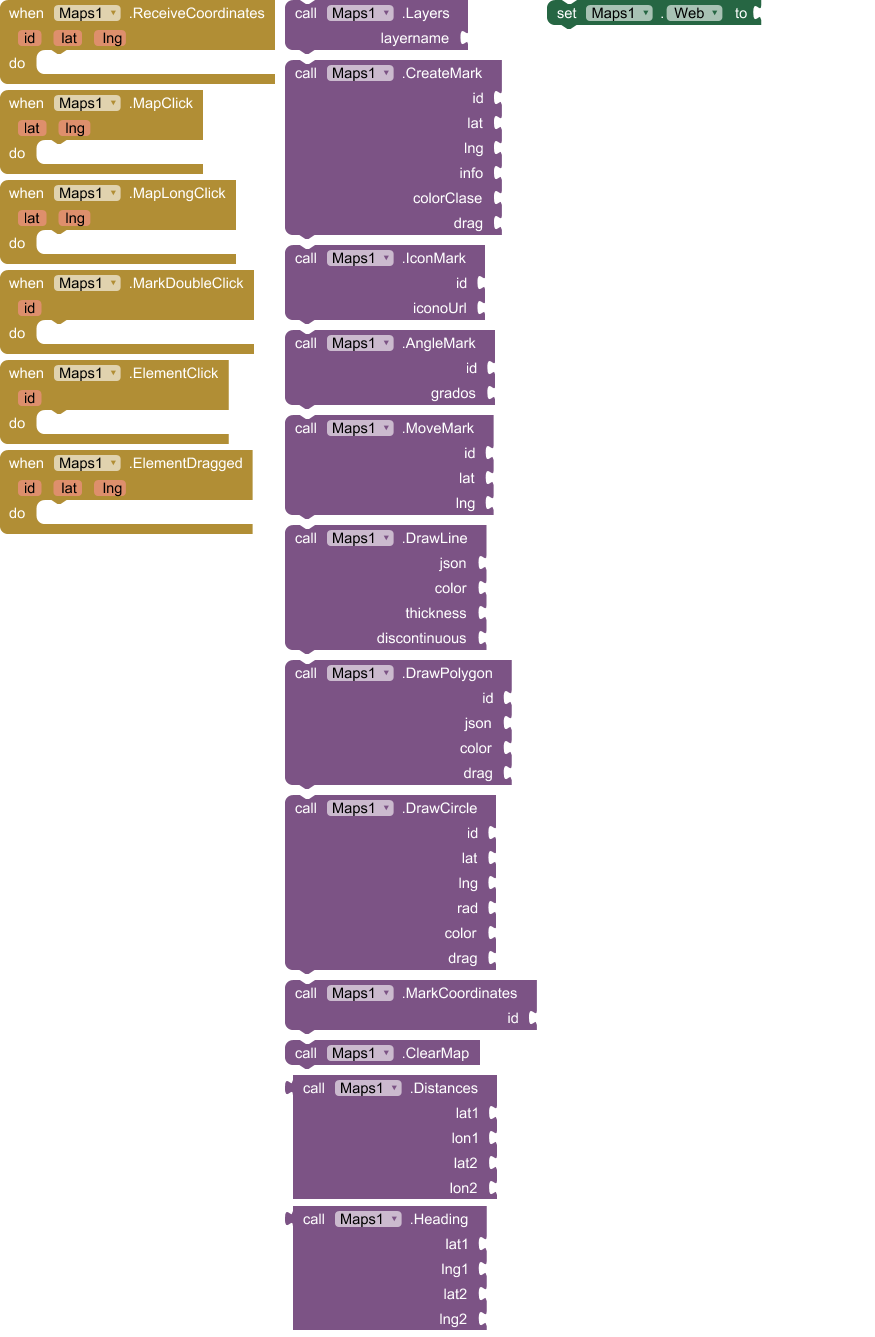
3. ReceiveCoordinates
Event received when requesting the coordinates of a marker
| Parameter | Type |
|---|---|
| id | text |
| lat | number |
| lng | number |
4. Rotate
Event that is triggered when a touch zoom/rotate gesture is completed.
| Parameter | Type |
|---|---|
| angle | number |
5. ZoomChange
Event received when Zoom Change
| Parameter | Type |
|---|---|
| nivel | number |
6. MapClick
Event received when Click Map
| Parameter | Type |
|---|---|
| lat | number |
| lng | number |
7. MapLongClick
Event received when LongClick Map
| Parameter | Type |
|---|---|
| lat | number |
| lng | number |
8. ElementClick
Event received when Click Element
| Parameter | Type |
|---|---|
| id | text |
| lat | number |
| lon | number |
| info | text |
| type | text |
9. MarkDoubleClick
Event received when DoubleClick Mark
| Parameter | Type |
|---|---|
| id | text |
| lat | number |
| lon | number |
| info | text |
| type | text |
10. CircleClick
Event received when Click Circle
| Parameter | Type |
|---|---|
| id | text |
| lat | number |
| lng | number |
| type | text |
11. ElementDragged
Event received when one element dragged
| Parameter | Type |
|---|---|
| id | text |
| lat | number |
| lng | number |
12. MapReady
It fires when the map has loaded and is ready to receive commands.
13. onCalculating
Event in calculating Navigation
| Parameter | Type |
|---|---|
| Km | text |
| Time | text |
| Points | list |
| Json | text |
| LatStart | number |
| LonStart | number |
| LatEnd | number |
| LonEnd | number |
14. NavigationCompleted
Event that is triggered when the user reaches the final destination.
Methods:
Maps has total 35 methods.
1. CrearWebView
Initialize a custom WebView in the chosen container
| Parameter | Type |
|---|---|
| contenedor | component |
2. OpenStreetView
Load Street View in the current viewer using coordinates.
| Parameter | Type |
|---|---|
| lat | number |
| lng | number |
3. CloseStreetView
Close Street View
4. ShowCompass
See or hide the compass
| Parameter | Type |
|---|---|
| visible | boolean |
5. ShowScale
Show or hide the scale and configure the measurement type (imperial or decimal)
| Parameter | Type |
|---|---|
| visible | boolean |
| useImperial | boolean |
6. InitMap
Initialize the map to an exact location and zoom level (always include this in MapReady())
| Parameter | Type |
|---|---|
| lat | number |
| lng | number |
| zoom | number |
7. Layers
Change the map layer, layersname = OSM Mapnik, OSM Humanitarian, ESRI World Street Map, ESRI World Imagery, ESRI World Topo Map, CartoDB Positron, CartoDB Dark Matter, OPNVKarte, OpenTopoMap, OSM Cycle, Top Plus Color, Top Plus Gray
| Parameter | Type |
|---|---|
| layername | text |
8. CrearMarca
Create a brand with position, pop-up window, color (grades 0 a 360, example red 140, green 260, blue 0 purpple 100..., try several values) and drag option.
| Parameter | Type |
|---|---|
| id | text |
| lat | number |
| lng | number |
| info | text |
| color | number |
| drag | boolean |
9. RotateMapa
Rotate the map to orient yourself according to the bearing or compass (it automatically reverses the rotation).
| Parameter | Type |
|---|---|
| grados | number |
10. IconMark
Replace a Mark icon with an image URL or an asset file. recomended max size 64
| Parameter | Type |
|---|---|
| id | text |
| iconoUrl | text |
| size | number |
11. AngleMark
Rotate a mark the indicated degrees, When using locationsensor, the icon must be facing north to function correctly.
| Parameter | Type |
|---|---|
| id | text |
| grados | number |
12. MoveMark
Move a marker to a specific latitude and longitude
| Parameter | Type |
|---|---|
| id | text |
| lat | number |
| lng | number |
13. DrawLine
Draw a Line on the map, json format [[lat,lon],[lat,lon]...], color 'blue', 'red'... or type '#3388ff'
| Parameter | Type |
|---|---|
| id | text |
| json | text |
| color | text |
| thickness | number |
| info | text |
| discontinuous | boolean |
14. DrawPolygon
Draw a polygon on the map, json format [[lat,lon],[lat,lon]...], color 'blue', 'red'... or type '#3388ff'
| Parameter | Type |
|---|---|
| id | text |
| json | text |
| color | text |
| info | text |
| drag | boolean |
15. DrawCircle
Draw a circle on the map, color 'blue', 'red'... or type '#3388ff'
| Parameter | Type |
|---|---|
| id | text |
| lat | number |
| lng | number |
| rad | number |
| color | text |
| drag | boolean |
16. MarkCoordinates
Request the coordinates of a marker
| Parameter | Type |
|---|---|
| id | text |
17. ClearMap
Clear map
18. SetView
Change position and zoom simultaneously with a flight effect.
| Parameter | Type |
|---|---|
| lat | number |
| lng | number |
| zoom | number |
19. SetZoom
Change the zoom without moving the coordinates.
| Parameter | Type |
|---|---|
| nivel | number |
20. CenterMap
Center Map
| Parameter | Type |
|---|---|
| lat | number |
| lng | number |
21. JSONAListoCoordeinates
Convert list JSON [[lat,lng],...] in one List of List App Inventor.
- Return type:
list
| Parameter | Type |
|---|---|
| jsonTexto | text |
22. ListCoordinatesAJSON
Convert ones list of coordinates App Inventor a JSON list coordinates.
- Return type:
text
| Parameter | Type |
|---|---|
| lista | list |
23. DeleteElement
Delete any element
| Parameter | Type |
|---|---|
| id | text |
24. BoundigBoxMap
Bounding box map on four points
| Parameter | Type |
|---|---|
| n | number |
| s | number |
| e | number |
| w | number |
25. BoundigBoxElement
Adjust the camera to perfectly frame a specific item using its ID.
| Parameter | Type |
|---|---|
| id | text |
26. RequestMeasure
Request the measurement (area or length) of an item by its ID.
| Parameter | Type |
|---|---|
| id | text |
27. ActiveRotationFingers
Define whether the two fingers zoom (false) or rotate (true).
| Parameter | Type |
|---|---|
| OnlyRotate | boolean |
28. Providers
List of Provider
- Return type:
list
29. Distances
Returns the distance in meters between two coordinates
- Return type:
number
| Parameter | Type |
|---|---|
| lat1 | number |
| lon1 | number |
| lat2 | number |
| lon2 | number |
30. Heading
Calculate the angle (0-360) between two GPS coordinates.
- Return type:
number
| Parameter | Type |
|---|---|
| lat1 | number |
| lng1 | number |
| lat2 | number |
| lng2 | number |
31. StartNavigation
Start Navigation
32. Navigation
Navigation
| Parameter | Type |
|---|---|
| latitud | number |
| longitud | number |
| speed | number |
| Transportation | text |
33. Language
Language
- Return type:
text
34. RequestNavigation
Request Navigation
| Parameter | Type |
|---|---|
| Lat1 | text |
| Lon1 | text |
| Lat2 | text |
| Lon2 | text |
35. keepsScreen
It keeps the screen on so that the GPS doesn't stop during navigation.
| Parameter | Type |
|---|---|
| Active | boolean |
Setters:
Maps has total 3 setter properties.
1. ButtonVisible
Show or hide the circular button on the map.
- Input type:
boolean
2. NavigatorApiKey
Api Key Navigator
- Input type:
text
3. Transportation
Type Transportation (foot-walking, driving-car, cycling-regular)
- Input type:
text
Getters:
Maps has total 7 getter properties.
1. ButtonVisible
Show or hide the circular button on the map.
- Return type:
boolean
2. NavigatorApiKey
Api Key Navigator
- Return type:
text
3. Transportation
Type Transportation (foot-walking, driving-car, cycling-regular)
- Return type:
text
4. KmRemaining
Km remaining
- Return type:
text
5. SpeedRoute
Speed Route
- Return type:
text
6. InsRoute
Instruction Route
- Return type:
text
7. TimeRemaining
Time Remaining
- Return type:
text
After help from TIMAI2 and suggestions from curious_singh, Zaq_Qum, and David_B, significant modifications have been made to the extension:
-
The extension now ignores the App Inventor WebView and generates from the native Android WebView component. You will need to specify a container to include the map. This eliminates the zoom button and makes map interaction smoother.
-
The map now adapts 100% to the container size.
-
Mark icons now have a new "size" parameter where you specify the icon size up to infinity, although 64 is recommended. You must consider the size of the asset icon to avoid misalignment.
-
The extension now works with both the App Inventor Companion and Kodular Companions without asset permission issues.
-
In addition to the clean map, you can now delete elements individually. To do this, each element (Marks, Lines, Polygons, and Circles) must have an ID. (Unique)
-
The colors of the circle, line, and polygon can be in #3388ff format or with the color's own name.
-
In the case of watermarks, it's different; it allows a color change from 0 to 360 degrees depending on the hue filter of the CSS file. 8. Elements allow a click event, returning all element information, except for markers, which will be triggered by a double click, as a single click is reserved for popup information.
-
Two Bounding Boxes have been included: one over the map with the north, south, east, and west coordinate parameters, and another over each element.
-
The map rotation function has been included.
-
The map includes a button that can be deleted by the user, which would be very useful for, for example, centering my position and creating a marker at my location, or anything else I want to do.
-
Functions have been included that calculate the length of the line in meters and the areas of the polygon and circle in square meters.
-
Four new layers have been included.
-
Two new functions have been included: one that converts a JSON of coordinates into an App Inventor list of lists, and another that converts an App Inventor list of coordinates into a JSON coordinate string.
es.mariosoft.maps.aix (45,1 KB)
Mapas.aia (75,5 KB)
Navegar.aia (113,8 KB)
Un saludo