Hi everyone, I'd like to share this extension I developed for reading and writing NXP iCode SLIX tags (ISO 15693 / NfcV). It supports memory read/write, AFI management and EAS control.
iCode SLIX tags are NFC chips manufactured by NXP Semiconductors, compliant with the ISO 15693 standard, known on Android as NfcV. They operate at 13.56 MHz and can be read up to 1.5 meters without a battery. Typical applications include libraries, pharmaceuticals, access control, industrial tracking and object identification.
Each iCode SLIX tag has a 112-byte memory organized in 28 blocks of 4 bytes each (blocks 0–27), a unique 8-byte UID, and two special configuration bytes called AFI and EAS.
AFI — Application Family Identifier
AFI is a single byte in the tag configuration that identifies the application family the tag belongs to. It works as a fast filter: a reader can query only tags with a specific AFI instead of all tags in the field, reducing communication time.
00 Default
10 Transport
20 Financial
30 Identification
40 Telecommunications
50 Medical
60 Multimedia
70 Gaming
80 Data Storage
90 Item Management
A0 Express Parcel
B0 Postal Services
C0 Airlines / Luggage
D0 Asset Management
E0 Libraries / Archives
F0 Reserved
EAS — Electronic Article Surveillance
EAS is an anti-theft function built into the chip. When EAS is enabled, the tag responds to the EAS Alarm command with a presence signal. When EAS is disabled, the tag remains silent. Anti-theft portals continuously send the EAS Alarm command — if a tag with active EAS passes through, the portal detects it.

ReadMode (boolean, default true) — Must be true for reading, false for writing. Write functions (WriteIcodeBlock, LockIcodeBlock, WriteAfi, EnableEas, DisableEas) do not execute if ReadMode is true.

Returns the UID of the last detected tag.

Returns the type of the last detected tag.

Reads tag system information.
Result fires SystemInfo
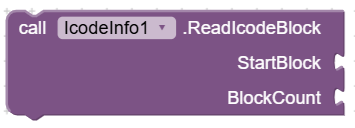
Reads one or more consecutive blocks.
StartBlock is the starting block
BlockCount is the number of blocks to read.
Requires ReadMode = true.
Result fires the GetBlocks event.
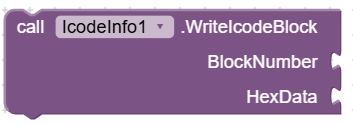
Writes 4 bytes to a single block.
BlockNumber is the target block
HexData is an 8-character hex string (e.g. "90015EC1")
Requires ReadMode = false
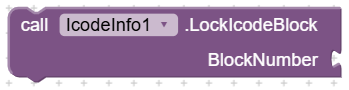
Permanently and irreversibly locks a block as read-only.
BlockNumber is the block to lock.
Requires ReadMode = false
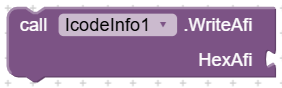
Writes the AFI value to the tag.
HexAfi is a 2-character hex string (e.g. "00", "70").
Requires ReadMode = false.
Result fires OperationSuccess or GetError

Enables EAS on the tag.
Requires ReadMode = false.
Result fires OperationSuccess or GetError

Disables EAS on the tag.
Requires ReadMode = false.
Result fires OperationSuccess or GetError

Queries the EAS status of the tag.
Result fires EasAlarmResult
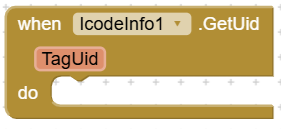
Fires when a tag is detected.
TagUid is the UID as a 16-character hex string.
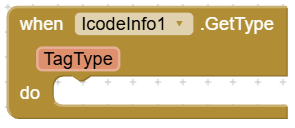
Fires after GetSystemInfo().
TagType is the chip model name (e.g. "iCode SLIX", "iCode SLIX2")
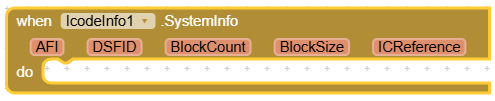
Fires after GetSystemInfo().
AFI = current AFI value (hex),
DSFID = data format (hex, normally
"00"),BlockCount = number of available blocks,
BlockSize = size in bytes of each block,
ICReference = internal code identifying the exact chip model.
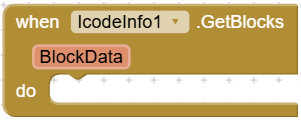
Fires after ReadIcodeBlock().
BlockData is a continuous hex string where every 8 characters represent one 4-byte block.
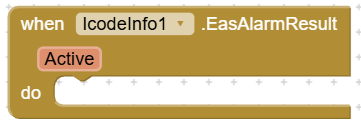
Fires after EasAlarm()
Active = true if EAS is enabled, false if disabled.
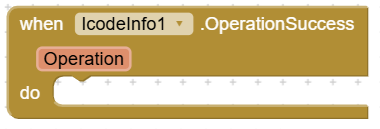
Fires when a write operation completes successfully.
Operation is the operation name: "WriteAfi", "EnableEas", "DisableEas".
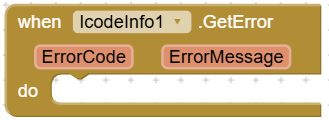
Fires when an error occurs.
ErrorCode: 0 = generic error, 1 = operation failed, 2 = IOException (communication problem).
Extension file
icode.info.aix (35.6 KB)
Icode Sample
IcodeSample.aia (98.8 KB)
I hope it can be useful to others working with this type of tag.
Best regards
Marco Perrone