🧩 Grav
An extension for MIT App Inventor 2.The Grav extension allows you to create stunning particle animations in your App Inventor apps. It provides a highly customizable particle system with various generators for colors, positions, shapes, and animations. Developed by TechHamara using Fast.
Find More Extension
Terms & Conditions
Find More On BuyMeCoffee Page
 Specifications
 Package: io.th.grav
 Size: 47.24 KB
 Version: 1.0
 Minimum API Level: 7
 Updated On: 2025-12-19T18:30:00Z
 Built & documented using: FAST v5.3.2
 Library Uses Thank You glomadrian for your Grav library.
 Get aix from here
Get More info and aia/apk on GitHub
Get aia
grav.aia (50.7 KB)
Demo
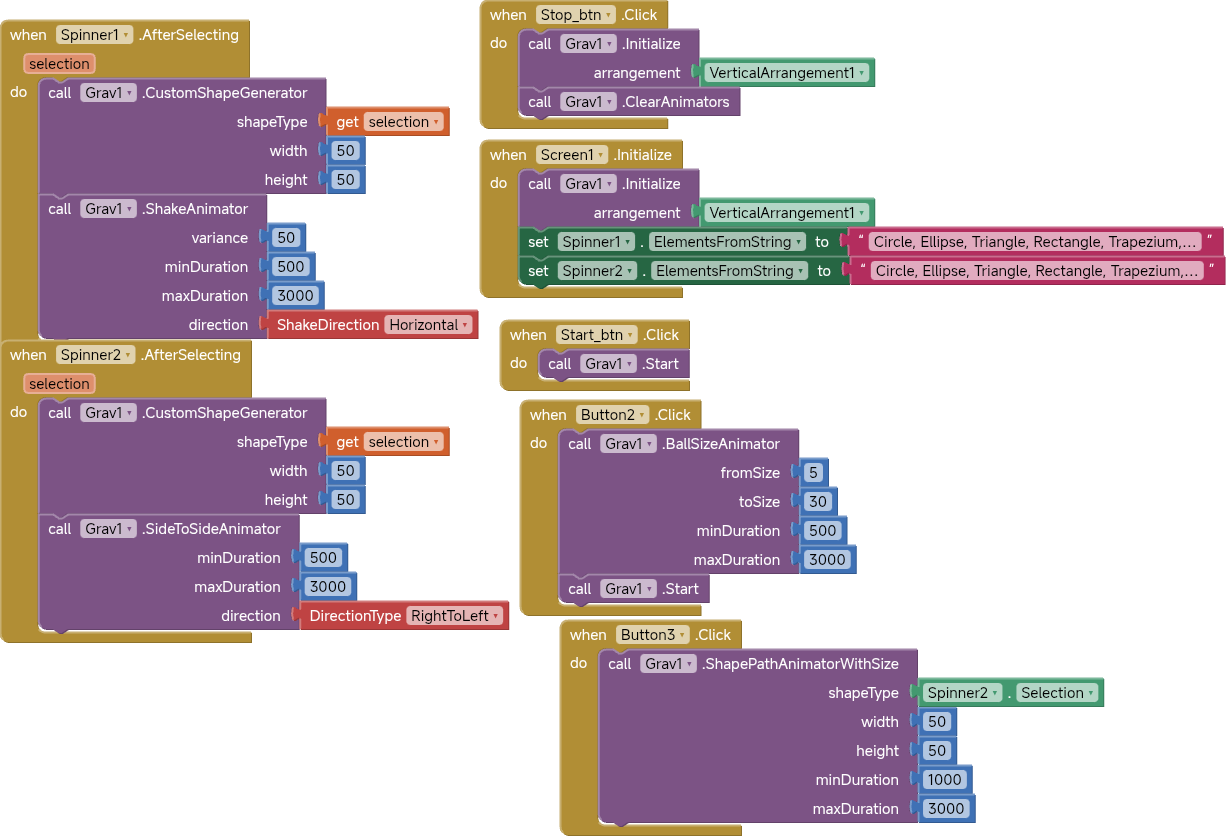
Multiple animations
Blocks
Descriptions
Click here
Events:
Grav has total 3 events.
1. Initialized
Event triggered when the Grav animation view has been successfully initialized and added to the arrangement. You can safely call configuration methods after this event.
2. AnimationStarted
Event triggered when the particle animation has started. Use this to update UI elements or perform actions when animation begins.
3. AnimationStopped
Event triggered when the particle animation has stopped. Use this to update UI elements or perform cleanup actions.
Methods:
Grav has total 20 methods.
1. Initialize
Initialize the Grav animation view inside an arrangement component. Call this method first before using any other functions. The view will fill the entire arrangement.
| Parameter | Type |
|---|---|
| arrangement | component |
2. Start
Start the particle animation. All configured generators and animators will begin animating the particles on screen.
3. Stop
Stop the particle animation. All animators will be halted and particles will freeze in their current positions.
4. RandomColorGenerator
Set the color generator to Random mode. Each particle will be assigned a random color from the full color spectrum. Changes take effect immediately.
5. OneColorGenerator
Set all particles to use a single color. Provide the color as an App Inventor color value (e.g., from the color picker). Changes take effect immediately.
| Parameter | Type |
|---|---|
| color | number |
6. ArrayColorGenerator
Set particles to cycle through a list of colors. Provide colors as a list of App Inventor color values or hex strings (e.g., '#FF0000'). Particles will use colors from this array in sequence. Changes take effect immediately.
| Parameter | Type |
|---|---|
| colors | list |
7. RegularPointGenerator
Generate particles in a regular grid pattern. cellSize determines the spacing between particles (in pixels), and variance adds randomness to positions (in pixels). Smaller cellSize creates more particles. Changes take effect immediately.
| Parameter | Type |
|---|---|
| cellSize | number |
| variance | number |
8. CircularPointGenerator
Generate particles in a circular/radial pattern from the center. cellSize determines the radial spacing (in pixels), and variance adds randomness to positions (in pixels). Creates an organic, expanding pattern. Changes take effect immediately.
| Parameter | Type |
|---|---|
| cellSize | number |
| variance | number |
9. PercentPointGenerator
Generate particles at specific percentage positions on the screen. Provide a list of coordinates as percentages (0-100) in format: [x1, y1, x2, y2, ...]. For example, [50, 50] creates one particle at screen center, [25, 25, 75, 75] creates two particles. Changes take effect immediately.
| Parameter | Type |
|---|---|
| percentPoints | list |
10. BallGenerator
Set particles to render as circles/balls. fromSize and toSize define the size range in pixels - each particle will be randomly sized between these values. Use the same value for both to have uniform-sized particles. Changes take effect immediately.
| Parameter | Type |
|---|---|
| fromSize | number |
| toSize | number |
11. RectangleGenerator
Set particles to render as rectangles. Specify the width and height in pixels. All particles will be the same size. Changes take effect immediately.
| Parameter | Type |
|---|---|
| width | number |
| height | number |
12. CustomShapeGenerator
Set particles to render as custom shapes. Supported shapes (case-insensitive): 'circle', 'ellipse', 'triangle', 'rectangle', 'trapezium', 'parallelogram', 'capsule', 'leaf', 'rhombus', 'heart', 'drop', 'star', 'diamond', 'pentagon', 'hexagon', 'cloud'. Specify width and height in pixels. Changes take effect immediately.
| Parameter | Type |
|---|---|
| shapeType | ShapeType (helper blocks) |
| width | number |
| height | number |
- Enums for ShapeType:
Circle,Ellipse,Triangle,Rectangle,Trapezium,Parallelogram,Capsule,Leaf,Rhombus,Heart,Drop,Star,Diamond,Pentagon,Hexagon,Cloud
13. AlphaAnimator
Add a transparency/fade animation to particles. 'from' and 'to' are opacity values (0-255, where 0 is transparent and 255 is opaque). minDuration and maxDuration are in milliseconds - each particle's animation duration is randomized within this range. Use multiple calls to add multiple animators.
| Parameter | Type |
|---|---|
| from | number |
| to | number |
| minDuration | number |
| maxDuration | number |
14. BallSizeAnimator
Add a size pulsing animation to ball particles. fromSize and toSize define the size range in pixels. minDuration and maxDuration are in milliseconds. Particles will continuously grow and shrink between these sizes. Only works with Ball generator.
| Parameter | Type |
|---|---|
| fromSize | number |
| toSize | number |
| minDuration | number |
| maxDuration | number |
15. ShakeAnimator
Add a shaking/vibration animation to particles. variance controls shake intensity in pixels. minDuration and maxDuration are in milliseconds. direction: 0 for horizontal shake, 1 for vertical shake. Particles will shake back and forth continuously.
| Parameter | Type |
|---|---|
| variance | number |
| minDuration | number |
| maxDuration | number |
| direction | ShakeDirection (helper blocks) |
- Enums for ShakeDirection:
Horizontal,Vertical
16. SideToSideAnimator
Add a smooth side-to-side movement animation. minDuration and maxDuration are in milliseconds. direction: 0=LeftToRight, 1=RightToLeft, 2=UpToDown, 3=DownToUp. Particles will move across the screen in the specified direction and loop back.
| Parameter | Type |
|---|---|
| minDuration | number |
| maxDuration | number |
| direction | DirectionType (helper blocks) |
- Enums for DirectionType:
LeftToRight,RightToLeft,TopToBottom,BottomToTop
17. PathAnimator
Add an animation that moves particles along a custom SVG path. 'path' is an SVG path string (e.g., 'M 0,0 L 100,100'). minVariance and maxVariance add randomness to the path. originalWidth and originalHeight define the path's coordinate system. minDuration and maxDuration are in milliseconds for the complete path traversal.
| Parameter | Type |
|---|---|
| path | text |
| minVariance | number |
| maxVariance | number |
| originalWidth | number |
| originalHeight | number |
| minDuration | number |
| maxDuration | number |
18. ShapePathAnimator
Add an animation that moves particles along a pre-built shape path. Supported shapes (case-insensitive): 'circle', 'ellipse', 'triangle', 'rectangle', 'trapezium', 'parallelogram', 'capsule', 'rhombus', 'heart', 'star', 'diamond', 'pentagon', 'hexagon'. minVariance and maxVariance add randomness to the path. originalWidth and originalHeight define the path's coordinate system (recommended 100x100). minDuration and maxDuration are in milliseconds for the complete path traversal.
| Parameter | Type |
|---|---|
| shapeType | ShapeType (helper blocks) |
| minVariance | number |
| maxVariance | number |
| originalWidth | number |
| originalHeight | number |
| minDuration | number |
| maxDuration | number |
19. ShapePathAnimatorWithSize
Add an animation that moves particles along a pre-built shape path with custom size. Supported shapes (case-insensitive): 'circle', 'ellipse', 'triangle', 'rectangle', 'trapezium', 'parallelogram', 'capsule', 'rhombus', 'heart', 'star', 'diamond', 'pentagon', 'hexagon'. width and height define the size of the path in pixels. minDuration and maxDuration are in milliseconds for the complete path traversal.
| Parameter | Type |
|---|---|
| shapeType | ShapeType (helper blocks) |
| width | number |
| height | number |
| minDuration | number |
| maxDuration | number |
20. ClearAnimators
Remove all animators from particles. Particles will remain visible but stop all movement and effects. Use this before adding a new set of animators or to create static particles. Changes take effect immediately.
Thanks
Feel free to contact us any quarry or suggestions.