🧩 CustomChromeTabs
An extension for MIT App Inventor 2.Developed by Numan using Fast.
**
General introduction
This is CustomChromeTabs implementation for
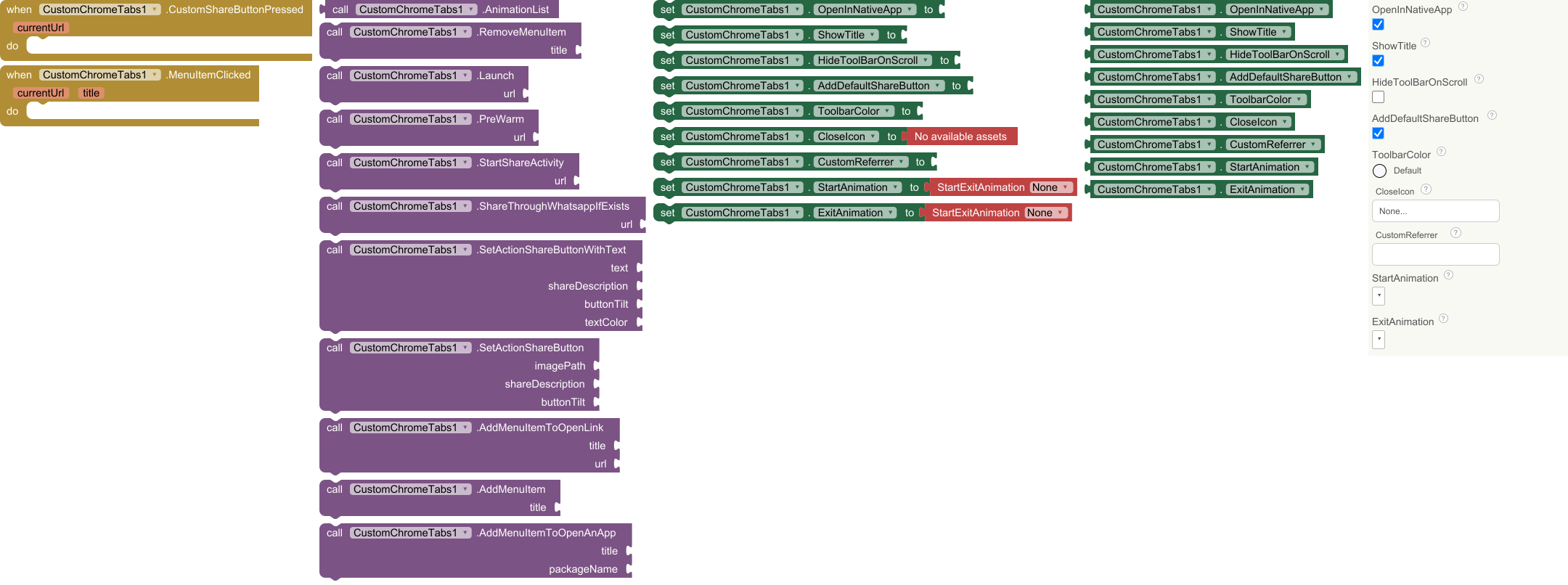
AI2. You can visit websites with chrome infrastructure instead of Webview. There are 2 events , 11 functions , 9 properties. Events and animations work in only compiled APK. not in companion. All icons must be 24dp in height and 24-48 dp in width.
**
 Specifications
 Package: com.sincan.customchrometabs
 Size: 346 KB
 Version: 1.0
 Minimum API Level: 14
 Updated On: 2026-04-20T21:00:00Z
 Built & documented using: FAST v5.3.1
Events:
CustomChromeTabs has total 2 events.
1. CustomShareButtonPressed
Fires when Custom Share Button Clicked. URL belongs to current webpage opened.

| Parameter | Type |
|---|---|
| currentUrl | text |
2. MenuItemClicked
Fires when Menu Item Clicked. Url belongs to current page.

| Parameter | Type |
|---|---|
| currentUrl | text |
| title | text |
Methods:
CustomChromeTabs has total 11 methods.
1. AnimationList
Available transition animations to use for closing or launching cct

- Return type:
list
2. RemoveMenuItem
Method for RemoveMenuItem

| Parameter | Type |
|---|---|
| title | text |
3. Launch
Launch custom tab

| Parameter | Type |
|---|---|
| url | text |
4. PreWarm
Prepare ServiceConnection to launch quickly next time.

| Parameter | Type |
|---|---|
| url | text |
5. StartShareActivity
start share activity. You can use it in events to share url.

| Parameter | Type |
|---|---|
| url | text |
6. ShareThroughWhatsappIfExists
start share activity to Whatsapp

| Parameter | Type |
|---|---|
| url | text |
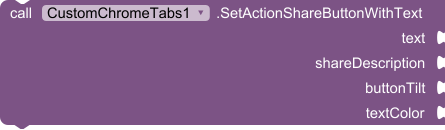
7. SetActionShareButtonWithText
Create a text label and use it as custom action share button icon.
| Parameter | Type |
|---|---|
| text | text |
| shareDescription | text |
| buttonTilt | boolean |
| textColor | number |
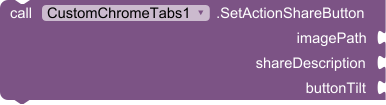
8. SetActionShareButton
Create action share button with image. Image must 24dp in height and 24-48 dp in width.
| Parameter | Type |
|---|---|
| imagePath | text |
| shareDescription | text |
| buttonTilt | boolean |
9. AddMenuItemToOpenLink
adds a menu item with title. When clicked, it opens web page

| Parameter | Type |
|---|---|
| title | text |
| url | text |
10. AddMenuItem
adds a simple menu item with title. When clicked, MenuItemClicked event fires

| Parameter | Type |
|---|---|
| title | text |
11. AddMenuItemToOpenAnApp
adds a menu item with title. When clicked, opens an app you want with the package name. The package name can be as example 'com.instagram.android' If that app doesnt exist in phone, menu item will not be added.

| Parameter | Type |
|---|---|
| title | text |
| packageName | text |
9. ExitAnimation
- Input type:
choices - Arguments:
None,Slide_To_Right,Slide_To_Left,Zoom,Fade,Slide_To_Up,Slide_To_Down,Bottom_Sheet_Style,ios_pop,ios,iOS_Swipe_Back_Style
Properties:
CustomChromeTabs has total 9 properties.
1. OpenInNativeApp
Whether or not to launch the native app of a web site if exists.


- type:
boolean
2. ShowTitle
Whether or not to show the title.*


type: boolean
3. HideToolBarOnScroll
Whether or not the toolbar will be hidden while scrolling.


type: boolean
4. AddDefaultShareButton
Whether or not to add the default share menu item into Toolbar


- type:
boolean
5. ToolbarColor
Specifies the color of the toolbar.


*type: number
6. CloseIcon
To add custom close icon.


- type:
text - Helper type:
asset
7. CustomReferrer
You can set your app as the referrer when launching your Custom Tab. For example 'my-ai2-app://'. In this way you can let websites know where their traffic is coming from.


- type:
text
8. StartAnimation
Set or get
start animation


- type:
text - Helper type:
StartExitAnimation - Helper enums options:
None,Slide_To_Right,Slide_To_Left,Zoom,Fade,Slide_To_Up,Slide_To_Down,Bottom_Sheet_Style,iOS_Swipe_Back_Style,ios_pop,ios
9. ExitAnimation
set or get exit animation


- type:
text - Helper type:
StartExitAnimation
Demo Blocks And Screenshots
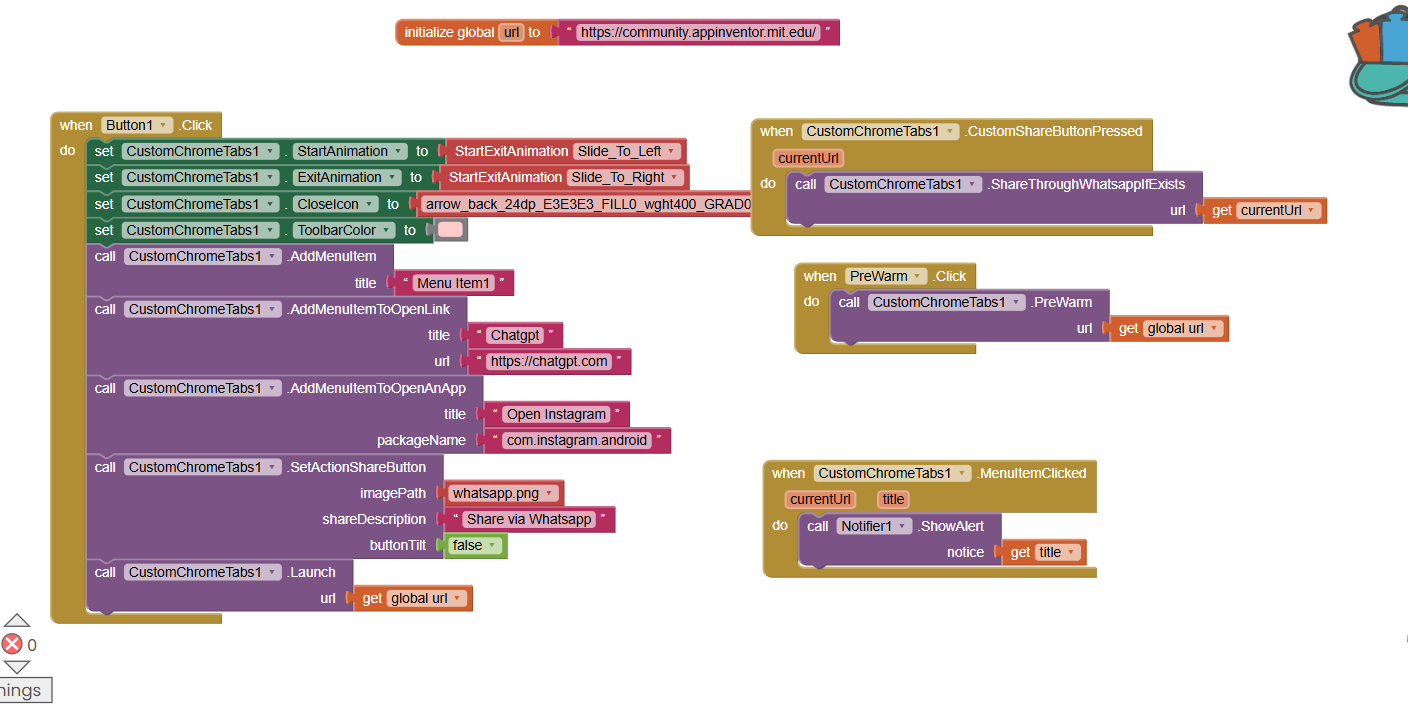


Example aia:
ChromeCustomTabs.aia (420.2 KB)
 Download Extension
com.sincan.customchrometabs.aix (346.6 KB)