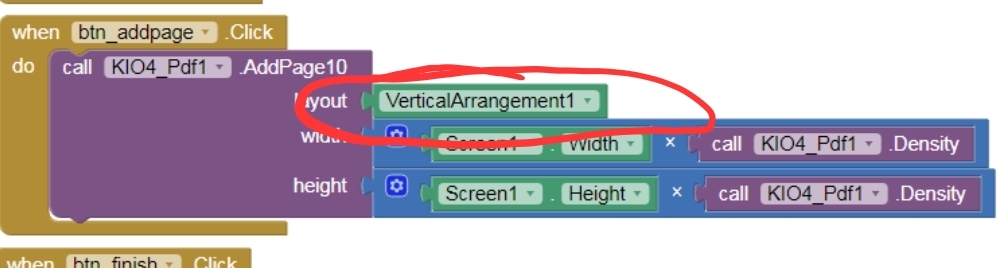
It looks loke you are trying to add a complete screen... use the AddPage method only with arrangements, see also Create Build Crear App Inventor Extensiones Extensions Crear PDF. Leer PDF.
Taifun
It looks loke you are trying to add a complete screen... use the AddPage method only with arrangements, see also Create Build Crear App Inventor Extensiones Extensions Crear PDF. Leer PDF.
Taifun
Hi!
I have tried different ways including kio410 to print pdf that is created from layout but the problem is I have android 11 and I can't find pdf file to use pdf reader to print it or print directly! I want an extension or a way to convert ASD to ByteArry or if you know how to do it!
If you are using the 10 blocks then the pdf will be in your ASD. You will need to copy/move it to Shared Storage for access by other apps.
You can use the SAF extension to convert a file to a byte Array.
Yes I did it with SAF ReadAsByteArry and saved the file to Document in my Ipad but when I try to open it to read or print then that's the problem (file damaged) he says! but when I use kio4 (create 10, apppage10, finish10 then Read then it works but I can neither find the file in my device nor print it!
The file will be in your ASD, you will need to use your app (File component) to find it:
storage/emulated/0/Android/data/packageName/files/...
If there is an issue with the SAF extension, then report it in the SAF extension topic.
yes but after I use file component how should I find the PDF file to print it?? can explain steps after Read kio10 how and which block function on file component should be used
Pls help to this problem.When click the createpdf button pdf not create and save.pls fix this issue.see the below blocks.
You probably need to be using the "10" blocks for your project.
Read through the above topic to understand how things work.
hi
still not create pdf.pls help to share blocks screen short
BLOCKS
AIA
createPDFKI04.aia (12.4 KB)
SCREEN
You may need to give a little bit of time for the pdf to be created before attempting to view it.
hi
I need to save the PDF I created. Can you tell me how to do it? Can you send me a block?
The pdf will be saved in your ASD (application specific directory). The path will be like this:
/storage/emulated/0/Android/data/<packageName>/files
You can use the KI04 GetAsdPath or the File component to get there.
hI
you can share full block above.
Hi
i need to know where exactly. i should add this 2 block and to which block it should be connected.if possible, please provide the full block.
What exactly do you want to do with your pdf file?
to maintain details file.it is important
Copy/Move/Share ?
all


