no, the container is red while the object is yellow

i put
#FFFFFF00
here are my new blocks and template btw

{"$components":[{"$Name":"OrderProd","$Type":"HorizontalArrangement","$Version":"4","AlignHorizontal":"3","AlignVertical":"2","BackgroundColor":"&H00FFFFFF","Width":"-2","Uuid":"1695947066","$Components":[{"$Name":"OrderName","$Type":"TextBox","$Version":"6","BackgroundColor":"{1}","Enabled":"True","Width":"-1030","TextColor":"&HFFFFFFFF","Uuid":"319033403"},{"$Name":"OrderQuantity","$Type":"TextBox","$Version":"6","BackgroundColor":"&H00FFFFFF","Enabled":"False","Width":"-2","TextColor":"&HFFFFFFFF","Uuid":"1995420656"},{"$Name":"OrderPrice","$Type":"TextBox","$Version":"6","BackgroundColor":"&H00FFFFFF","Enabled":"False","Width":"-2","TextColor":"&HFFFFFFFF","Uuid":"1761926890"},{"$Name":"OrderAmtDue","$Type":"TextBox","$Version":"6","BackgroundColor":"&H00FFFFFF","Enabled":"False","Width":"-2","TextColor":"&HFFFFFFFF","Uuid":"-1748426138"},{"$Name":"Remove","$Type":"Button","$Version":"7","BackgroundColor":"&HFFD1B14E","Text":" - ","TextAlignment":"2","Uuid":"679233961"}]}],"$blocks":[]}
1 Like
Seems there is a bug in there somewhere. (@Kevinkun )This works using anyComponent blocks
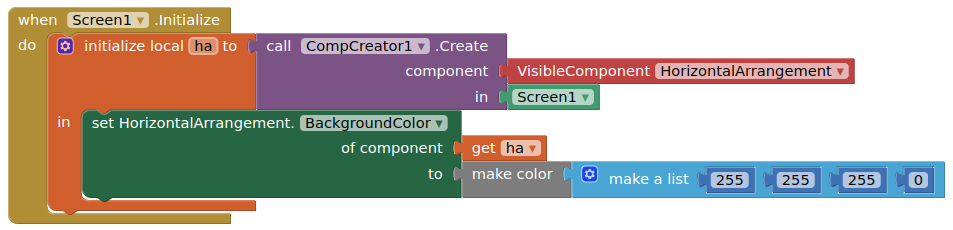
so you may need to create your components with template, then set with anyComponent blocks
2 Likes
okeem thanks for the help, btw wdym by anyComponent blocks(which one)?

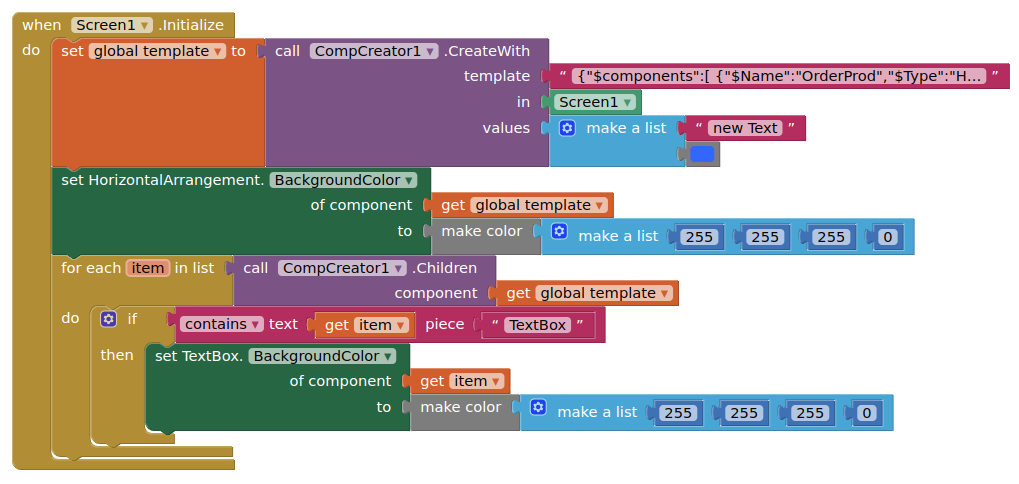
Like this:
-
As you may have figured out, you need to drag a real HorizontalArrangement and a real TextBox out onto the designer in order to get their anyComponent blocks
-
All your textboxes are coming through with a white background as well
ahhh, tysm! what if there are different kinds of components and not just a text box?
You would need to test for them as I have shown
ahh alrightt tnx again
Ok, i will check this bug .
2 Likes
After using Remove component, the parent still has a null reference after the deleted children component.

First time I click Button2, all components is removed, and each removal is logged.
If I click a second time, I get the error:
Runtime Error
Attempt to invoke virtual method 'int android.view.ViewGroup.indexOfChild(android.view.View)' on a null object reference
Looks like the Children block picks up some trace of the deleted components.
I have worked around the problem by just hiding the components, but it's cumbersome.
Saw the example further up in the thread about checking component type.
So I tried to get around it by:

And it logs: com.google.appinventor.components.runtime.HorizontalArrangement@4cb320
But it's unable to reference the component in any way. So the logging of the component Index fails
Hmm, tried to make a small example of the problem, but was unable to recreate, so I will check a bit more.
What is the difference between this one and the dynamic component extension?
No id is needed.
I see. I would like to create an other extension's component (Andres Cotes WebSocketCl) dynamically. Is it possible? I could not achieve it with the DC extension, neither with this one so far. I guess it only can create AI2 native components, isn't it.
Yes, and only visible components.
1 Like
Creating extension components dynamically should work as expected, it just doesn't work with by simply entering its name, like "Button", but passing an existing component's block is supported regardless of if it is a native component or not.
2 Likes
Brilliant. I could create it. I tried it before but i tried to create on Screen1 and that did not work. I had to create on an arrangement.
I still have a problem. When I create one at screen init that works. If i delete it and recreate in runtime it does not work. I still did not have time to debug why.