🧩 SmartPersonalColor
An extension for MIT App Inventor 2.Smart Personal Color - Skin Tone Analyzer — On-device background removal (no external API), average face RGB, undertone, season, and 15 professional color palettes.




 Table of Contents
- What does this extension do?
- How it works — No Java knowledge required
- Specifications
- Installation
- Quick Start
- Events
- Method
- Working with Palettes
- The 15 Color Palettes Explained
- Undertones Explained
- Seasons Explained (12-Season System)
- Background Removal — How it works
- Full Block Example
- Common Mistakes
- Contributing
- Credits
 What does this extension do?
SmartPersonalColor analyzes a photo of a person's face and returns:
- The average skin color of the face as RGB values (red, green, blue numbers).
- The undertone of the skin — whether it leans golden, rosy, olive, peach, or neutral.
- The personal color season — a result from the professional 12-season color analysis system (e.g. "True Spring", "Deep Autumn", "True Winter").
- 15 professional color palettes — a curated list of colors that harmonize with that specific skin tone, organized by color theory and personal color analysis principles.
- A PNG image of the face with the background removed — entirely on-device, no internet, no paid API.
This is useful for building fashion, beauty, makeup, or personal styling apps.
 Specifications
| Property | Value |
|---|---|
 Package Package |
com.iagolirapassos.smartpersonalcolor |
 Size Size |
20.50 KB |
 Version Version |
4.0 |
 Minimum API Level Minimum API Level |
14 (Android 4.0+) |
 Updated On Updated On |
2026-02-18 |
 No Internet Required No Internet Required |
 Fully on-device Fully on-device |
 Built & documented using Built & documented using |
FAST v5.5.0 |
Installation
- Download the
.aixfile from the Releases page. - Open your project in MIT App Inventor 2.
- In the left panel, click Extensions → Import extension.
- Select the downloaded
.aixfile and click OK. - The
SmartPersonalColorcomponent will appear in your Extensions palette. - Drag it into your screen — it is non-visible, so it won't appear on the phone screen.
 Quick Start
The simplest possible usage in 3 steps:
Step 1 — Call Analyze passing the path of a photo:
Use a
CameraorImage Pickercomponent to get the image path, then pass it directly toAnalyze.
call SmartPersonalColor1.Analyze
    imagePath  →  [path from Camera or ImagePicker]
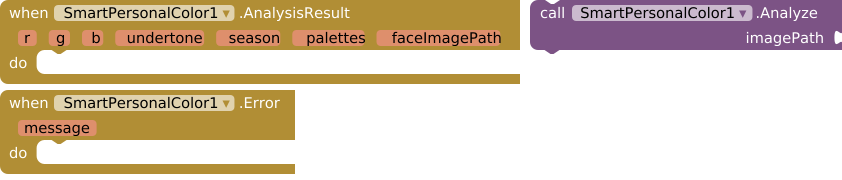
Step 2 — Handle the AnalysisResult event:
when SmartPersonalColor1.AnalysisResult
     r  g  b  undertone  season  palettes  faceImagePath
do
    set Label_Season.Text to  season
    set Label_Undertone.Text to  undertone
    set Image_Face.Picture to  faceImagePath
Step 3 — Handle the Error event (always do this):
when SmartPersonalColor1.Error
     message
do
    set Label_Error.Text to  message
That's it. The face image with background removed will be set automatically to your Image component.
 Events
SmartPersonalColor has 2 events.
1. AnalysisResult
Fires when analysis completes successfully.
Returns average face RGB, undertone, 12-season result, 15 named color palettes (List of Lists: index 0 = name, index 1–5 = hex colors), and a transparent PNG path of the face with background removed (no external API).
| Parameter | Type | Description |
|---|---|---|
r |
number | Red channel of the average skin color (0–255) |
g |
number | Green channel of the average skin color (0–255) |
b |
number | Blue channel of the average skin color (0–255) |
undertone |
text | One of: Golden, Rosy, Neutral, Peach, Olive |
season |
text | One of the 12 seasons, e.g. True Spring, Deep Autumn |
palettes |
list | A List containing 15 palettes (see section below) |
faceImagePath |
text | Local file:// path to the transparent PNG of the face |
2. Error
Fires when analysis fails for any reason.
| Parameter | Type | Description |
|---|---|---|
message |
text | A human-readable description of what went wrong |
Common reasons for failure:
- The image does not contain a visible, forward-facing face.
- The image file path is incorrect or the file does not exist.
- The image is too small or too dark to detect skin pixels.
 Method
SmartPersonalColor has 1 method.
1. Analyze
Analyzes the image. Fires AnalysisResult with: average face RGB, undertone, season, 15 color palettes (List), and the path to a PNG of the face with background removed.
| Parameter | Type | Description |
|---|---|---|
imagePath |
text | The file path of the image to analyze. Accepts file:// paths. |
Important: Analysis runs in a background thread and is non-blocking. Your app will not freeze. Results always arrive through the
AnalysisResultevent — never as a return value.
 Working with Palettes (the most important part)
The palettes parameter is a list of lists. Here is exactly how it is structured:
palettes
  └── palette 1  →  ["Monochromatic", "#C4A882", "#D4B892", "#B49872", "#A08862", "#907852"]
  └── palette 2  →  ["Analogous",     "#C4A882", "#C4B882", "#C4C882", "#B4A882", "#A49872"]
  └── ...
  └── palette 15 →  ["Neutral Harmony", "#F5F0EB", "#C8BDB2", "#8C8278", "#504640", "#1A1614"]
Each inner list has exactly 6 items:
- Index 1 → the palette name (text)
- Index 2 → color 1 in
#RRGGBBhex format - Index 3 → color 2 in
#RRGGBBhex format - Index 4 → color 3 in
#RRGGBBhex format - Index 5 → color 4 in
#RRGGBBhex format - Index 6 → color 5 in
#RRGGBBhex format
How to display all palettes — Block logic
To loop through every palette:
for each  palette  in  palettes
do
    set var_name   to  select list item  list → palette  index → 1
    set var_color1 to  select list item  list → palette  index → 2
    set var_color2 to  select list item  list → palette  index → 3
    set var_color3 to  select list item  list → palette  index → 4
    set var_color4 to  select list item  list → palette  index → 5
    set var_color5 to  select list item  list → palette  index → 6
To display just one specific palette (e.g. "Earth Tones", which is palette 13):
set var_earthPalette to  select list item  list → palettes  index → 13

set var_name   to  select list item  list → var_earthPalette  index → 1
set var_color1 to  select list item  list → var_earthPalette  index → 2
To convert a hex color string to an App Inventor color (for backgrounds):
MIT App Inventor does not natively parse #RRGGBB strings into colors directly in blocks. The recommended approach is to pass the hex string to a Canvas or display it as a label text, or use a WebViewer with a small HTML snippet to render color swatches.
How to display a color swatch using a Label
set Label_Color1.BackgroundColor to  [use the "make color" block]
    → make color  list → [r_value, g_value, b_value]
To extract RGB values from a hex string like #C4A882, use these math blocks:
R = mod( (floor(hex / 65536)), 256 )   ← use a hex-to-decimal conversion first
G = mod( (floor(hex / 256)),   256 )
B = mod(  hex,                 256 )
Tip: The simplest approach is to display the hex string as a label text and set the label's background color using the Android-compatible
make colorblock with a predefined lookup, or pass the hex values to a WebViewer for rich rendering.
 The 15 Color Palettes Explained
Group A — Color Theory (Palettes 1–6)
These are generated mathematically from the exact hue of the detected skin tone using classical color wheel relationships.
| # | Name | What it is |
|---|---|---|
| 1 | Monochromatic | Same hue as the skin, across 5 steps of brightness and saturation — from light tint to deep shade. |
| 2 | Analogous | Five hues that sit next to each other on the color wheel (−60°, −30°, base, +30°, +60°). Harmonious and natural. |
| 3 | Complementary | The skin tone color paired with its direct opposite on the color wheel (180°). High contrast, bold. |
| 4 | Triadic | Three colors evenly spaced 120° apart on the wheel. Vibrant but balanced. |
| 5 | Split-Complementary | The skin color plus two colors that flank its complement at ±30°. Less harsh than pure complementary. |
| 6 | Tetradic | Four colors evenly spaced at 90° on the wheel. Rich and complex, best used with one dominant color. |
Group B — Personal Color Analysis (Palettes 7–15)
These palettes are based on the three professional dimensions used in color draping: Temperature (warm/cool), Value (light/dark), and Chroma (clear/muted). They represent the wearable color families for each season type.
| # | Name | Season Archetype | Character |
|---|---|---|---|
| 7 | Warm Tones | True Spring / Warm Autumn | Yellow, gold, apricot, coral — mid-high chroma |
| 8 | Cool Tones | True Summer / True Winter | Powder blue, periwinkle, lavender, cool rose |
| 9 | Light & Pastel | Light Spring / Light Summer | Very high brightness, low saturation — white-tinted, airy |
| 10 | Deep & Rich | Deep Autumn / Dark Winter | Low brightness, high saturation — intense, anchoring |
| 11 | Clear & Vivid | Bright Spring / Bright Winter | Maximum saturation, no grey pigment — pure, eye-catching |
| 12 | Muted & Soft | Soft Autumn / Soft Summer | Low saturation, grey-toned — understated, blended |
| 13 | Earth Tones | Warm / True Autumn | Terracotta, rust, cognac, olive, golden sand |
| 14 | Tones | True / Dark Winter | Sapphire, emerald, ruby, amethyst, deep teal |
| 15 | Neutral Harmony | All seasons | Near-zero saturation from white to near-black, each tinted with the skin's own hue |
 Undertones Explained
The undertone is the subtle color beneath the surface of the skin that doesn't change with tanning or seasons.
| Undertone | Meaning | Common skin tones |
|---|---|---|
| Golden | Warm yellow-gold cast | Medium to tan skin with yellow warmth |
| Rosy | Cool pink-red cast | Fair to medium skin with pink or red veins |
| Neutral | Neither warm nor cool | Balanced mix, no dominant cast |
| Peach | Warm with a pinkish tint | Fair to light skin with warm pink-peach mix |
| Olive | Warm with a greenish-grey cast | Mediterranean, Latino, some Asian skin tones |
 Seasons Explained (12-Season System)
The extension maps each person to one of 12 seasonal archetypes based on three dimensions of their skin tone:
| Dimension | Detected from |
|---|---|
| Temperature (warm/cool) | Undertone classification |
| Value (light/dark) | HSV brightness of the skin color |
| Chroma (clear/muted) | HSV saturation of the skin color |
| Season | Temperature | Value | Chroma |
|---|---|---|---|
| True Spring | Warm | Light | Clear |
| Light Spring | Warm | Light | Muted |
| Bright Spring | Cool | Light | Clear |
| Light Summer | Cool | Light | Muted |
| Warm Autumn | Warm | Deep | Clear |
| Deep Autumn | Warm | Deep | Muted |
| True Winter | Cool | Deep | Clear |
| Soft Summer | Cool | Deep | Muted |
Common Mistakes
| Mistake | What happens | Fix |
|---|---|---|
| Passing a URL instead of a local file path | Analysis fails | Use Camera or ImagePicker — they return local paths |
Not handling the Error event |
App silently fails with no feedback | Always add the Error block |
| Trying to use the result before the event fires | Empty or null values | All results come through AnalysisResult — never inline |
| Using index 0 for palette name | Crashes or wrong value | App Inventor lists start at index 1 |
| Setting an Image component with a JPEG expecting transparency | White background instead of transparent | The extension returns PNG — make sure your Image component supports PNG |
Calling Analyze with an image that has no visible face |
Error event fires | Ensure the photo is well-lit and the face is centered and forward-facing |
 Contributing — For Extension Developers
SmartPersonalColor is open source and actively looking for contributors who want to improve the color analysis quality, face segmentation accuracy, or extend its capabilities.
Clone the repository
git clone git@github.com:iagolirapasssos/SmartPersonalColor.git
cd SmartPersonalColor
Areas open for improvement
- Better face segmentation — the current 4-pass HSV algorithm works well for portraits, but could be improved for side profiles, glasses, or beards.
- Fitzpatrick scale classification — explicitly classify the skin into the 6 phototype categories beyond undertone.
- Nose, eye, and lip landmark detection — real-time coordinate events using
android.media.FaceDetectorlandmarks. - Improved 12-season mapping — the current decision tree is solid but could use a more refined multi-axis scoring model.
- More palette strategies — additional personal color analysis approaches such as the 16-season Sci/ART system.
- Unit tests — color classification logic tests using JUnit.
How to contribute
- Fork the repository on GitHub.
- Create a branch with a descriptive name:
git checkout -b feature/better-segmentation - Make your changes with clear, commented code.
- Open a Pull Request describing what you changed and why.
Community
After implementing improvements, please post about them in the MIT App Inventor Community and drop the link to your community post as a comment on the original release thread so other developers can find your work, test it, and build on it.
Comment on the release post with:
- What you improved
- A link to the community post where you published your version or discussed the changes
This keeps the knowledge centralized and helps App Inventor developers who don't write Java benefit from every improvement made to the source code.
 Technical Notes for Java Developers
- The extension uses
android.media.FaceDetector(no ML Kit, no Vision API). - Background removal is a custom implementation in pure Java using
android.graphics.Color,Bitmap.getPixels(), and separable box blur — no native code, no.sofiles. - Palette generation uses
Color.HSVToColor()andColor.RGBToHSV()with mathematically derived hue rotations via therotH()helper. - The alpha mask uses a smoothstep S-curve (
t² × (3 − 2t)) for perceptually natural edge blending. - Output images are saved as PNG (lossless) to preserve the alpha channel. JPEG would destroy transparency.
- All analysis runs on a background thread via
new Thread(...)and results are posted back on the UI thread viacontainer.$form().runOnUiThread(...). - The fixed random seed (
new Random(42)) insampleSkinPixelsmakes color sampling deterministic and reproducible across calls on the same image.
 Credits
| Role | Name |
|---|---|
| Author & Maintainer | Iago Lira Passos |
| Build Tool | FAST v5.5.0 |
| Platform | MIT App Inventor 2 |
Made with  for the MIT App Inventor community.
If this extension helped your project, consider starring the repository and sharing your app in the community!






