CanvasLayers
A comprehensive multi-layer canvas extension for MIT App Inventor 2 with drawing, selection, effects, and export tools.
 Specifications
|
|
 Package Package |
com.iagolirapassos.canvaslayers |
 Size Size |
84.94 KB |
 Version Version |
1.4 |
 Minimum API Minimum API |
14 |
 Updated Updated |
2026-02-17 |
 Built with Built with |
FAST v5.5.0 |
 Overview
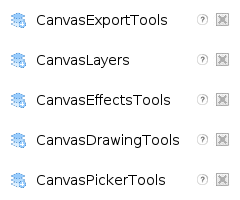
CanvasLayers is a powerful extension that transforms your Canvas component into a professional-grade layer-based drawing application. It consists of 5 integrated components that work together seamlessly:
| Component |
Description |
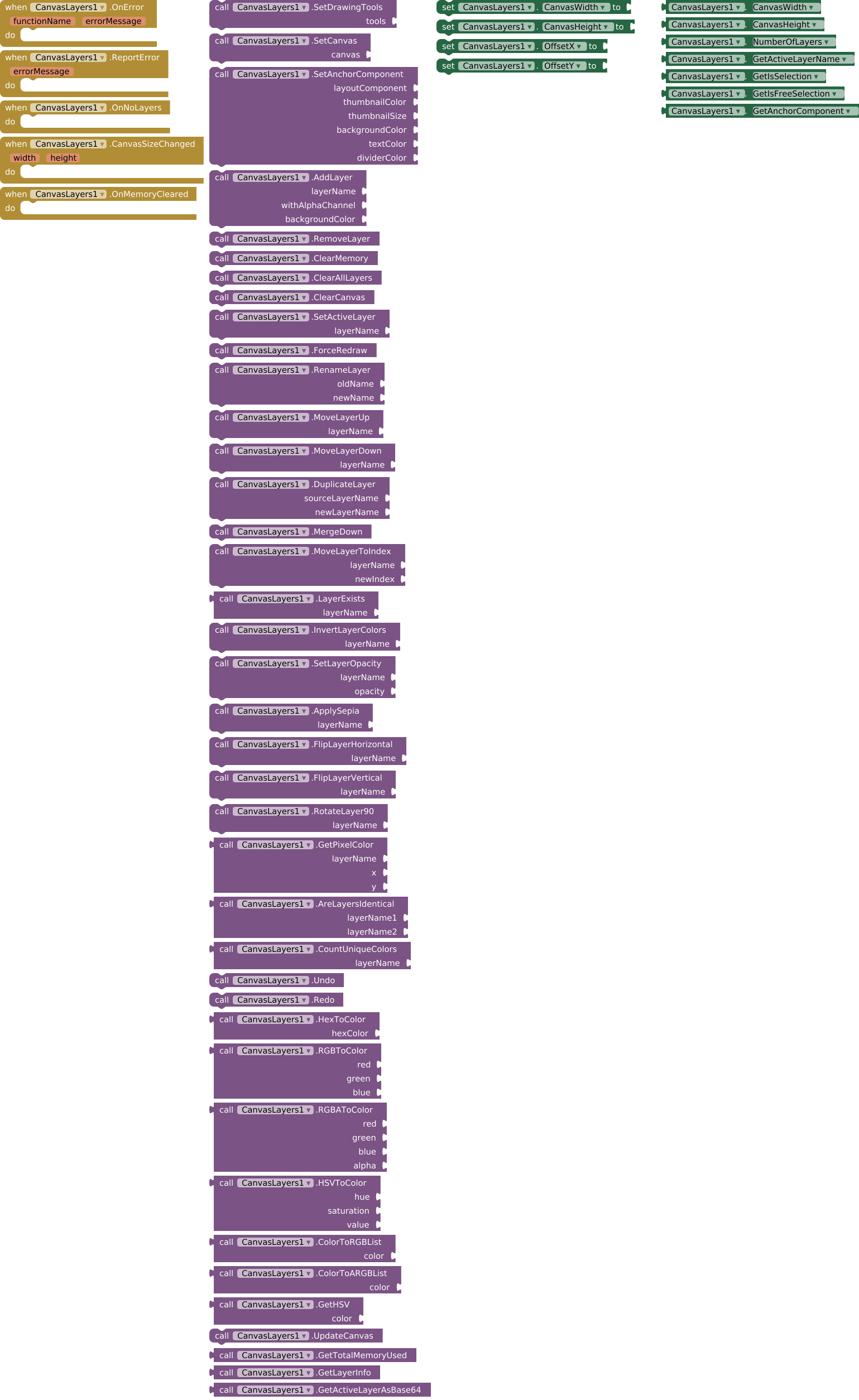
| CanvasLayers |
Core layer management and effects |
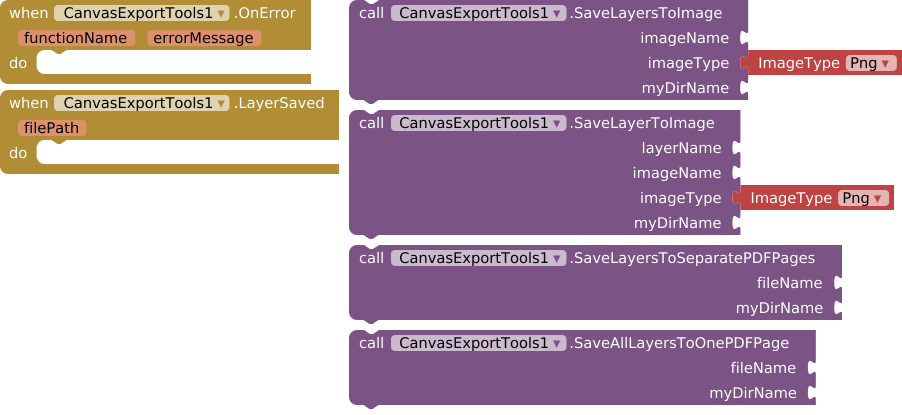
| CanvasExportTools |
Image and PDF export functionality |
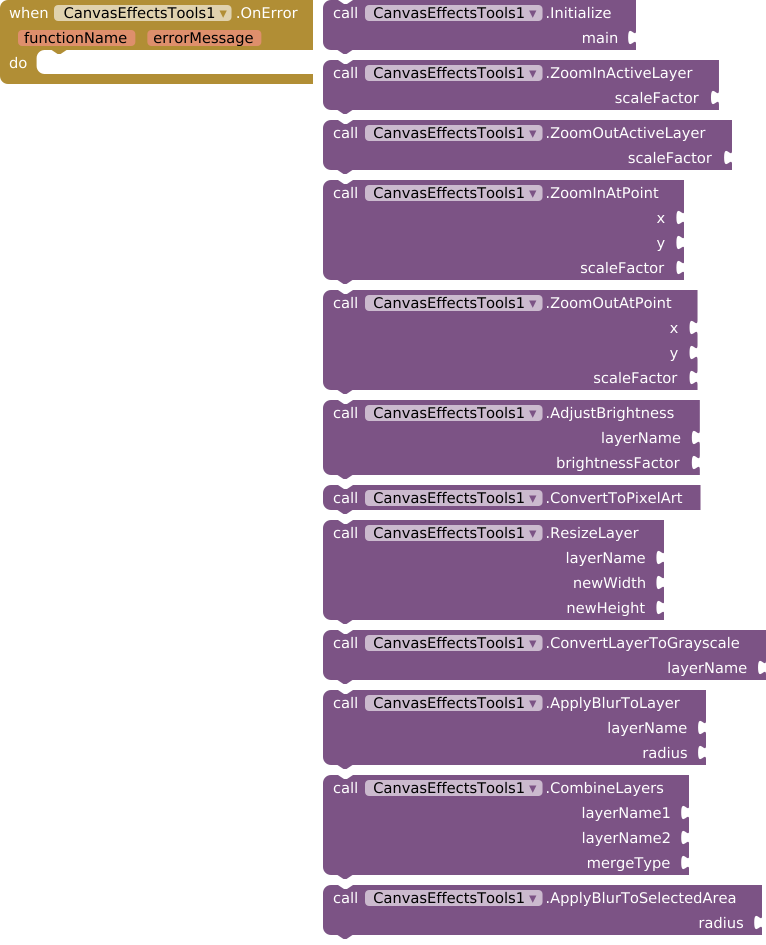
| CanvasEffectsTools |
Filters and visual effects |
| CanvasDrawingTools |
Shape creation and manipulation |
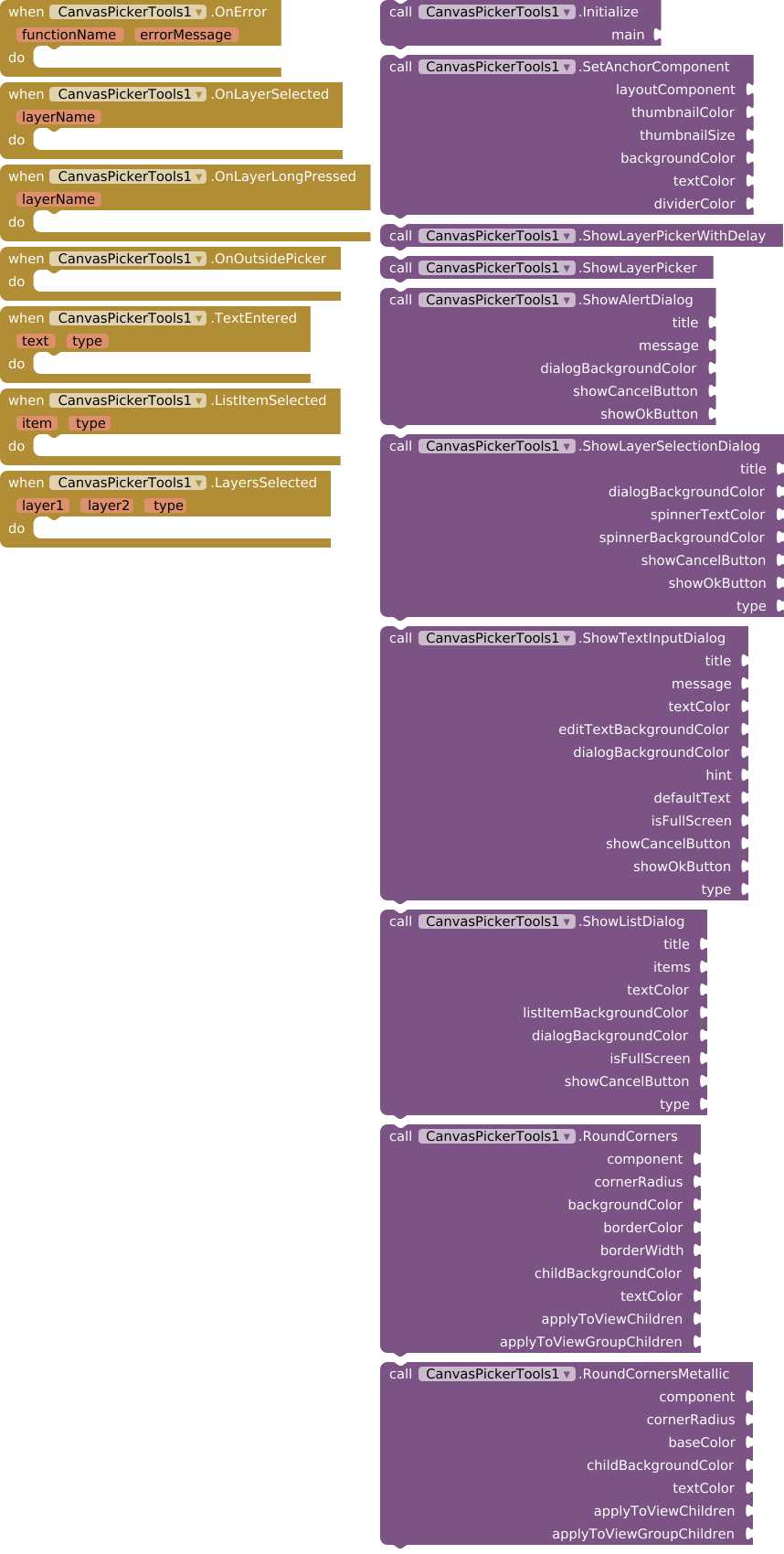
| CanvasPickerTools |
Dialogs and layer picker interface |
 Initial Setup
Before using any tools, you MUST initialize all components:
When Screen1.Initialize
  // 1. Configure main extension
  call CanvasLayers1.SetCanvas(Canvas1)
  call CanvasLayers1.AddLayer("Background", true, -1)

  // 2. Initialize all tools with the main extension
  call CanvasDrawingTools1.Initialize(CanvasLayers1)
  call CanvasSelectionTools1.Initialize(CanvasLayers1)
  call CanvasEffectsTools1.Initialize(CanvasLayers1)
  call CanvasExportTools1.Initialize(CanvasLayers1)
  call CanvasPickerTools1.Initialize(CanvasLayers1)

  // 3. Connect drawing tools for real-time preview
  call CanvasLayers1.SetDrawingTools(CanvasDrawingTools1)
 Component Details
CanvasLayers – Core Component
The heart of the extension that manages layers, undo/redo stacks, and basic operations.
 Properties
| Getter |
Type |
Description |
CanvasWidth |
number |
Current canvas width |
CanvasHeight |
number |
Current canvas height |
NumberOfLayers |
number |
Total layers count |
GetActiveLayerName |
text |
Name of active layer |
GetIsSelection |
boolean |
Rectangular selection active |
GetIsFreeSelection |
boolean |
Freeform selection active |
GetAnchorComponent |
component |
Layer picker anchor |
| Setter |
Type |
Description |
CanvasWidth |
number |
Set canvas width |
CanvasHeight |
number |
Set canvas height |
OffsetX |
number |
Set drawing X offset |
OffsetY |
number |
Set drawing Y offset |
 Key Methods
| Method |
Description |
AddLayer(name, alpha, color) |
Create new layer |
RemoveLayer() |
Delete active layer |
ClearMemory() |
Free up bitmap resources |
MergeDown() |
Merge active layer with layer below |
DuplicateLayer(source, newName) |
Clone existing layer |
MoveLayerToIndex(name, index) |
Reorder layers |
InvertLayerColors(name) |
Color inversion effect |
SetLayerOpacity(name, 0-255) |
Transparency control |
ApplySepia(name) |
Sepia filter |
FlipLayerHorizontal/Vertical(name) |
Mirror layer |
RotateLayer90(name) |
90° rotation |
 Events
| Event |
Parameters |
Description |
OnError |
functionName, errorMessage |
Error occurred |
ReportError |
errorMessage |
Custom error |
OnNoLayers |
– |
No layers remain |
CanvasSizeChanged |
width, height |
Canvas resized |
OnMemoryCleared |
– |
Memory freed |
CanvasExportTools – Export Component
Save your work as images or PDF documents.
 Export Methods
| Method |
Description |
SaveLayersToImage(name, type, dir) |
Save all visible layers |
SaveLayerToImage(layer, name, type, dir) |
Save specific layer |
SaveLayersToSeparatePDFPages(file, dir) |
Multi-page PDF |
SaveAllLayersToOnePDFPage(file, dir) |
Single-page PDF |
ImageType options: Png, Jpeg, Webp
 Events
| Event |
Parameters |
Description |
LayerSaved |
filePath |
Export completed |
CanvasEffectsTools – Effects Component
Apply filters and transformations to your layers.
 Effect Methods
| Method |
Description |
ZoomIn/OutActiveLayer(factor) |
Scale layer |
ZoomIn/OutAtPoint(x, y, factor) |
Zoom at specific point |
AdjustBrightness(layer, factor) |
Brightness control |
ConvertToPixelArt() |
Pixelate active layer |
ResizeLayer(layer, width, height) |
Resize layer |
ConvertLayerToGrayscale(layer) |
Black & white |
ApplyBlurToLayer(layer, radius) |
Gaussian blur |
ApplyBlurToSelectedArea(radius) |
Blur selection only |
CombineLayers(layer1, layer2, type) |
Merge with blend mode |
CanvasDrawingTools – Drawing Component
Create, manipulate, and select shapes with real-time preview.
 Shape Creation
| Method |
Description |
StartShape(type, x, y, color, width, filled) |
Begin shape |
StartTextAtPoint(x, y, text, color, size) |
Create text |
UpdateShape(x, y) |
Resize during drag |
DrawShape() |
Finalize and draw |
CancelShape() |
Abort creation |
AddPointToPolygon(x, y) |
Add polygon vertex |
ShapeType options: Rectangle, RoundRect, Oval, Line, Arrow, Polygon, Star, Text, Image, FreePath
 Special Effects
| Method |
Description |
DrawLinearGradient(l, t, r, b, start, end, horiz) |
Gradient rectangle |
DrawRadialGradient(cx, cy, r, center, edge) |
Gradient circle |
DrawGlow(cx, cy, r, color, alpha) |
Glow effect |
AddImageToActiveLayer(path) |
Import image |
Selection Tools
| Method |
Description |
StartSelection(x, y) |
Begin rectangular selection |
StartFreeformSelection(x, y) |
Begin freehand selection |
UpdateSelection(x, y) |
Adjust during drag |
EndSelection(type) |
Complete selection |
ClearSelection() |
Hide selection box |
SelectAll() |
Select entire layer |
CopySelectedArea() |
Copy rectangular area |
CutSelectedArea() |
Cut rectangular area |
CopyFreeSelectedArea() |
Copy freeform area |
CutFreeSelectedArea() |
Cut freeform area |
PasteCopiedArea() |
Paste at last position |
PasteCopiedAreaAtPoint(x, y) |
Paste at specific point |
SelectionType options: Rectangle, Free, All, None
Basic Drawing
| Method |
Description |
DrawPixelOnActiveLayer(x, y, color, size) |
Square pixel |
DrawPointOnActiveLayer(x, y, color, size) |
Circular point |
DrawLineOnActiveLayer(x1,y1,x2,y2,color,width) |
Line |
DrawWithBrushTexture(texturePath, size) |
Pattern brush |
DrawWithShinyBrush(color, size) |
Glossy brush |
Erase(x, y, radius) |
Eraser tool |
FloodFill(x, y, color, tolerance) |
Fill area |
 Line & Arrow Tools
| Method |
Description |
StartLine(x, y, color, width) |
Begin line |
UpdateLine(x, y) |
Adjust endpoint |
DrawLine() |
Finalize line |
StartArrow(x, y, color, width) |
Begin arrow |
UpdateArrow(x, y) |
Adjust endpoint |
DrawArrow() |
Finalize arrow |
 Grid System
| Method |
Description |
DrawGrid(hSpacing, vSpacing) |
Show grid overlay |
RemoveGrid() |
Hide grid |
CanvasPickerTools – UI Component
Dialog and picker interfaces for layer management.
 Layer Picker
| Method |
Description |
SetAnchorComponent(comp, thumbColor, size, bgColor, textColor, divider) |
Configure picker |
ShowLayerPicker() |
Display layer list |
ShowLayerPickerWithDelay() |
Show after short delay |
 Dialog Methods
| Method |
Description |
ShowAlertDialog(title, message, bgColor, showCancel, showOk) |
Simple alert |
ShowLayerSelectionDialog(title, bgColor, textColor, spinnerBg, showCancel, showOk, type) |
Two-layer selector |
ShowTextInputDialog(title, message, textColor, editBg, dialogBg, hint, default, fullScreen, showCancel, showOk, type) |
Text input |
ShowListDialog(title, items, textColor, itemBg, dialogBg, fullScreen, showCancel, type) |
List selection |
Visual Effects
| Method |
Description |
RoundCorners(comp, radius, bg, border, width, childBg, text, applyToChildren, applyToGroups) |
Rounded corners |
RoundCornersMetallic(comp, radius, baseColor, childBg, text, applyToChildren, applyToGroups) |
Metallic effect |
Picker Events
| Event |
Parameters |
Description |
OnLayerSelected |
layerName |
Layer chosen |
OnLayerLongPressed |
layerName |
Long press on layer |
OnOutsidePicker |
– |
Clicked outside |
TextEntered |
text, type |
Dialog input |
ListItemSelected |
item, type |
List choice |
LayersSelected |
layer1, layer2, type |
Two layers chosen |
 Example Projects
Simple Drawing App
When Screen1.Initialize
  // Setup
  call CanvasLayers1.SetCanvas(Canvas1)
  call CanvasLayers1.AddLayer("Sketch", true, -1)
  call CanvasDrawingTools1.Initialize(CanvasLayers1)
  call CanvasLayers1.SetDrawingTools(CanvasDrawingTools1)

When Canvas1.TouchDown
  x y
  call CanvasDrawingTools1.StartPathAtPoint(x, y, -16776961, 5)

When Canvas1.TouchMove
  x y
  call CanvasDrawingTools1.AddPointToPath(x, y)

When Canvas1.TouchUp
  x y
  call CanvasDrawingTools1.DrawShape()
Layer Management
When ButtonAdd.Click
  call CanvasLayers1.AddLayer("New Layer", true, -1)

When ButtonDelete.Click
  if call CanvasLayers1.NumberOfLayers() > 1
    call CanvasLayers1.RemoveLayer()
  else
    call Notifier1.ShowAlert("Can't remove last layer")

When Spinner1.AfterSelecting
  selection
  call CanvasLayers1.SetActiveLayer(selection)
Export to Image
When ButtonSave.Click
  call CanvasExportTools1.SaveLayersToImage(
    "my_drawing",
    "png",
    "MyApp"
  )

When CanvasExportTools1.LayerSaved
  path
  call Notifier1.ShowAlert("Saved to: " + path)
Helper Enums
| Enum |
Values |
| ImageType |
Png, Jpeg, Webp |
| ShapeType |
Rectangle, RoundRect, Oval, Line, Arrow, Polygon, Star, Text, Image, FreePath |
| SelectionType |
Rectangle, Free, All, None |
 Links
Links
Files
AIX: (V3) com.iagolirapassos.canvaslayers.aix (84.9 KB)
AIA: (V3) CanvasLayers.aia (656.2 KB)
Made with ❤️ for the MIT App Inventor community