Hi – I’m an oldish dude (73 Yo) trying to teach myself some coding skills from scratch and am starting with ai2 so please go easy on me. I have done extensive searches and have not found an answer that I understand to the following.
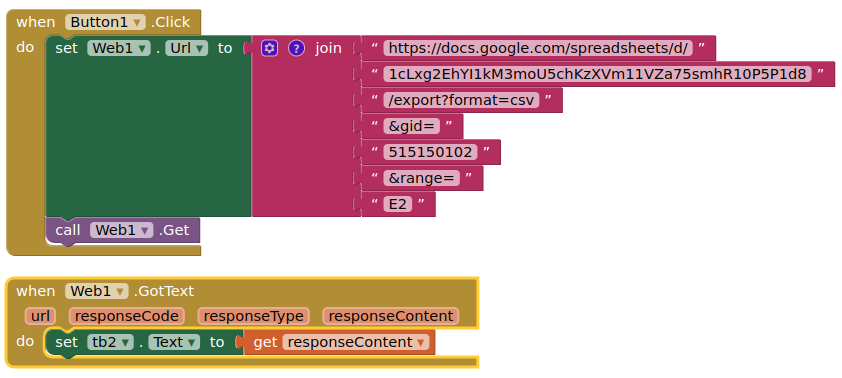
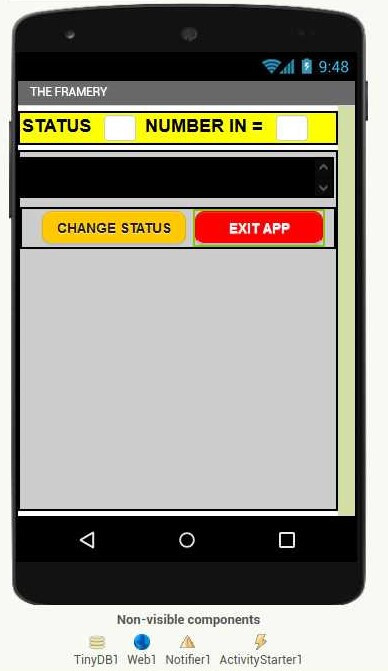
I need to extract the content of cell E2 from the Google sheet and place the result in the text box (TB2) to the right of the “NUMBER IN =” label.I will use that result to trigger a Notification
The Formula for Cell E2 =Countif(C:C,"In")
The app is to inform the last person in a private Student boarding house to set
the alarm when they leave.So when Inners = 0 when they change status then the notifyer will kick in with a flashing notification telling them they are the last person in and to please set the alarm as they leave.
I have worked out how to fill the list etc but am stuck on placing the contents of a Google Sheet Cell in a text box.
| id | name | status | Timestamp | Inners |
|---|---|---|---|---|
| 1 | John | Out | 23/01/2023 10:31:00 | 4 |
| 2 | Davi | Out | 23/01/2023 10:30:38 | |
| 3 | Natasha | In | 23/01/2023 10:31:14 | |
| 4 | Ross | Out | 23/01/2023 10:36:47 | |
| 5 | Phill | Out | 23/01/2023 10:32:07 | |
| 6 | Zoli | In | 23/01/2023 10:32:18 | |
| 7 | Aimee | Out | 23/01/2023 10:31:28 | |
| 8 | Silindile | In | 23/01/2023 10:32:26 | |
| 9 | Sub | Out | 23/01/2023 10:34:18 | |
| 10 | Yolan | In | 23/01/2023 10:32:33 |
[mod: fixed image]