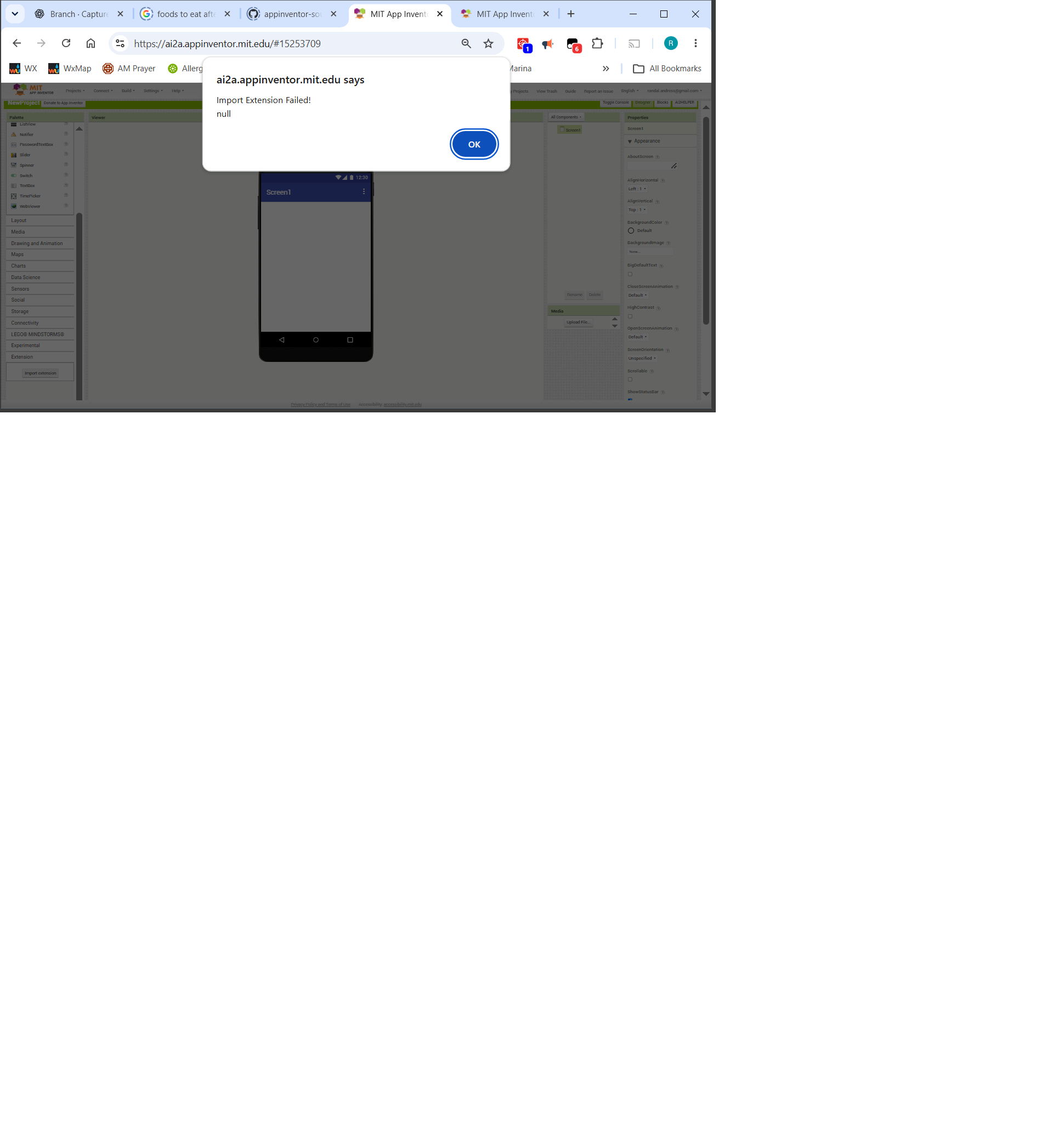
Extension fails to import to new empty project

I (using chatGPT) am working on an extension which fails to import with “null” as the reason?

How can I get more information as to its cause?

Prior versions imported and functioned normally.

I have included the extension (.aix) which fails.

com.example.radiotimeshift.aix (7.6 MB)

Any help or comments would be greatly appreciated.

Kind regards,

Randal

What does ChatGPT say about that issue?

It might make more sense to provide the source code to see what you and Chat are doing...

Taifun

It has spent a good bit of time checking various things. Here is the latest:

The fact that you're testing in an otherwise empty App Inventor project is important. It rules out a conflict with an existing RadioTimeShift extension or its blocks in that project.

Here's what we've established:
1. The AIX upload reaches App Inventor. The server returned SUCCESS for the upload request.
2. The import still fails. App Inventor subsequently processes the temporary upload, and the UI reports “Import Extension Failed.”
3. The package contents have been inspected. The metadata JSON files parse, the expected RadioTimeShift.class and Guava classes are present in AndroidRuntime.jar, and classes.jar contains classes.dex.
4. We do not yet know why App Inventor rejects the AIX. The raw GWT response we captured has not revealed the actual import status or error.
I recommend that we stop changing the Java source, DEX packaging, and build configuration for now. We should diagnose the import rejection first. The experimental folder can remain our work area; the two stable build folders and your existing App Inventor project and blocks remain untouched.

Next step: Let's identify the actual error returned during App Inventor's component-import stage. The earlier browser response was serialized, so seeing //OK[...] alone wasn't enough to identify the failure. We should decode or capture the relevant response before making another change to the AIX.

RadioTimeShift_java.txt (32.7 KB)

Thanks for taking a look,

-Randal

In my opinion, any extensions larger than about 4MB cannot be imported.

1 Like

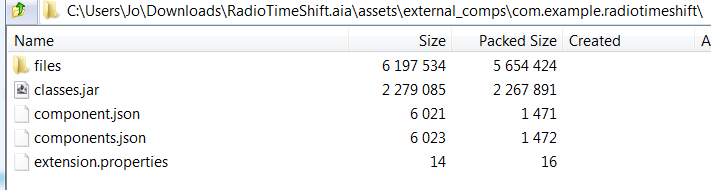
@Patryk_F , thanks for taking a look… here is a breakdown of the size…

     0 Thu Oct 29 01:58:24 CDT 2026 com.example.radiotimeshift/
     0 Thu Oct 29 01:57:12 CDT 2026 com.example.radiotimeshift/files/
2279085 Thu Oct 29 01:58:24 CDT 2026 com.example.radiotimeshift/classes.jar
  6021 Thu Oct 29 01:56:56 CDT 2026 com.example.radiotimeshift/component.json
  6023 Thu Oct 29 01:56:56 CDT 2026 com.example.radiotimeshift/components.json
    14 Thu Oct 29 01:56:56 CDT 2026 com.example.radiotimeshift/extension.properties
6196918 Thu Oct 29 01:57:12 CDT 2026 com.example.radiotimeshift/files/AndroidRuntime.jar
   307 Thu Oct 29 01:56:56 CDT 2026 com.example.radiotimeshift/files/component_build_info.json
   309 Thu Oct 29 01:56:56 CDT 2026 com.example.radiotimeshift/files/component_build_infos.json

Perhaps the AndroidRuntime is does not belong in the .aix. Could that be the problem?

-Randal

Try optimizing the extension size by using ProGuard.

I would expect that exceeding a size limit (30Mb?) would be issued with a better diagnostic message. Under what condition(s) would the reason/message associated with a load failure be “null”? Are there logs that could be turned-on or accessed which would reveal more information about the failure?

???,

Randal

@ALL_YALLALL_YALL,

Progress, sort of :slight_smile:

Bit of background (for those with insomnia or chronic curiosity :slight_smile: … This extension project was built in two independent parts - 1) a live audio stream recorder/exporter and 2) a player with controls (usual ones, Play, Pause, Resume, Stop, Forward, Rewind, & Stop).

Each “part” was developed and tested independently, with the recorder output being exported for input to the player. The recorder build was managed/accomplished using ant; and the player using RUSH.

When it came time to merge these two component parts, I steered ChatGPT to do so in the ant env… especially since my understanding of Android/AI2 is very limited, I wanted an environment which would be more familiar to veteran extension builders (to make getting help more likely and more productive).

It is the build of the merged extension code (RadioTimeShift.java) using ant which produced this mystery .aix that fails to import.

After posting this thread on the forum, I moved the merged java source from its ant home to a RUSH environment where the compiler/code-generator? quickly led me to add:

import com.google.appinventor.components.annotations.Extension;

and

@Extension(
    description = "Merged Media3 audio record/playback test for RadioTimeShift.",
    icon = "icon.png"
)

With these additions, the RUSH build succeeded and the resulting .aix was imported into my test project with no errors. The app also ran with most rudimentary functionality (Select pre-recorded file and Play) with no obsrved errors.(*see note below)

I intend to:

  1. Move the corrected java source back to the ant env and see if it will build, load, and run.
  2. Begin working again with ChatGPT to see if it can generate a fix (this one or another one). At some point, if failure to load persists, I can suggest the additio@Ext@Extensionn@Extensionion of @Extension().

I am particularly interested in why the java compiled/generated in the RUSH envor@Extensionn@Extensionent without the @Extension error that I got in the Rush env (or something similar), or perhaps it was ignored (see note*)

Processing
│ error No extension found
│ help Annotate the extension class with @Extension

Thanks to all who gave this some thought … If am able to navigate the ant env, I hope to post what I learn.

As before, I’d appreciate any feedback/comments.

Kind regards,

Randal

*Note: I believe ChatGPT may have noted and postponed dealing with these warnings,

warn androidx.annotation:annotation:1.6.0 is required, but App Inventor provides an older version (androidx.annotation:annotation:1.0.0) which will be used instead. This may cause errors at runtime.
│ warn androidx.annotation:annotation-experimental:1.3.1 is required, but App Inventor provides an older version (androidx.annotation:annotation-experimental:1.3.0) which will be used instead. This may cause errors at runtime.
│ info Downloading resolved artifacts...

…which, if eliminated, by using up-dated version(s) of androidx.annotation… might have prevented the problem. Possibly I will run across that in the chat.
RadioTimeShift.aia (7.6 MB)

Btw, no problem to import it in Kodular, but the same issue with Niotron (as expected).

Niotron restricts uploads to 1MB, we need purchase an increased asset limit to upload larger files.

@Anke,

Thank you for taking the time to test me this out.

The ant build with the successful source (androidx.annotation import and method) fails to compile with Java 8 and 17 (because the annotations.Extension class is not found).

[javac] D:\AIExtensions\RadioTimeShiftBuild_MergeTest2\src\com\example\radiotimeshift\RadioTimeShift.java:19: error: cannot find symbol
    [javac] import com.google.appinventor.components.annotations.Extension;

If it still balks with 11 (haven’t tested yet), I will take a look at the build.xml which has been modified from its standard state (at the suggestion of ChatGPT :slight_smile: )

-Randal

@JEWEL,

Thanks for the information…

Kind regards,

Randal