Display Different colors based on data received via bluetooth from sound sensor

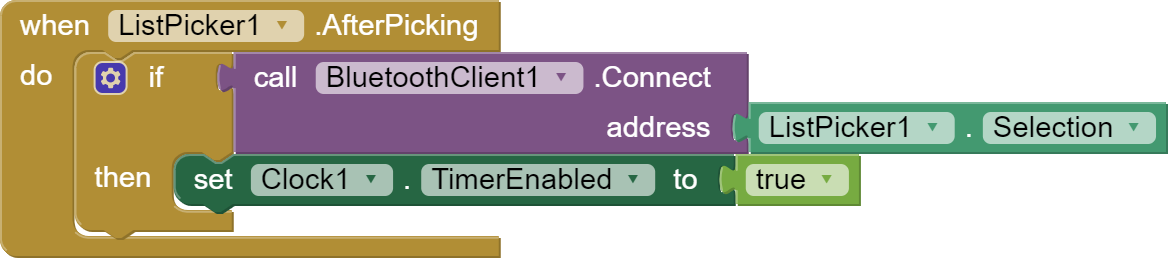
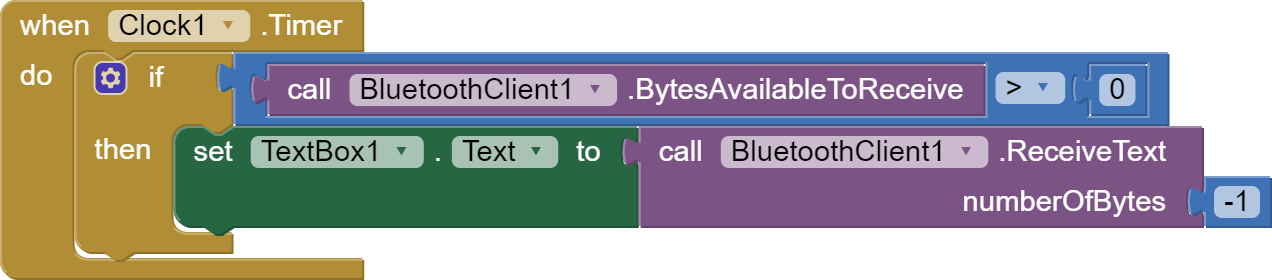
I think you would make changes to the arduino first. Then he tested the connection to the app. But in the app, make changes to the clock block.

  1. Now you have "bytesAvalibleToReceives> = 0", change to "bytesAvalibleToReceives> 0"

  2. You are reading all bytes as text. If you read everything, the second block of read tekst will have nothing to read. Consider what the data sent to the application will look like?

For testing, do this:


1 Like

Here's where I'm at now:

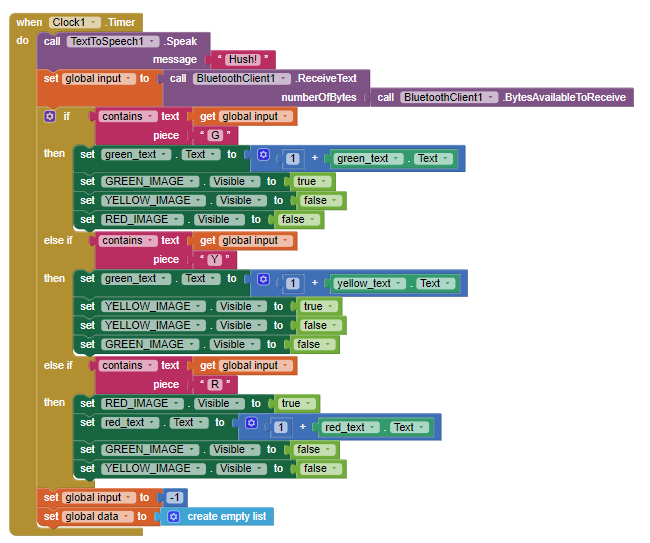
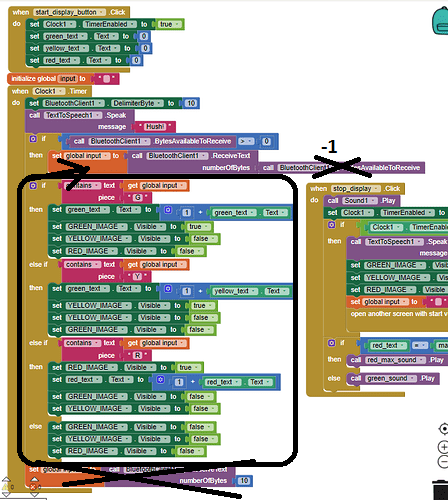
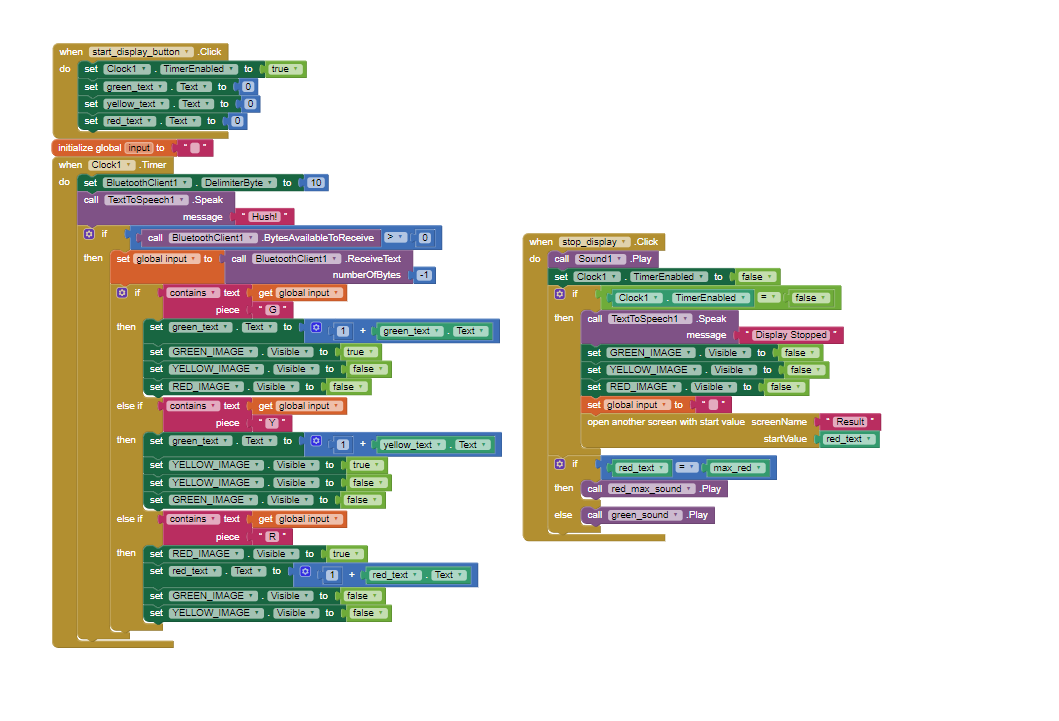
The data from the sensor/arduino work properly: i labeled the values coming in with an R,Y,&G depending on the magnitude, then on app inventor i set up the clock and inside it, when a value is detected with an R,Y,or G an image with the appropriate color will be made visible, then made invisible once the value is changed. Something is wrong with my loop and it only stays the green image. can anyone help me troubleshoot this?

You are not splitting the incoming messages individually, so that is causing your Clock1.Timer IF/THEN/ELSEIf cascade to pick up only the first R/Y/G letter in the input chunk. (I would not call it a message until it is delimitted.)

Also, I recommend setting the other 2 images invisible in each if/then/elseif branch, instead of afterwards. It's simpler and more direct.

Here's the standard BlueTooth Delimiter advice ...

Please see the Delimiter article in FAQ

Be sure to use println() at the end of each message to send from the sending device, to signal end of message. Do not rely on timing for this, which is unreliable.

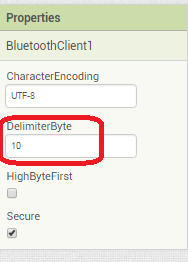
In the AI2 Designer, set the Delimiter attribute of the BlueTooth Client component to 10 to recognize the End of Line character.
BlueToothClient1_Properties

Also, return data is not immediately available after sending a request,
you have to start a Clock Timer repeating and watch for its arrival in the Clock Timer event. The repeat rate of the Clock Timer should be faster than the transmission rate in the sending device, to not flood the AI2 buffers.

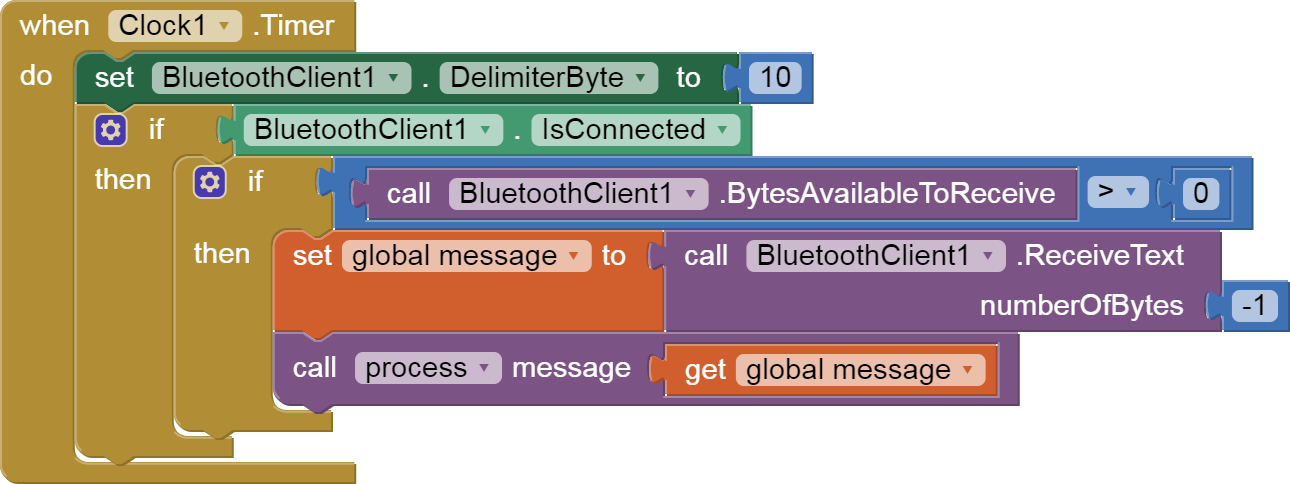
In your Clock Timer, you should check

  Is the BlueTooth Client still Connected?
  Is Bytes Available > 0?
     IF Bytes Available > 0 THEN
       set message var  to BT.ReceiveText(-1) 

This takes advantage of a special case in the ReceiveText block:

ReceiveText(numberOfBytes)
Receive text from the connected Bluetooth device. If numberOfBytes is less than 0, read until a delimiter byte value is received.

If you are sending multiple data values per message separated by | or comma, have your message split into a local or global variable for inspection before trying to select list items from it. Test if (length of list(split list result) >= expected list length) before doing any select list item operations, to avoid taking a long walk on a short pier. This bulletproofing is necessary in case your sending device sneaks in some commentary messages with the data values.

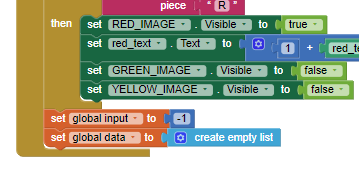
I triple checked my arduino code and i confirmed i am using println(). I moved the visibility blocksto the same if else blocks. Now the delimiter placement is where im unsure.

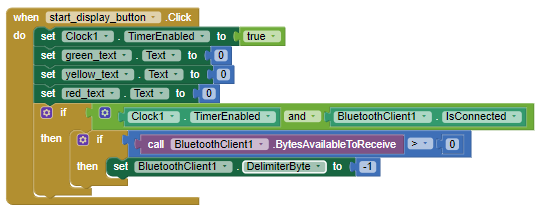
So i set the delimiter byte to negative one here when the start display button is hit and the clock timer & bluetooth is enabledimage

at the end of my when timer cascade i just need to set my message variable global data to -1?


image

The Delimiter Byte should be set to 10. 10 = New Line in ASCII.


global message
(draggable)

You could also just set it in the Designer Attributes of the BlueTooth Client component just once.

I see,

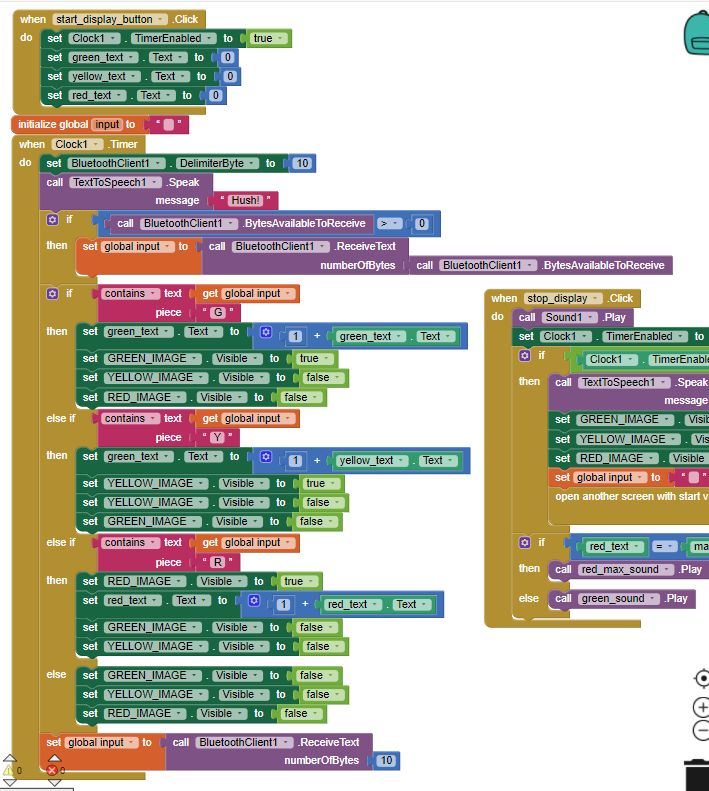
I changed my delimiter byte to ten at the beginning of the clock timer then set my variable equal to the delimiter byte

but now the app shuts down once I press the start button. perhaps it is getting the values too rapidly? how do i implement a delay on the app inventor side? I tried a delay on the arduino side but it ruins the functionality of my code and the values being sent.

f6b9a4354ce6b81c2ab274710fae63b52a358ed2_2_448x500

(tearing out hair)

Thank you for your patience.

Like so?

It doesnt shut down now, but all the still visible

Remove the speech in the Clock Timer, and replace it to a call to this logger ...
https://groups.google.com/d/msg/mitappinventortest/II_RlElGddU/J0q_E-2rAwAJ

You need to see your input messages and their timing.

Hello friends,

There may be translation errors because I use a translator.

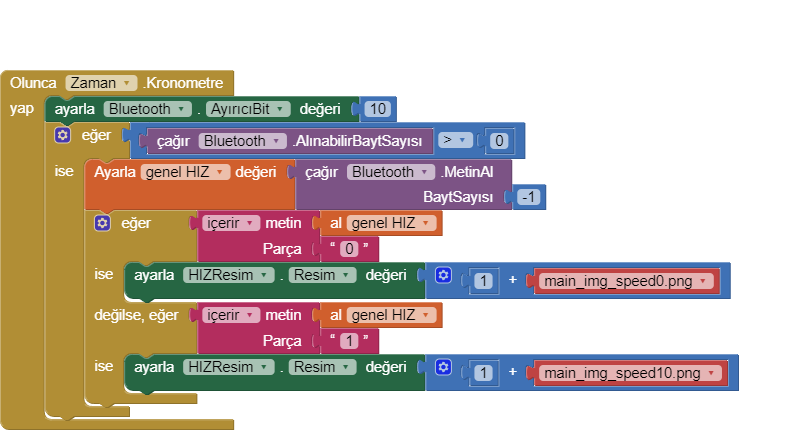
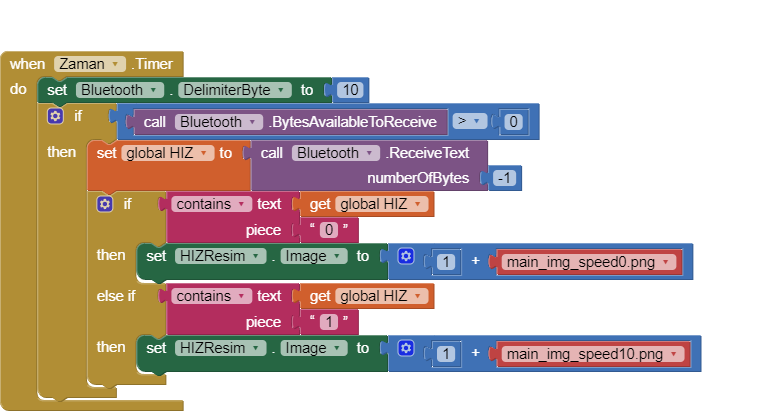
Byte 0,1,2 sent by Bluetooth ... I want it to change the picture according to this incoming data value, I couldn't figure it out. Thank you in advance for your help.

Are you receiving text?

I am receiving data via bluetooth.

How can you add 1 to a file name?

Dear ABG,

I may not be able to explain the problem fully because I use translation. Please I would be glad if you can help.

Example;

Bluetooth incoming data 0 - image0.png
Bluetooth incoming data 1 - image1.png
Bluetooth incoming data 2 - image2.png

To concatenate text use the text JOIN block.

Please see the Delimiter article in FAQ

Be sure to use println() at the end of each message to send from the sending device, to signal end of message. Do not rely on timing for this, which is unreliable.

In the AI2 Designer, set the Delimiter attribute of the BlueTooth Client component to 10 to recognize the End of Line character.
BlueToothClient1_Properties
Also, return data is not immediately available after sending a request,
you have to start a Clock Timer repeating and watch for its arrival in the Clock Timer event. The repeat rate of the Clock Timer should be faster than the transmission rate in the sending device, to not flood the AI2 buffers.

In your Clock Timer, you should check

  Is the BlueTooth Client still Connected?
  Is Bytes Available > 0?
     IF Bytes Available > 0 THEN
       set message var  to BT.ReceiveText(-1) 

This takes advantage of a special case in the ReceiveText block:

ReceiveText(numberOfBytes)
Receive text from the connected Bluetooth device. If numberOfBytes is less than 0, read until a delimiter byte value is received.

If you are sending multiple data values per message separated by | or comma, have your message split into a local or global variable for inspection before trying to select list items from it. Test if (length of list(split list result) >= expected list length) before doing any select list item operations, to avoid taking a long walk on a short pier. This bulletproofing is necessary in case your sending device sneaks in some commentary messages with the data values.

If all your messages are only one character, ask for only one character per message.

Use text compare.

Do not add 1 to the image file names.

Also upload the .ino file here so we can see if you are sending text.

I'm back.

I'll read your code here.

Here are your variable types in the .ino:

//Program variables
double lat;
double lng;
//int day, month, year;
String hours, minutes;
int saniye;

int num_sat, HIZ;

The interesting variable here is HIZ, which I see you declared as int, which is an integer that can be a number up to some power of 2 (+/- 32,767 ?), positive or negative.

We can get an idea of the range of HIZ by searching for it in the code:

 // Show HIZ and align its position
  u8g.setFont(u8g_font_profont22);
  u8g.setPrintPos(54,60);
  if (HIZ<10){                              
    u8g.print("0");
  }
  if (HIZ>99) {                                  
    u8g.setPrintPos(47,60);
  }
  u8g.print(HIZ);
  

u8g is some other local display in your hardware, I assume.
But here HIZ ranges from 0 to above 100.

Here is where I imagine you transmit HIZ to AI2 via BlueTooth:

void loop(void){
  if (Serial.available())
  char veri = Serial.read();

  while (Serial1.available())
  char veri = Serial1.read();

  Serial1.print(HIZ);
  Serial1.println("|");
...

(text clips are courtesy of NotePad++)
So I am pretty sure you are sending text messages, one per line, but you add a '|' at the end that will probably bite you on the rear if you try to do math on the message.

(to be continued on the next post, as this is getting long.)

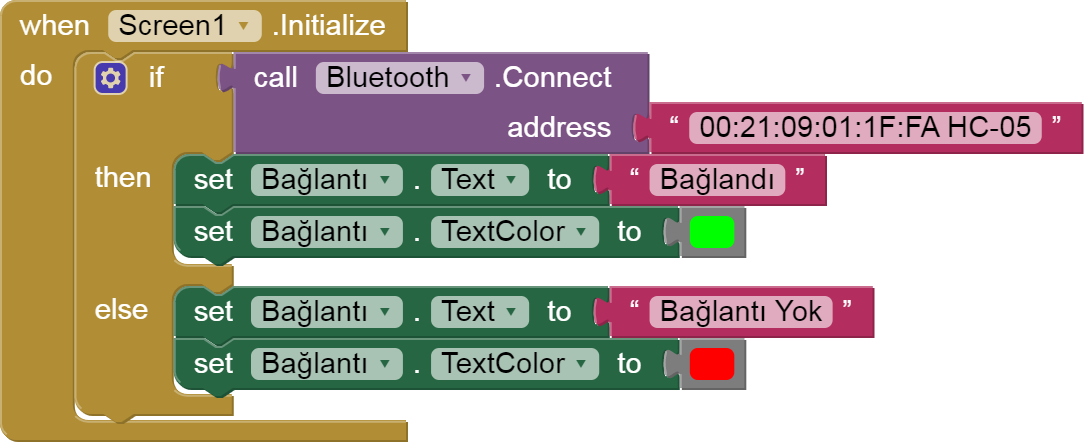
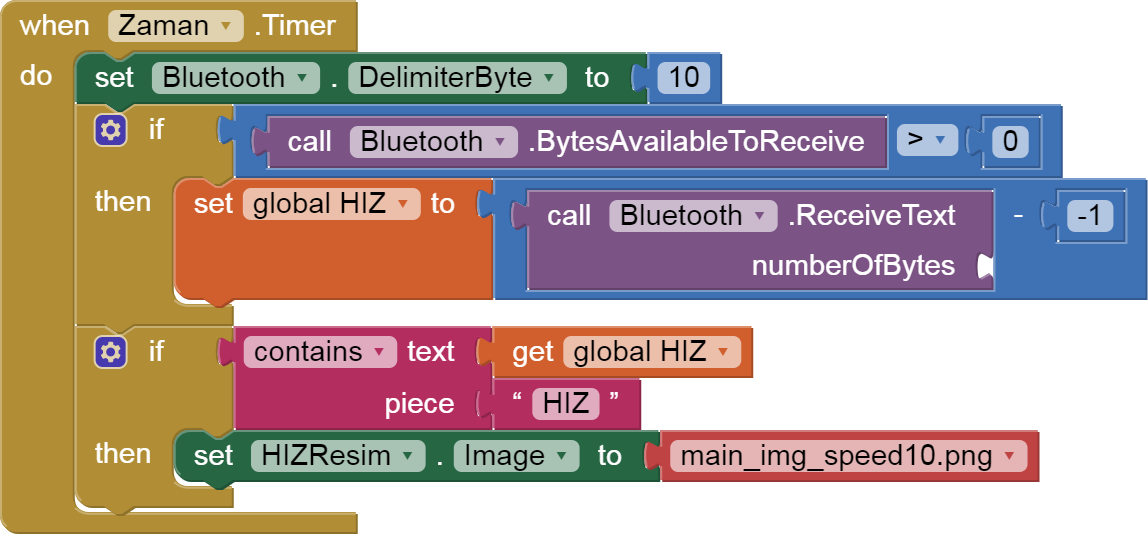
I looked at your blocks and Clock.

It looks like you are trying to continually adjust the background image of one of your Arrangements to simulate a glowing arc of varying length on a round speedometer, with a dozen different images for different speeds.

Most people use a Canvas and draw their own arcs for this.

But you are stuck at the data transmission and reception part, which needs to be fixed first.
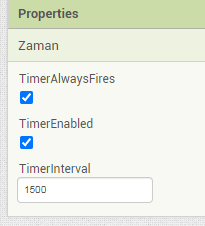

Zaman

Your .ino transmits data only if it has incoming data:


void loop(void){
  if (Serial.available())
  char veri = Serial.read();

  while (Serial1.available())
  char veri = Serial1.read();

  Serial1.print(HIZ);
  Serial1.println("|");
  //Serial1.print(heading);
  //Serial1.print("|");
  //Serial1.print(lat);
  //Serial1.print("|");
  //Serial1.println(lng);
  //Serial1.print("|");
  //Serial1.print(hours);
  //Serial1.print(":");
  //Serial1.print(minutes);  
  //Serial1.println("|"); 
  //----------------------------------------------------------
  Read_GPS();
  //----------------------------------------------------------
  gosterge_cubugu_konumu = map(HIZ,0,200,0,90); //SET NEEDLE
  // show needle and dial
  xx = gosterge_cubugu_konumu;                                    
  if (xx<45)
    {xx=xx+135;}
  else
    {xx=xx-45;} 
  //----------------------------------------------------------
  //Display Data on Oled
  {
    u8g.firstPage(); 
    do {             
      gauge(xx);
    }
    while( u8g.nextPage() );
  }
  //----------------------------------------------------------
}

This part is wrong, since you don't send requests from AI2 back to Serial1, so you will never send HIZ to Ai2.

There are plenty of BlueTooth .ino examples on this board by other Power Users (@Juan_Antonio, @Chris_Ward, etc.)
also see
FAQ Section: BlueTooth Starter Guides

I leave it to others to set your .ino right, sending text data periodically.
Brfore you play with your input data, display it in a Label.Text, just to make sure data is incoming.

Here is the general code structure for how to test an input number (after you remove that '|' garbage)...

(HIZ has the incoming number)
Init a global list of all your image speed numbers, ascending numerically:
init global speeds = CSV TO LIST('0,10,22,32,40,50,60,70,80,90,100,110,120,130,140,150,160,170,173')
(those are the numeric parts of your speed image files, in ascending order.)

Loop over the speeds list, to find the highest speed less than HIZ:
for each speed in speeds
  if HIZ >= speed then 
     set image file name to JOIN('main_img_speed', speed, '.png')
end for each

You will end up with the last image file name matching HIZ.