To cut a long story short, post the .aia file—or better yet, a simple version of it that addresses only this specific problem.
I will do that...
Include any method used in your app to transfer images to your shared directory
photEaze.aia (116.9 KB)
this version will post the list in listview without a photo, but the photo shows up in google photos (which is the ultimate goal, as about 100 photos can be taken at one session identifying a multitude of machines with loto points (Lock Out Tag Out).
I have to go to work now....
thanks again for your help in finding this gremlin.
Charley
By the way...
OK Charley, ignoring your somewhat convulated blocks, I have had a look at this from scratch and hopefully have the answer:
EXAMPLE (the basics)
- Take Picture
- Picture Moved (Async) to DCIM/Camera (uses full filepath with
file://) - Once moved, refresh gallery (removing
file://from filepath) - Add photo to list, with full file path, and then display in a listview
- Open Gallery on device and all images displayed
BLOCKS
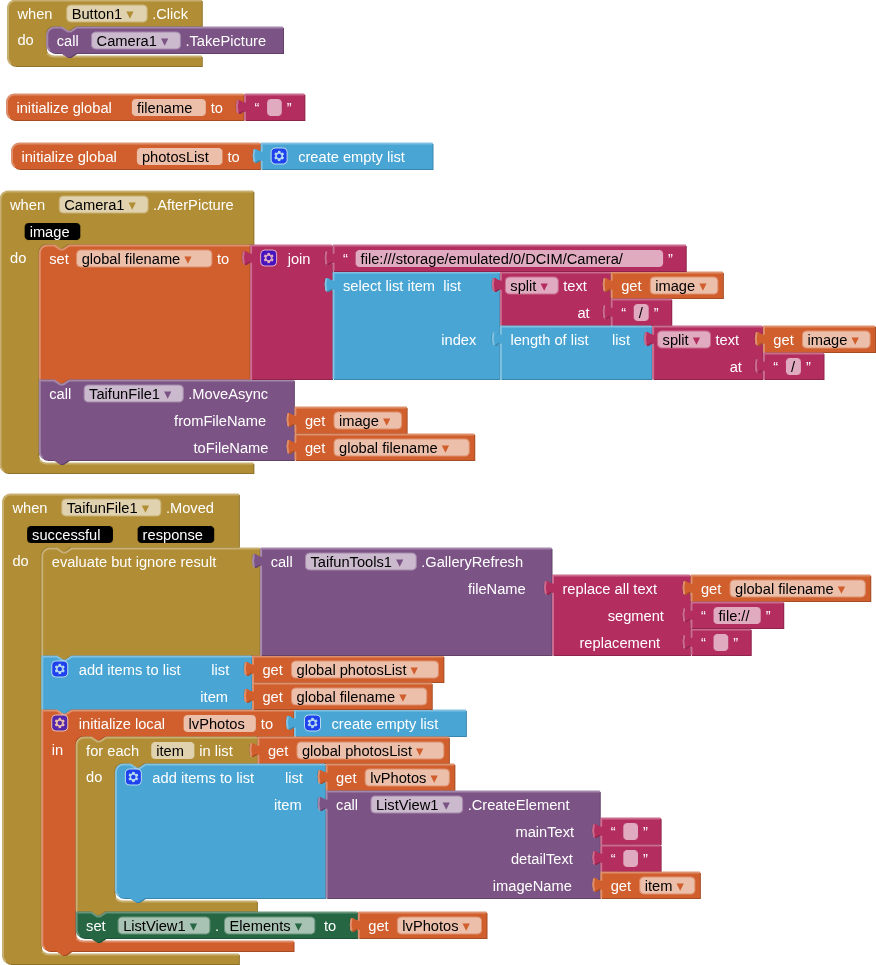
Remember, if you are using an Async block, any actions you want to carry out on the image should be done in the when.Moved event (I note you ignored my previous advice on this in your blocks)
photoGalleries.aia (57.9 KB)
(credits @Taifun for File and Tools extensions)
1 Like
no, I wasn't ignoring you, i just had a lot on my plate and missed some points. Thanks for pointing it out though.
That works well. I have read through it all and it makes sense. I was getting lost with the changing directory portion.
I have added back in my 'convoluted' blocks for data testing and naming, and it all works wonderfully.
One last question, how do I get past:
"Error 908 the permission READ_MEDIA_IMAGES has been denied. Please enable it in the Settings app." There is no such opportunity in my Settings App.
As I mentioned earlier, this is a bug that the AI2 team apparently does not intend to fix. You need to use an extension to solve the problem—for example, "Picasso" by @vknow360.
No issues with that permission when using compiled version of my example app.
Because you didn't use an Image component.
On purpose 
I have an image component, so when I click on the pic in the listview, I get the permissions error.
Even compiled, I get the error.
The problem being I need to have the ability to delete pics, and would like to see the pic before deletion to make sure.
I am going to check the permissions on the phone for the 100th time...to verify once again, there are no permissions denied in the App Settings. It seems there is something b=about putting them in the DCIM/Camera folder
Yes, the Image component doesn't declare READ_MEDIA_IMAGES in the Manifest. You must request this permission manually (in order to declare it there):
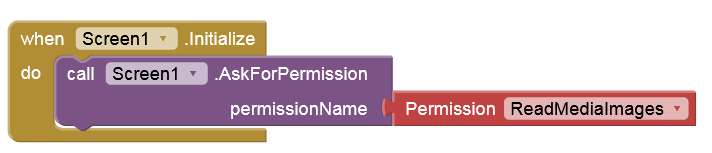
even though it isn't actually necessary. Strictly speaking, it’s simply a bug. Period. I’ve been pointing this out for years, but no one seems to be listening. 
Apart from that, Google won't accept your app in the Play Store without special approval.
Even when I asked for that permission, it still doesn't allow me to do anything with the picture. I have employed a workaround where the user is asked to delete the pic from the device's photo app, and then just double check to see if exists from within the app. It displays in the list view only those which still exist.
As for Google play, this is a one time very propriatory app for a company, so it will never make it to google play
No, you can do everything with the picture, especially delete it. The image is created by the app and therefore the app owns it.
Try this simple test app. Build the APK without testing with Companion beforehand:
image.aia (34.6 KB)
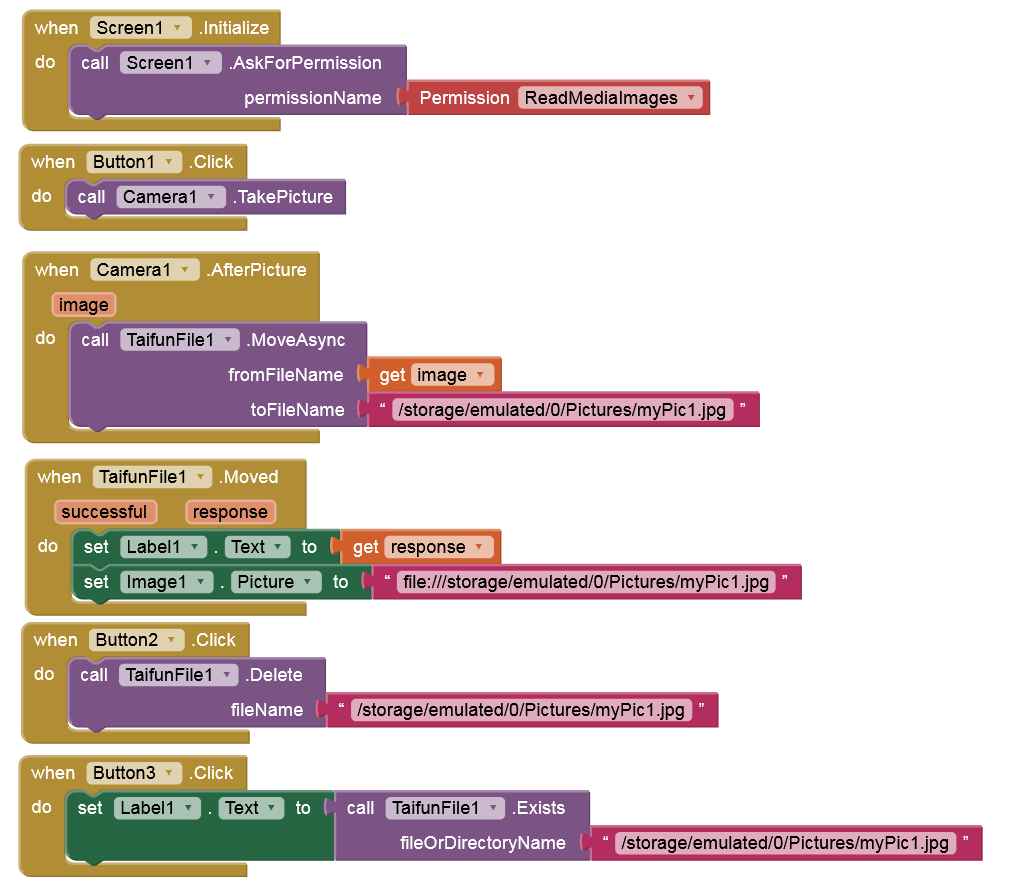
I'm at work now, Anke, but I will try that out when I get home. Why should I not test it first? False data in the dB?
Then the moved image is created by another app (Companion) and the APK cannot access (overwrite, delete) it.
This topic was automatically closed 7 days after the last reply. New replies are no longer allowed.