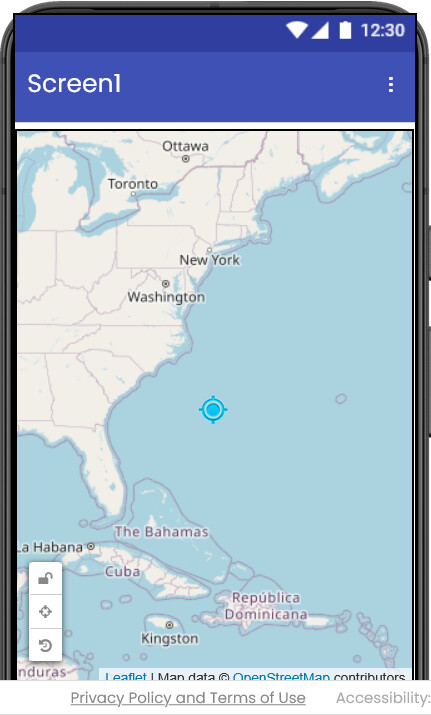
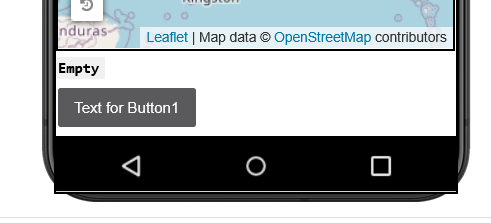
The simulated phone frame does not properly clip the app content. Elements like the Leaflet attribution/footer overflow outside the visible phone border.
Description
In the MIT App Inventor Designer (Neo UI), the simulated Android device frame does not correctly clip the app content.
When using the Map component, UI elements (e.g., Leaflet attribution/footer) extend beyond the visible phone frame boundary. This creates a visually incorrect preview where content appears outside the device.
Steps to Reproduce
- Create a new project
- Add a Map component to Screen1
- Set Map height to Fill Parent
- Switch preview to:
- Android 5+ (Material) OR Android 3
- Observe the bottom area of the screen
Expected Behavior
- All UI content should be properly clipped within the simulated phone frame
- No elements should render outside the device boundary
Actual Behavior
- Bottom UI elements overflow outside the phone frame
- Device frame clipping appears broken in Android preview
- iOS preview does not show this issue
Additional Notes
- The issue does not affect runtime behavior (works correctly on real device / companion)
- This appears to be a Designer-only rendering issue (CSS / viewport clipping bug)

