I'm using the custom web viewer extension and I want a way to save the page as a PDF.
perhaps
for one and lots of others if you search the Forum and Internet using
App Inventor save custom web extension ; Image to PDF etc.
Perhaps this ?
Any update on this?
You can download the aix from GitHub repository.
Saving a Blob/RAM File to Storage in Android 11+
I am building a File Compressor app where the compression happens entirely inside the browser (using JavaScript in an HTML file). The file is generated successfully in the RAM as a Blob URL (blob:http://...).
What I have achieved so far:
- I am using CustomWebView to load the HTML.
- I successfully triggered the download using a Javascript Interface.
- I converted the Blob to a Base64 string using the XMLHttpRequest method in the OnDownloadNeeded event.
- I am using the KIO4_Base64 extension to decode and save the string.
The Problem:
I can save the file as a .txt or .zip successfully, but I am struggling with the File Path and Permissions on Android 10/11+.
- If I use StringToFile, it sometimes fails or saves a corrupted file.
- If I use StringToFileASD, it saves to the App Specific Directory (Private folder), but I want the user to see it in their main Downloads folder.
My Question:
Does anyone have a working block logic or a recommended extension that can:
- Take a Base64 string (from the Blob).
- Decode it to a binary ZIP file.
- Save it directly to /storage/emulated/0/Download/ on newer Android versions (Scoped Storage)?
Any help or guidance on how to move the file from ASD to Downloads would be greatly appreciated!
You can download the blob directly using customwebview, no need for base64 encoding. See the documentation.
Ensure that the base64 decoder is supplied with just a base64 string, it should not have the datauri stuff at the beginning.
Where is your "download" currently saving this blob zip/txt ?
Don't know what that means.
Back on topic, did you see my previous post that tells you that you can download a blob directly to a file ?
I actually tried the direct download method first, but it seems to fail because I am dealing with a dynamically generated Blob URL (blob:http://...), not a standard HTTP link.
From what I've tested, the native Android Download Manager usually fails with Blob URLs on Android 11+ (Scoped Storage) because it can't access the browser's internal RAM. That is why I switched to the Base64 approach—it's the only way I found to successfully extract the data so far.
If you have a working Block logic that can download a blob: URL directly to the /Download/ folder on Android 11+ without using Base64, could you please share a screenshot? I would love to use a simpler method if it works!"

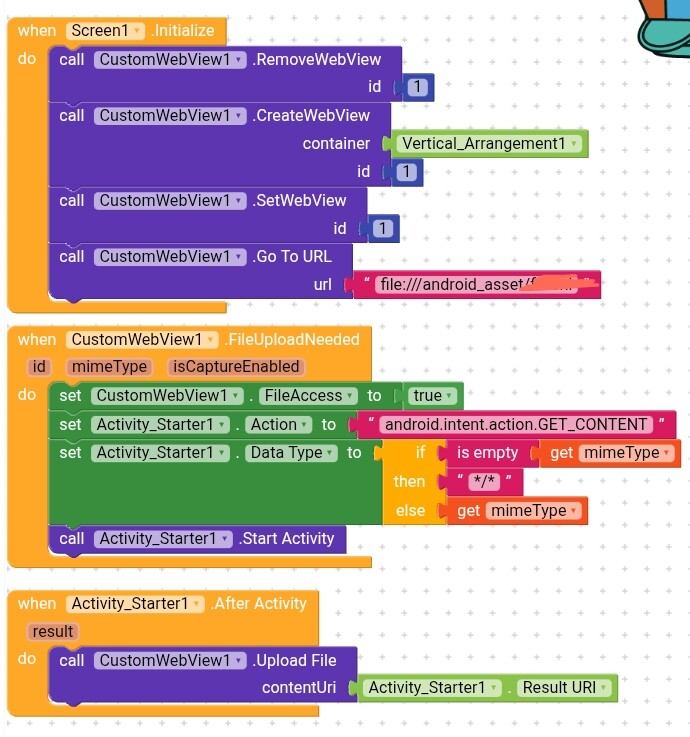
It is my current blocks... I have imported WebViewExtra extension but not understand how to implement its block... Can you give me block image that I need to complete it?(post deleted by author)
Do not mix webviewextra with customwebview, they are two different things altogether. If you want to know how to use webviewextra then please ask on that topic. Webviewextra uses the native webviewer, customwebview does it's own thing
Did you not see the blocks provided above by @vknow360 that show how you download a blob url with customwebview ?
On coustomWebViewer extension i can't get download helper extension... When I searched on internet I get 2 com.sunny.CustomWebView file.
One about 78kb and other about 295kb
When I import 295kb file I get only CustomWebView extension there is no DownloadHelper extension... But when I import 78kb file it have both 2 extention but when I change its block it not have all blocks.
So I try to use WebViewExtra extension 

Import both aix files.
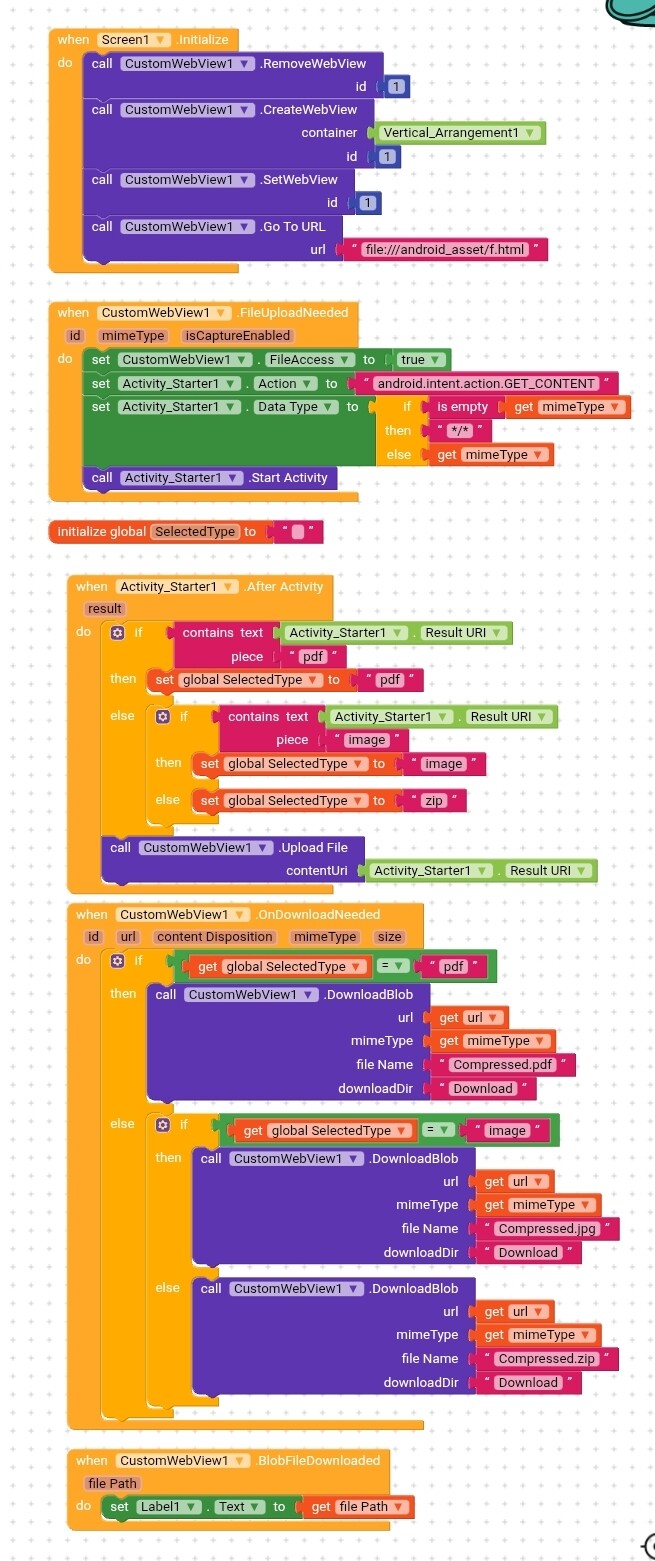
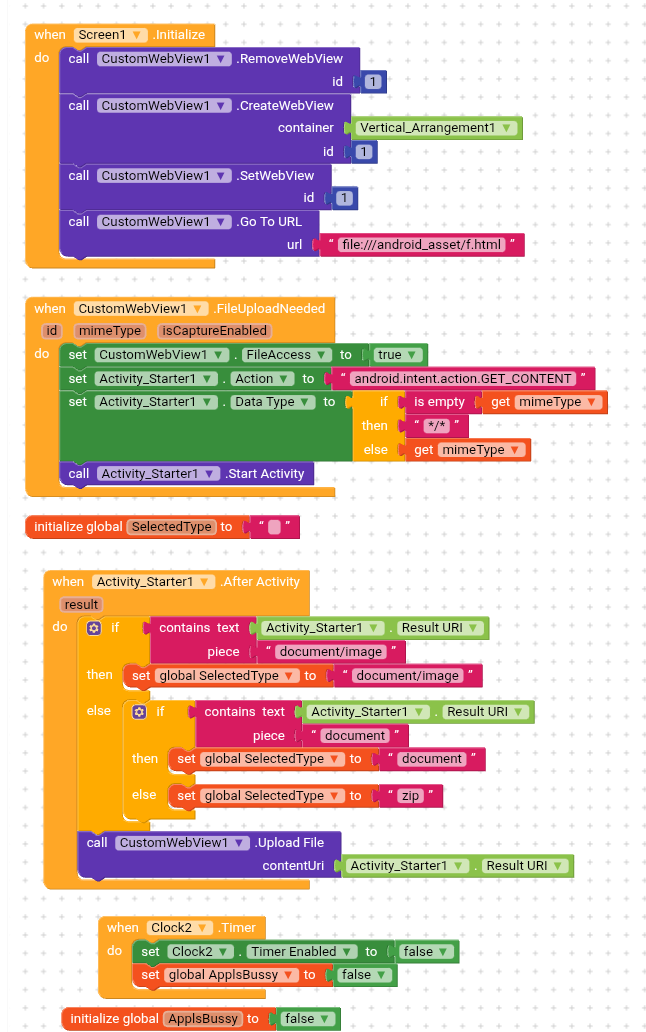
After a lot of debugging, the app is almost finished, but I am stuck on one final issue regarding PDF downloads.
Here is the current status of the app:
 Images work perfectly: When a user compresses an image, it downloads correctly in its image format (e.g., .jpg).
Other files work: Other generic file types download correctly as a safe .zip file.
 The Problem with PDFs: When a user compresses a PDF, the compression actually works on the server. However, the app downloads the result as a .zip file instead of a .pdf file.
The Current Workaround:
Currently, if the user manually opens their file manager and renames the downloaded file from file.zip to file.pdf, the PDF opens perfectly. The data is correct, but the extension is wrong.
Where I need help:
It seems my logic is failing to detect that the incoming file is a PDF, so it defaults to the .zip fallback. I have tried detecting the mimeType in the FileUploadNeeded event, but it seems the server might be sending a generic type instead of application/pdf.
Lable1 showing-
For image- Content://com.android.providers.media.documents/document.document.image%3A1000657020
For pdf- Content://com.android.providers.media.documents/document.document%3A1000657020
I am looking for guidance on the correct block design to handle this situation so that PDFs download automatically with the correct .pdf extension.
I have attached my current block setup below.
You should check mime type of picked file instead.
Could you share the javascript you use to generate the blob and convert the blob/url to base64? We might be able to improve the extensions if it works without needing a server.
I have this that works well, running the html file from the assets, locally on the app, and returns the base64 to the app using the webviewstring:
HTML
<script>

//Attribution: https://stackoverflow.com/questions/18650168/convert-blob-to-base64

const data = "Hello, world!";
const blob = new Blob([data], { type: "text/plain" });

const blobUrl = URL.createObjectURL(blob);

blobUrlToBase64(blobUrl).then(base64 => {
  console.log(base64);
  console.log(atob(base64));
  if (window.AppInventor) {
    window.AppInventor.setWebViewString(base64);
  }
});

URL.revokeObjectURL(blobUrl);

async function blobUrlToBase64(blobUrl) {
  try {
    const response = await fetch(blobUrl);
    const blob = await response.blob();
    return new Promise((resolve, reject) => {
      const reader = new FileReader();
      reader.onloadend = () => {
        const base64 = reader.result.split(',')[1];
        resolve(base64);
      };
      reader.onerror = reject;
      reader.readAsDataURL(blob);
    });
  } catch (error) {
    reject(error);
  }
}

</script>
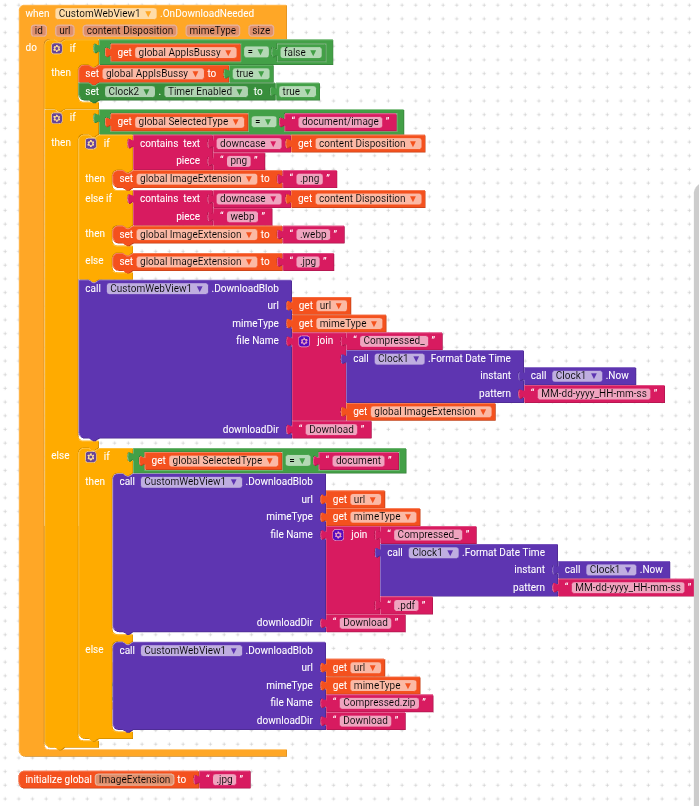
I want the app to save the downloaded file with the correct extension.
If the user compresses a PNG \rightarrow Save as .png
If the user compresses a WebP \rightarrow Save as .webp
Otherwise \rightarrow Save as .jpg
My Current Logic:
Inside the OnDownloadNeeded event, I am checking the mimeType variable:
IF mimeType contains "png" THEN extension = ".png"
ELSE IF mimeType contains "webp" THEN extension = ".webp"
ELSE extension = ".jpg"
The Problem:
When I test the app, the mimeType from the server often returns application/octet-stream (generic binary) instead of image/png.
Because of this, my IF condition fails, the logic falls into the ELSE block, and every single image is saved as a .jpg.
My Question:
Since mimeType is unreliable (giving octet-stream), what is the best way to detect the real file extension?
Should I be checking the contentDisposition or the url instead?
Does anyone have blocks or a regex pattern to extract the ".png" or ".webp" from the contentDisposition string?
Here is a screenshot of my current blocks that are failing: