Thanks a lot for such a fast response.
Now when scrolling though the blocks found in the search, the selected one appears just in the middle of the screen.
No more need to look for them in the corners or in the margins of the screen.
Also the simbols for up, down or close the search box have improved.
Congratulations.
P.D.: I just found a little bug:
In this case (a procedure with many blocks inside, and wich name starts the same as the block) the screen is centered in the middle of the procedure, instead of being scrolled to show the selected block in the center (and the block happens to fall out of sight).
P.D. 2:
It’s not only this case.
Sometimes when scrolling with the up or down arrows through the results of the search, the block marked in grey color is out of sight, and you have to scroll up the screen to be able to see it.
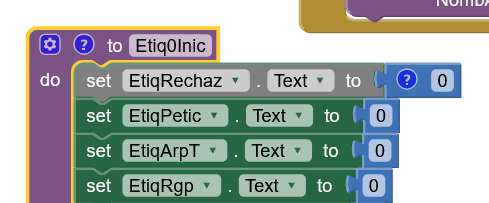
I don’t know if it is something related or not. Happens something similar when (after right clicking in a procedure call) hiting the Higlight Procedure option. The whole procedure appears centered in the screen.
¿Wouldn’t it be better if the head of the procedure (where its name and the mutator button are) appears centered?