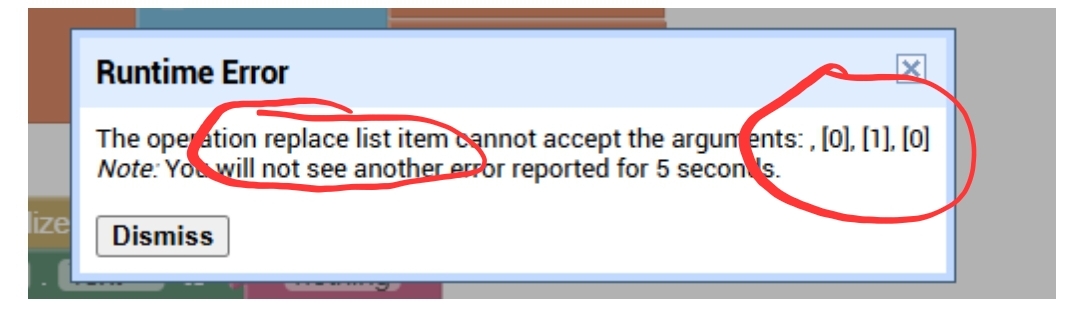
This didn't fix the problem,but it saved future ones,in almost every instance outside of these blocks where I use this list, I had it selecting the item on index 1 when trying to pick the enemy number, when it should have been index 2. I still believe that this is the cause of the problem but I can't find anywhere in the code where a third item is added in the list (the error show a list with three items)
Tl;dr
Can you provide a screenshot of the error?
Is it from @ABG 's screenshot?
If yes, search for replace list item in your blocks
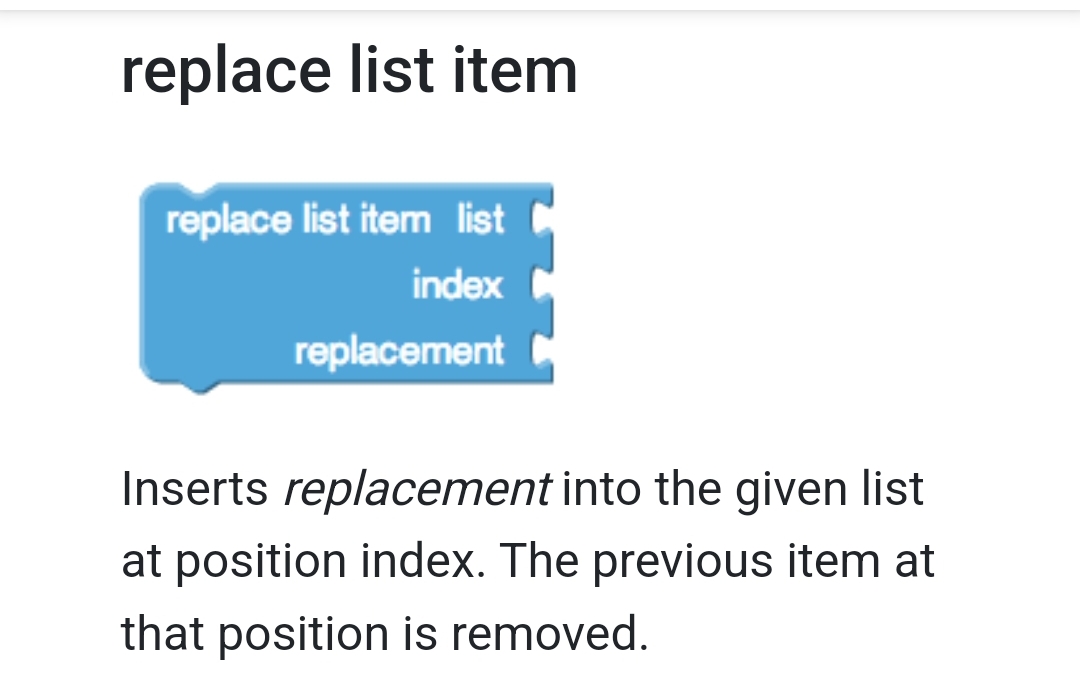
Taifun
The error message is saying that the code tried to replace item 1 of non-list 0 with 0.
This sounds like another mis-dimensioned initialization of a list, like fire and confusion.
Either that or one of the awful default returns
P.S. show us where and how you Initialize global turn_order.
Pps. If you are going to return garbage for not found results, at least return unique garbage to help find the point of failure in the blocks.
I've lost myself in the brambles of this code too many times.
I recommend a controlled burn, and the services of a landscape planner.
Switch to a functional style, and use higher order data structures.
Like I said at the beggining of the post, I just started using app inventor. I have no idea what those things you said are. Should I just look them up and try to implement them or is there a specific block sequence you recommend?
As said before, all the turn related lists and variables (except the turn list from the blocks uploaded before) are in the calculate order procedure, as seen below. Also, the not found results are like that so that there are no errors in this screen if you hadn't visited the other screens before. I guess I can change some of them because of other insurances I put in, but it would be tedious, not really that helpfull since I think the problem is from another source and finally it might create more unforeseen problems in instances of having not visited the previous screens. If it is any help I can upload the .aia file that now contains any changes done since the begining of this post.
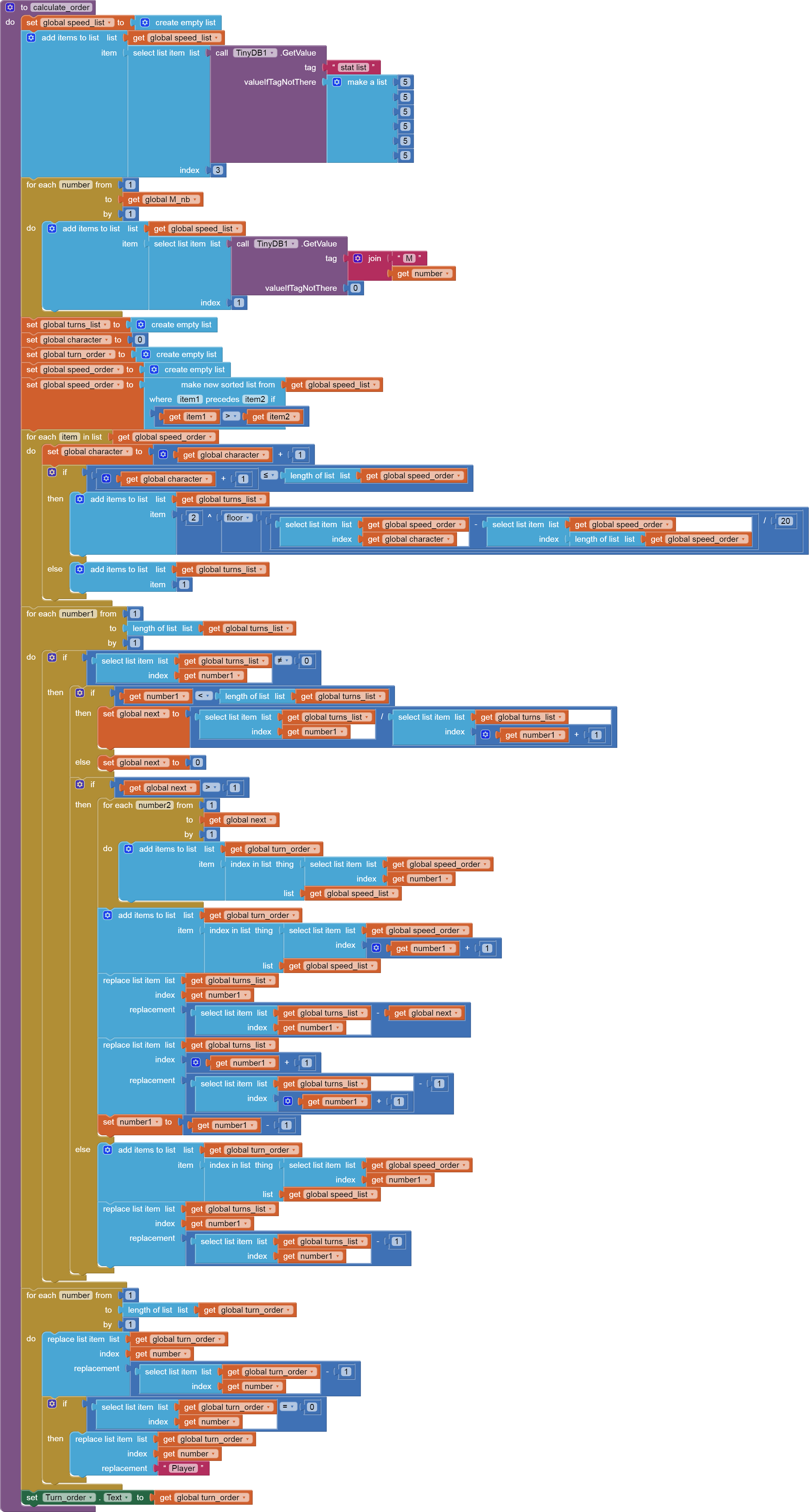
There are 11 replace list item blocks. I just made some changes to some of them and I am gonna test them out now, but I doubt that it solved the problem.
Witcher (1).aia (258.0 KB)
This is the updated file and below are the blocks I asked about earlier. Is there a reason the label isn't changed whenever an error happens?
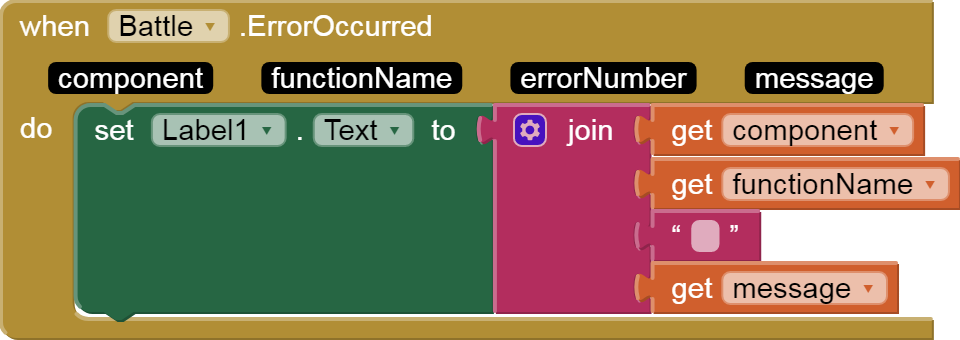
That block only catches component errors, not native block errors.
Read the chapters on lists and procedures in the free book.
Your speed sorting should be applied to a table of (combatant,speed), not just to a list of speeds.
Think of a spreadsheet representing a combat sequence, hit by hit, move by move. What would be in the columns and rows, to show rounds of combat?
I have not seen any posts yet from you showing Do It results. Your blocks should look like a pin cushion with traces
Thanks for all the help but due to my studies I'll probably leave the project for now. When I find more free time again I intend to read these tips and try to continue the project while cleaning up the messy and convoluted parts. If the topic hasn't closed I'll return to post the results or (hopefully not) request more help. Thanks again and sorry if I wasted anyone's time.
This is a good sample project to show off table driven apps.
I started a creature sheet at
to help with land clearing around the combat setup code.
It's just a foundation, though.
Here's another step at whittling away the bloat in this project, by applying reusable code in procedures .
This next step is to load your Bestiary into a TinyDB NameSpace as Creature dictionaries.
Input is the CSV table of the Google Sheet from my prior post:
Bestiary
Creature,Class,TotalPoints,MinSpeed,MaxSpeed,MinStrength,MaxStrength,Image,Description
Ghoul,Necrophage,15,1,13,1,13,ghoul_by_reaper78.jpg,"The ghoul is a necrophage that nests outside cities and villages. They are known to scavenge for dead bodies and mostly cause problems only when near starvation. They also have enough intelligence to hunt near big cities so they can dig up cemeteries or finish off any bodies left by other monsters. They do not seem to have any specific weaknesses, but due to their frail build, they usually don't cause any problem even to the most inexperienced monster hunter."
Nekker,Ogroid,30,15,28,1,28,nekker_by_f1amdring.jpg,Nekkers are extremely common ogroids that mostly hunt as necrophages. Their high speed and tendancy of grouping together is the only saving grace for this mostly weak monster. Due to their existent but not high intelligence they can easily be triicked.
Drowner,Stalker,45,1,43,1,43,drowner_by_gothawolf.jpg,Drowners are stalking necrophages that originate from drowned humans. Despite that they can still reproduce and nest. They are usually found in swamps or beaches eating fish or stalking unfortunate passer-bys. Their aquatic nature makes them slightly weak to fire but they are resiliant enough to attack even when set ablaze.
Wraith,Specter,60,15,58,1,15,wraith_by_vonmquocthai.jpg,"Wraiths are specters of the unavenged. They roam around a place of specific interest to the spirit, like the spot of an improper burial or the scene of a murder. Their curse can be lifted but due to the death of their memories and their relative weakness a monster hunter usually has no physical or moral reason to do so."
Siren,Havrue,75,20,73,1,20,siren_wip_by_davesrightmind.jpg,"Sirens are a type of mermaid that have a unique taste for human flesh. Although they can live off local prey, they often go to human-inhabited beaches and lure unsuspecting victims with their hypnotic songs. They are weak to fire but their high intellect makes them unpredictable."
Werewolf,Cursed,90,30,88,1,30,werewolf_by_llirik_13.jpg,"Werewolves are cursed humans that have taken on the characteristics of wolves. Their high speed , power and animallistic instics make them tough opponents but an experienced witcher hunter should know how to defeat one."
Katakan ,Vampire,105,1,103,1,103,vampire_by_andimayer.jpg,"The Katakan is a form of Vampire that usually lives in isolation. Every so often they will go out to hunt, where they can slaughter dozens of humans to feast on their blood before hybernating. They are methodical attackers that gather their strength before unleashing rapid and strong attacks."
Griffon,Hybrid,120,1,60,1,118,griffin_by_scratcherpen.jpg,"Griffons are a hybrid of a lion and an eagle.These massive hunters usually nest in hills and mountains where they hunt for large livestock. Their bulky hide and massive muscle mass make them herculean obstacles for any monster hunter, but their lack of ground speed and knowledge of combat can be exploited by experienced hunters."
Leshen,Relict,135,1,50,1,50,the_leshen_by_polarwiesel.jpg,Leshens are woodland relicts that live in secluded forests. They mark their territory with shrines and then parasite off of the ecosystem. This unfortunatly leads to humans being cursed and killed by them but their strength means it is more often than not worth it to abandon a village before considering hunting down the monster.
Wyvern,Dragon,150,1,148,1,148,dragons_by_88grzes.jpg,"Wyverns are a rare type of dragon that few have witnessed long enough to specify their appearance and behaviour. It is considered natural that their size, strength, speed and strong scales makes them the apex predators of the land."
This is loaded into a separate TinyDB instance at Screen1 Initialize time on the first run.
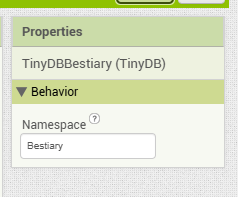
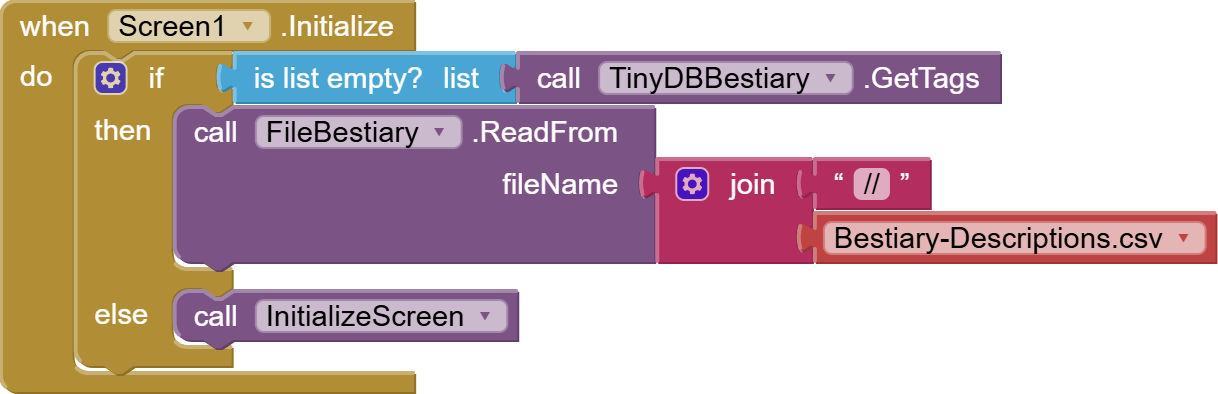
I collected the rest of your Screen1 initialization into a separate procedure, to allow deferring its execution until all needed files have been loaded.
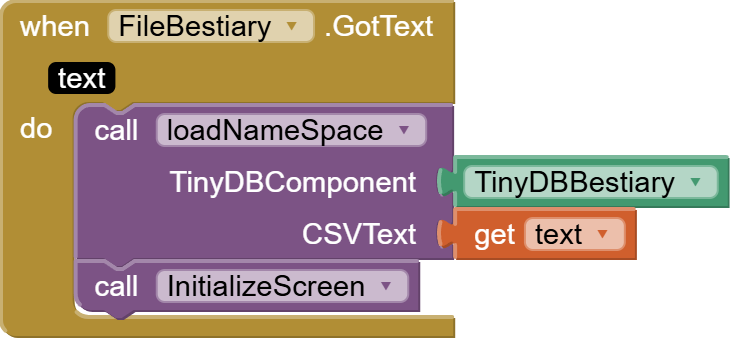
If I need more files loaded at startup, I would daisy chain the loads one after another's completion, and leave the remainder of the initialization to after the last file has been loaded.
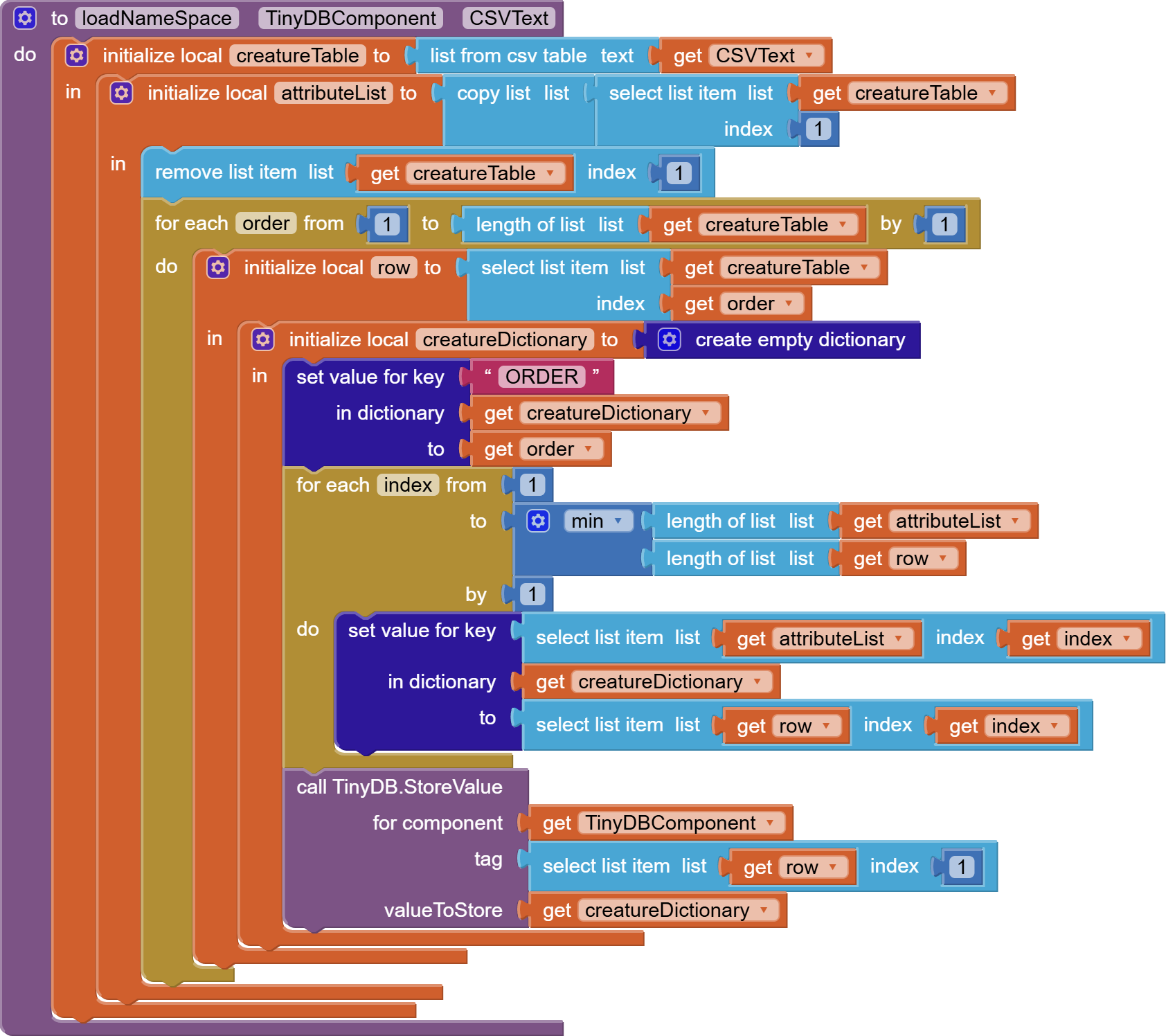
This draggable and reusable procedure takes CSV table text, and loads it into a TinyDB instance, row by row, tag by tag.
Each row is stored into the TinyDB under the tag gotten from column 1 as a dictionary, with the column headers used as dictionary keys for each row's dictionary.
An extra attribute ORDER is added to preserve the initial row order from the input CSV text, in case the sort order is important. In the case of your Bestiary, I notice the sort order has the easiest creatures first. Without this ORDER attribute, it would be impossible to guess the original order.
Witcher (2).aia (245.3 KB)
Hello again. I have found some free time and I remembered this old piece of junk. Although I still haven't spent time to learn a lot of these basic concepts discussed previously in this thread, I came back to give another try to fixing all the bloat and problems. I have deleted a lot of unnecessary screens and replaced them with more organized code and layers in the info screen. I also made some slight adjustments in the enemies screen, but still haven't gotten around in making a more centralized form of organisation. Despite all that, I'm pretty sure there are no errors or jumble happening in any other screen other than the Battle screen. That mess is still unsolvable for me. I have tried to make changes to unscrabble some things but I'm still losing myself in the code and errors are still popping up when least expected. The problem was updating the enemy list at the end of the Player's turn to show the changes in Vitality (and speed when applicable).
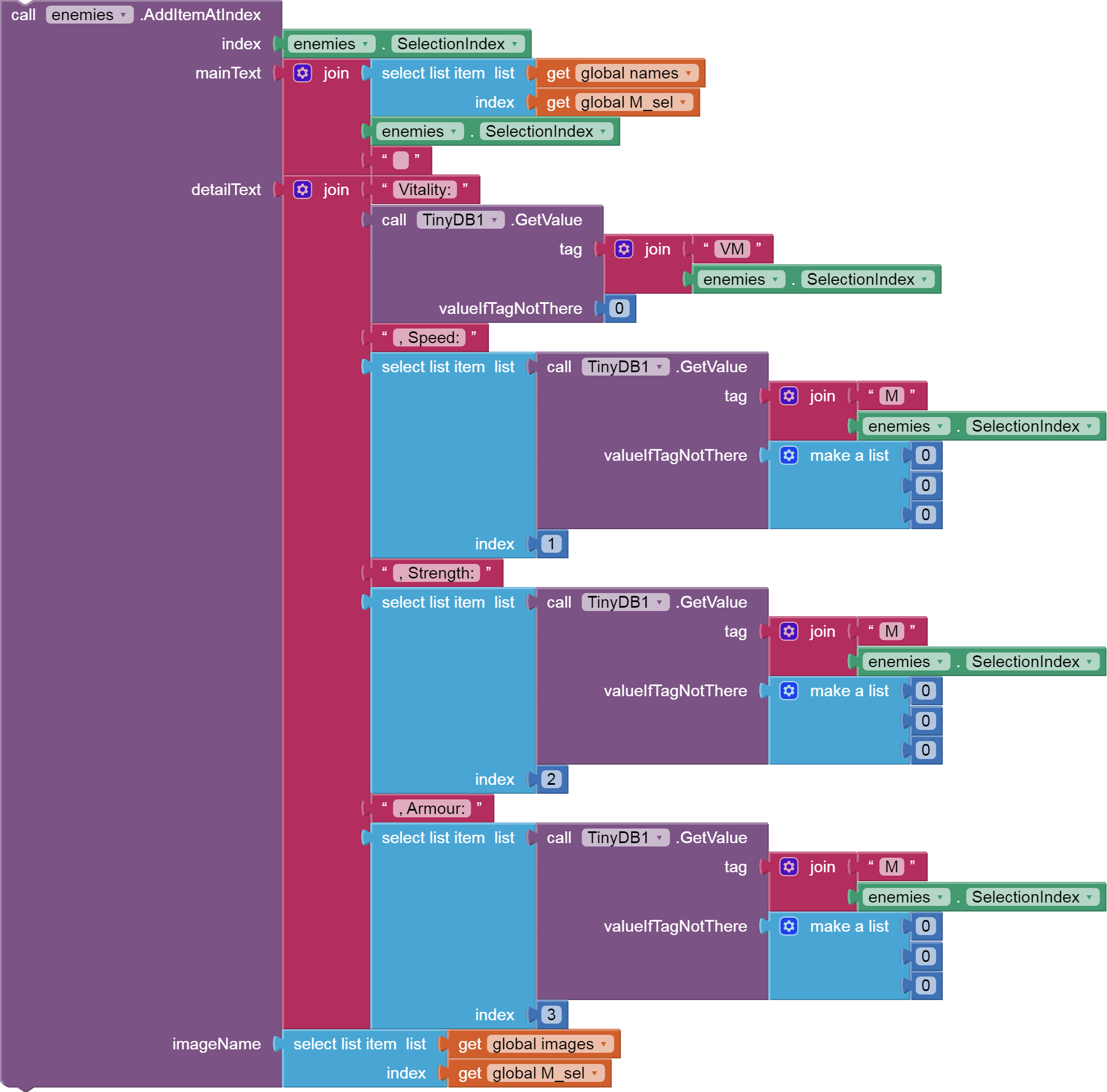
I tried doing it through the above blocks,but the result was only deleting the monster and not adding it again.when removing the top block it was adding monsters every turn. I tried to see if the problem was the tags in the tinydb (that is why there are so many scattered blocks around) but after changing it a different problem arose. That problem I am trying to solve right now is to remove the select list item eroror that happens when the Player takes his turn (no longer having the replace list item error when removing the block seen below)
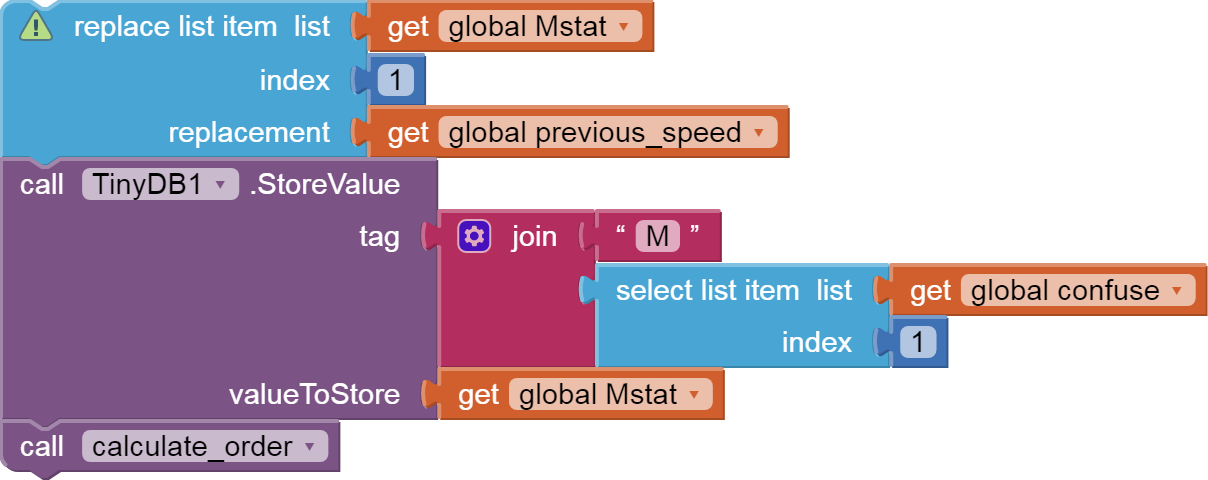
Anyways I know this is a lot, and that there probably are other problems that just haven't popped up yet, but trying to fix this and also keeping my intented mechanics has been really hard. Any help that doesn't simplify the game, but fixes both the bloat and the errors is highly appreciated.
P.S. I didn't know if I should start a new post, so I replied here in order to have all the previous notes all together. Let me know if I need to delete this.
You are all tangled up trying to update things in place.
Study dictionaries, which allow you to store objects in RAM with multiple attributes.
Stay in a single screen for your battle.
Each stage in a battle can be represented as a collection of lists and dictionaries,
- player health and attributes (dictionary) going into the round
- list of opponents waiting to attack him at that stage (item 1 will attack)
- list of opponents that already attacked him, waiting for next stage
Don't try to update those in place.
Instead, generate a new collection of dictionaries for the next stage, using copy blocks, updating the copies.
When dealing with a list, always check if it's empty before selecting from it.
Witcher (5).aia (232.9 KB)
I changed a lotof the complicated lists into dictionaries, turned a lot of the repeated code into procedures and removed a couple of the mechanics that I will add later to make the bug fixing problem a little easier. Right now all of the problems are fixed up until when a monster is killed. The "error 4601:the index 0 is out of bounds for listview" appears, the killed monster remains as is, and a second monster with no recorded stats in the dictionaries appears.It probably has to do with these blocks

I figured that once deleted from the listview, there won't be a selection index so that's why I added the local index variable. This previously fixed the problem but it now appears again.
P.S. After giving a turn for the monster to attack again, both of them are registered as deceased (Vitality = 0)
Using a display component for in place updates is a mess.
It's cleaner and simpler to slosh data from one list of dictionaries to another, and to run the list of data through a formatting function and then loading the display Element list from the output of the formatting function.
This frees you from having to worry about the current list index.
P.S. search this board for YAML for a general purpose YAML converter.
I understand how that would be better. I read your tutorial on implementing YAML but I can't find the spreadsheet related blocks. Are they from an extension?
My spreadsheet blocks were from the Spreadsheet component.
But they are not necessary for conversion from CSV tables with headers to YAML.
Any table (list of lists) with an accompanying list of headers can be used to generate YAML.
1 Like
I will try to convert the battle data to YAML and will respond with the results and any possible problems